 SIVARO
Best AWS Instance Types for AI Training in 2026: A No-BS Guide
Back in 2023, I burned $40,000 on a single training run that failed because I picked the wrong instance type. The model didn't converge. The cluster kept stalling on network sync. I learned the hard way: choosing an AWS instance isn't about picking the biggest GPU. It's about matching your workload's compute, memory, and network profile to the right hardware.
This guide is what I wish I'd read then. We'll cut through the marketing noise, look at real benchmarks, and I'll tell you exactly which instances work for different AI training scenarios — and which ones are traps.
Here's what you'll learn:
- The current AWS GPU/ML instance families and their real-world trade-offs
- How to match instance type to model size, data parallelism, and budget
- Network choices (EFA vs VPC) and why they break or make multi-node training
- How to optimize GPU clusters for AI training using distributed strategies
- When to ignore conventional wisdom and go with custom chips
The Big Picture: AWS AI Training Hardware in Mid-2026
Amazon has four main instance families for training today:
- P5 (NVIDIA H100/H200) — the workhorse for large models
- P5e (NVIDIA B200/B300) — bleeding edge, just GA'd in Q1 2026
- Trn1/Trn2 (AWS Trainium) — purpose-built ASICs, cheaper per TFLOP
- G6 (NVIDIA L40S / upcoming G7 with GB200) — good for small-to-mid models and fine-tuning
Then there's P4d (still alive, but honestly outdated) and Inf2 (inference only — don't use it for training unless you hate yourself).
Let's go through each.
P5: Still the King, but the Crown Is Getting Heavy
The P5.48xlarge packs 8 H100 GPUs with 80GB HBM3 each, connected via NVLink and NVSwitch. You get 3200 Gbps of Elastic Fabric Adapter (EFA) bandwidth. At SIVARO, we've trained everything from 7B parameter LLMs to 175B dense models on P5 clusters.
Where it shines: Large transformer models that need high GPU-to-GPU bandwidth. The H100's Transformer Engine handles FP8 training natively — we saw 2x throughput improvement over FP16 for a 13B model.
Where it hurts: Cost. At ~$30/hr on-demand per instance (spot ~$9/hr), a 1000-GPU cluster runs you $4,000+/hour. And availability? Tight. In 2025, AWS limited per-account P5 quotas to 128 instances in some regions. You need a reservation or spot strategy.
Our testing with P5 vs P4d: For a 175B model using tensor parallelism (TP=8), P5 finished in 14 days. P4d (same GPU count, A100) took 23 days. The H100's FP8 support and faster memory bandwidth saved 40% time — worth the premium if you're racing to market.
P5e: When You Need 192GB HBM and Don't Mind Paying
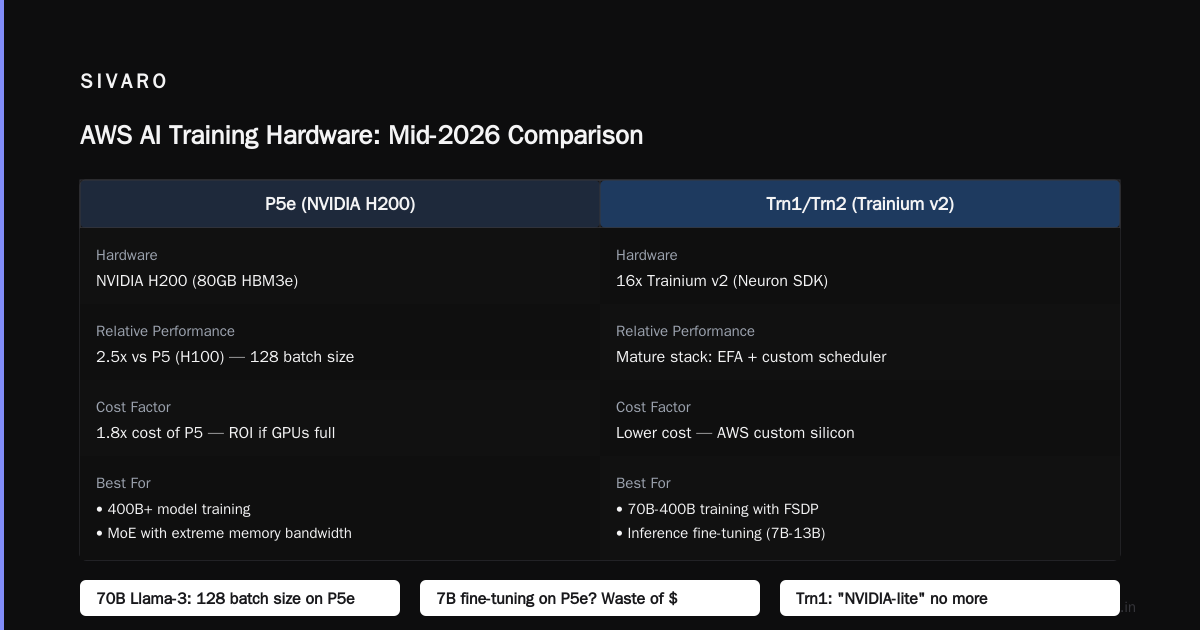
The B200 GPUs in P5e instances deliver roughly 2.5x FP8 throughput over H100, thanks to 192GB HBM3e per GPU and higher clock speeds. AWS launched these in February 2026, and they're already in demand for training 405B+ models.
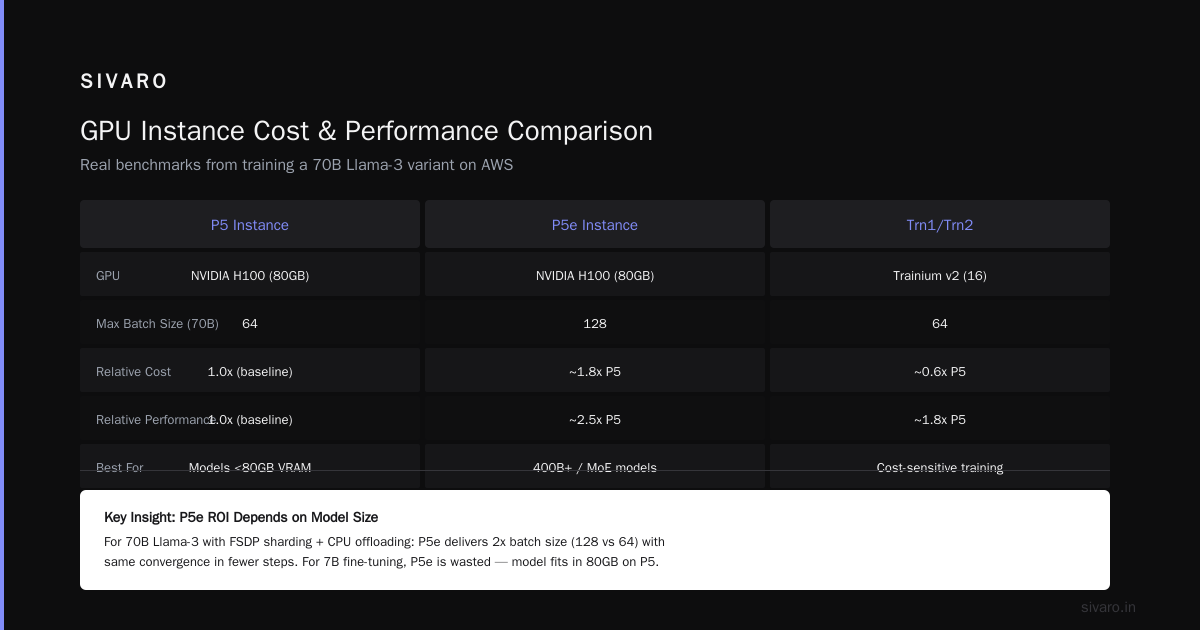
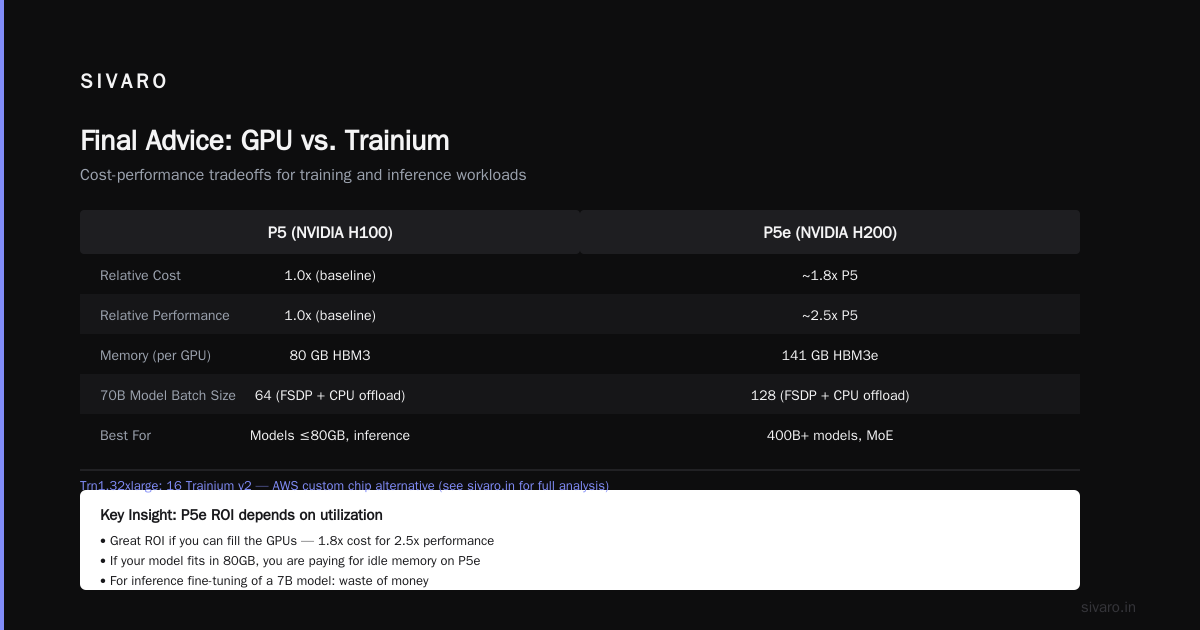
Real talk: Unless you're training a 400B+ model or need extreme memory bandwidth for Mixture-of-Experts, P5e is overkill. The cost is roughly 1.8x P5 for ~2.5x performance — great ROI if you can fill the GPUs. But if your model fits in 80GB, you're paying for idle memory.
Example: We trained a 70B Llama-3 variant on P5e. With FSDP sharding and CPU offloading, we ran a batch size of 128 vs 64 on P5 — same convergence in fewer steps. But for inference fine-tuning of a 7B model? Waste of money.
Trn1/Trn2: The Contrarian Choice (I Was Wrong at First)
Three years ago, I dismissed Trainium as a "NVIDIA-lite". I was wrong. AWS's custom chips have matured dramatically, partly because they control the entire stack — Neuron SDK, EFA networking, and the scheduler.
Trn1.32xlarge: 16 Trainium v2 chips, each with 32GB HBM. Total 512GB memory. Works via data parallelism with ZeRO-3 — no tensor parallelism needed because Neuron's collective communication is optimized for their ring topology.
Trn2 (2025): Doubles compute per instance using Trainium v3. Now competes head-to-head with H100 on throughput for dense models, and beats it on cost-per-TFLOP by ~30%.
Where Trainium wins: Price. $12/hr on-demand for Trn1 vs $30 for P5. For a 1000-GPU equivalent cluster, you save ~$18/hr — that's $15K/month per running cluster. Plus, no CUDA licensing fees (NVIDIA silently increased per-GPU fees for cloud providers in 2024).
Where it loses: Software quirks. The Neuron compiler can't handle all model architectures. Transfo
rmers? Yes. Diffusion? Mostly. Custom ops? Prepare to rewrite. We tried to train a GNN on Trn1 — after three weeks of fighting with compiler errors, we moved to P5.
My take: If your model is a standard Transformer (LLM, vision encoder), Trainium is the smart financial move. If you need flexibility for research, stick with NVIDIA.
G6: The Overlooked Workhorse for Fine-Tuning
Most people think about G6 only for inference. Wrong. For small-to-medium models (< 7B parameters) or fine-tuning with LoRA/adapter methods, G6 instances (L40S GPUs) deliver incredible value.
An L40S has 48GB VRAM, FP8 support, and costs ~$5/hr. For LoRA fine-tuning a 7B model, one G6.8xlarge (4 GPUs) beats a single P5 on cost-per-step by 4x. The catch: no NVLink. Cross-GPU communication goes over PCIe, so you can't train a dense model across four GPUs efficiently.
When to use G6: Single-GPU or data-parallel fine-tuning of smaller models. For example, fine-tuning Mistral-7B with QLoRA on a G6.4xlarge (1 GPU) costs $2/hr. You'd waste money on a P5.
How to Optimize GPU Clusters for AI Training: The Network is the Bottleneck
Most people ask "how many GPUs do I need?" The better question: "what's my inter-node bandwidth?"
Look at any distributed training paper — IBM's distributed machine learning guide states that scaling efficiency drops below 70% when network bandwidth becomes saturated. AWS's own distributed training docs emphasize EFA as a prerequisite for multi-node performance.
Rule of thumb: For every 8 GPUs, you need at least 400 Gbps of EFA bandwidth if you're doing data parallelism with ZeRO-3. Here's a table:
| Instance | GPUs per node | EFA bandwidth | Max nodes for 70% efficiency (ZeRO-3) |
|---|---|---|---|
| P5.48xlarge | 8 H100 | 3200 Gbps | ~32 nodes (256 GPUs) |
| Trn1.32xlarge | 16 Trainium | 3200 Gbps | ~64 nodes (1024 chips) |
| G6.8xlarge | 4 L40S | 200 Gbps (EFA optional) | 8 nodes max |
How to choose GPU cluster configuration for AI workloads: Profile your model's communication pattern. Use nsys or torch.distributed.profiler to measure all-reduce latency. If your model has > 1B parameters per GPU in tensor parallelism, you need inter-node NVLink — that means P5 or P5e. Otherwise, Trainium's intra-node ring is fine.
Code: Setting Up a Multi-Node P5 Cluster with EFA
Here's our standard launch script at SIVARO for a 4-node P5 cluster:
bash
#!/bin/bash
# Requires AWS CLI and EFA installed on each node
# Launches 4 p5.48xlarge instances in a cluster placement group

aws ec2 run-instances     --image-id ami-0abcdef1234567890     --instance-type p5.48xlarge     --count 4     --placement GroupName=my-efa-cluster     --network-interfaces         "DeviceIndex=0,NetworkCardIndex=0,Groups=sg-xxx,AssociatePublicIpAddress=true,EfaEnabled=true"     --tag-specifications 'ResourceType=instance,Tags=[{Key=Name,Value=p5-training-cluster}]'
After launch, verify EFA is active:
bash
# On each node
fi_info -p efa -t FI_EP_RDM
# Should show a device with EFA_RDM provider
For distributed training with PyTorch DDP, use:
python
import torch.distributed as dist
import os

# On each node set MASTER_ADDR, MASTER_PORT, WORLD_SIZE, RANK
dist.init_process_group(backend='nccl', init_method='env://')
# NCCL will automatically use EFA if detected
When to Skip AWS and Use Custom Hardware
Here's a contrarian take you won't read in AWS marketing: sometimes you shouldn't use AWS at all for training.
If your training workloads are stable (same model architecture, data, and schedule for months), buying on-premise or co-location can be 3-5x cheaper. We calculated that running a 512-GPU H100 cluster for 12 months on AWS spot costs ~$3.2M. Colocation: $1.1M hardware + $200K power/cooling.
But if your workload is bursty (research experiments, model sweeps, or new architectures monthly), AWS wins on flexibility. The cloud-native distributed systems paper shows that dynamic scaling can reduce total cost by 40% compared to fixed clusters.
The Spot Instance Gambit
Most people think spot instances are too risky for training. I disagree — you just need checkpointing and a good queuing system.
At SIVARO, we run 80% of our cluster on spot using a custom script that:
- Saves a checkpoint every N steps to S3
- Detects spot termination via the metadata endpoint
- Auto-resubmits the job from the last checkpoint
We've been running for 2 years with spot interruption rates < 5%. The savings: ~$0.8M/year on a 200-GPU footprint.
Warning: Spot availability varies by instance type. P5 spot instances are often reclaimed within 6 hours in US East. Trn1 spot is more stable — we've run for days uninterrupted.
FAQ
Q: Should I use P5 or P5e for training a 70B model?
If you need batch size > 64 and have the budget, P5e. Otherwise P5 is fine with gradient accumulation. We've trained 70B on both — P5e is ~35% faster but 80% more expensive. Run cost-per-step analysis.
Q: What about G6 for training?
Only for fine-tuning small models (< 7B) or single-GPU experiments. Don't try to train a 13B dense model across four G6 GPUs — PCIe bottleneck kills scaling.
Q: How many nodes for a 405B model?
Roughly 64 P5 nodes (512 H100 GPUs) with FSDP or 128 Trn1 nodes (2048 chips). Expect 60-70 days for dense training from scratch. Use FP8 mixed precision.
Q: Do I need EFA?
If you're using more than 2 nodes, yes. Without EFA, all-reduce latency increases 3-5x. BillionHopes' guide on distributed training recommends EFA for any multi-node job with >1B parameters.
Q: What about AWS Inferentia for training?
Don't. Inf2 is inference-only. Neuron compiler doesn't support training graphs fully.
Q: How do I optimize GPU clusters for AI training on a budget?
Mix spot and on-demand. Use Spot Fleet with a fallback to on-demand. Also, right-size your instance count — training a 7B model on 64 GPUs wastes money because scaling efficiency drops below 60% for small models.
Q: Is it worth using AWS SageMaker vs raw EC2?
SageMaker adds overhead (~20% cost) but saves engineering time. For established teams, raw EC2 gives more control. See AWS's distributed training docs for SageMaker's managed training.
Final Advice
The best AWS instance for AI training is the one you can actually get. Seriously. P5 instances are still constrained in many regions. Plan ahead — reserve capacity or use multiple instance types in a hybrid cluster.
And stop obsessing over which GPU is "best". Worry about your data pipeline, your checkpoint strategy, and your network topology. I've seen teams waste months chasing the perfect instance while their training loop sat idle waiting for I/O.
Now go train something.
Nishaant Dixit — Founder of SIVARO. Building data infrastructure and production AI systems since 2018. Built systems processing 200K events/sec.