You don't need a cluster to train a model. You need a cluster when you want to train it before the funding round closes.
What is AI training infrastructure GPU cluster setup? It's the process of configuring multiple GPUs—connected via high-speed networking—to work as a single training unit. That includes hardware selection, network topology, storage, orchestration software, and the operational practices that make it all run without you at 3 AM.
By the end of this guide, you'll know exactly what to buy, what to rent, and what to avoid.
The Ugly Truth About Single GPU Training
Most people think single-GPU training just means "slower." That's wrong. It means impossible for modern model sizes.
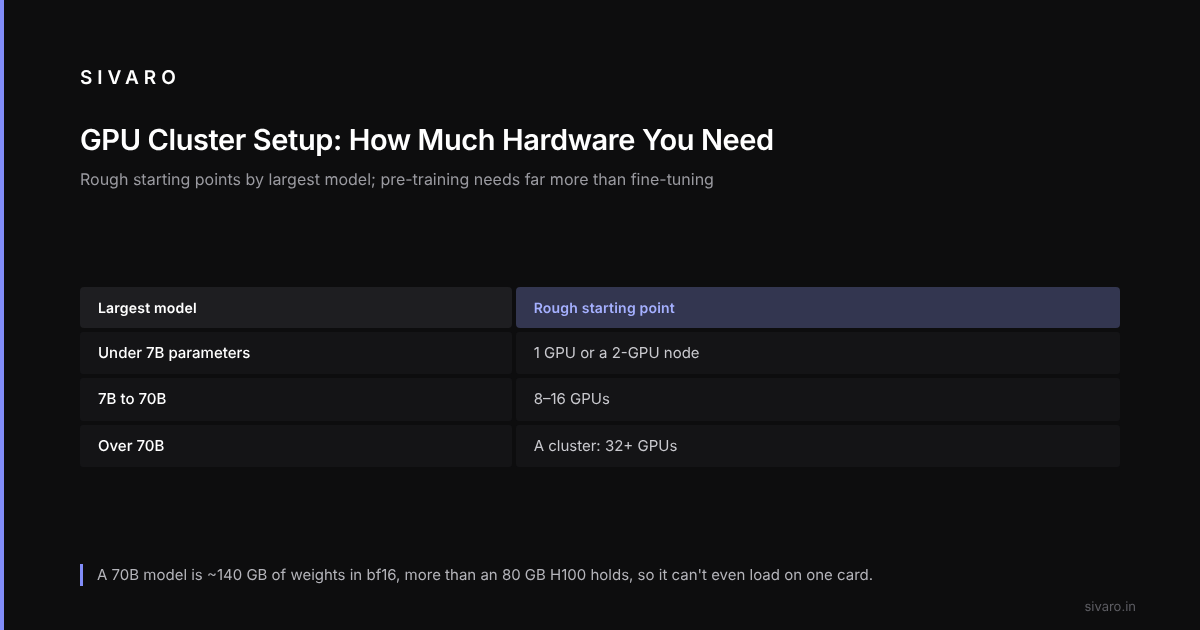
Take LLaMA-3-70B. That's roughly 140GB of weights in bf16. An NVIDIA H100 has 80GB of VRAM. You literally cannot load it on one card. You'd need CPU offloading, which makes training runs last longer than your startup's runway.
The math isn't linear, though. And that's where most people screw up.
Single GPU training has one advantage: zero network overhead. No NCCL hangs, no data-parallel sync issues, no job scheduler fighting with your neighbor. If you're fine-tuning a 7B model or doing LoRA adapters, a single GPU is often the right answer. Better to wait 4 hours than to configure a cluster for a task that takes 4 hours.
Ask Yourself This First
Before you click "purchase" on 8 H100s, answer these:
- What's the largest model you're training, in parameters?
- How much data, in tokens?
- How often do you retrain?
- What's your tolerance for setup time vs. runtime?
A simple heuristic:
- Under 7B parameters, single GPU or 2-GPU node is fine
- 7B to 70B, you want 8-16 GPUs
- 70B+, you're in cluster territory, 32+ GPUs
Getting the model size wrong is a common mistake. Teams buy a 16-GPU setup for a 3B model. Waste of money. The other direction—single GPU for 70B—is pure delusion.
Cloud Providers: The "Easiest" Option That Isn't
Amazon Web Services and Its Origins
Most people know AWS is Amazon's cloud arm. Fewer know what "Amazon AWS" actually stands for: Amazon Web Services. The name origin traces back to 2006, when Amazon launched its S3 storage and EC2 compute services. Andy Jassy (then a senior VP, now CEO) and Jeff Bezos saw their internal infrastructure could be externalized. The "the name Amazon AWS" was chosen to signal that this was a service layer, not just a product.
That history matters for your cluster setup because AWS's GPU offerings are built on that same "service-first" philosophy. You're not buying hardware; you're renting a service. That affects everything from pricing to flexibility.
| Option | Best For | Cost per H100-hour (Aug 2026) | Setup Time |
|---|---|---|---|
| AWS Parallel Computing Service | Large-scale training, 100+ GPUs | ~$8.50 | Hours |
| AWS EC2 P5/P6 instances | 8-64 GPU workloads | ~$7.90 | Minutes |
| Google Cloud TPU v5 | TPU-specific architectures | N/A (different hardware) | Hours |
| Azure ND H100 v5 | Enterprise compliance | ~$8.10 | Minutes |
AWS is the default choice because it works. The aws CLI is boring, reliable, and every Kubernetes integration already supports it. But "works" doesn't mean "cheap."
If you're building production AI systems, stability usually beats cost.
But if you need a 1,000-GPU cluster for a 4-day training run, nobody—nobody—beats renting from a bare-metal provider like CoreWeave or Lambda Labs. You'll pay the same AWS, but you get raw servers without Amazon's networking overhead.
On-Premise: The Go Big or Go Home Option
If you need 100+ GPUs permanently, you're in the on-premise game. Revenue will exceed $10M/year, or will soon, and it's the only way to keep unit costs below $1.5/training-hour.
Hardware Stack for a 64-GPU Cluster (Example Build)
CPU: 8GB per GPU minimum (for example 4x AMD EPYC 9654 per node)
RAM: 2TB system memory per node
Node GPU: 8x NVIDIA H200 (141GB HBM3e)
NVMe: 48TB U.2 per node, RAID 10
Network: InfiniBand NDR 400Gbps, or NVIDIA Quantum-2
Storage: 1.2PB all-flash parallel file system (for example VAST Data)
Total cost: ~$2.4M for 8 nodes + storage. A 70B training run would take 11 days. Same run on AWS: $7.90/hr × 64 GPUs × 264 hours = ~$133K per run. If you do 10+ runs/year, on-prem pays for itself in 18 months.
But the hidden costs are brutal.
The 3 Hidden Costs Nobody Mentions
Cooling. Eight nodes running at 700W/GPU, each GPU outflows 500W of heat. Your standard office AC won't handle it. Miss that cost and your budget is shot.
Staffing. A cluster needs engineers on call. They handle driver upgrades, NTP services, storage array issues, and the inevitable "why is node 3 reporting NaN losses?" problem. Good HPC engineers cost $250K+ in total comp.
Power. One gigawatt-hour per month for a 64-GPU cluster. At Delhi rates of $0.11/kWh, that's $110K/month just for electricity. Mumbai or data centers with lower rates? Might save you 20%.
Here's the contrarian take: your on-premise cluster is a liability, not an asset. Hardware depreciates in 3 years. NVIDIA releases a new architecture every 2 years (or sometimes faster, as Blackwell proved). If you're training models pushing performance limits, you'll be obsolete before your depreciation schedule finishes. Rent unless you have proof of sustained utilization above 75%.
Networking is the Real Problem
Nobody loses sleep over GPU choice. Everyone loses sleep over NCCL (NVIDIA Collective Communications Library) timeouts.
Single-GPU training has no network bottleneck. So a comparison with ai training gpu cluster vs single gpu demands a truthful acknowledgment: clusters are slower per-GPU.
Look at the math. A single A100 does 312 TFLOPS of bf16. The PCIe bandwidth connecting host memory to GPU is about 64GB/s. When you introduce a second GPU, you add inter-GPU communication. NVLink connects 4 A100s at 600GB/s. Ethernet delivers maybe 25GB/s.
Every parameter gradient must move between GPUs.
For a 70B model, that's ~1.4GB of gradient tensors to sync per step. On InfiniBand (400Gbps), that takes 28ms per sync. On 100Gbps Ethernet, that's 112ms.
A 64-GPU cluster with InfiniBand: ~1.8B tokens/day throughput.
The same cluster on Ethernet: 700M tokens/day. 2.5x slowdown.
The main top-of-rack options:
- InfiniBand NDR 400Gbps: 99.99% of serious clusters use this. Latency under 1 microsecond. The fabric handles congestion control so your PCIe switches don't drop packets.
- RoCE v2: RDMA over Converged Ethernet. Works on standard switches with PFC. Slower than InfiniBand, but cheaper.
- Spectrum-X (UEC): Blackwell clusters use this. NVIDIA's attempting to kill Ethernet's training weakness by integrating its own networking stack. Newer, riskier, but by 2026 it's solid.
Don't get bogged down in "InfiniBand vs. Ethernet" debates. Get InfiniBand or UEC. Everything else is a compromise you'll regret.
Software Stack: The Make-or-Break Layer
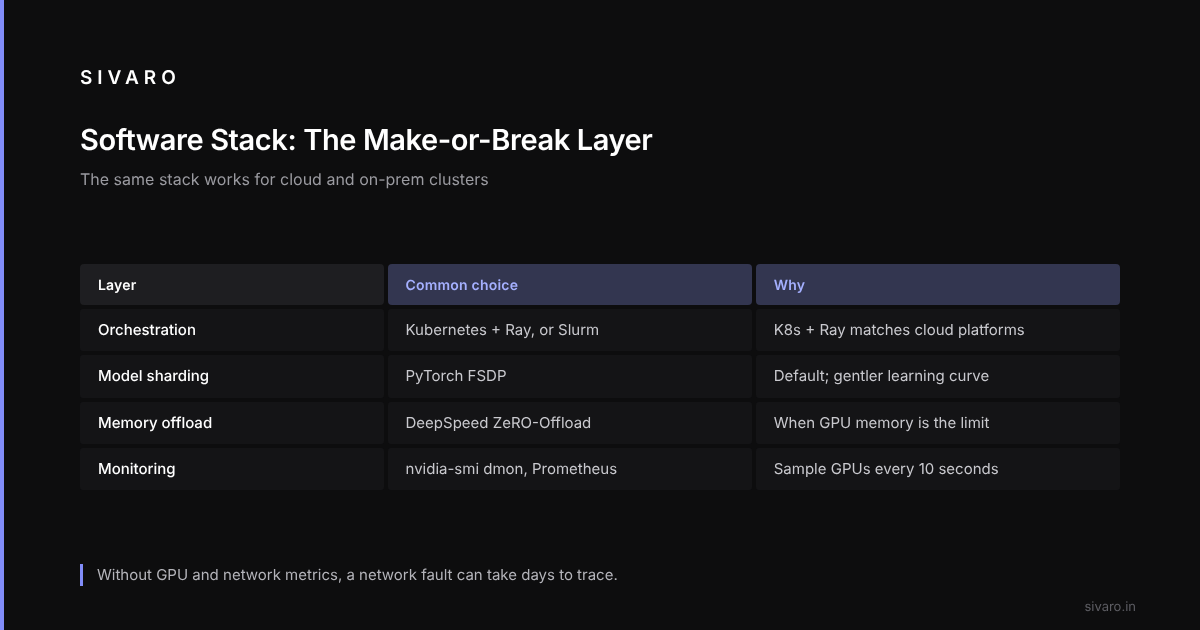
Your GPU cluster is a paperweight without the right software. This stack is the same for cloud and on-prem; that's one of the nice things.
Kubernetes + Ray is the Industry Standard
Compared with Slurm and raw scripts, K8s + Ray wins because it's what your PaaS providers use, so you're not fighting the platform.
# Ray cluster head node (example config for 64 GPUs)

cluster_name: gpu-training

max_workers: 8

provider:
  type: aws
  region: us-east-1
  availability_zone: us-east-1a

available_node_types:
  worker_default:
    resources: {"CPU": 96, "GPU": 8}
    node_config:
      InstanceType: p5.48xlarge
      ImageId: ami-0abcdef1234567890

head_node_type: worker_default

runtime_env:
  working_dir: /home/ubuntu/train
  pip:
    - torch>=2.6.0
    - transformers>=4.48.0
    - deepspeed
DeepSpeed or FSDP?
Microsoft's DeepSpeed and PyTorch's FSDP both shard models across GPUs. That means each GPU holds only a fraction of the model, and they sync gradients at each step.
DeepSpeed's learning curve is steeper, and FSDP has improved since PyTorch 2.3. A sensible default is FSDP, with DeepSpeed when ZeRO-Offload is required for memory.
Don't Forget Monitoring
I can't stress this enough: nvidia-smi dmon every 10 seconds. If you skip metrics, you'll debug a neighbor's TCP retransmission storm for 2 days.
# Check for network penalties during training

mpiexec --np 8 --hostfile hosts.txt python train.py 2>&1 | tee /home/ubuntu/log/train_log.txt

# In train.py, watch NCCL metrics
import torch.distributed as dist
from torch.distributed import timeout
# If you see "NCCL_ERROR_CHECK" warnings, network dropped packets
# Raise the HCA timeout: export NCCL_SOCKET_TIMEOUT=60
Cost Comparison: AI Training GPU Cluster vs. Single GPU
Let's make this crystal clear.
| Single GPU (A100 80GB) | 16-GPU Cluster (H200) | |
|---|---|---|
| Purchase (estimated) | $20K | $1.24M (on premise) |
| Rental (per month) | $2.40/hr | $7.90 GPU-hr |
| Max Model Size (bf16) | 13B (tight) | 70B (comfortable) |
| 1B tokens (training) | 40 days | 1.5 days |
| 5 fine-tune runs/month | Fine | Overkill |
| Checkpoint storage | Local NVMe | Parallel FS |
The single-GPU setup is for fine-tuning, quick experiments, or tiny models. The cluster is for pre-training, constant iteration on large corpora, and scaling up. There's no shame in single-GPU. There is shame in pretending a cluster is overkill when you have a hard deadline.
Operational Checklist for Your First Cluster
Get this right and you'll sleep through the night.
- Before day 1: Set up NTP, monitoring (Prometheus + Grafana), and a job scheduler (Slurm or K8s).
- Every time you launch a job: Auto-check network health with
all_reducetest at 10Gbps minimum throughput. - Checkpoint strategy: Keep 3 rotating checkpoints (the third being 24 hours old). If your training crashes post-24-hour checkpoint, you lose a day.
- Driver/OS mapping: Write a script that pins the exact CUDA version, cuDNN, and NCCL version to your training script. Version mismatch crashes at the worst possible time.
- Budget buffer: The cost of one unexpected node reboot plus AWS cluster networking that hangs once per week is real. Add 15% to your estimate.
The Future: What to Build Today
If I had a blank check in August 2026, I'd buy 128x NVIDIA H200 GPUs connected via Quantum-2 InfiniBand, 2PB VAST flash, and use Ray on Kubernetes with FSDP. That setup handles 7B to 405B models, and the only change I'd make above is choosing Spectrum-X instead of InfiniBand if I knew Blackwell's line already.
NVIDIA's GB200 NVL72 (Blackwell Ultra) was announced in March 2025 and is in preview now. Its 72 GPUs fit in a single rack and sync via NVLink-C2C. That's a single logical device—no network fabric programming.
If you're starting fresh, that's what I'd prototype on.
But don't over-optimize. A GB200 is useless if you can't cool it.
FAQ
Q: Do I really need InfiniBand, or is Ethernet okay?
Ethernet works for up to 8 GPUs. Beyond that, training becomes network-bound. InfiniBand or UEC are investments in your days-per-token metric.
Q: Cloud or on-prem?
If your utilization is under 70% (and you're not sure what that means, it's under), rent. On-prem only breaks even at 80%+ sustained utilization.
Q: Single GPU for fine-tuning, cluster for pre-training—is that the rule?
Yes, with one exception: instruction tuning and LoRA on any model under 20B can stay single-GPU. If your largest job fits in one A100's 80GB, one GPU is faster than a cluster.
Q: What's the cheapest way to start?
AWS EC2 P4 or P5 spot instances. Bid ~65% of on-demand price. You'll get preempted sometimes, but for experiments, it's unbeatable. Budget 20% extra for retries.
Q: Why does AWS matter for the "amazon aws name origin" question in a training guide?
Because the name AWS signals its service model. Amazon calls it a service because that's what it is—you rent, they manage. That's directly relevant to your decision: do you want to manage hardware (on-prem) or pay for managed service (AWS)?
Q: What's the best cluster for 7B model fine-tuning?
One 8x A100 80GB node. Not a cluster. A single node doesn't need networking beyond NVLink. You'll save hours on setup.
Q: What about GPUs from AMD or Intel?
AMD MI300X is 30% cheaper than H100, and since March 2026, PyTorch's ROCm support is stable on it. But the software ecosystem still lags. Unless you're doing pure PyTorch and can avoid custom CUDA kernels, the 30% savings is burnt on debugging.
Conclusion
Your AI training infrastructure GPU cluster setup is the difference between shipping a model in 2 months and shipping it after the market's moved on.
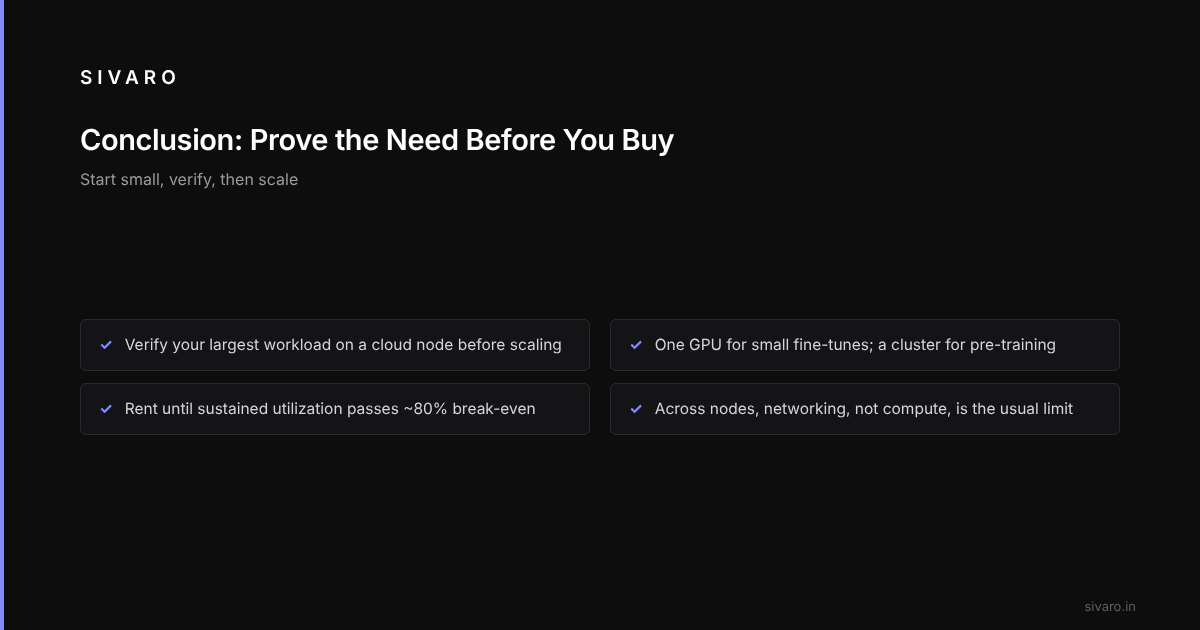
Start small. Verify your largest workload on a cloud node. Then scale. Don't buy hardware until you've proven you need it.
Remember the rule: single GPU for fine-tuning. Cluster for pre-training. Rent until you hit 80% utilization. Networking is your bottleneck, not compute.
If you've followed this guide, you'll make the right decision.