 SIVARO

Docker Isn’t Magic — It’s Just Better Than What You Were Doing Before
I remember the exact moment Docker clicked for me. 2015. I was trying to deploy a Python app that worked perfectly on my MacBook but crashed on the Ubuntu server. Logs showed a missing OpenSSL version. “But it works on my machine” became the most dangerous sentence in software engineering.
So what is a docker and why is it used? The short answer: Docker packages your application with everything it needs to run — libraries, system tools, config files — into a single unit called a container. That container runs identically on your laptop, your team’s staging server, and your production cluster. No surprises. No “works on my machine”.
But that’s the boring definition. Let me show you what Docker actually does, why it’s not a virtual machine, and when you should (and shouldn’t) use it.
By the end of this guide, you’ll understand:
- What containers are and how they differ from VMs
- The real architecture of Docker — namespaces, cgroups, the whole thing
- Why Docker became the default for modern deployments
- The trade-offs nobody talks about
- Practical use cases from companies that actually use it
I’ve been building production systems since 2013. SIVARO handles data pipelines processing 200K events per second. Docker isn’t a toy — it’s how we keep those pipelines alive.
What Is a Docker and Why Is It Used? The Honest Answer
What is Docker? describes it as “a platform for developing, shipping, and running applications using containerization.” Technically correct. But let me translate.
Docker is a packaging system. Think of it like a shipping container for your code. Before containers, moving cargo across ships was chaotic — boxes of different shapes, sizes, stacking nightmares. Then someone standardized the container. Suddenly you could stack them, move them, ship them anywhere.
Same idea. Your application gets bundled with its dependencies into a standard unit. That unit runs on any machine with Docker installed. Linux, Windows, Mac, AWS, Azure, your Raspberry Pi at home — same behavior.
Why does this matter?
Because software is fragile. Your app might need Python 3.9. The server might have Python 3.11. Boom — broken. Your app needs a specific version of libssl. The server has a security patch that replaced it. Car crash.
Docker eliminates this. You define the environment in a Dockerfile. That file becomes a reproducible blueprint. Build it once, run it everywhere.
Here’s the simplest Dockerfile I’ve written:
dockerfile
FROM python:3.9-slim
WORKDIR /app
COPY requirements.txt .
RUN pip install -r requirements.txt
COPY . .
CMD ["python", "app.py"]
Six lines. That’s it. Build it:
bash
docker build -t my-app .
docker run -p 8000:8000 my-app
Your app is now running on port 8000, inside a container that has exactly Python 3.9 and nothing else. No conflicts with the host system. No assumptions about what’s installed globally.
Is Docker Just a VM? No — And the Difference Matters
I see this confusion constantly. People ask “is docker just a vm?” at meetups. The answer is a hard no, and understanding why is critical.
Let’s lay it out side by side.
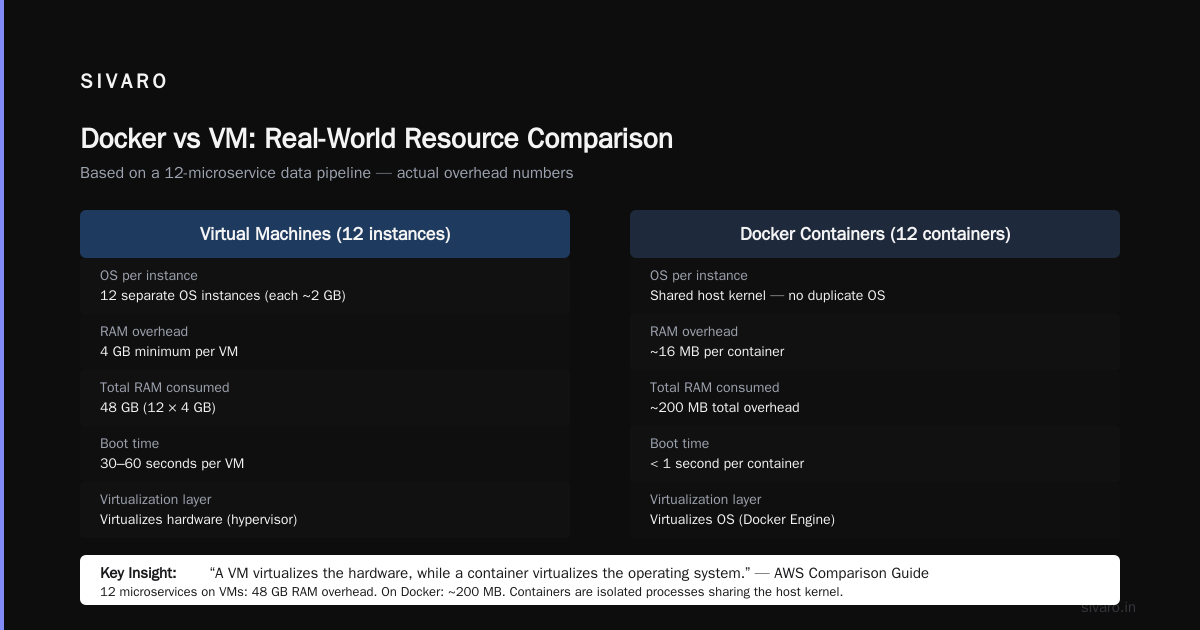
Virtual Machines:
- Emulate entire hardware stack (CPU, memory, storage)
- Each VM runs a full guest operating system
- Hypervisor manages multiple VMs on one host
- Typical VM: 2-8 GB RAM overhead just for the OS
- Boot time: 30-60 seconds
Docker Containers:
- Share the host’s operating system kernel
- No guest OS — just the application and its libraries
- Docker Engine manages containers
- Typical container: 10-50 MB overhead
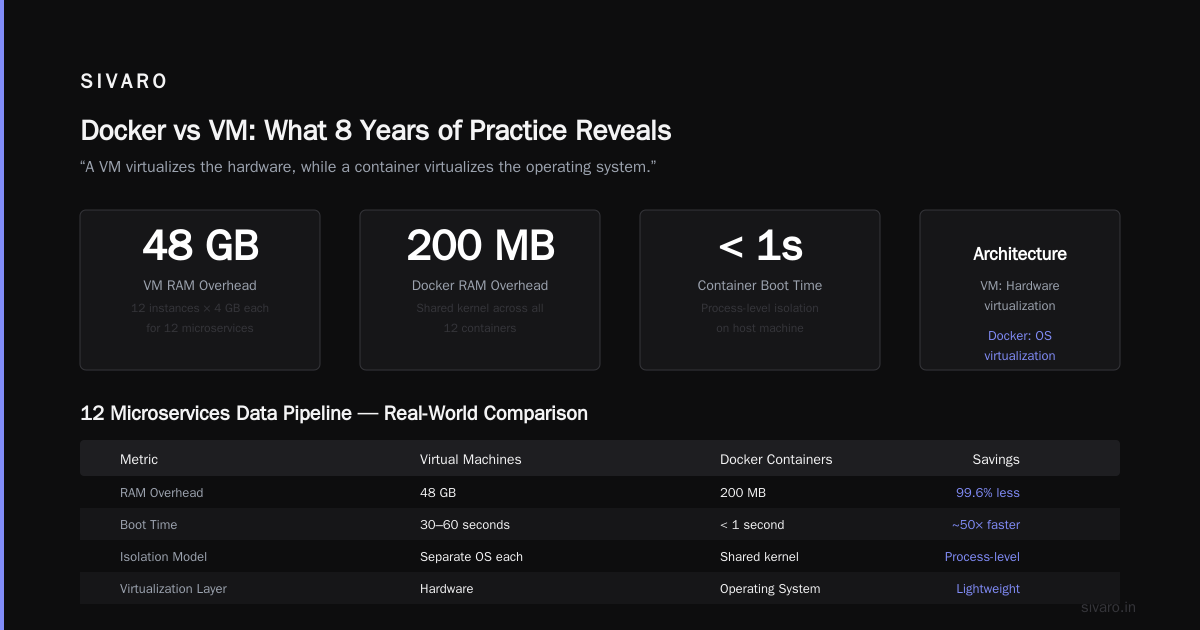
- Boot time: < 1 second
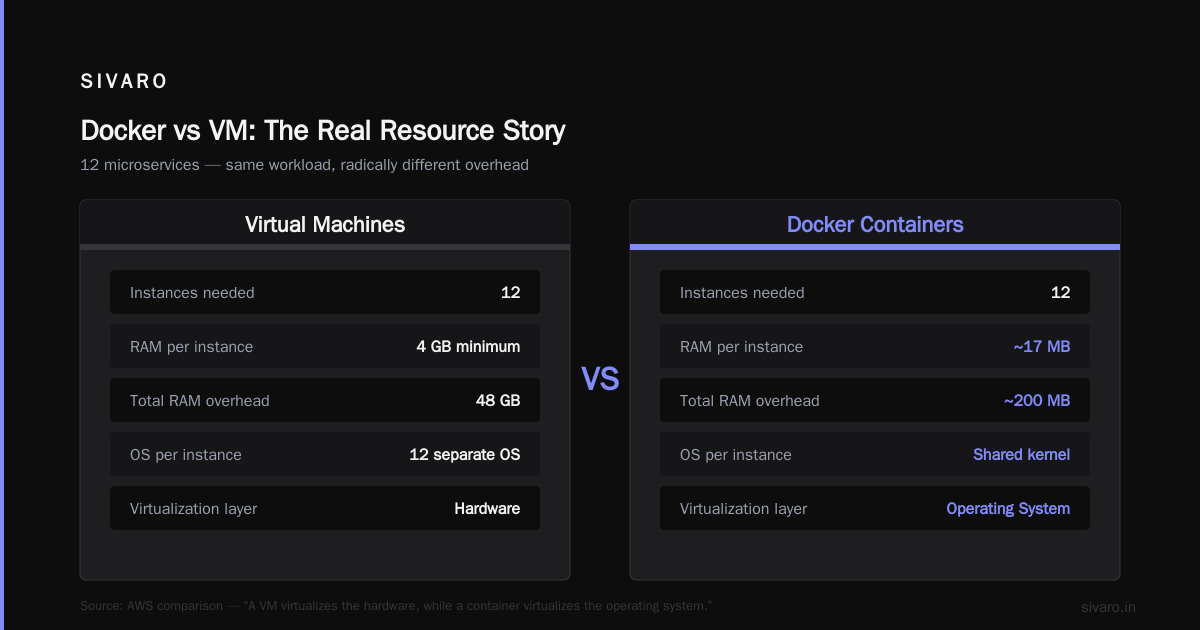
Docker vs VM - Difference Between Application ... puts it neatly: “A VM virtualizes the hardware, while a container virtualizes the operating system.”
But that’s academic. Here’s what it means in practice.
I run a data pipeline with 12 microservices. On VMs, I’d need 12 separate instances, each with its own OS, each consuming 4 GB RAM minimum. Total: 48 GB RAM just for overhead.
With Docker? Those 12 containers share the same kernel. Total overhead: maybe 200 MB. The containers are processes on the host machine — isolated processes, yes, but processes nonetheless.
This Docker vs VM: What's the Difference, and Why You Care! video shows a demo: starting 100 containers takes 3 seconds. Starting 100 VMs takes 20 minutes.
But there’s a catch.
Containers are less isolated than VMs. If your container gets compromised, the attacker still shares the host kernel. For true multi-tenant security — where you’re running code from strangers — VMs are safer. Google Cloud Run runs containers on lightweight VMs for exactly this reason. Trade-offs everywhere.
How Docker Actually Works Under the Hood
Let’s get technical. But not too technical. Just enough that you understand why Docker is fast and lightweight.
Introduction to Containers and Docker breaks it into three Linux kernel features:
1. Namespaces
Namespaces isolate processes. Each container gets its own view of the system:
- PID namespace: container sees only its own processes
- Network namespace: container has its own network stack
- Mount namespace: container sees only its own filesystem
- User namespace: container runs as root but has no real root privileges
2. Control Groups (cgroups)
Cgroups limit resources. You tell Docker “this container gets max 512 MB RAM and 0.5 CPU cores.” Docker enforces it. If your app has a memory leak, the container gets killed — not the host.
3. Union Filesystems
This is the magic behind Docker images being small and fast. Each layer in a Dockerfile — each FROM, RUN, COPY — creates a read-only layer. Layers are cached and shared across containers.
Here’s a practical example. Say you have two services:
dockerfile
# Service A
FROM python:3.9-slim
RUN pip install flask
COPY app_a.py .
dockerfile
# Service B
FROM python:3.9-slim
RUN pip install django
COPY app_b.py .
Both share the python:3.9-slim base layer. Docker stores it once. Building and running both containers costs only the extra layers — a few kilobytes.
This is why Docker images are so small. A Java JRE image is ~200 MB compressed. A full Ubuntu VM image is 2+ GB. And pulling a Docker image from a registry takes seconds, not minutes.
Why Docker Won (And What It Loses)
Docker wasn’t the first container technology. LXC existed before. FreeBSD jails existed before. Solaris Zones existed before. But Docker won for one reason: developer experience.
Docker: Accelerated Container Application Development made it dead simple:
- One command to build an image
- One command to run a container
docker-compose.ymlto define multi-service setups- Docker Hub to share images publicly
Before Docker, deploying software was a checklist of 20 manual steps. With Docker, it’s docker run.
What problems does this actually solve?
We at SIVARO run a real-time event processing system. Events come in from 50+ sources — Kafka, webhooks, database CDC streams. Each source has different processing logic. Different libraries. Different dependencies.
Before Docker, we had a monorepo with Python 3.7 and a requirements.txt that was a warzone. Updating one dependency broke three others. Deployments were every Friday — and we’d hold our breath.
After Docker, each event processor runs in its own container. We can update the Kafka processor’s Python version independently. Rollbacks are docker stop and docker start — under a second.
What Is Docker? How It Works, Benefits and Use Cases lists more use cases:
- Microservices architecture
- CI/CD pipelines
- Local development environments matching production
- Running multi-version software on one machine
- Isolating experiments
But let’s be honest about the downsides.
Docker isn’t a silver bullet. Here’s what people don’t tell you.
Security isolation is weaker. A container escape vulnerability can give access to the host. In 2019, a vulnerability in runc (the container runtime) allowed exactly this. Keep your Docker and kernel updated.
Stateful applications are painful. Docker is designed for stateless services. Databases work but require volumes, networking configuration, and careful backup handling. Kubernetes has StatefulSets for this, but it’s still more complex than just running Postgres on a VM.
Orchestration complexity. Docker works great for 3 containers. For 300 containers, you need Kubernetes. And Kubernetes is a beast — a platform you’ll spend months learning.
Image bloat. Your “slim” Python image is 150 MB. Multiply by 50 microservices. That’s 7.5 GB of images to store, pull, and manage. Alpine Linux helps (5 MB base images) but breaks some native extensions.
Practical Docker: What You Actually Need to Know
Enough theory. Here’s what you do with Docker in real projects.
Building an Image
dockerfile
# Dockerfile
FROM node:18-alpine AS build
WORKDIR /app
COPY package*.json .
RUN npm ci --only=production

FROM node:18-alpine
WORKDIR /app
COPY --from=build /app/node_modules ./node_modules
COPY . .
EXPOSE 3000
CMD ["node", "server.js"]
Multi-stage builds. Build dependencies in one stage, copy only what’s needed to the final image. Your production image goes from 1 GB to 150 MB.
Running Containers
bash
# Run interactive
docker run -it --rm python:3.9-slim bash

# Run detached with port mapping
docker run -d -p 8080:80 --name web-server nginx:alpine

# Run with resource limits
docker run -d --memory=512m --cpus=0.5 my-app
Docker Compose for Local Development
yaml
version: '3.8'
services:
  web:
    build: .
    ports:
      - "3000:3000"
    volumes:
      - .:/app
      - /app/node_modules
    environment:
      - DATABASE_URL=postgres://user:pass@db:5432/app
  db:
    image: postgres:15-alpine
    volumes:
      - pgdata:/var/lib/postgresql/data
    environment:
      POSTGRES_PASSWORD: pass

volumes:
  pgdata:
One command — docker compose up — and your entire stack runs. Web server, database, everything. Production-like environment on your laptop.
When You Shouldn’t Use Docker
I’ve been using Docker since 2015. I’ve also made mistakes with it. Here’s where I’ve learned to avoid it.
Desktop applications. Docker runs in the background. If your user needs a GUI application, Docker adds friction. Electron apps don’t need this.
Real-time audio/video. Docker adds latency to audio and video processing. For live streaming or audio production, native is better.
GPU-heavy workloads. Yes, Docker supports GPU passthrough with --gpus all. But GPU drivers, CUDA versions, and NVIDIA container toolkit complicate things. For ML training, I’ve preferred bare-metal or VMs for simpler debugging.
Single-process servers. If you have one application with no dependencies, Docker adds unnecessary complexity. systemd plus the package manager works fine.
Tiny VPS with 512 MB RAM. Docker has overhead. The daemon itself uses ~200 MB. On a tiny server, that’s significant. Alpine containers help, but single-threaded apps might just run better natively.
The Docker Ecosystem Today
Docker has evolved. It’s not just docker run anymore.
Docker now offers:
- Docker Desktop — GUI for Mac/Windows with Kubernetes built-in
- Docker Hub — image registry (public and private)
- Docker Compose — multi-container orchestration
- Docker BuildKit — faster, parallelized builds
- Docker Scout — vulnerability scanning for images
But the ecosystem extends beyond Docker:
- Podman — daemonless drop-in replacement by Red Hat
- containerd — core container runtime used by Docker and Kubernetes
- Kubernetes — orchestrator for containers at scale
- GitHub Actions, GitLab CI — all build Docker images natively
The container standard is OCI (Open Container Initiative). Docker images follow OCI specs, so any OCI-compatible runtime can run them. The format is standardized.
FAQ: Docker Questions I Actually Get Asked
Q: What is a docker and why is it used?
A: Docker packages your app with its dependencies into a container that runs identically everywhere. It’s used to eliminate “works on my machine” problems, simplify deployments, and isolate applications without the overhead of virtual machines.
Q: Is docker just a vm?
A: No. Docker containers share the host kernel, while VMs run a full guest OS. Containers start in milliseconds instead of minutes and use far less memory. But VMs provide stronger isolation — a compromise Docker accepts for speed and efficiency.
Q: What is a docker container?
A: A running instance of a Docker image. Think of an image as a class and a container as an object. The image is the blueprint; the container is the executing process, isolated from the host.
Q: What is the meaning of docker in english?
A: “Docker” originally meant a person who loads and unloads cargo from ships — a dock worker. The software metaphor: Docker loads and carries software containers, just like a docker carries shipping containers.
Q: Do I need Docker for microservices?
A: Not strictly, but it helps enormously. Each microservice in its own container isolates dependencies, simplifies scaling, and makes deployments independent. Kubernetes even assumes containers as the deployment unit.
Q: Is Docker secure for production?
A: Mostly, with caveats. Containers provide process-level isolation, not VM-level. Run containers as non-root users, use read-only filesystems, scan images for vulnerabilities, and update regularly. Docker Scout helps with this.
Q: Can Docker run Windows containers?
A: Yes, on Windows Server with Hyper-V isolation. But the native Docker experience is Linux containers. Mac and Windows both run Docker in a lightweight Linux VM.
Q: How do Docker and Kubernetes differ?
A: Docker manages individual containers. Kubernetes orchestrates groups of containers across multiple machines. Docker is for running containers; Kubernetes is for managing fleets of containers.
What I’ve Learned After 8 Years of Docker
I’ve shipped Docker in production since Docker 1.9. I’ve seen companies use it for everything — and misuse it for everything.
The biggest lesson: Docker solves the packaging problem, not the architecture problem. You can still write terrible software that runs in Docker. Containers don’t fix bad code, bad APIs, or bad data models.
What Docker does fix is reproducibility. Your dev environment matches production. Your CI pipeline builds the same artifact every time. Your staging and production run the same image, just with different config.
That’s huge. Before Docker, I spent 30% of my time debugging environment differences. Now that number is near zero.
At SIVARO, we process 200K events per second through Docker containers. Those containers restart in under 100ms. They scale from 1 to 100 instances in seconds. They cost us less than half what VMs would.
And yet — I still don’t use Docker for everything. My personal website? Static HTML on a cheap VPS. No Docker needed.
Use Docker when:
- You have multiple services with different dependencies
- Your deployment frequency is high
- Your team size is > 3 people
- You need consistent environments across dev/staging/prod
Skip Docker when:
- You have one simple application
- You’re on a memory-constrained machine
- You need maximum security isolation
- Your users need native performance (audio, video, GPU)
Docker is a tool. Know what problem it solves. Use it for that problem. Don’t use it because it’s trendy.
The question “what is a docker and why is it used?” has a simple answer: it makes software portable. But the real question is — does your software need to be portable? If yes, Docker is your best bet. If not, keep it simple.
Nishaant Dixit — Founder of SIVARO. Building data infrastructure and production AI systems since 2018. Built systems processing 200K events/sec.