Is Docker Just a VM? The Answer That Changed How I Build Systems
I still remember the first time someone asked me "is docker just a vm?" — it was 2017, I was explaining our deployment pipeline to an investor, and he cut me off with that exact question. I gave a rambling answer about processes and isolation layers. He nodded politely. I could tell he didn't buy it.
Here's the honest truth: Docker is not a VM. Not even close. But the confusion is understandable — both solve the "it works on my machine" problem. Both provide isolation. Both let you ship software without worrying about the underlying OS quirks.
But they solve these problems at fundamentally different layers of the stack.
A VM virtualizes hardware. Docker virtualizes the operating system.
That sounds academic. Let me show you what it means in practice — because I've spent seven years building data infrastructure at SIVARO, and getting this distinction wrong costs real money. Real downtime. Real headaches.
In this guide, I'll walk through the real differences, the trade-offs nobody tells you about, and exactly how to explain docker in an interview without sounding like you're reciting a textbook.
The Core Difference: What Actually Happens Under the Hood
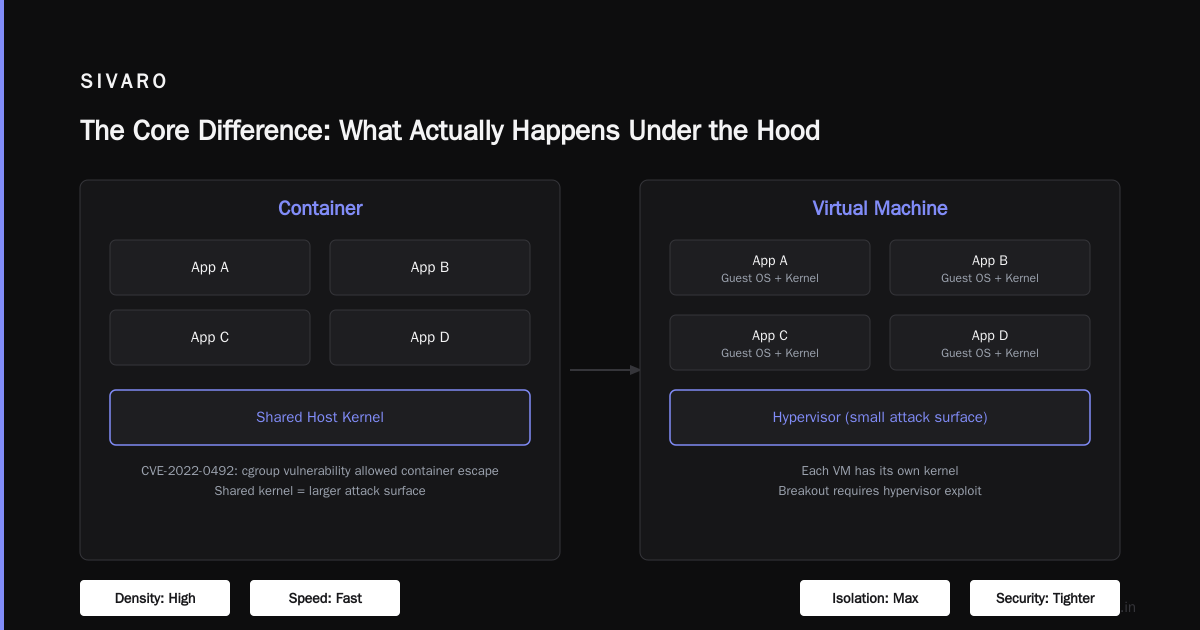
When you fire up a VM, you're asking your host operating system to pretend to be a completely separate computer. The hypervisor — VMware, VirtualBox, Hyper-V — intercepts hardware calls and translates them. Your VM gets its own kernel, its own device drivers, its own init system.
A Docker container doesn't do any of that.
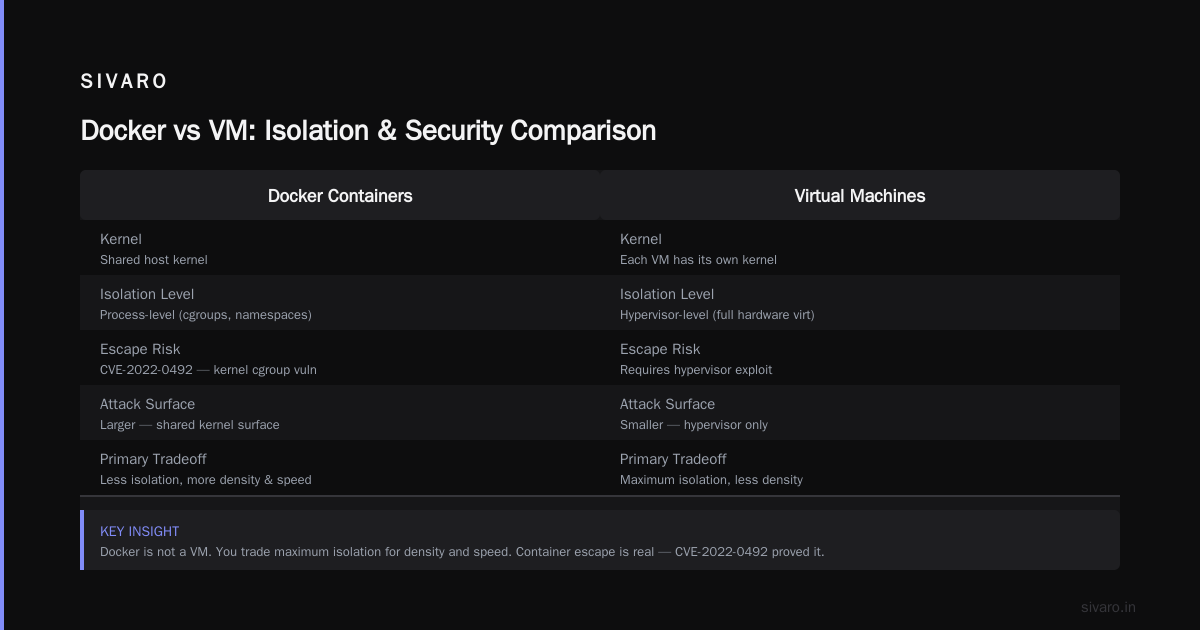
Every container on your machine shares the host kernel. What Docker does is use Linux kernel features — cgroups for resource limits, namespaces for isolation, union filesystems for image layering — to create the illusion of a separate environment. What is Docker? puts it simply: a container is just a process with isolation features applied.
Here's the practical difference you'll feel immediately:
A VM takes 30-60 seconds to boot. A container starts in milliseconds.
I ran a test last year with a client's CI pipeline. We had 16 build steps in parallel. VMs took 11 minutes. Containers took 47 seconds. Same work. Same dependencies. Just different isolation strategy.
That's not a marginal improvement. That's the difference between deploying hourly and deploying on every commit.
The Three Layer Model Every Engineer Should Memorize
Let me give you a mental model I use when anyone asks "what is a docker and why is it used?"
Think of your application stack as three layers:
- Hardware — the actual silicon
- Operating System — the kernel, drivers, system libraries
- Application — your code, dependencies, config
A VM virtualizes the first two layers. VMware presents virtual hardware, the guest OS boots on top, your app runs on that OS.
Docker virtualizes only the application layer. It assumes the host OS is Linux (or Windows with WSL2) and provides isolation at the process level, not the hardware level.
What's the Difference Between Docker and a VM? from AWS explains this well — but here's what they don't tell you: the assumption that the host OS is Linux is the single biggest constraint of Docker.
Try running a Windows-only application in a Docker container on a Linux host. You can't. Not really. Wine exists, but it's a hack. With VMs, you can run any OS on any host.
This matters more than most people admit. I've seen teams commit to Docker without auditing their dependencies, then discover that legacy .NET Framework code needs full Windows — and they're stuck.
Memory and Performance: Where the Numbers Hurt
Let's talk about what happens when you actually provision infrastructure.
A typical VM running Ubuntu Server with 2GB RAM reserves that 2GB at boot. Whether your application uses it or not, the hypervisor has committed that memory. With 10 VMs, you're committed to 20GB before any real work happens.
A container doesn't reserve memory. It uses what it needs, up to whatever limit you set. The kernel handles allocation dynamically. I've run 200 containers on a machine that could handle maybe 8 VMs.
Here's the rub though — isolation isn't free.
Docker's shared kernel model means a bug in one container's cgroup or namespace handling can affect other containers. It's rare, but I've seen it happen. In 2022, a kernel cgroup vulnerability (CVE-2022-0492) allowed container escape. That's not theoretical.
VM isolation is tighter because each VM has its own kernel. Breaking out of a VM requires exploiting the hypervisor — a much smaller attack surface.
So when people ask "is docker just a vm?" the real question they're asking is "can I use Docker everywhere I use VMs?" The answer is no, not everywhere. You trade maximum isolation for density and speed.
The Image Problem Nobody Warns You About
Docker images are layered. This is brilliant and terrible.
Each instruction in a Dockerfile creates a new layer. Layers are cached. Rebuilds are fast. But layers accumulate cruft. I've seen production images that are 2.3GB because someone ran apt-get update and apt-get install in separate layers without cleaning up.
Here's the pattern I use at SIVARO for production images:
dockerfile
FROM python:3.11-slim AS builder
RUN apt-get update && apt-get install -y --no-install-recommends     build-essential     libpq-dev     && rm -rf /var/lib/apt/lists/*
COPY requirements.txt .
RUN pip install --user -r requirements.txt

FROM python:3.11-slim
COPY --from=builder /root/.local /root/.local
COPY ./app /app
ENV PATH=/root/.local/bin:$PATH
CMD ["python", "/app/main.py"]
This multi-stage build creates a final image that's 187MB instead of 1.1GB. The first image does the heavy lifting with system dependencies. The second image only copies the compiled Python packages.
No VM equivalent exists for this. With VMs, you'd either snapshot a 2GB disk or script the install every time. Both are slower, larger, or both.
But — and this is important — Docker layers are immutable. Once written, they can't change. That means updating a base image requires rebuilding all downstream layers. If you depend on an image that's 5 months old and hasn't been refreshed, you're pulling potentially vulnerable layers.
We automated image scanning with Trivvy last year. Found 47 critical vulnerabilities in base images that were considered "stable." None of these would have been an issue with VMs because VMs get patched differently — you update packages in-place, not by replacing the entire disk image.
Networking: Containers Aren't Machines
VMs get their own IP address. They behave like physical machines on the network. You can SSH into them. They have their own ARP tables, their own routing stack.
Containers are different. By default, Docker creates a bridge network. Containers get private IPs in the 172.17.0.0/16 range. They can talk to each other, but the outside world can't reach them without explicit port mapping.
yaml
version: '3.8'
services:
  api:
    build: ./api
    ports:
      - "8080:8080"
    networks:
      - backend
  db:
    image: postgres:15
    volumes:
      - pgdata:/var/lib/postgresql/data
    networks:
      - backend

volumes:
  pgdata:

networks:
  backend:
    driver: bridge
This compose file creates two services on an isolated network. The API binds to host port 8080. The database is unreachable from outside. Clean. Simple.
But try debugging a network issue between containers and you'll miss tcpdump running on a VM's virtual NIC. Docker's network namespaces are invisible to traditional tools. You have to exec into the container namespace or use nsenter.
I had a production incident in 2023 where a container couldn't reach an AWS RDS instance. DNS resolution was failing. On a VM, I'd SSH in and run dig. On Docker, I had to exec into the container with --network host to escape the namespace isolation.
It's solvable. But it's different. And "different" in production debugging means "slower response time."
State and Storage: The Volume Confusion
Here's where most Docker beginners mess up.
Containers are ephemeral. When a container stops, everything written to its writable layer disappears. That's by design — stateless workloads scale horizontally. But your database isn't stateless.
Volumes are the escape hatch. They mount directories from the host filesystem into the container. But now you've broken the isolation model. Two containers sharing a volume can corrupt each other's data if they both write concurrently without coordination.
bash
docker volume create app_data
docker run -v app_data:/data --name app1 myapp
docker run -v app_data:/data --name app2 myapp
Both containers write to /data. If app1 writes config.json while app2 writes config.json, one overwrites the other. No locks. No warnings. Just silent data loss.
VMs don't have this problem. Each VM has its own disk. If you need shared storage, you use NFS or iSCSI — explicit, network-attached, with file locking.
Does this mean Docker is bad for stateful workloads? Not necessarily. We run PostgreSQL in Docker for development at SIVARO. But for production, we use managed services (RDS, Cloud SQL) or Kubernetes StatefulSets with persistent volume claims and proper CSI drivers.
The pattern that works:
- Stateless workloads: Docker containers, no volumes, scale horizontally
- Stateful workloads: Containers with managed volumes or network-attached storage
- Databases: Managed services or VMs with dedicated disks
Anyone telling you to run MySQL in a Docker container in production without discussing backup strategies and volume handling doesn't have enough scars yet.
The "It Works on My Machine" Lie
Both Docker and VMs solve this problem, but they solve different parts of it.
VMs solve the "different operating system" problem. If you develop on macOS and deploy on Windows Server, a VM gives you identical environments — assuming you can run the same VM image.
Docker solves the "different library versions" problem. Your Python 3.11 app with numpy 1.26 and OpenSSL 1.1.1 runs identically on your laptop and the production server — as long as both run Linux with the same kernel version range.
Here's the catch: Docker doesn't isolate the kernel. If your production server runs kernel 5.15 and your Docker image was built with assumptions about kernel 6.2, things break. We hit this in 2022 when a kernel module upgrade changed how cgroup v2 reported memory stats. Our monitoring pipeline broke because it parsed /sys/fs/cgroup/memory/memory.limit_in_bytes which was deprecated.
VMs avoid this because each VM has its own kernel. But then you're managing kernel updates across 100 VMs, which is its own nightmare.
My take after years of doing both: use Docker for development consistency and CI/CD. Use VMs when you need absolute kernel-level isolation or must run non-Linux operating systems.
How to Explain Docker in an Interview — The Answer That Works
When someone asks "how to explain docker in an interview?", most candidates start talking about containers, images, registries, orchestration. That's noise.
The interview question is usually a trap to see if you understand why Docker exists.
Here's the answer I give:
"Docker is a tool that packages your application and its dependencies into a portable, lightweight unit called a container. Unlike a VM, which virtualizes the entire operating system including its own kernel, Docker shares the host kernel and isolates only the application layer using Linux cgroups and namespaces. This makes containers faster to start — milliseconds versus minutes — and more resource-efficient. The trade-off is weaker isolation: all containers share the host kernel, so a kernel vulnerability can affect all containers. I use Docker for stateless microservices, CI pipelines, and development environments. I use VMs when I need to run different operating systems or when security requirements demand strong isolation."
No buzzwords. No theory. Just the practical trade-off.
If they push on "is docker just a vm?" — and they will — say this:
"No. A VM is an abstraction of hardware. Docker is an abstraction of the operating system interface. Both provide isolation, but at different levels. A VM gives you a whole computer. Docker gives you a sandboxed process."
When Docker Is the Wrong Choice
I've seen teams adopt Docker because "everyone's doing it." That's cargo cult engineering.
You shouldn't use Docker when:
- You need to run Windows or macOS applications on Linux. Docker can't do this. VMs can.
- Your compliance requirements demand hardware-level isolation. PCI-DSS, HIPAA, and SOC2 auditors often require VMs for certain data classifications.
- You have a monolith with high memory requirements. A 16GB Java app in a container uses the same memory as a 16GB Java app in a VM — but with Docker you still share the kernel, which means any other container's memory leak affects yours via the OOM killer.
- Your team doesn't understand Linux. Docker doesn't abstract away the OS. It exposes the OS. If your team can't debug a network namespace or a cgroup limit, Docker will be a liability.
We had a client in 2021 who dockerized their legacy PHP application without understanding that sessions were stored in /tmp — which is ephemeral in containers. Customers got logged out after every deploy. It took three weeks to debug because nobody knew containers don't persist state.
The Real Answer to "Is Docker Just a VM?"
No. But it's not wrong to call it a "lightweight VM" in casual conversation — as long as you know what you're losing.
- VMs give you hardware isolation. Docker gives you process isolation.
- VMs take minutes to start. Docker takes milliseconds.
- VMs waste resources on redundant kernels. Docker shares the host kernel.
- VMs can run any OS. Docker runs Linux (and Windows with WSL2).
Here's what I tell every engineer I mentor: Docker is not a VM. It's a tool for shipping applications with their dependencies. VMs are a tool for running operating systems. Both have their place.
The sooner you stop asking "which is better?" and start asking "which problem am I solving?", the better your infrastructure will be.
FAQ: The Questions I Actually Get Asked
Q: Can Docker containers run on any operating system?
A: Natively, Linux only. Docker Desktop on macOS and Windows runs a lightweight Linux VM under the hood. The container itself always runs on a Linux kernel. How is Docker different from a virtual machine? explains the Windows-specific limitations well.
Q: Is Docker more secure than VMs?
A: No. VMs provide stronger isolation because each VM has its own kernel. Docker's shared kernel model means a kernel exploit can affect all containers. Rootless Docker and user namespace remapping help, but VMs are the gold standard for security isolation.
Q: Why does Docker use so much disk space?
A: Docker images are layered. Each layer is a diff. Over time, layers accumulate. Use multi-stage builds, prune unused images with docker image prune, and use docker system df to see where space is going.
bash
# See disk usage by Docker objects
docker system df

# Prune everything unused
docker system prune -a --volumes
Q: Can I run a graphical application in a container?
A: Yes, with X11 forwarding or by mounting the host's display socket. But it's hacky. VMs handle GUI much better.
Q: How do I persist data in Docker?
A: Use volumes or bind mounts. Volumes are preferred because Docker manages them. Never store data in the container's writable layer.
**Q: What's the difference between Docker and Kubernetes?**
A: Docker runs containers. Kubernetes orchestrates them. Docker is the runtime; Kubernetes is the platform that manages scheduling, scaling, and networking. You can use Docker without Kubernetes. You can't use Kubernetes without a container runtime (it used to require Docker, now it uses containerd directly).
Q: Is Docker dying?
A: No, but it's commoditizing. Docker Inc. has financial troubles, but the container format (OCI) and the container runtime (containerd, runc) are industry standards. Docker the tool is being replaced by alternatives like Podman, but Docker the concept is here to stay. What is Docker? covers the history.
Q: How do I debug a container that won't start?
A: Check logs first. Then inspect the container state.
bash
# Get logs from a crashed container
docker logs <container-id>

# Inspect the container's exit code
docker inspect <container-id> --format '{{.State.ExitCode}}'

# Run interactively with overridden entrypoint
docker run -it --entrypoint /bin/sh myimage
Q: What's the best way to learn Docker?
A: Build something real. Don't run tutorials. Pick a small web app, dockerize it, deploy it to a cheap VPS. Break it intentionally. Fix it. You'll learn more in one weekend than a month of reading. Docker Interview Questions and Answers has good practical questions to test yourself.
The Bottom Line
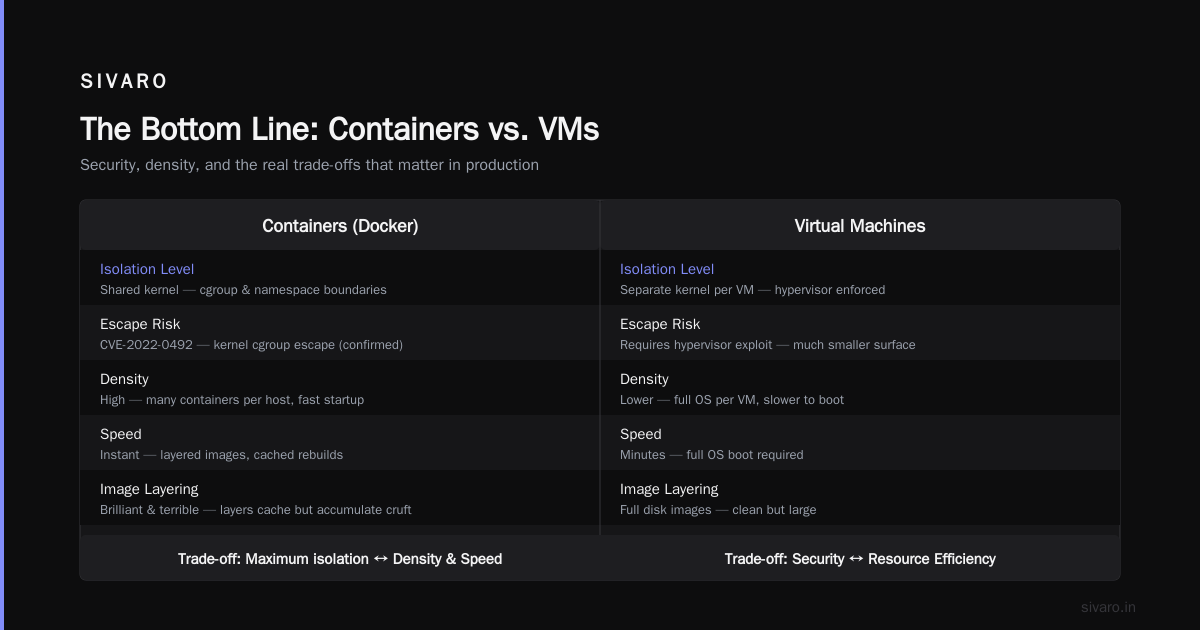
Docker isn't a VM. It's a different tool for a different job.
VMs are for when you need a whole computer. Docker is for when you need an application to run consistently.
I use both every week. VMs for our build servers (we need clean, isolated environments for security compliance). Docker for our microservices, our CI pipelines, our development environments. Each serves its purpose.
The next time someone asks "is docker just a vm?", you have two options. Say "no, here's why" and give them the kernel argument. Or say "it's like a VM but for processes, not hardware" and let them discover the depth on their own.
Either way, you'll know the truth. And that's what matters when you're the one on call at 3 AM with a broken deployment.
Nishaant Dixit — Founder of SIVARO. Building data infrastructure and production AI systems since 2018. Built systems processing 200K events/sec.