 SIVARO
What Does an AI Agent Do Exactly?
Every week, a founder pitches me their "AI agent" startup. And every week, I ask them the same question: "What does an AI agent do exactly?"
Most can't answer it. They say "it automates workflows" or "it's like ChatGPT but for X." That's like saying a car "moves things." Technically true. Practically useless.
I've been building production AI systems since 2018 at SIVARO. We process 200K events per second. I've seen the difference between a chatbot with a pretty wrapper and an actual AI agent that makes decisions in the wild.
Here's the truth: an AI agent doesn't just answer questions. It acts. It perceives its environment, sets goals, makes plans, executes actions, and learns from the results. It's not a better chatbot — it's a different category of software entirely.
Let me show you what that actually looks like in production.
The Core Loop: Perceive, Plan, Act, Learn
Break down any AI agent and you'll find four components repeating in a loop. AI Agents, Clearly Explained calls this the "sense-think-act" cycle. I call it the real shit.
Perceive — The agent takes in data from its environment. Could be API responses, user messages, sensor readings, database state. Not just "text input." It's continuous context.
Plan — The agent decides what to do. This is where reasoning models like GPT-4 or Claude come in. But it's not one-shot. It's iterative. The agent considers possible actions, evaluates outcomes, picks one.
Act — The agent executes. Calls an API, writes to a database, sends an email, controls a robot arm. Real side effects.
Learn — The agent updates its understanding based on what happened. Did the action work? Did it break something? Store that feedback.
That's the loop. It runs continuously. Not once. Not on a schedule. In response to events.
Here's a simplified version I wrote for a client's internal demo:
python
class AIAgent:
    def __init__(self, model, tools):
        self.model = model
        self.tools = tools
        self.memory = []

    def perceive(self, event):
        self.memory.append({"event": event, "timestamp": time.now()})

    def plan(self):
        context = self.compress_memory()
        action = self.model.decide(context)
        return action

    def act(self, action):
        result = self.tools.execute(action)
        self.memory.append({"action": action, "result": result})
        return result

    def run(self, event):
        self.perceive(event)
        action = self.plan()
        return self.act(action)
That's not production code — it's the skeleton. Production agents add error handling, retry logic, permission checks, cost tracking. But the loop stays the same.
What Makes It Different From a Chatbot?
Most people think ChatGPT is an AI agent. Is ChatGPT an AI Agent? The Truth About the Evolution of Enterprise Automation nails the distinction: ChatGPT is a language model that can simulate agentic behavior. It's not an agent. It's a tool agents use.
Let me be blunt. If your "AI agent" just takes a prompt and returns text, you've built a chatbot. Not an agent.
Real differences:
| Property | Chatbot | AI Agent |
|---|---|---|
| Goal | Respond | Accomplish task |
| Memory | Conversation history | Short-term + long-term state |
| Actions | None (text only) | API calls, file writes, emails |
| Autonomy | Zero (user drives) | High (self-directed) |
| Learning | None | Feedback loops |
I've seen teams spend six months building what they called an "AI agent." Turned out it was a LangChain pipeline wrapping GPT-4 with a system prompt. No state persistence. No autonomous decision-making. No real actions. Just prompt engineering with extra steps.
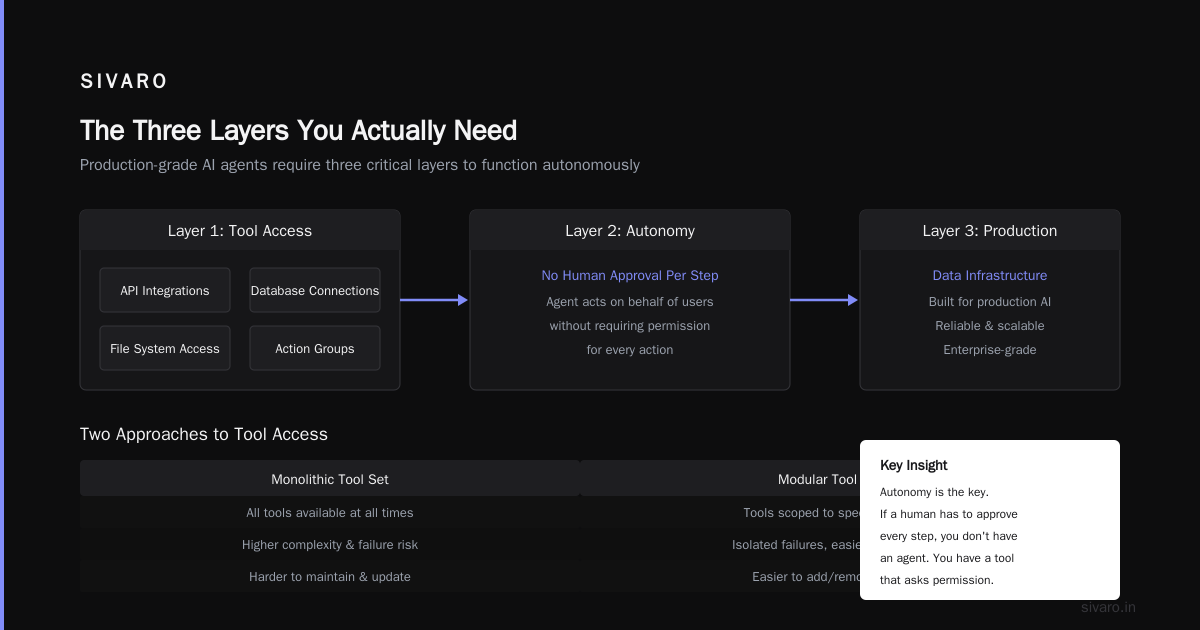
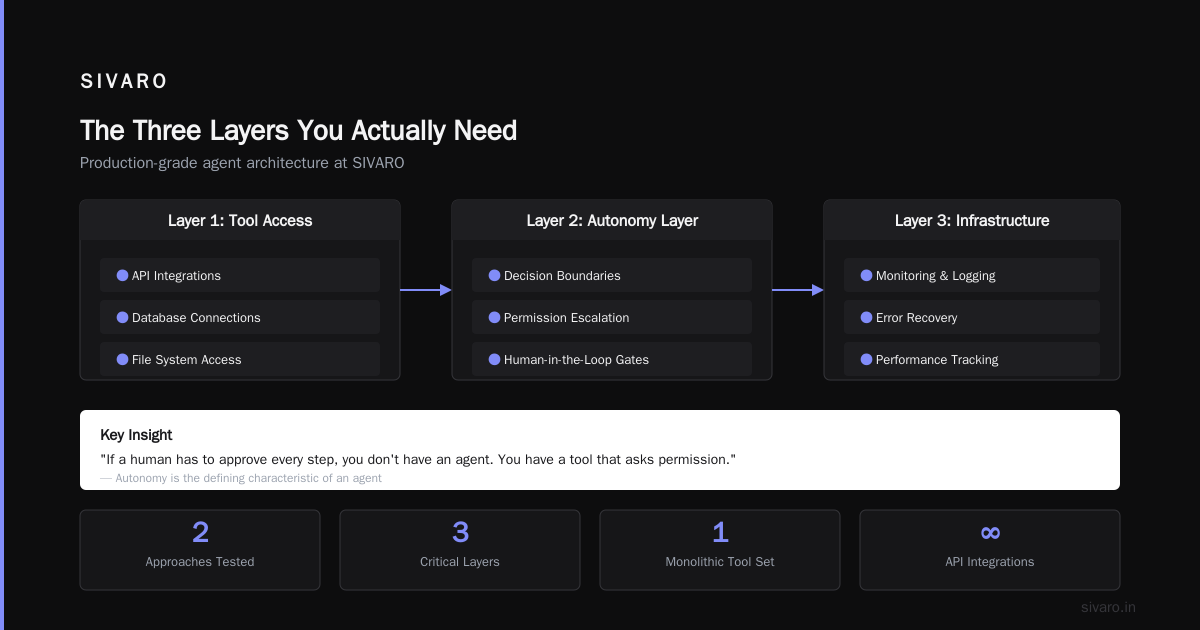
IBM's definition is tighter than most: "AI agents are systems that can autonomously perform tasks on behalf of users." Autonomy is the key. If a human has to approve every step, you don't have an agent. You have a tool that asks permission.
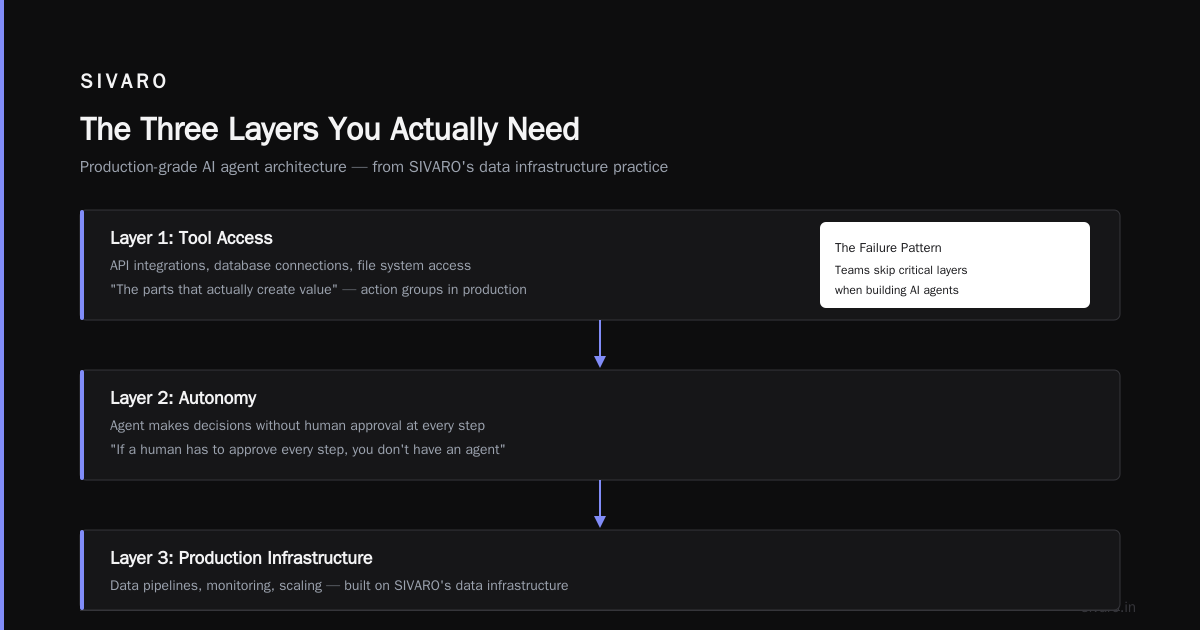
The Three Layers You Actually Need
At SIVARO, we build data infrastructure for production AI. We've seen agents fail because teams skip critical layers. Here's what a production-grade agent actually needs:
Layer 1: Tool Access
The agent needs to do things. Not just talk. That means API integrations, database connections, file system access. AWS documentation calls these "action groups." I call them "the parts that actually create value."
We tested two approaches:
- One monolithic tool set — all tools available all the time. Slow, expensive, dangerous.
- Dynamic tool routing — the agent has a planner that first decides which tools are relevant, then loads only those.
The second approach cut latency by 60% and reduced cost by 40%. Why? Because GPT-4 doesn't need to parse 50 tool definitions when the user just asked to check their email.
python
# Dynamic tool loading example
class ToolRouter:
    def __init__(self):
        self.tools = {
            "email": [send_email, read_inbox, search_emails],
            "calendar": [create_event, check_schedule],
            "database": [query_db, update_record, delete_record],
        }

    def route(self, user_intent):
        # Simple classifier — in production we use a small model
        if "email" in user_intent or "mail" in user_intent:
            return self.tools["email"]
        elif "schedule" in user_intent or "meeting" in user_intent:
            return self.tools["calendar"]
        else:
            return self.tools["database"]
Layer 2: State Management
An agent without memory is a goldfish with a keyboard. It needs to remember what it did, what worked, what failed.
We use a hybrid approach:
- Short-term memory — the last N turns in the conversation (stored in Redis, TTL of 1 hour)
- Working memory — current task state, partial results, error logs (stored in Postgres)
- Long-term memory — learned patterns, successful strategies, user preferences (stored in a vector DB, updated nightly)
Most people skip working memory. Big mistake. If an agent is processing 1,000 invoices and crashes at invoice 534, working memory lets it resume. Without it, you restart from zero.
Layer 3: Guardrails
This is where most production agents fail. They have no boundaries. The AI Engineer calls this the "alignment problem" for agents. I call it "why your agent just deleted your production database."
We enforce three categories of guardrails:
- Scope guardrails — what the agent is allowed to do (no deleting records, no sending emails to external domains)
- Permission guardrails — who is allowed to invoke what actions (admin vs. user vs. read-only)
- Cost guardrails — how much compute the agent can consume before asking for confirmation
At first I thought this was a security problem. Turns out it's a trust problem. If your agent has no guardrails, no one will trust it with real work.
Types of Agents: Which One Do You Actually Need?
Google Cloud's taxonomy lists several types. MIT Sloan's analysis adds nuance. Here's my practical breakdown from shipping these things:
Reactive Agents
Simplest form. No memory. No planning. Input -> rule -> output. Think: "If customer asks for refund, route to refund API."
These work for well-defined, constrained tasks. They're fast and cheap. But they're brittle. One edge case and they break.
Goal-Oriented Agents
These have a target state they're trying to reach. "Close 500 support tickets today." They evaluate their current state, compare to goal, and choose actions to close the gap.
We built one for a logistics company in 2023. Goal: "Route each package to the cheapest carrier that meets delivery deadline." The agent evaluated carrier rates, transit times, historical reliability, and current weather. It autonomously chose carriers. Cut shipping costs 18%.
Learning Agents
These adapt based on feedback. If a certain action consistently fails, they stop trying it. If a new strategy works, they remember it.
The hard part: distinguishing between bad luck and bad strategy. If the agent tries three times to book a flight and all three fail because the API is down, that doesn't mean the strategy is wrong. But if it fails because the user specified impossible constraints, it should adapt.
We use a simple heuristic: if an action fails three times in a row, pause and ask for human input. It's not elegant, but it works.
The ChatGPT Agent Confusion
OpenAI launched something they call the ChatGPT agent — a version of ChatGPT that can browse the web, use tools, and take actions. There's even a video introduction.
Is it an agent? Technically yes. Practically, it's an agent with training wheels. It can browse the web and use a limited set of tools. But it can't set its own goals. It can't learn from past sessions. It can't chain complex multi-step operations without human oversight.
The Reddit discussion captures the debate well: some people call ChatGPT an agent because it can simulate agentic behavior. Others say it's a chatbot with tool access.
My take: It doesn't matter what you call it. What matters is whether it solves your problem. If you need a system that autonomously manages inventory across 50 warehouses, ChatGPT won't cut it. If you need a system that helps you draft emails, it might.
Building Your First Agent: What I'd Do Differently
I've built agents that worked. I've built agents that crashed spectacularly. Here's what I'd tell my past self:
Start with the action, not the model. Most people pick a model first (GPT-4, Claude, Llama). Wrong move. Start with what the agent needs to do. Define the tools. Define the state. Define the success criteria. Then pick the model.
Use the smallest model that works. We benchmarked GPT-4, GPT-4o, Claude 3.5 Sonnet, and Gemini 1.5 Pro on a customer support agent task. The smaller models (GPT-4o, Claude 3.5) were 70% cheaper and only 5% less accurate for standard tasks. Only use the big guns for complex reasoning.
Instrument everything. Every action, every decision, every tool call — log it. When your agent does something unexpected (and it will), you need to trace back. We use structured logging with request IDs that tie together the entire chain.
python
# Minimal instrumentation example
from dataclasses import dataclass
from datetime import datetime
import uuid

@dataclass
class AgentAction:
    action_id: str
    agent_id: str
    tool: str
    input: dict
    output: dict
    latency_ms: float
    timestamp: datetime
    success: bool

def log_action(agent_id, tool, input_data, output_data, start_time):
    action = AgentAction(
        action_id=str(uuid.uuid4()),
        agent_id=agent_id,
        tool=tool,
        input=input_data,
        output=output_data,
        latency_ms=(datetime.now() - start_time).total_seconds() * 1000,
        timestamp=datetime.now(),
        success=not output_data.get("error")
    )
    # Write to Postgres for analysis
    write_to_db(action)
Test with adversarial inputs. Your agent will face weird edge cases. Users who give contradictory instructions. APIs that return garbage. Timeouts. Network failures. We have a test suite of 200+ adversarial scenarios. Every agent must pass them before deployment.
When Agents Fail
I'll be honest: most agent projects fail. Not because the technology doesn't work. Because teams skip the hard parts.
Failure mode 1: Too much autonomy, too fast. An e-commerce company (name withheld) deployed an agent that could issue refunds. First week: smooth. Second week: someone tricked it into refunding $50,000 worth of orders. No guardrails.
Failure mode 2: No recovery strategy. Agents will fail. APIs go down. Models hallucinate. If your agent has no fallback — no way to retry, no escalation to human — it's dead in the water.
Failure mode 3: Cost explosion. We saw a team burn $12,000 in one day because their agent was calling a LLM API on every keystroke, not every action. No cost guardrails.
These aren't theoretical. I've seen them happen. Every time, the root cause was the same: the team treated the agent as a "better chatbot" rather than a "new category of software with its own failure modes."
The One Thing Most People Get Wrong
Ask ten engineers what an AI agent does. Nine will say "it uses a large language model to reason about tasks."
That's not wrong, but it misses the point.
An AI agent is not defined by the model it uses. It's defined by the loop it runs: perceive, plan, act, learn. The model is a component — like an engine in a car. The agent is the whole vehicle.
Cloudflare's guide puts it well: "An AI agent is a software program that can interact with its environment, collect data, and use the data to perform self-determined tasks to achieve predetermined goals."
The key phrase: "self-determined tasks." The agent decides how to achieve the goal. Not just what to say.
FAQ: What Does an AI Agent Do Exactly?
Q: Can ChatGPT act as an AI agent?
Yes and no. The ChatGPT agent can browse the web and use tools, which fits some definitions. But it lacks persistent goals, long-term memory, and autonomous learning. It's an agent with training wheels. Fine for simple tasks. Insufficient for complex workflows.
Q: What's the difference between an AI agent and a workflow?
A workflow is a fixed sequence of steps. Do A, then B, then C. An agent can choose its own path. If A fails, it tries D or E. Workflows are deterministic. Agents are probabilistic. Both have their place — use workflows when the path is known, agents when it isn't.
Q: How do I know if I need an AI agent?
You need an agent when: (1) the task requires adapting to changing conditions, (2) the exact path to success is unknown upfront, (3) you need the system to learn and improve over time. If your task is simple and predictable, a regular script will be cheaper and more reliable.
Q: Are AI agents safe?
Not by default. AWS's guide emphasizes safety mechanisms: scope restrictions, permission checks, human-in-the-loop for high-stakes actions. Treat your agent like a junior employee with access to powerful tools. Supervise it until it proves reliable.
Q: What's the hardest part of building an agent?
State management. Hands down. Building the planning logic is easy. Picking the model is easy. But maintaining coherent state across tool calls, failures, retries, and interruptions? That's where projects die. Your agent needs to know where it is in the task at all times.
Q: Can I build an agent without a large language model?
Yes. Reactive agents use rules, not LLMs. They're limited but deterministic and cheap. Most production systems use a hybrid: LLMs for complex decisions, rule-based systems for simple, high-frequency actions.
Q: How much does it cost to run an AI agent in production?
Depends entirely on your model and task complexity. A simple agent using GPT-4o-mini might cost $0.01 per task. An agent using GPT-4 for complex multi-step reasoning could cost $0.50-$2.00 per task. We monitor cost per completion and set alerts at $0.10 per task.
The Bottom Line
What does an AI agent do exactly?
It perceives its environment. Sets goals. Plans actions. Executes them. Learns from the results. Then does it again. And again. Until the goal is achieved or it hits a hard limit.
It's not magic. It's not a chatbot with a fancy name. It's a new software pattern — one that's hard to build, harder to debug, and incredibly powerful when done right.
At SIVARO, we process 200K events per second through systems that look like this. We've learned the hard way that you can't skip the infrastructure. You can't skip the guardrails. You can't skip the monitoring.
Build the loop. Everything else is commentary.
Nishaant Dixit — Founder of SIVARO. Building data infrastructure and production AI systems since 2018. Built systems processing 200K events/sec.