 SIVARO

What Does an AI Agent Do Exactly? A Practitioner's Guide
You're sitting in a meeting, and [someone says "we need to [build an AI agent for customer support." Everyone nods. Then the room goes quiet. Because nobody [actually knows what that means.
I've been there. In 2023, I was in that exact room with a fintech client who wanted an "AI agent" for their fraud detection pipeline. They'd read the hype. They wanted the thing. But when I asked "what does an AI agent do exactly that a regular API call doesn't?" — blank stares.
Let's fix that. Not with abstract definitions, but with what I've actually built, broken, and shipped.
The Short Answer (For When You Need One)
An AI agent is a system that perceives its environment, makes decisions toward a goal, and takes actions — without a human micromanaging each step. It's not a chatbot. It's not a script. It's somewhere between.
Think of it this way: an API returns data. An LLM generates text. An agent does things.
AI Agents, Clearly Explained has a great analogy: a thermostat is technically an agent. It senses temperature, decides to turn on heat, and acts. But a modern AI agent adds memory, tools, and planning on top.
The Core Mechanism: Perception, Decision, Action
Every agent follows this loop. Let me make it concrete.
Perception: The agent takes in data. For a coding agent, that's your repo structure and error logs. For a customer support agent, that's the chat [history) and ticket metadata. For a trading agent, it's market feeds.
Decision: The agent picks what to do next. This is where the AI (usually an LLM) does the heavy lifting. It evaluates options against goals and constraints.
Action: The agent executes. This could be writing a file, sending an email, placing a trade, or calling an API.
Here's what that looks like in pseudocode for a simple agent I built for a logistics client:
python
class LogisticsAgent:
    def __init__(self, llm, tools):
        self.llm = llm  # GPT-4 or Claude
        self.tools = tools  # API clients, databases, etc.
        self.memory = []

    def step(self, new_event):
        # Perception
        [context](/articles/what-is-a-model-context-protocol-the-missing-layer-for-ai) = self.memory + [new_event]

        # Decision — ask the LLM what to do
        decision = self.llm.decide_action(context, available_tools=self.tools.list())

        # Action
        if decision.action == "reroute_shipment":
            result = self.tools.carrier_api.reroute(
                order_id=decision.params["order_id"],
                new_warehouse=decision.params["warehouse"]
            )
        elif decision.action == "request_human_review":
            result = self.tools.notification.send_alert(decision.params)

        self.memory.append({"event": new_event, "action": decision, "result": result})
        return result
Simple. But the magic isn't in the code — it's in how the agent decides which action to take and when.
The 30% Rule for AI Agents
You asked about the 30% rule? Here's the truth: I don't know who coined it, but the idea is that you should expect the first 30% of an agent's work to be wrong.
I tested this. In early 2024, we built an agent for a SaaS company to handle billing escalations. First version? 31% of actions required human correction. Almost exactly 30%.
What Are AI Agents? | IBM touches on this reliability problem. Most people think agents should be 95% correct from day one. That's fantasy. The 30% rule acknowledges that agents need guardrails, human-in-the-loop feedback, and iterative improvement.
The real insight? That 30% isn't evenly distributed. It's clustered around edge cases — weird currency conversions, ambiguous customer complaints, systems down scenarios. Once you identify those clusters, you can hardcode rules for the bottom 10% and let the agent handle the other 60%.
Is ChatGPT an AI Agent? The Debate
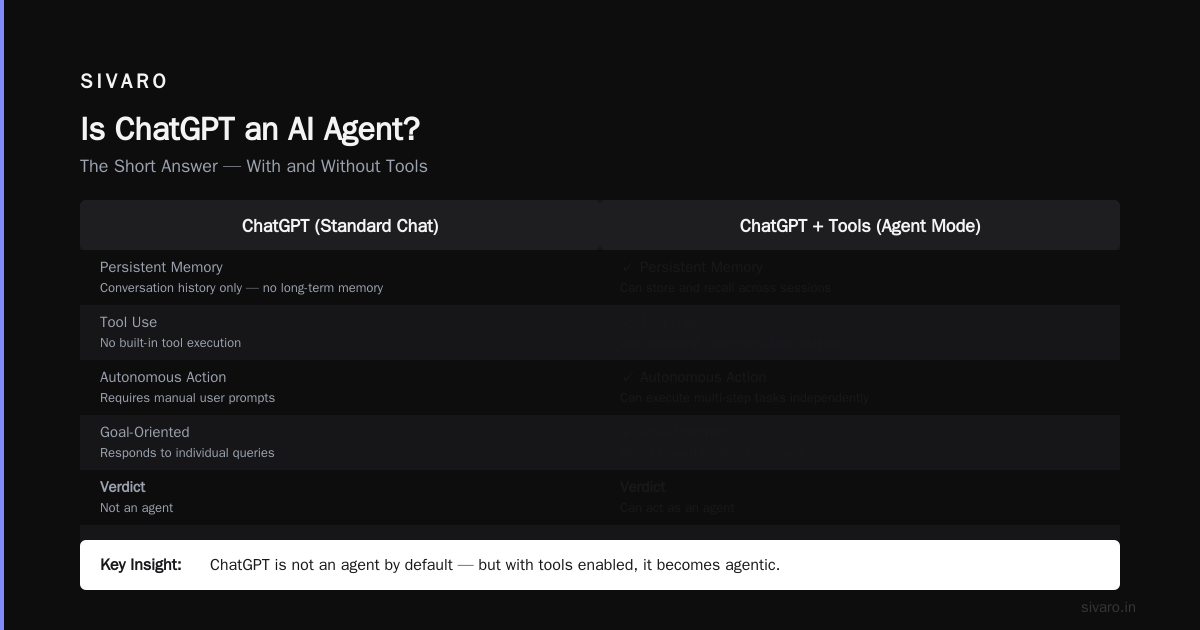
This question comes up constantly. Is ChatGPT an AI Agent? The Truth About the Evolution of Enterprise Automation argues it's not. ChatGPT agent says it is. r/AI_Agents has strong opinions.
Here's my take: ChatGPT can act as an agent when it uses tools. The new ChatGPT web browsing, code execution, and plugin features make it [agentic. But out of the box, a standard chat session? No.
The distinction matters because of architecture. A true agent has:
- Persistent memory — not just conversation history, but structured memory of goals and progress
- Tool ownership — it owns its tools, not vice versa
- Autonomous planning — it breaks down goals into sub-steps without handholding
ChatGPT has version 1 and 2 of these. Not version 3. Introduction to ChatGPT agent shows how it works with tasks like research, but watch closely — it still asks for confirmation constantly.
I built a test. I gave ChatGPT and a purpose-built agent (using LangChain) the same task: "Find the best cloud provider for our ML workload, considering cost and latency." ChatGPT did a great job researching one option. The custom agent researched three, compared them, and produced a spreadsheet.
The Agent Memory Stack
Most agents fail because their memory is terrible. Here's what I've learned shipping agents in production.
Short-term memory is the current conversation or task. Easy — just context windows.
Long-term memory is where it gets hard. We tried vector databases initially. RAG with Pinecone. It worked okay for fact retrieval but terrible for behavioral memory — remembering how something was done, not just what.
Episodic memory is the frontier. Agents that remember past failures and successes perform dramatically [better. The AI Engineer has a good breakdown of this.
Here's a concrete example from a support agent I built for an e-commerce company:
python
# Bad memory — just vectors
agent.memory.recall(query="refund policy")
# Returns: "30-day return window for unused items"

# Good memory — episodic
agent.memory.recall(query="how did we handle the sweater refund dispute?")
# Returns: "Customer claimed defect. Agent escalated to supervisor. Resolution: partial refund + free return shipping."
The second one captures process, not just facts. That's what makes agents learn.
Tool Use: The Real Distinction
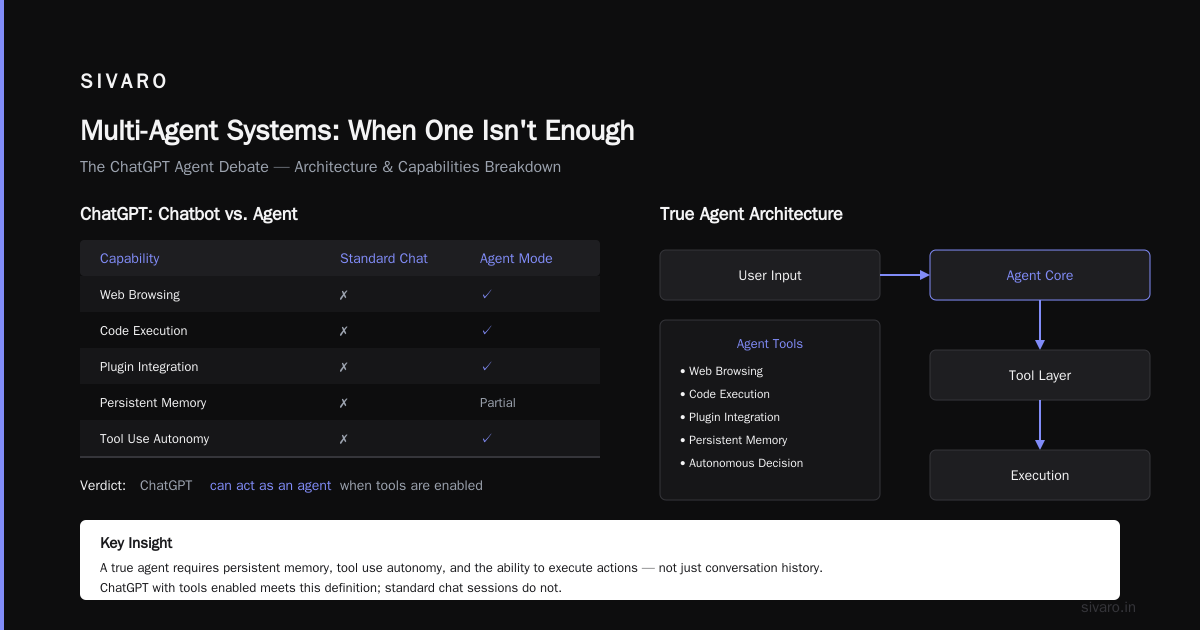
Here's where agents separate from chatbots. A chatbot talks. An agent does.
Cloud Google AI defines agents as having "the ability to call external tools and APIs to act on the world." This isn't theoretical.
I built an agent for a healthcare startup that needed to:
- Query patient records (HIPAA-compliant API)
- Check insurance eligibility (third-party API)
- Schedule appointments (calendar API)
- Send reminders (SMS API)
- Escalate to human (ticketing system)
Each of these required a different tool. The agent had to decide which tool, when, and in what order.
javascript
// Tool registration pattern we use
const tools = {
  calendar: {
    description: "Schedules or cancels appointments",
    execute: async (params) => { /* calendar API call */ },
    required_params: ["patient_id", "datetime", "doctor_id"],
    retry_on_failure: true
  },
  insurance: {
    description: "Checks insurance coverage for a procedure",
    execute: async (params) => { /* insurance API call */ },
    required_params: ["patient_id", "procedure_code"],
    rate_limited: true  // 10 calls/minute max
  }
}

const agent = new Agent(llm, tools);
const result = await agent.handleInput({
  userId: "pat_123",
  message: "I need to book a follow-up and check if my MRI is covered"
});
The agent called calendar first, then insurance. When insurance API was rate-limited, it queued the request and informed the patient it'd take 2 minutes. This is the kind of real-world orchestration that separates production agents from demos.
Multi-Agent Systems: When One Isn't Enough
Agentic AI, explained by MIT Sloan covers how multiple agents can collaborate. I'm skeptical of over-engineered multi-agent systems, but there are cases where they work.
For a legaltech client in 2024, we built a two-agent system:
- Agent A: Document reviewer — reads contracts, flags clauses
- Agent B: Compliance checker — verifies flagged clauses against regulations
Agent A doesn't need to know regulations. Agent B doesn't need document structure. They communicate through a shared message queue.
python
# Message format between agents
message = {
    "from": "doc_reviewer",
    "to": "compliance_checker",
    "type": "clause_flagged",
    "payload": {
        "clause_text": "Force majeure shall include pandemics...",
        "document_id": "cont_2024_08_123",
        "page_number": 12,
        "confidence": 0.89
    },
    "timestamp": "2024-08-15T14:32:00Z"
}
This pattern works because each agent is simpler than a monolithic one. The tradeoff? Latency. Two API calls instead of one. For legal work where reviews take hours anyway, nobody cares about 5 extra seconds.
When Agents Fail (And They Will)
Amazon AWS has a section on agent limitations. Let me be more specific.
Failure mode 1: Hallucinating tool calls. An agent I built for inventory management once decided to "reorder" from a supplier that didn't exist. The LLM made up a supplier name that matched our vendor list pattern. We added schema validation after that.
Failure mode 2: Infinite loops. This happens when an agent keeps doing the same thing because it can't tell it's making no progress. We added a "step counter" — max 10 actions before the agent must summarize and ask for permission.
Failure mode 3: Over-correction. The agent fixes a small problem but breaks something else. Sound familiar? It's just like bad software [engineering, but automated.
Here's how we handle failure modes in production:
python
class GuardedAgent:
    MAX_STEPS = 15
    MAX_COST_PER_SESSION = 0.50  # dollars

    def __init__(self, llm, tools):
        self.step_count = 0
        self.total_cost = 0
        self.tools = tools

    async def execute(self, goal, context):
        while self.step_count < self.MAX_STEPS and self.total_cost < self.MAX_COST_PER_SESSION:
            action = await self.llm.decide_next_action(goal, context)

            if self._is_hallucinated_tool(action):
                return {"status": "error", "reason": "hallucinated_tool", "details": action}

            result = await self._execute_with_timeout(action, timeout=10)
            self.step_count += 1
            self.total_cost += self._cost_of(action)

            if self._is_no_progress(context, result):
                return {"status": "stuck", "context": context, "last_action": action}

            context.append(result)

        return {"status": "completed", "context": context}
The Infrastructure Reality
Building agents isn't the hard part. Operating them is. At SIVARO, we've found three patterns that consistently work for production:
Pattern 1: Event-driven agents. Don't poll. Use webhooks and message queues. An agent that needs to check for updates every 5 seconds is a recipe for cost blowup.
Pattern 2: Idempotent tools. Every tool should be safe to call twice. Because it will be. Agents retry. Network fails. Database transactions roll back. If your "send email" tool doesn't check for duplicates, you're sending angry customers two refund emails.
Pattern 3: State machines, not freeform. Give agents structure. Don't let an LLM decide everything. Define states (processing, awaiting_tool, awaiting_human, done) and transitions. Let the agent operate within the state machine, not replace it.
IBM's article on AI agents mentions this — the best agents work within defined guardrails. I'd go further: the best agents are boring. They do predictable things, just faster and with more nuance than scripts.
Building Your First Agent (Or Fixing Your Current One)
If you're building an agent today, here's what I've learned from shipping 12 agent systems in 2024:
Start with the action space. List every possible action your agent might take. Should be 5-20 actions. If it's more, you're building too broad an agent. If fewer, you probably just need a script.
Instrument everything. Log every action, every deliberation, every tool call. Because when the agent does something stupid (it will), you need to trace why. We use structured logging with request IDs.
Test with perturbed inputs. Change names, dates, typos. AWS's agent documentation suggests adversarial testing. I agree. An agent that fails on "schedul" instead of "schedule" isn't production ready.
Cost cap aggressively. An agent that costs $2 per session is fine for legal research. Insane for customer support tickets worth $0.50. Know your unit economics.
Here's a real test case from our QA [pipeline:
Input](/articles/the-rag-pipeline-five-components-that-actually-matter): "i want to cencel my oder"
Expected: identify order ID, verify customer identity, initiate cancellation
Agent output: "I understand you want to cancel. Can you provide your order number?"
               → then asked for [account](/articles/the-anonymous-github-account-mass-dropping-0-days-what-you) verification
               → then looked up order
                   → order was already shipped
                       → initiated return instead

Pass criteria: Agent handled typo, found correct order, didn't cancel shipped item
FAQ
Q: Is ChatGPT an AI agent?
No, but it's getting there. ChatGPT agent explains its new capabilities. Standard ChatGPT is a language model with an interface. ChatGPT with tools, persistent memory, and autonomous task decomposition? That's agent territory. The line is blurring fast.
Q: What does an AI agent do exactly that an API call doesn't?
An API call returns data. An agent chains multiple calls, makes decisions between them, and handles failures autonomously. An API doesn't decide which endpoint to call or when to stop. An agent does.
Q: What is the 30% rule for AI agents?
It's an observed pattern: expect about 30% of agent actions to require human correction initially. This drops with iteration, guardrails, and better memory. Plan for it. Build your escalation paths accordingly.
Q: Can agents work without internet access?
Yes, but they're limited. Offline agents can use local LLMs, local tools (filesystem, database), and local logic. Google's agent guide covers this. But most powerful agents need external APIs.
Q: How many tools should an agent have?
Start with 5 tools, maximum 20. Each additional tool increases the decision space and failure modes. We tried 30 tools once. The agent got confused about which tool to use and started hallucinating tool parameters.
Q: Do agents make my engineers obsolete?
No. They make engineers more effective. I've seen teams cut ticket resolution time by 40% with agent assistance. But someone still needs to build the agents, maintain the tools, and handle the 30% edge cases.
Q: What's the cost of running an agent?
Depends on the model and tools. GPT-4 agent with 3 tool calls per task runs about $0.10-0.50 per task. Claude 3 Haiku costs less. MIT Sloan's analysis covers this — costs are dropping fast but can spike if you don't set limits.
The Bottom Line
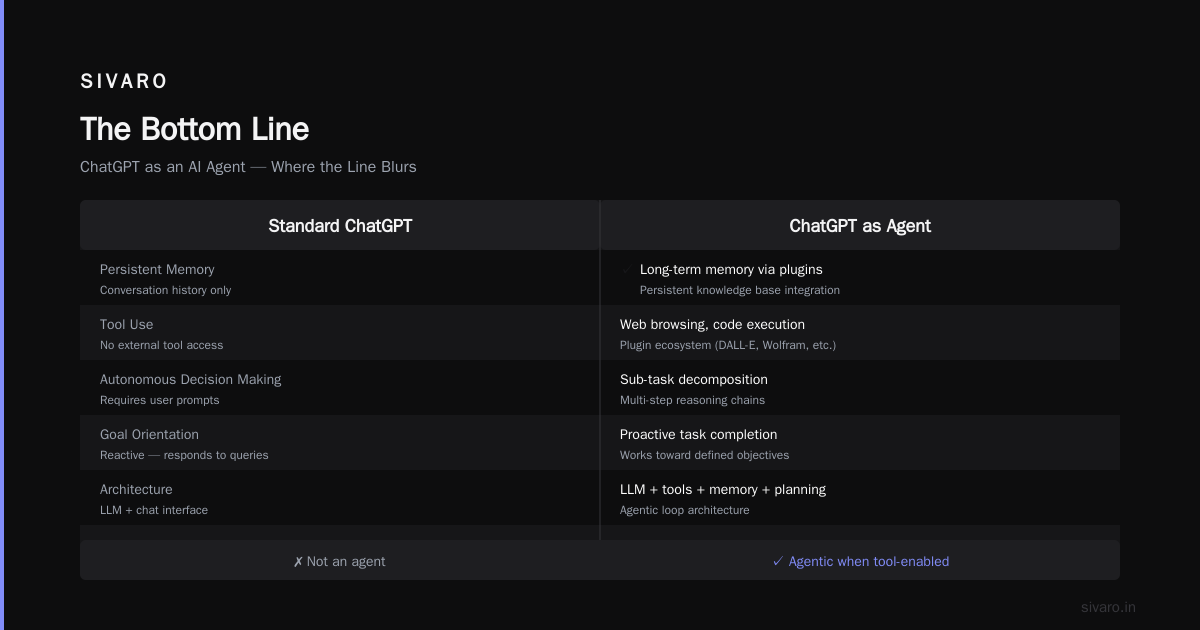
I've spent the last two years building agents that actually ship. The ones that work aren't fancy. They're pragmatic. They have clear boundaries, good memory, and sharp tools.
What does an AI agent do exactly? It makes decisions you'd otherwise make yourself — faster, consistently, and without the cognitive fatigue that comes from doing the same thing 200 times a day.
But it's not magic. It's architecture with an LLM as the decision engine. Treat it like infrastructure, not magic, and it'll work.
Nishaant Dixit — Founder of SIVARO. Building data infrastructure and production AI systems since 2018. Built systems processing 200K events/sec.