 SIVARO
What Does Kubernetes Actually Do?
I was six months into building SIVARO when a potential client asked me flat out: "What does Kubernetes actually do?" Not "What is Kubernetes?" — he knew the marketing. He wanted the real answer.
And honestly? Most explanations are garbage.
They'll tell you it's "container orchestration." They'll show you a diagram with pods and nodes and some boxes connected by arrows. They'll say it's "like having a robot that runs your containers." None of that tells you what it does in practice — the trade-offs, the pain, the moments when it saves your ass versus when it costs you a weekend.
I've run Kubernetes in production since 2018. I've watched it crush problems I couldn't solve any other way. I've also watched teams spend six months on a cluster only to realize they needed three instances and a cron job.
So here's the real answer.
The 30-Second Answer
Kubernetes is a distributed systems operating system.
That's it. You run containers on a cluster of machines. Kubernetes decides where they go, keeps them running, connects them to each other and the outside world, and handles the mess when things break.
Google built the first version based on their internal Borg system. They'd been running containers at scale for a decade. They open-sourced it in 2014. Now it's the standard.
But "what exactly is Kubernetes used for?" varies wildly depending on who you ask.
The Actual Architecture (Without The BS)
Every Kubernetes cluster has two layers:
The control plane — the brain. It runs the API server, scheduler, and controllers. You talk to this part.
The worker nodes — the muscles. Each node runs pods, which are one or more containers sharing storage and network.
Here's the trick most tutorials skip: Kubernetes doesn't run containers directly. It runs pods. A pod is the atomic unit. You can have one container per pod (90% of cases) or multiple containers that need to share resources (sidecar patterns, logging agents, etc.).
yaml
apiVersion: v1
kind: Pod
metadata:
  name: simple-app
spec:
  containers:
  - name: app
    image: nginx:1.25
    ports:
    - containerPort: 80
That's the simplest possible unit of work. Deploy this and Kubernetes will find a node with capacity, pull the image, and start the container. If the container crashes, Kubernetes restarts it. If the node dies, Kubernetes reschedules the pod somewhere else.
But nobody runs raw pods. You use controllers.
yaml
apiVersion: apps/v1
kind: Deployment
metadata:
  name: web-app
spec:
  replicas: 3
  selector:
    matchLabels:
      app: web
  template:
    metadata:
      labels:
        app: web
    spec:
      containers:
      - name: app
        image: myapp:1.2.3
        ports:
        - containerPort: 8080
A Deployment manages replicas. Tell it you want 3 copies running. If one dies, it creates another. If you update the image, it rolls new pods gradually. If the rollout breaks, it rolls back.
This is what Kubernetes actually does — it takes a desired state (3 replicas of myapp:1.2.3) and continuously drives actual state toward it. No scripts. No manual restarts. No SSH sessions at 3AM.
The Three Problems Kubernetes Actually Solves
1. Hardware Failure Isn't An Emergency Anymore
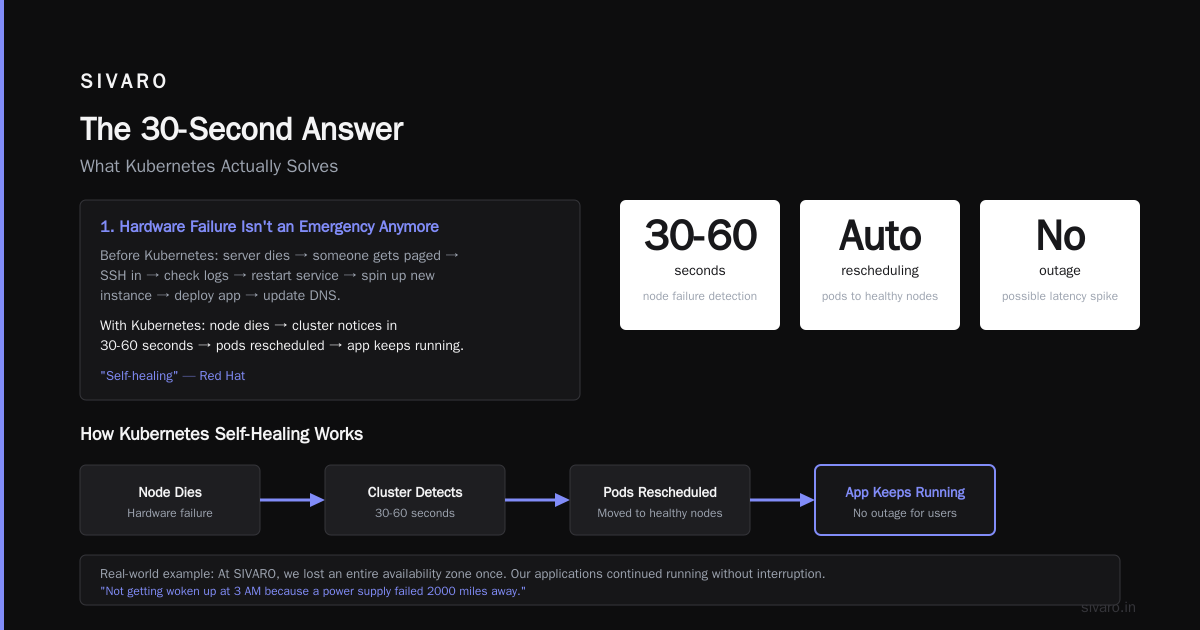
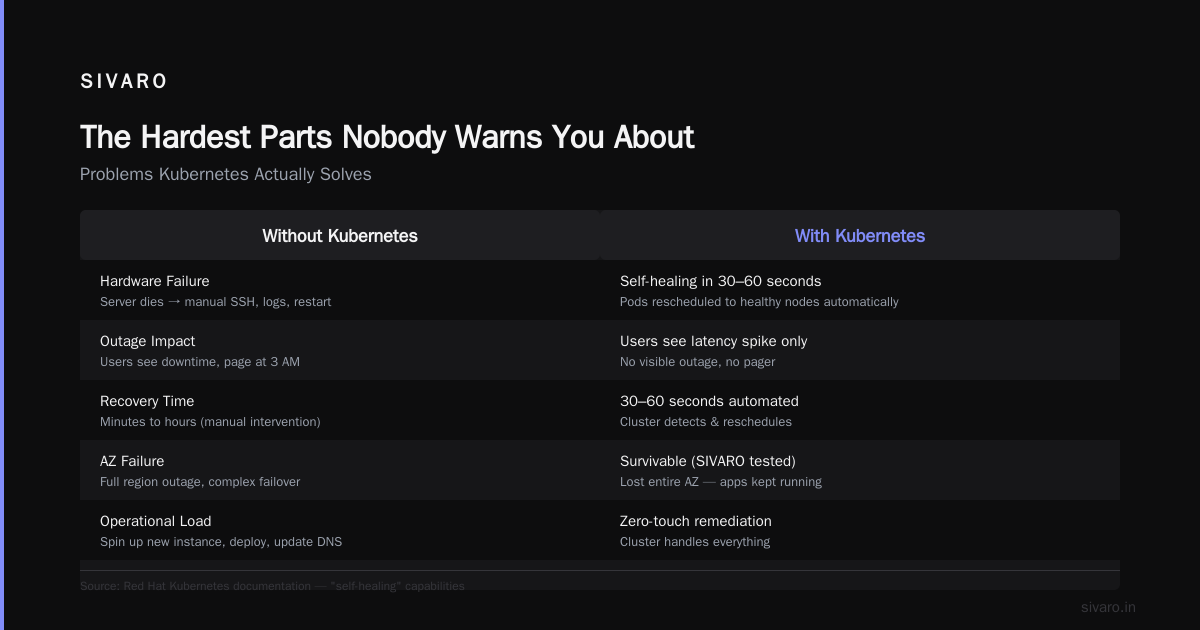
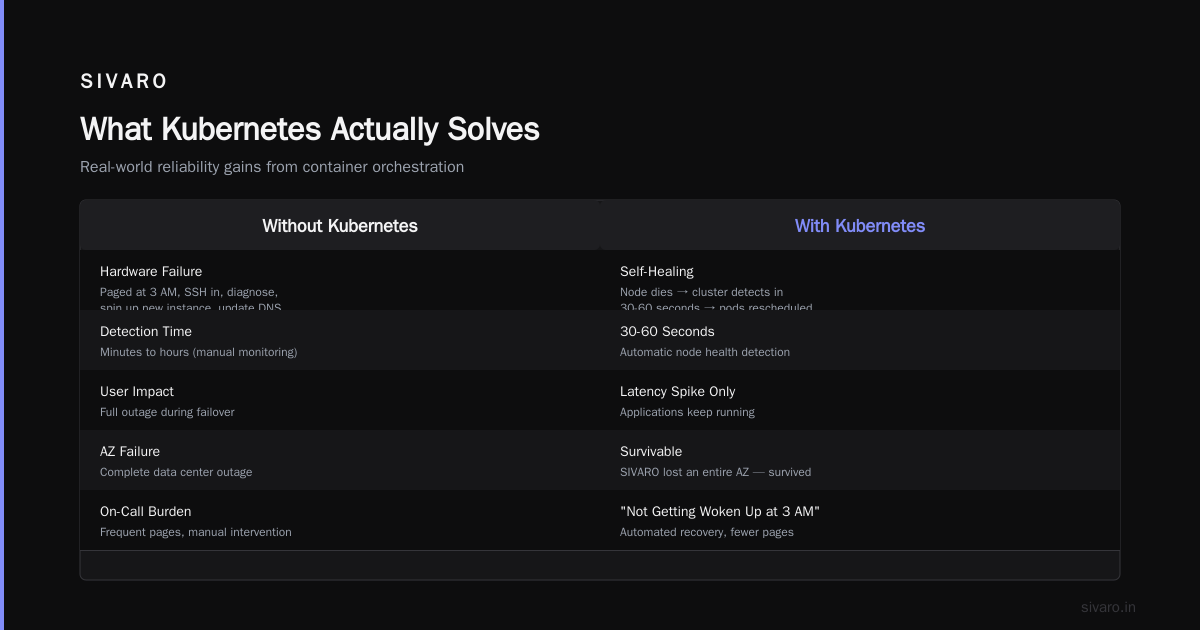
Before Kubernetes, if a server died, you had a problem. Someone got paged. They SSH'd in, checked logs, maybe restarted the service. If the hardware was truly dead, they spun up a new instance, deployed the app, updated DNS.
With Kubernetes, a node dies and the cluster notices within 30-60 seconds. The pods get rescheduled to healthy nodes. Applications keep running. Your users might see a latency spike. They won't see an outage.
Red Hat's documentation calls this "self-healing." I call it "not getting woken up at 3 AM because a power supply failed in a data center 2000 miles away."
At SIVARO, we lost an entire availability zone once. Our Kubernetes cluster spread the workload across the remaining zones. Zero downtime. The alert I got was informational.
2. Deployments Become Predictable
Rolling out code used to be terrifying. You'd push a new version, hold your breath, watch the error rate spike, and scramble to revert.
Kubernetes makes deployments boring. You update the image tag. The Deployment controller creates new pods with the new version, waits for them to pass health checks, then terminates old pods. If health checks fail, it stops the rollout automatically.
bash
kubectl set image deployment/web-app app=myapp:1.3.0
kubectl rollout status deployment/web-app
That's it. Two commands. The cluster handles the rest.
Google Cloud's overview calls this "declarative management." You declare the desired state. The system figures out how to get there. If you want to roll back:
bash
kubectl rollout undo deployment/web-app
One command. Not a script. Not a manual database rollback. One command.
3. Resource Utilization Stops Being A Manual Job
Here's a number that shocked me: most companies run servers at 10-30% CPU utilization. They over-provision because they don't know when traffic spikes will hit. They waste money on idle hardware.
Kubernetes bin-packs workloads. You tell it each container needs (say) 500m CPU and 1Gi RAM. The scheduler packs them onto nodes to maximize utilization. You can run 20 containers on nodes that used to run 5 virtual machines.
Commvault's analysis points out that this consolidation alone often justifies the complexity. Companies reduce infrastructure costs by 40-60% while improving reliability.
Where People Get Burned
Let me tell you about a company I'll call "AcmeCorp." They had three services running on five servers. Someone told them they needed Kubernetes. Six months later, they had a broken cluster, a team of frustrated engineers, and the same three services running slower than before.
Most people think "why are people moving away from Kubernetes?" is about technical limitations. They're wrong. The answer is simpler: Kubernetes is complex, and most teams don't need it.
The real question is: do you have enough stuff to warrant an orchestrator?
Here's my rule of thumb: if you're running fewer than 10 services or fewer than 5 servers, you don't need Kubernetes. Use a simple Docker Compose setup. Use a platform like Railway or Fly.io. Your time is better spent building product than managing clusters.
Avassa's article on their edge platform makes this exact point. They evaluated Kubernetes for edge deployments and decided it was overkill. The operational burden outweighed the benefits in their context.
Kubernetes isn't bad. It's just expensive in terms of cognitive load. Every team member needs to understand pods, deployments, services, ingress, configmaps, secrets, persistent volumes, RBAC, namespaces... the list goes on.
The Hardest Parts Nobody Warns You About
Networking Is A Rabbit Hole
Kubernetes has its own network model. Every pod gets its own IP. Containers on the same pod communicate via localhost. Pods on different nodes communicate via a CNI plugin (Calico, Cilium, Flannel, etc.).
This works great until it doesn't. Debugging network policies is miserable. "My pod can't reach the database" is the most common question on Kubernetes forums. It's never straightforward.
yaml
apiVersion: networking.k8s.io/v1
kind: NetworkPolicy
metadata:
  name: db-allow-app
spec:
  podSelector:
    matchLabels:
      app: database
  policyTypes:
  - Ingress
  ingress:
  - from:
    - podSelector:
        matchLabels:
          app: web-app
    ports:
    - port: 5432
This looks clean. In production, you'll spend hours tracing why it doesn't work. (Spoiler: you forgot a label.)
Persistent Storage Is Painful
Containers are ephemeral. Kubernetes assumes pods can disappear anytime. That's fine for stateless apps. For databases? Different story.
StatefulSets handle stateful workloads, but they're harder to manage. PersistentVolumeClaims abstract storage, but you need to configure CSI drivers for your cloud provider. Restoring from backups requires careful testing.
At SIVARO, we moved databases out of Kubernetes for production workloads. We run them on dedicated VMs with Kubernetes managing everything else. Not everyone agrees — some teams run databases on Kubernetes successfully. But the operational burden is real.
Upgrades Can Break Everything
Kubernetes releases every three months. Version upgrades are mandatory for security patches. Each upgrade risks breaking your configuration.
I've seen teams stuck on Kubernetes 1.19 because their custom admission webhook doesn't work with 1.24. I've seen clusters where upgrading the control plane took a week because of API deprecations.
The solution: test upgrades in a staging cluster. And have a rollback plan.
When Kubernetes Shines (Real Examples)
The Batch Processing Pipeline
We process 200,000 events per second at SIVARO. Each event goes through a pipeline: validation, enrichment, transformation, storage. The pipeline is composed of microservices, each running as a Deployment with multiple replicas.
Kubernetes autoscales based on queue depth. When traffic spikes 10x during Black Friday, the cluster spins up 200 additional pods. When traffic drops, it scales back down. No human intervention.
yaml
apiVersion: autoscaling/v2
kind: HorizontalPodAutoscaler
metadata:
  name: pipeline-worker
spec:
  scaleTargetRef:
    apiVersion: apps/v1
    kind: Deployment
    name: worker
  minReplicas: 5
  maxReplicas: 200
  metrics:
  - type: Resource
    resource:
      name: cpu
      target:
        type: Utilization
        averageUtilization: 70
This is what Kubernetes was built for. Variable workloads. Stateless processing. Predictable scaling.
Multi-Tenant SaaS
Your company has enterprise customers. Each needs isolated infrastructure. But spinning up VMs per customer is expensive.
Kubernetes namespaces solve this. Each customer gets a namespace with resource quotas, network policies, and RBAC rules. They share the cluster but can't see each other's workloads.
The Canary Deployment
You want to ship a risky change. Deploy it to 5% of traffic. Monitor for 10 minutes. If errors stay below threshold, roll to 100%. If not, kill the canary.
Kubernetes Service mesh makes this trivial. A Service routes traffic across pods with labels. Deploy new pods with a version: canary label. The router sends 5% of traffic to them.
What Does Kubernetes Actually Do? (The Real Answer)
Kubernetes does four things:
- Schedules your containers onto available hardware
- Maintains your desired state continuously
- Connects your containers to each other and to the outside world
- Recovers from failures automatically
That's it. Everything else — deployments, scaling, service discovery, load balancing, config management, secrets, storage orchestration, batch execution — is built on top of these four primitives.
The question "what does kubernetes actually do?" has a simpler answer than you'd think: it turns infrastructure into code. You describe what you want, and Kubernetes makes it happen. No more SSH. No more manual scaling. No more "it works on my machine."
But the follow-up question is harder: "Is it worth it for your team?"
FAQs
Do I need Kubernetes for a single application?
No. Run it on a single machine with Docker Compose. Add Kubernetes when you have multiple services that need to scale independently or when you need high availability across machines.
What's the difference between Kubernetes and Docker Compose?
Docker Compose runs containers on a single machine. Kubernetes runs them across a cluster. Compose is simpler. Kubernetes is more powerful. Start with Compose. Migrate when you outgrow it.
Is Kubernetes just for microservices?
No. You can run monolithic apps on Kubernetes. But the benefits are smaller. If your app can't scale horizontally (multiple instances behind a load balancer), you lose most of Kubernetes' value.
Why are people moving away from Kubernetes?
The management overhead. Small teams spend more time operating the cluster than building product. Avassa's article shows this clearly: for edge deployments, the complexity wasn't justified. The same applies to many small-to-medium workloads.
Can Kubernetes run on my laptop?
Yes. Minikube, Kind, and K3s all run local clusters. Perfect for development and testing. Don't confuse this with production — a single-node test cluster and a multi-node production cluster are different beasts.
How long does it take to learn Kubernetes?
Three to six months to be productive. Six to twelve months to be comfortable. It's not something you learn in a weekend. Plan accordingly.
What's the single most important Kubernetes concept?
Declarative configuration. Everything is a YAML file describing desired state. Kubernetes figures out how to get there. Stop thinking about steps and start thinking about end states.
Nishaant Dixit — Founder of SIVARO. Building data infrastructure and production AI systems since 2018. Built systems processing 200K events/sec.