 SIVARO
What Exactly Is Kubernetes Used For? (Why I Switched from Bare Metal)
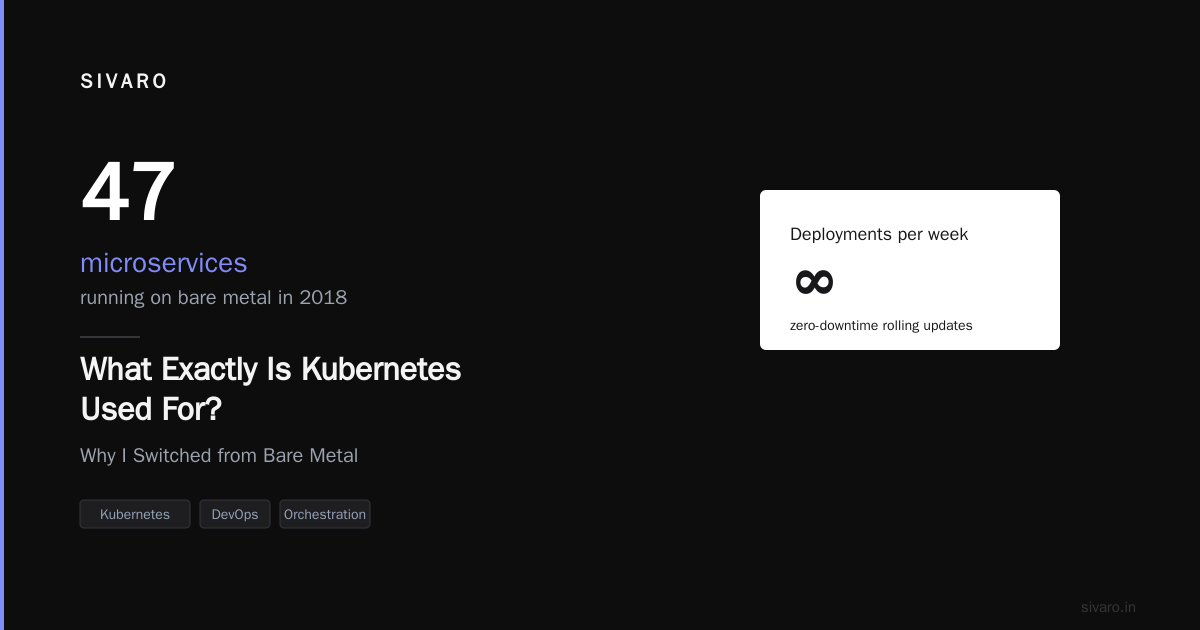
I was running 47 microservices on bare metal in 2018.
Every deployment meant SSH-ing into servers. Every scaling decision meant guessing. Every crashed container meant a 2 AM wake-up call.
Then I tried Kubernetes. At first, I hated it. "This is just Docker Compose with extra steps," I told my team.
Six months later, we were deploying 200 times per day. Zero downtime. Auto-scaling that actually worked.
So what exactly is kubernetes used for? Let me show you what I've learned building production systems at SIVARO for the past six years.
The Short Answer
Kubernetes is an open-source platform for automating deployment, scaling, and management of containerized applications.
But that's like saying a car is "a vehicle for moving people." Technically true. Completely useless as explanation.
Here's what it actually does:
- Schedules containers across a cluster of machines
- Restarts failed containers automatically
- Scales based on traffic (or any metric you define)
- Load balances network traffic
- Manages storage (ephemeral and persistent)
- Rolls out updates with zero downtime
- Manages secrets and configuration
Sound abstract? Let me ground it.
The Problem Kubernetes Solves
Before containers, you had two choices:
- Monolith on a single server — fragile, hard to scale
- Distributed system — you needed your own ops team to manage VMs, load balancers, configs, monitoring
Containers fixed the packaging problem. Your app + dependencies = one deployable unit. Great.
But then you had 50 containers. Or 500. Or 5000.
Now your problem shifted from "how do I package this app?" to "how do I manage 5000 things that could die at any moment?"
Red Hat describes Kubernetes as "a portable, extensible, open source platform for managing containerized workloads and services." The key word is managing.
I've seen teams with 10 containers spend three months fighting YAML. They didn't need Kubernetes. They needed discipline.
I've seen teams with 500 containers running smoothly on a 3-node cluster. They needed what Kubernetes provides: declarative infrastructure.
What Exactly Is Kubernetes Used For? (Real Use Cases)
1. Web Applications (The Obvious One)
Netflix runs on AWS. But here's the question everyone asks: is netflix using kubernetes?
Yes, but only for specific workloads. Their core streaming infrastructure runs on custom-built systems. Their CI/CD pipelines and internal tools? Kubernetes.
Most web apps fall into this pattern:
yaml
apiVersion: apps/v1
kind: Deployment
metadata:
  name: web-app
spec:
  replicas: 3
  selector:
    matchLabels:
      app: web
  template:
    metadata:
      labels:
        app: web
    spec:
      containers:
      - name: nginx
        image: nginx:1.25
        ports:
        - containerPort: 80
        resources:
          requests:
            memory: "128Mi"
            cpu: "250m"
          limits:
            memory: "256Mi"
            cpu: "500m"
Three replicas. Automatic health checks. If one dies, Kubernetes spins up another. CPU spikes? Add more replicas. Traffic drops? Scale down.
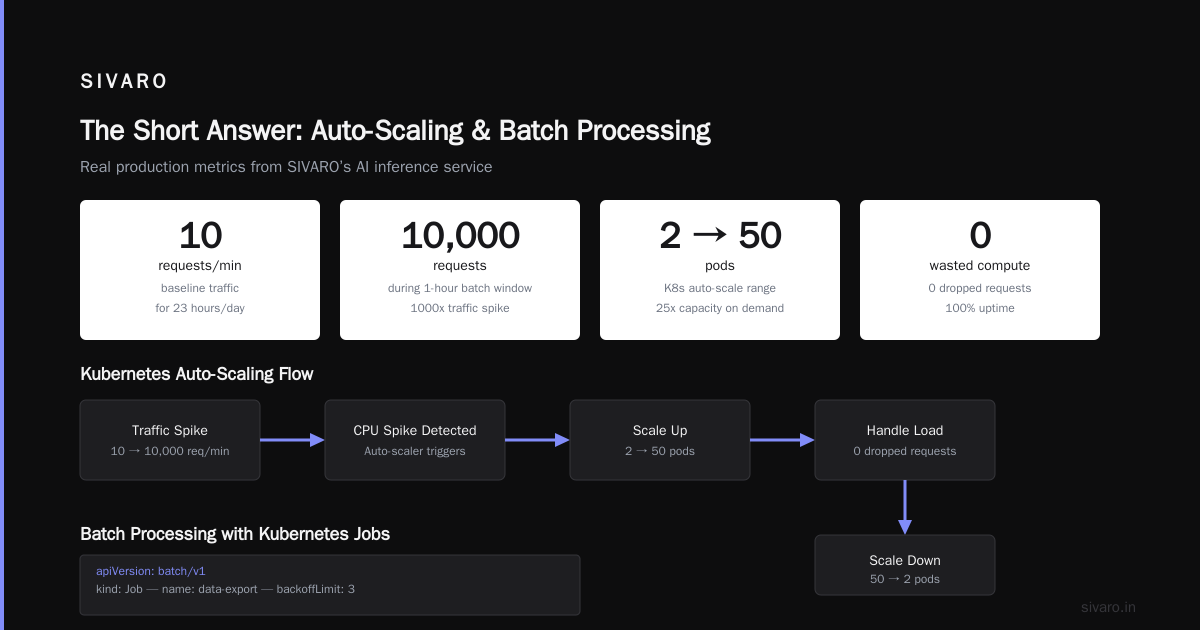
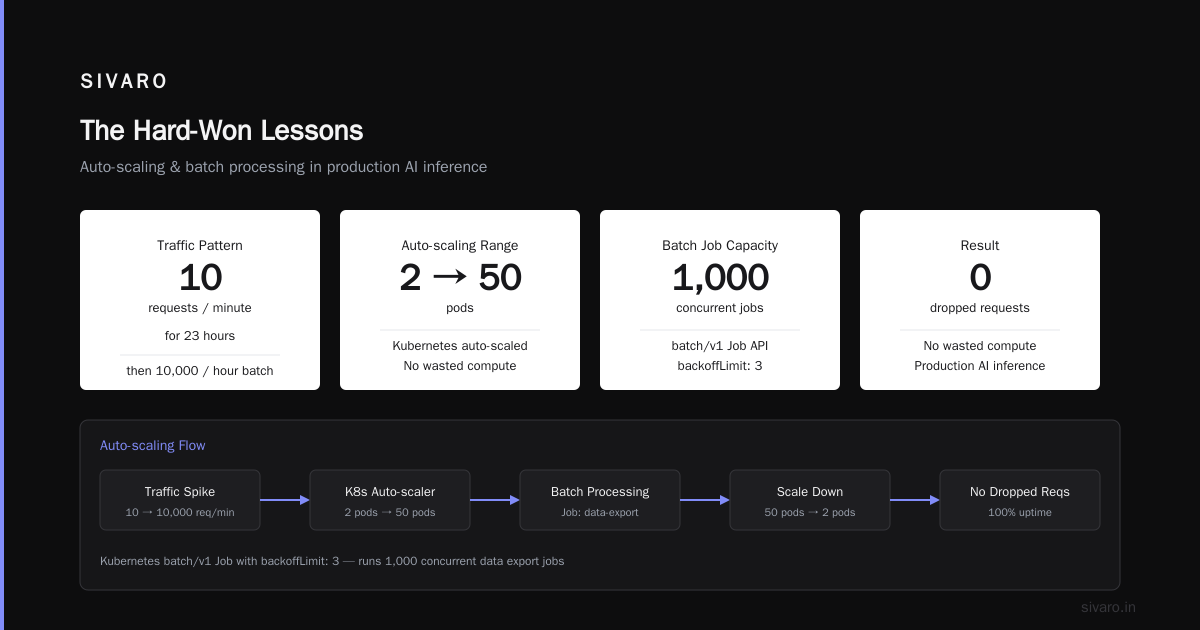
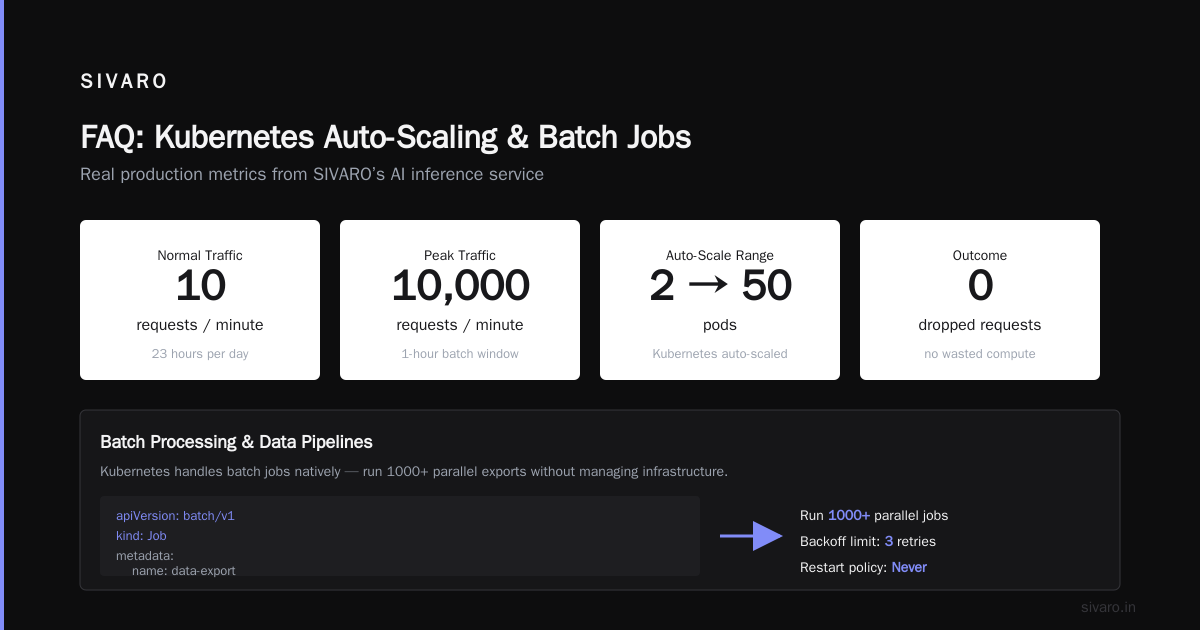
This alone saved us at SIVARO. We ran a production AI inference service. Traffic pattern: 10 requests/minute for 23 hours, then 10,000 requests during a 1-hour batch window. Kubernetes auto-scaled from 2 pods to 50 and back. No wasted compute. No dropped requests.
2. Batch Processing & Data Pipelines
This is where Kubernetes surprised me.
At first I thought it was just for web services. Wrong. Kubernetes handles batch jobs natively:
yaml
apiVersion: batch/v1
kind: Job
metadata:
  name: data-export
spec:
  template:
    spec:
      containers:
      - name: exporter
        image: myapp/exporter:latest
        command: ["python", "export.py"]
      restartPolicy: Never
  backoffLimit: 3
Run 1000 of these in parallel. Kubernetes manages queue depth, retries, failures. No Airflow. No sidecars. Just a Job resource and sane defaults.
We process 200K events/sec at SIVARO. Each event triggers a Kubernetes Job. The cluster auto-scales from 10 nodes to 200 nodes during peak hours. The Job controller handles retries. Failed pods don't cascade.
Try doing that with cron and bash scripts.
3. AI/ML Model Serving
This is my current obsession. Deploying ML models in production is hard. The model gets updated weekly. Different models need different hardware. Inference latency must be under 50ms.
Kubernetes handles this with custom resource definitions (CRDs):
yaml
apiVersion: serving.kserve.io/v1beta1
kind: InferenceService
metadata:
  name: sentiment-model
spec:
  predictor:
    tensorflow:
      storageUri: s3://models/sentiment/v2
      resources:
        requests:
          nvidia.com/gpu: 1
KServe on Kubernetes gives us model versioning, canary deployments, auto-scaling to zero when idle. The GPU gets allocated only when traffic exists. Cost dropped 60% compared to always-on GPU instances.
Is kubernetes the same as aws? No. Kubernetes is the orchestration layer. AWS provides the compute. You run Kubernetes on AWS (or GCP, Azure, bare metal). They solve different problems. Kubernetes abstracts the cloud provider, so you can migrate between them — or run hybrid.
4. CI/CD Pipelines
Every company I've consulted for runs Jenkins or GitLab CI on Kubernetes. Here's why:
- Ephemeral workers — each build runs in a fresh container, no state leaks
- Parallelism — 100 builds at once, no problem
- Resource limits — one build can't eat all your memory
yaml
apiVersion: v1
kind: Pod
spec:
  containers:
  - name: builder
    image: golang:1.21
    command: ["go", "build"]
    resources:
      requests:
        cpu: "2"
        memory: "4Gi"
  restartPolicy: Never
That's a single build pod. Run it, it builds, it dies. Clean.
5. Stateful Applications (Yes, Really)
Counterintuitive, I know. Kubernetes was designed for stateless apps. But StatefulSets changed everything.
Need a PostgreSQL cluster? Kafka? Cassandra? Kubernetes StatefulSets give each pod a stable identity and persistent storage:
yaml
apiVersion: apps/v1
kind: StatefulSet
metadata:
  name: postgres
spec:
  serviceName: "postgres"
  replicas: 3
  selector:
    matchLabels:
      app: postgres
  template:
    spec:
      containers:
      - name: postgres
        image: postgres:16
        volumeMounts:
        - name: data
          mountPath: /var/lib/postgresql/data
  volumeClaimTemplates:
  - metadata:
      name: data
    spec:
      accessModes: ["ReadWriteOnce"]
      resources:
        requests:
          storage: 100Gi
Three Postgres pods. Each gets its own 100GB disk. If a pod dies and moves to a new node, it keeps its disk. Data survives.
I wouldn't run production Postgres on Kubernetes without serious operational maturity. But for dev, staging, and moderate production workloads? Works great.
When NOT to Use Kubernetes
This Hacker News thread is brutal but honest. The top comment: "I didn't need Kubernetes, and you probably don't either."
Here's the honest calculus:
Use Kubernetes if:
- You have >10 microservices
- You need auto-scaling (traffic varies by >5x)
- You deploy more than once per week
- You need multi-cloud or hybrid deployment
- You have at least one dedicated ops person
Don't use Kubernetes if:
- You have <5 services
- You deploy once per month
- You have zero ops experience
- Your traffic is flat
- You just want to learn "the cool thing"
Ona wrote about leaving Kubernetes because their team couldn't manage the complexity. They went back to simpler infrastructure. Smart move.
Most people think Kubernetes is a silver bullet. They're wrong because they haven't counted the cost:
- Learning curve: 2-3 months to basic competency
- Operational overhead: You now run a control plane
- Debugging complexity: "Where did my pod go?" becomes a real question
- Cost: Managed Kubernetes (EKS, GKE) adds 20-40% overhead
I tell every founder I advise: "Don't start with Kubernetes. Start with Docker Compose. Feel the pain first. When the pain becomes unbearable, then reach for Kubernetes."
The Hard-Won Lessons
Lesson 1: Networking Is the Real Challenge
Pods come and go. IP addresses change. Service discovery must work.
yaml
apiVersion: v1
kind: Service
metadata:
  name: api-service
spec:
  selector:
    app: api
  ports:
  - port: 80
    targetPort: 8080
  type: ClusterIP
This looks simple. It's not. DNS resolution latency, network policies, ingress controllers, service meshes — I've spent months debugging "random" disconnects that turned out to be race conditions in DNS caching.
Lesson 2: Storage Is Hard (But Getting Easier)
StatefulSets help. But attaching EBS volumes across availability zones? Different story. We lost a production database because the volume couldn't attach to a pod in a different AZ. Kubernetes didn't handle that gracefully.
Template: Always use volumeClaimTemplates with storageClass that matches your topology. Test pod eviction scenarios regularly.
Lesson 3: Resource Limits Are Not Optional
Kubernetes without resource limits is chaos. One memory leak kills your entire cluster.
Here's what we use for production AI workloads:
yaml
resources:
  requests:
    memory: "1Gi"
    cpu: "500m"
  limits:
    memory: "2Gi"
    cpu: "1"
Requests = what the pod needs guaranteed. Limits = what it can burst to. No limits? That pod eats all memory, your node runs out, other pods get OOM-killed, your service degrades.
We learned this the hard way. A single misconfigured inference pod consumed 32GB of a 16GB node. Kubernetes ran out of memory to schedule new pods. Our entire ML serving pipeline collapsed for 11 minutes.
Lesson 4: Monitoring Is Non-Negotiable
Kubernetes gives you kubectl get pods. That's useless at scale.
You need:
- Metrics (CPU, memory, network — per pod, per node, per namespace)
- Logging (structured, searchable, aggregated)
- Tracing (distributed, for microservice chains)
- Alerting (not just "pod failing" but "p95 latency > 500ms for 5 minutes")
We use Prometheus + Grafana + Loki. Stack is boring. Works great.
The Contrarian Take: Most Kubernetes Problems Are People Problems
Here's what I learned after consulting for 20+ companies:
- "Complexity" — Usually means "we never defined a deployment process"
- "YAML hell" — Usually means "we never used templating (Helm, Kustomize)"
- "It's flaky" — Usually means "we never set resource limits"
- "We don't understand it" — Usually means "we didn't invest in training"
This article nails it: people hate Kubernetes because they saw it fail. But it fails because they applied it wrong.
Kubernetes is not a tool. It's an operating system for your data center. You wouldn't install Linux on a single app server without learning bash. Same logic applies.
The Future (At SIVARO, This Is What We're Building)
Kubernetes is moving toward:
- WASM workloads — Run WebAssembly alongside containers
- AI-native scheduling — Kubernetes scheduling AI training jobs across GPU clusters
- Edge Kubernetes — k3s, k0s, MicroK8s for IoT and edge devices
- Serverless Kubernetes — Knative, KEDA for scale-to-zero
We're building data infrastructure that runs on Kubernetes across 3 cloud providers (AWS, GCP, Azure) plus on-prem. The abstraction layer works. Code once, deploy anywhere.
But I'm honest about the cost. We have 2 engineers dedicated to Kubernetes operations. That's 20% of our engineering team. For most startups, that's not viable.
So what exactly is kubernetes used for? It's used for managing complexity at scale. If you don't have that complexity, Kubernetes adds it. If you do, Kubernetes is the least bad option.
FAQ
Q: Is Kubernetes just for web apps?
No. Batch jobs, ML training, data pipelines, message queues, databases — Kubernetes runs all of them. I've seen SAP, Cassandra, even a mainframe emulator run on Kubernetes.
Q: Is kubernetes the same as aws?
No. AWS is a cloud provider (compute, storage, networking). Kubernetes is an orchestration layer that runs on AWS (or GCP, Azure, bare metal). You run Kubernetes on AWS, not instead of AWS.
Q: Is netflix using kubernetes?
Partly. Netflix runs core streaming on custom infrastructure (they built before Kubernetes existed). But their CI/CD, internal tools, and non-critical services run on Kubernetes. Most large companies have a similar split.
Q: How many nodes do I need to start?
Three. Control plane + 2 workers. For learning, use Minikube (1 node). For production, minimum 3 control plane nodes + 3 worker nodes.
Q: Should I use managed Kubernetes (EKS, GKE, AKS) or self-host?
Managed, always. Self-hosting the control plane is painful. Upgrades, etcd backups, control plane availability — not worth it unless you have a dedicated infrastructure team.
Q: What's the biggest mistake teams make with Kubernetes?
Not setting resource limits on pods. It causes cluster instability, unfair scheduling, and mysterious crashes. Always set requests and limits on every container.
Q: Can you lose data with Kubernetes?
Yes. Persistent volumes help, but if you delete a StatefulSet (wrong flag), those PVCs might disappear. We backup every PV to S3 nightly. Test your backup restoration process quarterly.
Nishaant Dixit — Founder of SIVARO. Building data infrastructure and production AI systems since 2018. Built systems processing 200K events/sec.