What is a Docker and Why is it Used? A Founder's Guide
I've been building data infrastructure since 2018. And in that time, I've watched Docker go from "that weird container thing" to the single most important tool in production engineering. If you're asking "what is a docker and why is it used?" — you're asking the right question. But the answers you'll find online are mostly garbage.
Let me fix that.
What Actually is Docker?
Docker is a platform for running applications in isolated environments called containers. What is Docker? That's the official definition. But here's what it means in practice:
You write code on your laptop. It works. You send it to a server. It breaks. Every single time. Because your laptop has Python 3.10, the server has 3.8. Your laptop has Ubuntu, the server has CentOS. Your laptop has 32GB RAM, the server has 8GB.
Docker solves this by packaging your application with everything it needs — libraries, dependencies, config files, system tools — into a single, portable container image. That image runs identically on your laptop, your CI server, and your production cluster.
Think of it like a shipping container for software. A shipping container carries cargo across oceans, trains, and trucks without ever opening it. The forklift at the destination doesn't care if you're shipping bananas or engine parts — it handles the container the same way. What is Docker?
Docker container does the same for your app. The server doesn't care if you're running Node.js or Java or Go. It just runs the container.
Why Docker Won
I was at a conference in 2019. A CTO from a fintech company told me they spent three months debugging a production issue that turned out to be a missing SSL library on a new server instance. Three months. Docker would have caught that in three seconds.
Most people think Docker is about isolation. They're wrong. Docker is about reproducibility.
Here's what Docker solves in real terms:
Environment drift. Your dev environment and prod environment slowly diverge over time. Docker freezes that environment into an image. It can't drift.
Onboarding hell. New developer joins. Day one: "Install these 17 tools. Configure these 5 services. Hope you have the right OS version." With Docker: "Install Docker. Run docker compose up." Done.
Dependency conflicts. App A needs Python 3.7. App B needs Python 3.10. Without Docker, you're choosing which app to break. With Docker, both run side-by-side in their own containers.
Scaling. Need 10 instances of your app? Docker starts 10 containers in seconds. Try that with manual server setup.
Is Docker Just a VM?
I get asked this constantly. "Is docker just a vm?" The short answer: hell no.
The longer answer touches on architecture, performance, and deployment patterns.
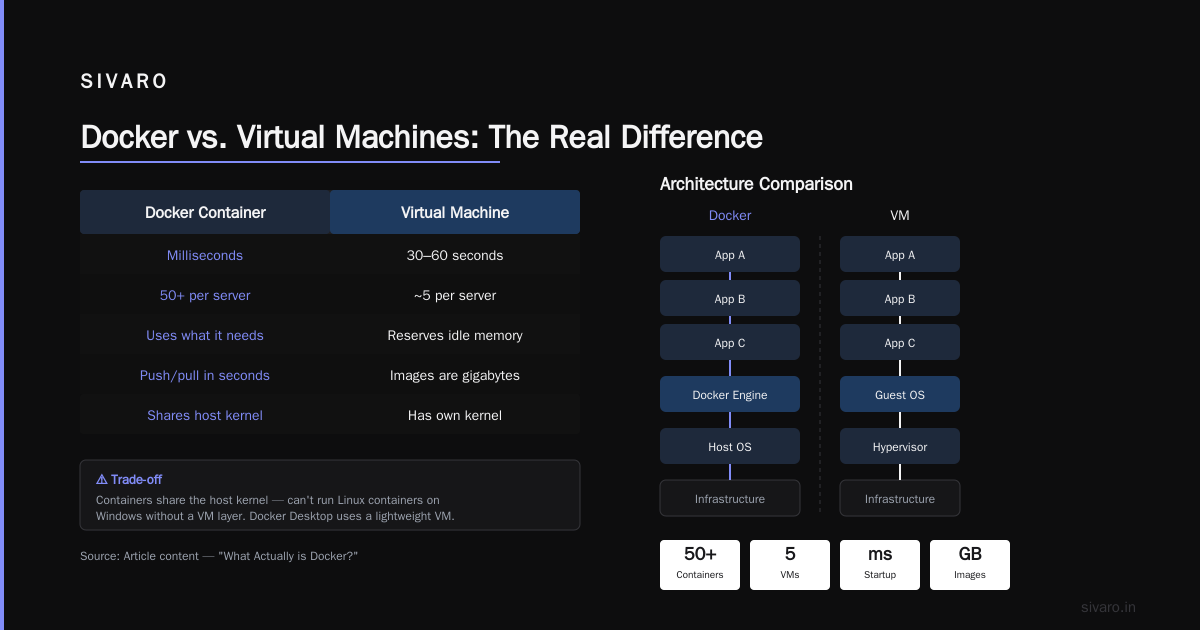
Virtual machines run a full operating system on top of a hypervisor. Each VM has its own kernel, its own OS, its own system libraries. That's 2-5GB per VM just for the OS overhead. A VM with 16GB RAM actually uses 2GB for the OS, leaving 14GB for your app. What's the Difference Between Docker and a VM?
Docker containers share the host's operating system kernel. They only package your application and its immediate dependencies. A container image might be 50-200MB. The overhead per container is negligible — we're talking megabytes, not gigabytes. How is Docker different from a virtual machine?
Here's the practical difference:
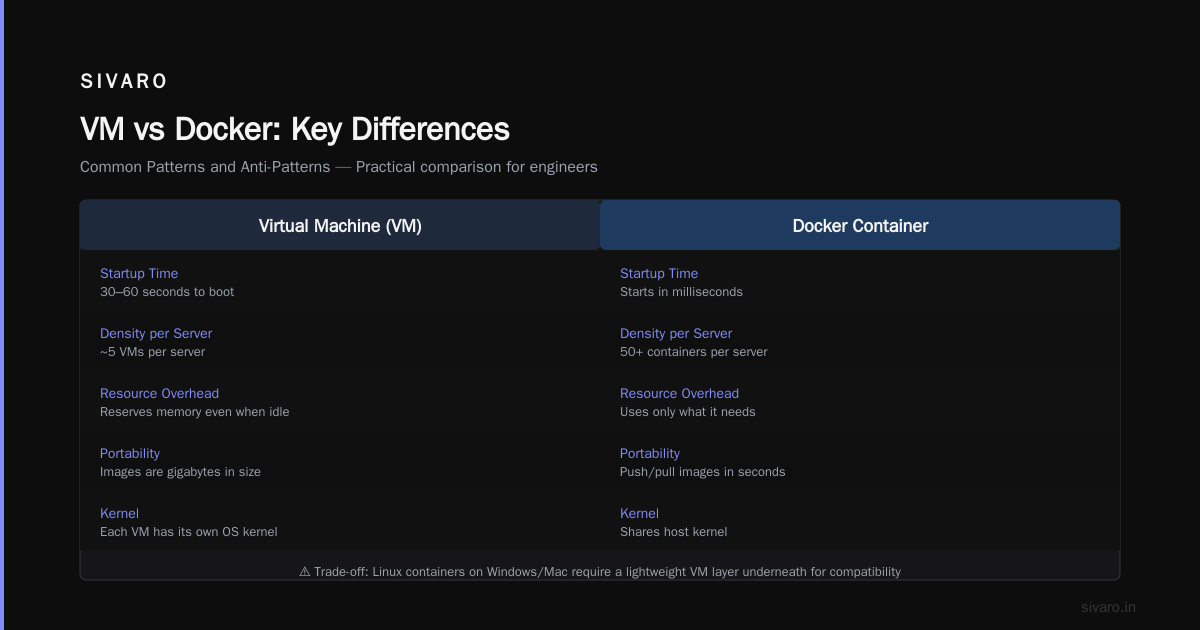
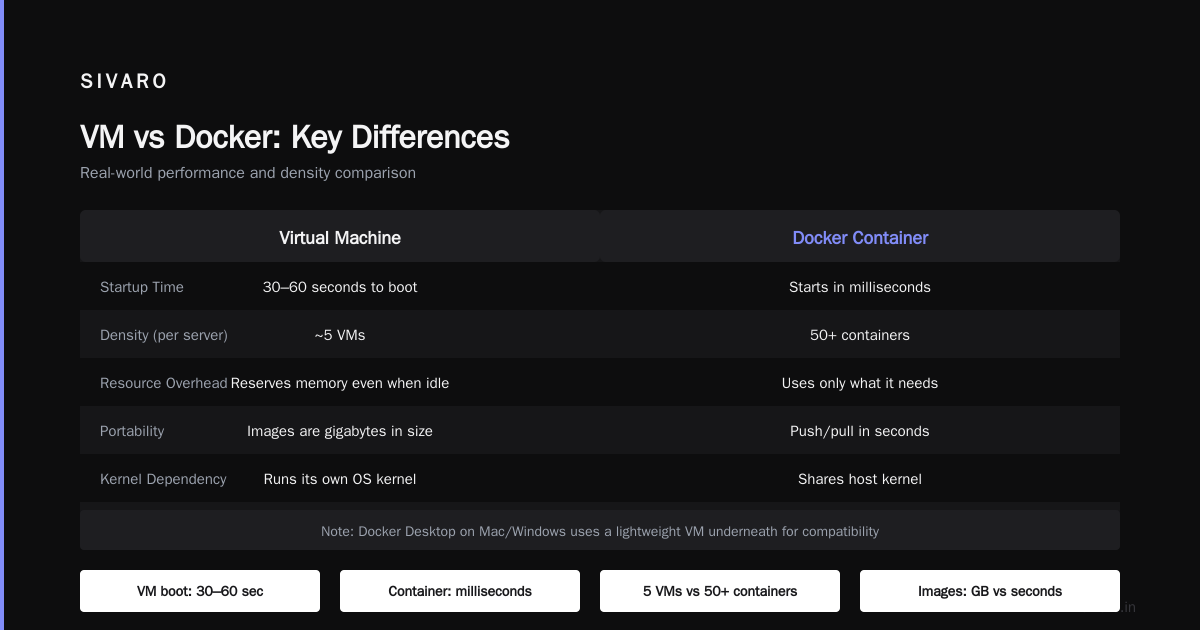
- Startup time: VM takes 30-60 seconds to boot. Docker container starts in milliseconds.
- Density: On a single server, you might run 5 VMs. You can run 50+ Docker containers.
- Resource overhead: VM reserves memory even when idle. Docker uses what it needs.
- Portability: VM images are gigabytes. Docker images can be pushed/pulled in seconds.
But there's a trade-off. Because Docker containers share the host kernel, you can't run a Linux container on a Windows host without a VM layer. That's why Docker Desktop on Mac/Windows uses a lightweight VM underneath. The container itself is still lightweight — it's just running inside a VM-based layer for compatibility.
How to Explain Docker in an Interview
Every engineer I interview gets asked some variation of "how to explain docker in an interview?" Here's the answer I look for:
First, explain the core concept: containers are isolated user-space environments that share the host kernel. Then explain why they matter: they solve the "it works on my machine" problem by packaging code with its dependencies.
But the answer that separates junior from senior candidates is this: Docker is not about virtualization. It's about deployment standardization.
A senior engineer will say: "Docker gives us a single artifact — the image — that goes through dev, test, staging, and production unchanged. We validate it once and deploy everywhere."
That's the real answer.
Architecture: Images, Containers, Registries, Dockerfile
Let's get concrete. Docker has four main components.
Dockerfile
This is a text file that defines how to build your application. Docker Interview Questions and Answers — Beginner to ...
dockerfile
FROM node:18-alpine
WORKDIR /app
COPY package*.json ./
RUN npm ci --only=production
COPY . .
EXPOSE 3000
CMD ["node", "server.js"]
Every line creates a "layer" in the final image. Layers are cached. When you rebuild, unchanged layers are reused. This is why Docker builds are fast after the first time.
Images
An image is a read-only template with instructions for creating a container. Think of it like a class definition in programming. You can create many containers from a single image.
Images are stored in registries. Docker Hub is the public one. But in production, you'd use a private registry like AWS ECR, Docker Hub private repos, or Harbor.
Containers
A container is a runnable instance of an image. It has its own filesystem, network stack, and process tree. But it shares the host kernel.
bash
# Run a container from an image
docker run -d -p 3000:3000 --name my-app my-image:latest

# See running containers
docker ps

# Stop a container
docker stop my-app

# Remove a container
docker rm my-app
Registries and Distribution
This is where Docker's superpower lives. You build an image on your laptop, push it to a registry, and pull it on any server in the world.
bash
# Tag an image for your registry
docker tag my-app:latest myregistry.com/my-app:v1.0.0

# Push to registry
docker push myregistry.com/my-app:v1.0.0

# Pull on another machine
docker pull myregistry.com/my-app:v1.0.0
Real Production Workflow
At SIVARO, we process 200K events per second through our AI systems. Every single component runs in Docker containers. Here's our actual workflow:
- Developer writes code, creates a Dockerfile
- CI pipeline builds the image, runs unit tests inside the container
- If tests pass, image is pushed to our private registry
- Deployment system pulls the exact same image to production
- Orchestrator (Kubernetes) manages container lifecycle
The critical point: the image that passes tests is the same image that runs in production. No "it worked in CI but broke in prod." No missing dependencies. No version mismatches.
We learned this the hard way. In 2020, we had a production outage because a developer's machine had Python 3.9.11 but our base image had Python 3.9.9. A bug in our code only triggered on 3.9.9. Docker wouldn't have fixed the bug — but it would have caught it before deployment, because the developer would have tested against the same Python version that runs in prod.
Common Patterns and Anti-Patterns
Multi-stage builds (do this)
dockerfile
# Build stage
FROM node:18-alpine AS builder
WORKDIR /app
COPY package*.json ./
RUN npm ci
COPY . .
RUN npm run build

# Production stage
FROM nginx:alpine
COPY --from=builder /app/dist /usr/share/nginx/html
EXPOSE 80
CMD ["nginx", "-g", "daemon off;"]
Final image size: 30MB instead of 500MB. No build tools in production. This is how you should use Docker.
Running everything in one container (don't do this)
I've seen Dockerfiles that install a web server, a database, and a message queue in one container. Don't. Each process gets its own container. Use Docker Compose or Kubernetes to orchestrate them.
yaml
# docker-compose.yml (good pattern)
version: '3.8'
services:
  web:
    build: ./web
    ports:
      - "3000:3000"
    depends_on:
      - db
      - redis
  db:
    image: postgres:15
    volumes:
      - postgres_data:/var/lib/postgresql/data
  redis:
    image: redis:7-alpine

volumes:
  postgres_data:
Using latest tag (don't do this)
Never use latest in production. It's impossible to know what version you're actually running. Use semantic versioning or commit hashes.
bash
# Bad
docker pull my-app:latest

# Good
docker pull my-app:v1.2.3
docker pull my-app:sha-a1b2c3d4
Running as root (don't do this)
Docker containers run as root by default. That means any vulnerability can give an attacker root access to your container. Create a non-root user.
dockerfile
FROM node:18-alpine
RUN addgroup -S appgroup && adduser -S appuser -G appgroup
USER appuser
WORKDIR /app
COPY . .
CMD ["node", "server.js"]
When Not to Use Docker
I'm not a Docker zealot. There are situations where Docker adds complexity without benefit.
Single binary applications. Go compiles to a static binary. You can copy that binary to a server and run it. Docker adds abstraction without value.
GUI applications. Docker isn't great for apps that need direct display access. You can hack it with X11 forwarding, but it's never clean.
Real-time applications. The networking overhead in Docker adds microseconds of latency. For high-frequency trading, you skip Docker.
Tiny deployments. One server, one app, no scaling needs. Docker adds a learning curve and operational overhead for zero benefit.
Most people overuse Docker. I've seen teams containerize a Python script that runs once a day. Why? Because Docker is trendy. Don't be that team.
Docker vs Kubernetes: The Confusion
People often ask: "Should I use Docker or Kubernetes?" That question makes no sense. They're different things.
Docker creates containers. Kubernetes orchestrates containers across multiple machines.
Think of Docker as your building blocks. Kubernetes is the construction crew that places those blocks, makes sure they stay up, replaces broken ones, and scales the structure when needed.
You can use Docker without Kubernetes. You can't use Kubernetes without some container runtime (Docker used to be the default, now it's containerd).
For a single server or small team, Docker Compose is usually enough. For anything beyond 3-4 services or multiple servers, start thinking about Kubernetes.
Security Considerations
Docker isn't secure by default. Here's what you need:
Image scanning. Scan your images for vulnerabilities. Trivy and Snyk are good options. We scan every image in our CI pipeline — if it has critical vulnerabilities, the build fails.
Least privilege. Don't run as root. Don't mount the Docker socket unless absolutely necessary (you probably don't need it). Use read-only filesystems when possible.
dockerfile
FROM node:18-alpine
# Don't give write access unless needed
RUN chmod -R a-w /app
Network isolation. By default, containers can communicate with each other. Specify network policies to limit this.
yaml
# docker-compose.yml with network isolation
services:
  web:
    networks:
      - frontend
  db:
    networks:
      - backend

networks:
  frontend:
  backend:
Resource limits. Containers can consume all host resources if unconstrained.
yaml
services:
  web:
    deploy:
      resources:
        limits:
          cpus: '0.5'
          memory: 512M
The Learning Path
If you're starting from zero, here's the order:
- Install Docker Desktop. Run
docker run -d -p 80:80 nginx. Openlocalhostin browser. You just ran your first container. - Learn Docker Compose. Set up a web app with a database.
- Write a Dockerfile for your own application.
- Push the image to a registry.
- Pull and run on another machine.
- Learn about orchestration (Kubernetes or Nomad).
Skip Kubernetes until you need it. Most people don't.
My Contrarian Take
Here's what nobody tells you: Docker solved the wrong problem initially. It started as a containerization tool. But the real value isn't containers — it's the image distribution model.
The ability to build once, sign, scan, version, and distribute an immutable artifact across environments is the actual killer feature. Containers are just the delivery mechanism.
Docker succeeded because it made this distribution model simple. Before Docker, we had tarballs and shell scripts and hope. After Docker, we had a standardized, reliable artifact pipeline.
That's why I care about Docker. Not because of resource isolation or fast startup times. Because it turned deployment from a fragile art into an engineering process.
FAQ
Q: What is a docker and why is it used?
A: Docker is a containerization platform that packages applications with their dependencies into portable images. It's used to eliminate environment inconsistencies between development and production, enabling reliable deployments across any system.
Q: Is docker just a vm?
A: No. Docker containers share the host kernel and only package application dependencies, while virtual machines run full operating systems with their own kernel. Containers start faster, use less resources, and achieve higher density on the same hardware.
Q: Docker vs VM — which should I use?
A: Use containers for application deployments (websites, APIs, microservices). Use VMs when you need to run different operating systems, need strong isolation between tenants, or need to run legacy software that can't be containerized.
Q: How to explain docker in an interview?
A: Explain that Docker packages code with its dependencies into immutable images that run consistently across any environment. Emphasize that the key benefit isn't isolation — it's standardization of the deployment artifact.
Q: Is Docker secure?
A: Docker provides isolation but isn't secure by default. You need to scan images for vulnerabilities, avoid running as root, limit network access, restrict resource usage, and keep the Docker daemon updated.
Q: What's the difference between Docker image and container?
A: An image is a read-only template (like a class). A container is a runnable instance of that image (like an object). You build images once and create many containers from them.
Q: Do I need Kubernetes if I use Docker?
A: No. Docker alone (with Docker Compose) works well for small deployments of 1-5 services. Kubernetes adds orchestration for multi-server, multi-service, auto-scaling deployments. Start with Docker compose, add Kubernetes only when needed.
Nishaant Dixit — Founder of SIVARO. Building data infrastructure and production AI systems since 2018. Built systems processing 200K events/sec.