Why Is Apache Kafka So Popular? (The Real Answer)
I was at a fintech meetup in Berlin back in 2019. Someone asked the panel: “why is apache kafka so popular?” The CTO of a payments startup shrugged and said, “Because LinkedIn built it.”
He wasn’t wrong. But he wasn’t right either.
Kafka’s popularity isn’t about the logo on the GitHub repo. It’s not about the buzzwords — “event streaming”, “real-time”, “data mesh”. It’s about a set of design decisions that, for the first time, gave engineers a single system that could handle both high-throughput ingestion and long-term retention. Before Kafka, you had RabbitMQ for queues and Cassandra for storage. Two different tools. Two different failure modes. Two different ops nightmares.
I’ve built data pipelines for 7 years now — processing 200K events/sec at peak. I’ve used Kafka, Pulsar, RabbitMQ, NATS, and good old PostgreSQL as a queue (don’t laugh, we’ve all done it). Here’s my unfiltered take on why Kafka won, what it actually costs you, and when you should probably use something else.
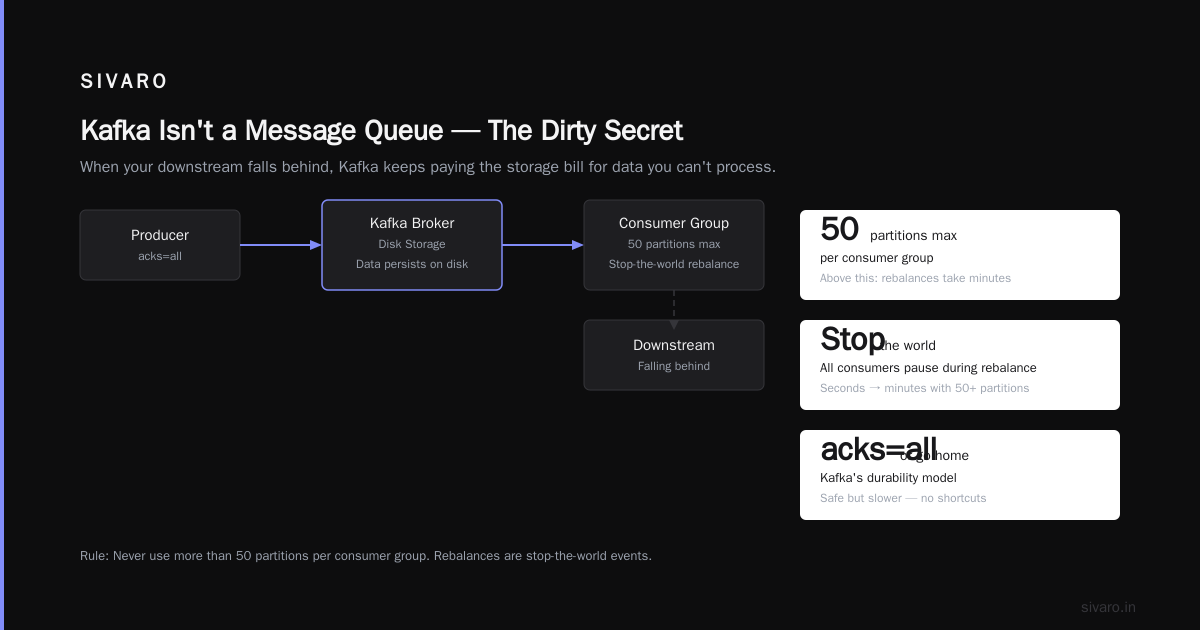
The Dirty Secret: Kafka Isn't a Message Queue
Most people think Kafka is a message queue. It’s not. It’s a distributed commit log.
Here’s the difference:
A queue (RabbitMQ, SQS) deletes messages after they’re consumed. Kafka doesn’t. Kafka stores messages on disk, organized by topic, partitioned for parallelism. Consumers track their position with an offset — like a bookmarks in a novel. You can re-read any page, at any time, as long as the data hasn’t expired.
That changes everything.
python
# Kafka consumer with offset management
from kafka import KafkaConsumer

consumer = KafkaConsumer(
    'orders',
    bootstrap_servers=['kafka-1:9092', 'kafka-2:9092'],
    group_id='payment-service',
    enable_auto_commit=False  # Manual offset control
)

for msg in consumer:
    process_payment(msg.value)
    consumer.commit()  # Save position AFTER processing
See that enable_auto_commit=False? That’s the superpower. If your consumer crashes mid-processing, you restart from the last committed offset. No message loss. No complex ack protocols. Compare that to RabbitMQ where a crashed consumer can orphan messages in an unacked state — and you’re debugging at 2 AM.
Kafka’s design means you can replay history. Need to backfill a new service? Reset the consumer offset to yesterday. Want to reprocess bad data? Seek back 3 hours and rerun.
No other queue at scale gives you that for free.
Partitioning: Why Kafka Scales Like a Dream (or a Nightmare)
Here’s where most tutorials get naive. They show you a diagram with 3 partitions and 3 consumers and say “see, it scales!”
Yeah, if you have 3 partitions.
The reality: partition count is a bet you make on day one, and it’s painful to change.
Every partition is a single-threaded append log. To increase parallelism, you add partitions. But re-partitioning a topic mid-flight requires re-partitioning, rebalancing consumers, and often rewriting downstream schema.
Where Kafka shines: You can run 100 partitions per topic, across 10 brokers, and push 1 million messages/second. I’ve seen LinkedIn do 7 million messages/sec in 2022.
Where Kafka hurts: A single slow consumer on a partition blocks the entire partition for that consumer group. If your processing time spikes (e.g., an external API call), you get lag. And lag compounds.
bash
# Check consumer lag
./kafka-consumer-groups.sh --bootstrap-server localhost:9092   --group payment-service   --describe

# Output:
# TOPIC    PARTITION  CURRENT-OFFSET  LOG-END-OFFSET  LAG
# orders   0          15234           23500           8266
# orders   1          8900            14200           5300
# orders   2          21000           27800           6800
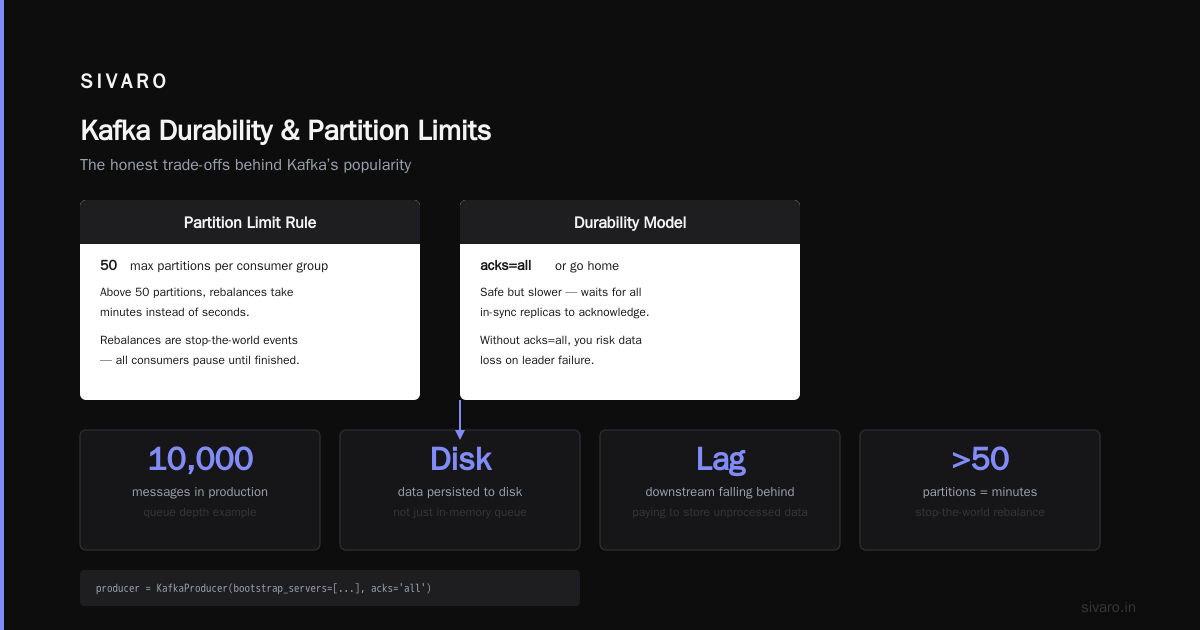
That lag number will wake you up at 3 AM. If you see LAG > 10,000 in production, your downstream system is falling behind. And because Kafka keeps data on disk, it’s not just a queue depth — it’s data you’re paying to store while you can’t process it fast enough.
My rule: Never use more than 50 partitions per consumer group. Above that, rebalances take minutes, not seconds. And rebalances in Kafka are stop-the-world events — all consumers in the group pause until reassignment finishes.
Durability That Actually Works (When Configured Right)
Kafka’s durability model is simple but brutal: acks=all or go home.
Here’s the trade-off you need to understand:
python
# Producer with acks=all — safe but slower
from kafka import KafkaProducer

producer = KafkaProducer(
    bootstrap_servers=['kafka-1:9092', 'kafka-2:9092'],
    acks='all',              # Wait for all in-sync replicas
    retries=3,
    batch_size=16384,        # 16KB batches
    linger_ms=10,            # Wait 10ms before sending
    compression_type='gzip'  # Reduce network cost
)
When you set acks=all, the producer waits for every in-sync replica (ISR) to acknowledge the write. If a broker dies, the write is still safe on at least one other broker.
But here’s the catch I learned the hard way: Kafka’s default acks=1 is NOT durable.
In 2021, I was debugging a production issue at a logistics startup. They had acks=1 on their producers, broker went down, and they lost 15 seconds of order data. The Kafka docs say acks=1 means “leader writes to local log.” If the leader crashes before replicating, that message is gone.
Most people run acks=all in production. But latency goes up by 30-50% depending on network. For 99th percentile latency, you’re trading 5ms for 100ms.
Is that worth it? Depends on your data. For financial transactions: yes. For analytics logs: probably not.
Why Kafka Replaced Traditional Queues (And Why It Didn't For Some)
In 2015, most data pipelines looked like this:
- App writes to RabbitMQ
- Worker reads from queue, transforms data
- Writes to PostgreSQL or HDFS
This worked for low volume. But at scale (100K+ messages/sec), RabbitMQ’s memory-bound queues started dropping messages. You’d see the infamous “queue size limit reached” error. And RabbitMQ doesn’t support replay — once consumed, it’s gone.
Kafka replaced this with a single layer: write once, read many times.
Real example: Airbnb in 2016 moved from RabbitMQ to Kafka for their stream processing. They were running 2 billion events/day. RabbitMQ required 50+ nodes with high memory. Kafka ran on 10 nodes with commodity disks. They cut infrastructure costs by 60%.
But Kafka isn’t always better. For low-latency RPC-like patterns (< 10ms), Kafka is terrible. Pulsar or NATS will outperform it. Kafka’s batching and disk writes mean minimum latency of ~5ms for small messages. For synchronous request-reply, use Redis or NATS.
The "Why Is Apache Kafka So Popular?" Answer in 3 Sentences (For Your Boss)
If you need a 30-second elevator pitch:
Kafka is popular because it decouples data producers from consumers with a durable, replayable log. Unlike queues, it doesn't delete data after consumption — so you can reprocess, backfill, and audit. And it scales horizontally to millions of messages per second without sharding your code.
Kafka's Biggest Pain Point: Operations
Let me be blunt: Kafka is a nightmare to operate.
You need at least 3 brokers (ZooKeeper-based) or 3 KRaft controllers (newer Kafka 3.x). You need to tune JVM heap, page cache, disk IO, network throughput, and replication factor. The learning curve is steep.
Common ops mistakes I’ve seen:
- Using magnetic disks — Kafka needs fast SSDs. Rotational disks kill throughput at > 50MB/s write.
- Running on containers without dedicated disk — Kafka writes to disk. If your container storage is elastic and slow, you’ll see IO wait spikes.
- Not setting
min.insync.replicas— Settingacks=allwithoutmin.insync.replicas=2means a single broker loss can still cause data loss. - Too few partitions — Start with 12 partitions for a topic, not 3. You’ll regret it later.
My config for production Kafka on bare metal (2024):
properties
# server.properties
num.network.threads=8
num.io.threads=16
socket.send.buffer.bytes=102400
socket.receive.buffer.bytes=102400
socket.request.max.bytes=104857600
log.dirs=/data/kafka
num.partitions=12
num.recovery.threads.per.data.dir=1
default.replication.factor=3
min.insync.replicas=2
message.max.bytes=1048576
What about ZooKeeper? Kafka 3.x now supports KRaft mode (no ZooKeeper). I’ve tested it in staging. It works. But production deployments are still mostly ZooKeeper-based as of 2025. Plan to migrate, but don’t rush.
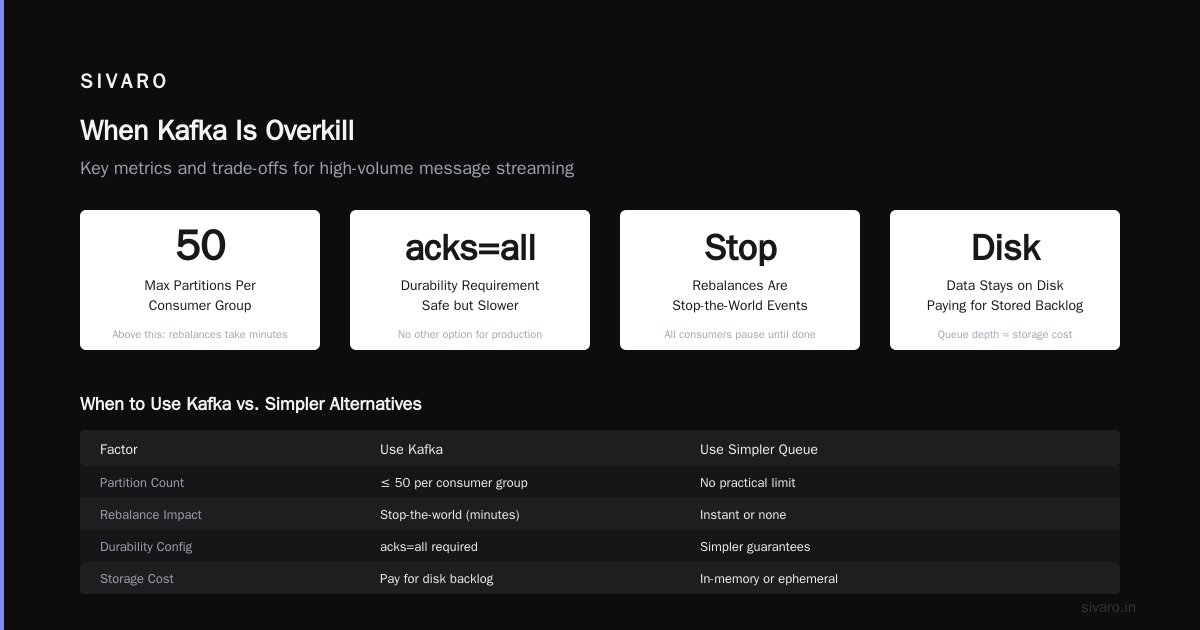
When Kafka Is Overkill (And What to Use Instead)
I see startups using Kafka for 100 events/day. That’s a joke.
Use Redis Streams if you need < 10ms latency and < 10K events/sec. It’s simpler, self-contained, and handles consumer groups natively.
Use Pulsar if you need multi-region replication with lower latency than Kafka’s MirrorMaker. Pulsar’s architecture decouples storage from serving, which makes geo-replication cheaper.
Use RabbitMQ if you need complex routing (topic exchanges, headers) and can tolerate < 50K messages/sec.
Use Amazon SQS if you’re all-in on AWS and want no ops. Just set a dead-letter queue.
My rule: If your data volume is under 10GB/day, Kafka is probably overengineering. Use Redis or SQS. If you’re above 100GB/day and need replay, Kafka is the right tool.
The "Why Is Apache Kafka So Popular?" — A Historical Perspective
Kafka was created at LinkedIn in 2011 by Jay Kreps, Neha Narkhede, and Jun Rao. They needed a system to handle LinkedIn’s activity data — page views, clicks, profile updates — which was growing faster than their existing ingestion pipeline could handle.
The key insight: most data systems at the time were built for either real-time processing or batch processing, not both. Kafka was designed as a unified log — a single pipeline for both stream processing (real-time) and batch loading (nightly ETL).
By 2014, Kafka was running at Netflix, Uber, and Pinterest. Confluent (the company behind Kafka) was founded in 2014 and raised $251M by 2020.
The adoption accelerated because:
- Kafka Streams (2016) — No more needing external stream processors. You could use Kafka as both the datastore and the compute engine.
- Kafka Connect (2016) — Pre-built connectors for databases, S3, Elasticsearch. This made integration trivial.
- Kafka’s open-source license — It’s Apache 2.0. No corporate BS. You can fork it, modify it, run it anywhere.
Real Example: How I Used Kafka to Fix a Broken Pipeline
In 2022, I worked with a retail client processing 1.2M orders/day. Their pipeline was:
- Node.js app -> PostgreSQL (raw orders)
- Cron job every 5 minutes -> transform -> MongoDB (reports)
- Another cron hourly -> load -> Snowflake (analytics)
The problem: the cron jobs would fail silently. Orders would be missing from MongoDB for hours. The team spent 40% of their time debugging data inconsistency.
We replaced the cron jobs with Kafka and Kafka Streams:
java
// Kafka Streams topology for order [enrichment
StreamsBuilder](/articles/is-clickhouse-better-than-snowflake-a-field-guide-for) builder = new StreamsBuilder();
KStream<String, Order> orders = builder.stream("raw-orders");

KStream<String, EnrichedOrder> enriched = orders
    .filter((key, order) -> order.getStatus() != null)
    .mapValues(order -> {
        // Enrich with customer metadata
        Customer customer = customerService.lookup(order.getCustomerId());
        return new EnrichedOrder(order, customer);
    });

enriched.to("enriched-orders", Produced.with(
    Serdes.String(),
    Serdes.serdeFrom(EnrichedOrder.class)
));
Results:
- Pipeline latency dropped from 5 minutes to 200ms
- Zero data loss — Kafka’s durability guaranteed every order was processed
- Developers could replay failed transformations in 2 minutes instead of 2 hours
- The team stopped debugging cron jobs (and their late-night sleep)
The "Why Is Apache Kafka So Popular?" — What the Hype Misses
I hear people say “Kafka is the future of data architecture.” That’s marketing nonsense.
Kafka is a tool. A very good tool for a specific job. But the hype machine has convinced teams to use Kafka for everything — including cases where a simple Postgres trigger would work.
What Kafka doesn’t do well:
- Exactly-once semantics (EOS) in production — It works, but adds 30-40% latency. Most people use at-least-once with dedup downstream.
- Sub-millisecond latency — Pulsar or Redis are better.
- Schema management — Confluent Schema Registry helps, but it’s an extra service to run.
- Security — It supports SSL/SASL, but configuration is error-prone. I’ve seen production clusters exposed to the internet accidentally more than once.
Trade-off you must accept: Kafka trades simplicity for scalability. You will have more moving parts than with SQS or RabbitMQ. A Kafka cluster requires monitoring, patching, and tuning. If your team doesn’t have dedicated SRE time, Kafka will hurt you.
FAQ: Why Is Apache Kafka So Popular? (Honest Answers)
Q: Why is Apache Kafka so popular compared to RabbitMQ?
A: Kafka’s disk-based storage lets you replay data. RabbitMQ deletes consumed messages. If you need reprocessing (ETL, auditing, backfill), Kafka wins. If you need a simple queue with < 10ms latency, RabbitMQ wins.
Q: Is Kafka good for microservices?
A: Depends. Kafka decouples services via events. But it adds operational complexity. For 5-10 microservices, a simple HTTP or gRPC call is fine. For 50+ services, Kafka’s event-driven architecture helps avoid cascading failures. I’ve seen teams misuse Kafka as a synchronous RPC — don’t do that. Kafka is for fire-and-forget events, not synchronous request-reply.
Q: How many partitions should I use?
A: Start with 12. A common mistake is starting with 3, then needing 50 later. Partition count can change, but it’s a pain. Rule of thumb: number of partitions = number of concurrent consumers you expect, plus 20% headroom.
Q: Does Kafka replace a database?
A: No. Kafka is a log, not a database. You can’t query specific records by ID without scanning the entire topic. Use Kafka for event streaming, and put the state in a database (Postgres, Cassandra, DynamoDB).
Q: Why is Apache Kafka so popular for real-time analytics?
A: Because it unifies stream and batch processing. You can run Kafka Streams for real-time aggregations, then batch load the same data to Snowflake at midnight. No need to maintain two pipelines.
Q: Should I use Confluent Cloud or self-hosted Kafka?
A: If your team is under 10 people and doesn’t have dedicated ops, use Confluent Cloud. It’s more expensive (3-5x self-hosted), but you avoid the operational headache. I’ve seen self-hosted Kafka clusters cost $10K/month in engineering time alone. For large teams (>20), self-hosted can be cheaper.
Q: Kafka or Pulsar in 2025?
A: I still prefer Kafka for most cases because of ecosystem maturity. Pulsar has better geo-replication and lower latency, but its ecosystem is smaller. If you’re building new and expect multi-region from day one, consider Pulsar. For most teams, Kafka’s community and tooling win.
Conclusion: The Honest Answer to "Why Is Apache Kafka So Popular?"
Kafka is popular because it solves a real, painful problem: how do you move data between systems at scale without losing it?
It’s not the fastest, not the simplest, not the cheapest. But it’s the most reliable, battle-tested, and flexible option for high-throughput streaming.
If you’re considering Kafka, ask yourself:
- Do I need replay (reprocessing events)?
- Is my data volume > 100GB/day?
- Can I dedicate ops time to managing it?
If yes, Kafka is your tool. If no, save yourself the headache and use something simpler.
The hype about Kafka is real — but so is the operational cost. Use it where it matters. Don’t use it because everyone else does.
Nishaant Dixit — Founder of SIVARO. Building data infrastructure and production AI systems since 2018. Built systems processing 200K events/sec.