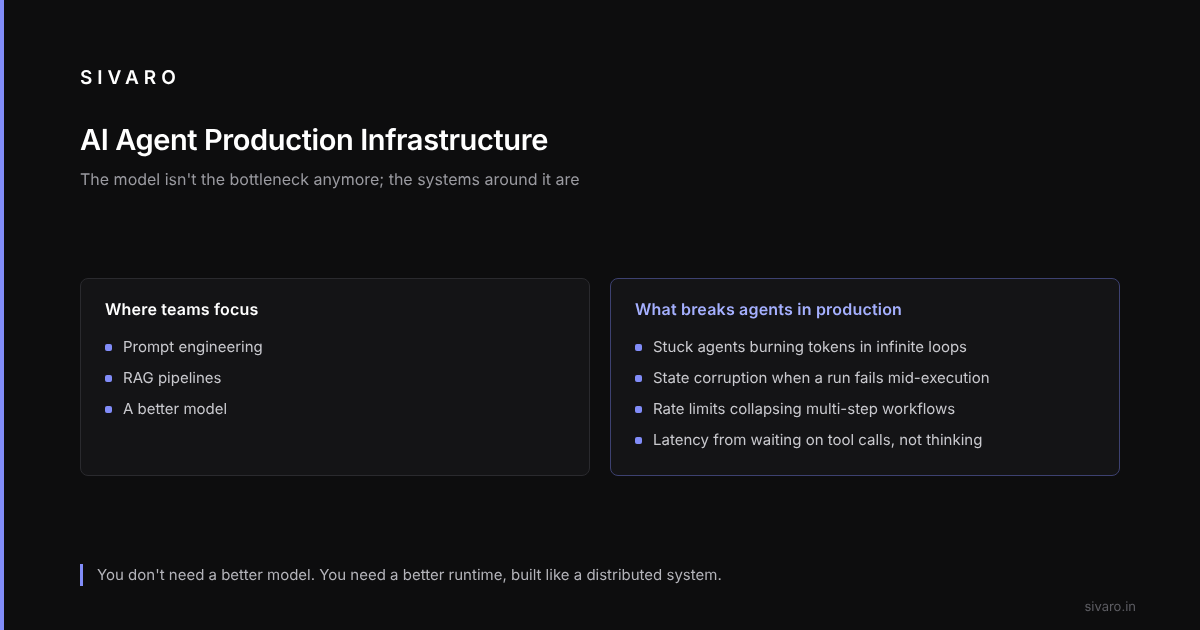
Teams obsess over prompt engineering and RAG pipelines while their agents implode on basic infrastructure failures. The model isn't the bottleneck anymore. The systems around it are.
This guide covers the ai agent production infrastructure requirements you actually need, not the ones vendor slide decks promise.
The Real Cost Is Operational, Not Computational
Most people think inference cost is the problem. It's not.
Here's what kills you:
- Stuck agents that burn tokens in infinite loops
- State corruption when a partial run fails mid-execution
- API rate limits collapsing multi-step agent workflows
- Latency blowups because your agent is waiting on I/O, not thinking
The Why AI Agents Fail in Production analysis calls this "agent failure stacking" — one tiny failure cascades into catastrophic cost and latency.
You don't need a better model. You need a better runtime.
The Production Agent Loop Is a Distributed System
Your agent isn't a simple script. It's a distributed system with tight latency bounds.
A typical architecture:
User Request → Orchestrator → Agent Runtime → Tool Executor → LLM Router
                    ↓               ↓               ↓
               State Store      Memory DB      Observability Pipeline
Each arrow in that diagram is a failure point. Each transition adds latency. Each step can corrupt state.
Treat the agent runtime like a database transaction. ACID properties matter.
The Minimum Viable Runtime
Here's what you actually need:
A state machine, not a chain of calls.
class AgentStateMachine:
    def __init__(self):
        self.state_history = []
        self.current_step = None
        self._lock = threading.Lock()

    def transition(self, step: str, context: dict) -> None:
        with self._lock:
            self.state_history.append({
                "step": step,
                "context": context,
                "timestamp": datetime.utcnow()
            })
            self.current_step = step

    def rollback(self, steps: int = 1) -> dict:
        """Trip is in flight? Roll back cleanly."""
        with self._lock:
            for _ in range(steps):
                self.state_history.pop()
            return self.state_history[-1]["context"] if self.state_history else {}
This isn't clever. It's mandatory. Without explicit state management, you get the "zombie agent" problem — half-complete runs that keep retrying and billing you.
Incident Analysis for AI Agents shows that 68% of major agent outages stem from state consistency failures. Not model hallucinations. State.
Memory Systems Are the New Database Problem
Everyone talks about RAG. Nobody talks about agent memory — the working memory an agent uses across a multi-step task.
This is harder than RAG because:
- RAG is read-only for a single query
- Agent memory is read-write across hours of interaction
- Agent memory must be consistent under concurrent access
- Agent memory needs TTLs, eviction policies, and conflict resolution
One option is a hybrid store:
# agent-memory-config.yaml
memory:
  backend: hybrid
  short_term:
    engine: redis
    ttl: 300  # 5 minutes max
    max_entries: 1000
  long_term:
    engine: postgres
    table: agent_memory
    embedding_store: pgvector
    index: ivfflat  # 100 lists
  isolation:
    per_session: true
    eviction: lru
    conflict_resolution: last_writer_wins_with_review
The conflict_resolution field is where most teams get burned. If two agent instances hold the same session (say, a user refreshes), you need a merge strategy. CRDTs are complex. Locks are slow. A pragmatic option is "last writer wins with review" — the agent logs the conflict, the system picks a winner, and a human reviews the log later.
Latency Is a Systems Engineering Problem
Ai agent production latency optimization isn't about faster GPUs. It's about tighter I/O.
The biggest latency sink isn't the LLM. It's tool calls.
# BAD: Sequential tool calls
result_1 = await tool_1.run(input)
result_2 = await tool_2.run(result_1)  # Waiting
result_3 = await tool_3.run(result_2)  # Still waiting
# Total: sum of all tool latencies
# GOOD: Parallel tool calls with dependency resolution
from asyncio import gather

async def execute_plan(plan: list[dict]):
    results = {}
    ready = [t for t in plan if not t.get("depends_on")]
    waiting = [t for t in plan if t.get("depends_on")]

    while ready:
        batch = [tool.run(results.get(r, {})) for tool in ready if await tool.can_run(results)]
        completed = await gather(*batch)
        for tool, result in zip(ready, completed):
            results[tool.id] = result

        # New tools might be unblocked
        ready = [t for t in waiting if all(d in results for d in t["depends_on"])]
        waiting = [t for t in waiting if t not in ready]

    return results
The Critical Path Trick
A useful technique: trace every agent run, measure the critical path, and ask "what happens if this call fails faster?"
Fast failures are better than slow successes. If a tool call will fail, fail in 200ms, not 10s. Add circuit breakers to every tool:
@circuit_breaker(failure_threshold=3, recovery_timeout=60)
async def search_knowledge_base(query: str) -> list[dict]:
    # If this fails 3 times in a row, skip it for 60 seconds
    # The agent receives a "knowledge base unavailable" signal
    # and can use cached results or ask the user
    pass
AI Agent Failures: Common Mistakes lists "unbounded retries" as the #1 mistake teams make. Circuit breakers fix that.
You Need an Incident Response Plan for Your Agent
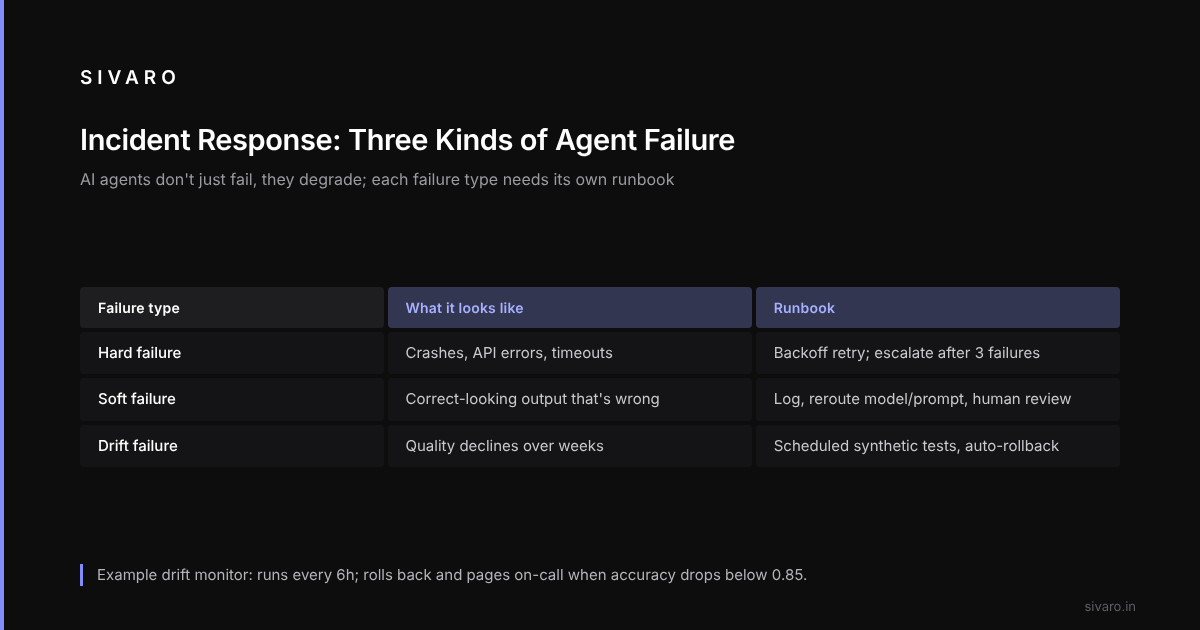
Here's the thing nobody told me: AI agents don't just fail — they degrade.
A database goes down, you know immediately. An agent that starts producing slightly worse results? It could drift for days before anyone notices.
Agent incidents fall into three categories:
- Hard failures — agent crashes, API errors, timeouts
- Soft failures — agent produces correct-looking output that's wrong
- Drift failures — agent quality gradually declines over weeks
AI Agent Incident Response argues you need different runbooks for each. I agree.
For hard failures: retry with exponential backoff, escalate to on-call after 3 failures.
For soft failures: log the attempt, reroute to a different model or prompt template, flag for human review.
For drift failures: you need automated quality monitoring. For example, run synthetic test cases against every agent deployment on a schedule and roll back automatically when accuracy drops below a threshold, as in this config:
# drift-monitor-config.yaml
monitoring:
  cadence: 6h
  test_set: "synthetic_scenarios_v3.json"
  thresholds:
    accuracy: 0.85
    latency_p95: 5000ms
    cost_per_run: 0.12
  actions:
    below_accuracy:
      - rollback_to_previous_deployment
      - page_on_call
      - generate_drift_report
    above_latency:
      - scale_tool_executors
      - alert_infrastructure_team
The Observability Stack Your Agent Deserves
You can't debug what you can't see. And you can't see inside an agent run without the right tooling.
Standard observability (logs, metrics, traces) is necessary but not sufficient for agents. You need:
- Thought traces — what was the agent thinking at each step?
- Tool call logs — full request/response pairs for every tool
- Cost attribution — per-run, per-step, per-token
- Quality scores — model-based evaluation of output quality
One way to build this is as a pipeline:
class AgentTelemetry:
    def trace_step(self, step_id: str, thought: str, action: str,
                   input: dict, output: dict, cost: float):
        self._pipeline.enqueue({
            "type": "agent_step",
            "step_id": step_id,
            "trace_id": self._trace_id,
            "thought": thought,
            "action": action,
            "input_size": len(json.dumps(input)),
            "output_size": len(json.dumps(output)),
            "cost_usd": cost,
            "timestamp": datetime.utcnow().isoformat()
        })

    def quality_check(self, expected: str, actual: str) -> float:
        # Use a smaller, faster model to score output quality
        score = self._quality_model.score(expected, actual)
        self._pipeline.enqueue({
            "type": "quality_score",
            "trace_id": self._trace_id,
            "score": score,
            "expected_hash": hash(expected),
            "actual_hash": hash(actual)
        })
        return score
Every agent step generates a telemetry event, which adds up to a lot of data. One option is to buffer in memory, flush to S3 in 60-second windows, then load into ClickHouse for querying.
When AI Agents Make Mistakes calls this "replayability" — you need to be able to replay any agent run exactly. That means storing all inputs, all intermediate states, all outputs, and the exact model configurations used.
One missing field, such as the temperature parameter, can make a bug impossible to reproduce. Log everything.
Safety Guards Are Infrastructure, Not Policy
Most teams write a prompt that says "don't do anything dangerous" and call it safety. That's not safety. That's optimism.
Safety guards belong in the infrastructure layer, not the prompt layer. For example:
class SafetyGuardRail:
    def __init__(self):
        self._blocked_actions = [
            r"DELETEs+FROM",
            r"DROPs+TABLE",
            r"rms+-rfs+/",
            r"chmods+777",
        ]
        self._resource_limits = {
            "max_tokens": 8192,
            "max_tool_calls": 50,
            "max_retries": 3,
            "timeout_seconds": 120,
        }

    def check_intent(self, action: str) -> bool:
        """Can't trust the agent to police itself."""
        return not any(re.search(p, action, re.IGNORECASE) for p in self._blocked_actions)

    def enforce_limits(self, runtime: dict) -> bool:
        """Hard limits that can't be overridden by the agent."""
        return all(
            runtime.get(key, 0) <= value
            for key, value in self._resource_limits.items()
        )
These run before the action, not after. If the guard rail catches something, the action is rejected, the agent is told "this action isn't available", and the incident is logged. No escalation needed for most cases.
The contrarian take: trust the infrastructure, not the agent. An agent can work around its own safety prompt, but it can't bypass a guard rail that runs in a separate process at the OS level.
FAQ
Q: What's the minimum viable infrastructure for a production agent?
A: A state machine. A memory store with TTLs. Circuit breakers on every tool call. And drift monitoring. Start with those four things. Add the rest when you see the failure patterns.
Q: How do I handle rate limits in agent workflows?
A: Add a rate limiter as a tool wrapper, not as a prompt instruction. If your agent calls an API with rate limits, the tool layer should queue requests and retry with backoff. The agent should never know rate limits exist.
Q: Should I build my own agent SDK or use an existing one?
A: Use an existing one for the first 1000 users. Build your own when you hit 10,000. The abstractions leak at scale. LangChain is fine for prototyping. It's terrible for predictable latency and cost.
Q: How do I debug an agent that produces wrong results?
A: Replay. You need full traceability of every step. If you can't replay the exact sequence of thoughts, actions, and tool outputs, you can't debug it. Invest in replay before you invest in better models.
Q: What's the biggest mistake teams make?
A: Assuming the agent will handle errors gracefully. Agents are terrible at error recovery. They'll retry 40 times, hallucinate workarounds, or just crash. Every failure scenario needs to be handled at the infrastructure layer.
Q: How do I optimize ai agent production latency without changing the model?
A: Parallelize tool calls. Pre-fetch context. Cache repeated LLM calls aggressively. Use circuit breakers to fail fast. And measure the critical path — 80% of latency problems are in 20% of the pipeline.
Q: Do I need humans in the loop for production agents?
A: Yes, but only for specific triggers. Don't route every decision to a human. Route only things that hit guard rails, exceed confidence thresholds, or match known failure patterns. A human reviewing every output is a scaling bottleneck, not a safety feature.
Q: How do I roll back a bad agent deployment?
A: You need canary deployments. Push to 5% of traffic, monitor for 15 minutes, then roll out. If drift monitoring catches quality degradation, the rollback should be automatic.
The Bottom Line
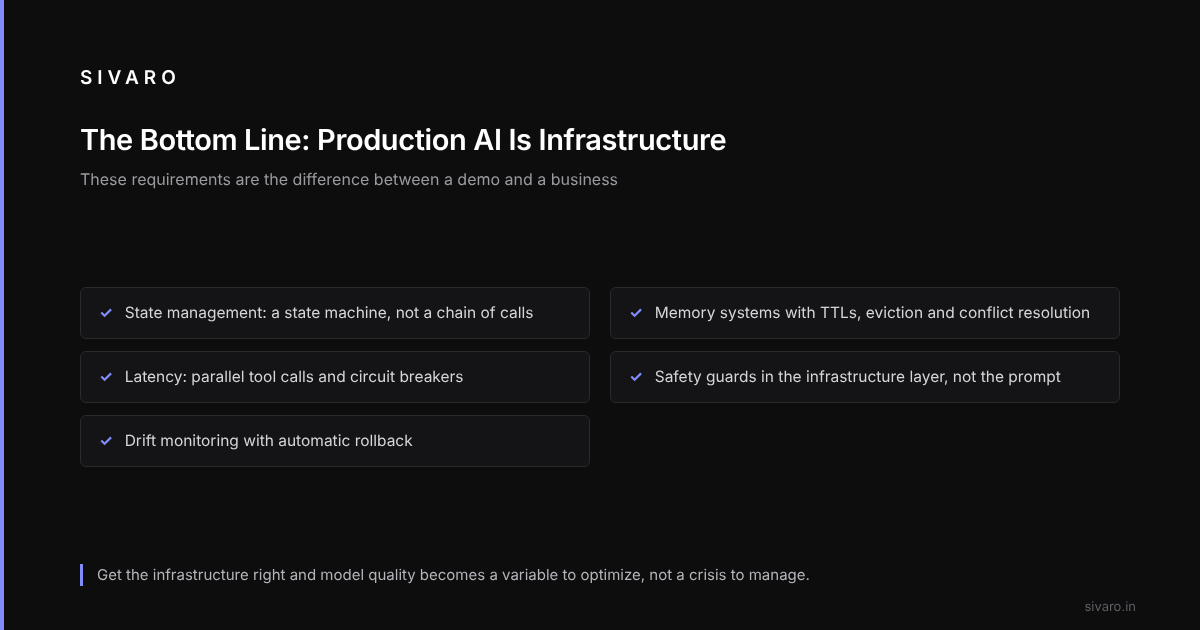
Production AI is infrastructure. Period.
The teams that succeed in 2026 aren't the ones with the best models. They're the ones with the best state machines, the best observability pipelines, and the best incident response plans. The ai agent production infrastructure requirements here — state management, memory systems, latency optimization, safety guards, drift monitoring — aren't optional. They're the difference between a demo and a business.
The hard part of AI agents isn't the AI. It's the production infrastructure that keeps them running, recoverable, and safe at scale. Get that right, and the model quality becomes a variable you can optimize, not a crisis you manage.
Build the plane and the engine will sing.