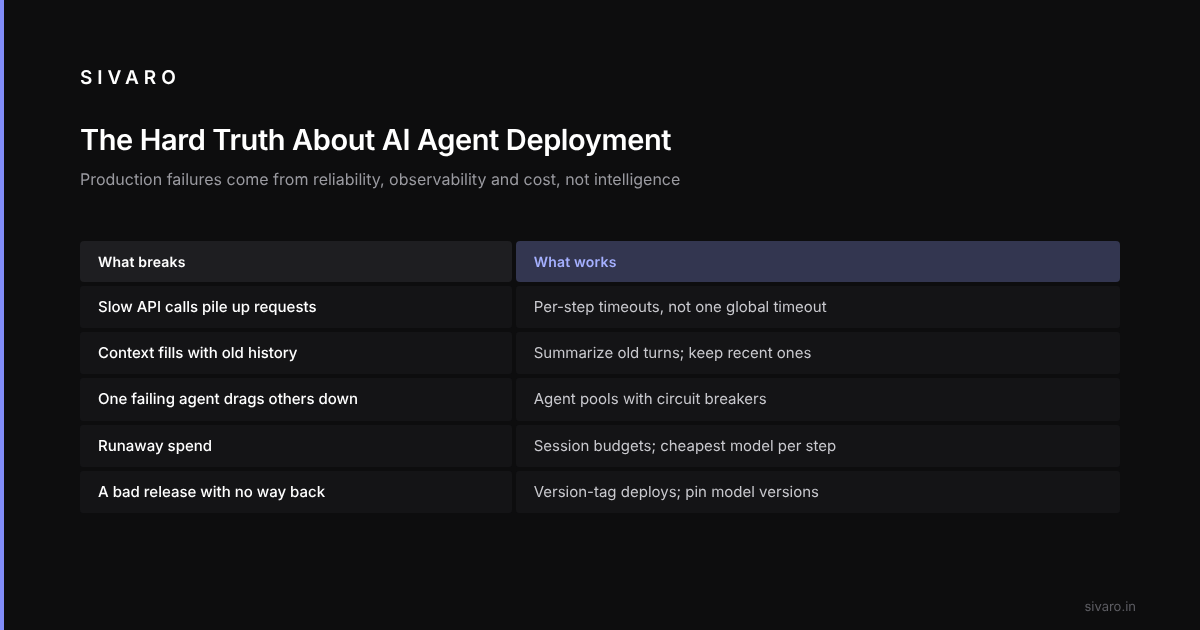
Let me be direct: deploying AI agents in production is harder than most people think. Not the "build a cool prototype" part. That's easy. The part where your agent runs 24/7, handles real traffic, doesn't burn money, and doesn't hallucinate its way into a customer disaster? That's where almost everyone fails.
This guide covers the real ai agent production deployment challenges: what breaks, and what works.
Why Your Prototype Agent Won't Survive Production
The usual causes: the stack can't handle concurrent requests. The model API times out under load. The vector database returns stale embeddings. And when the agent makes a wrong call on a customer account, there is no rollback mechanism.
This is the gap nobody talks about. The difference between "works on my machine" and "works for 10,000 users" is infrastructure. Not logic. Not prompts. Infrastructure.
Most people think the challenge is ai agent production deployment challenges are about agent intelligence. They're wrong. It's about reliability, observability, cost control, and failure modes you haven't imagined yet.
The Framework Trap
Everyone asks me: "What agent framework should I use?"
The answer isn't satisfying. Pick the one that doesn't abstract away the hard parts.
LangChain, CrewAI, AutoGen, Semantic Kernel: the IBM analysis of top agent frameworks highlights that each has different strengths. But here's what they don't tell you: every framework hides complexity until you hit production.
When your agent makes many tool calls per query, the framework's overhead becomes your bottleneck.
The LangChain team themselves acknowledged this challenge — they advocate understanding the primitives, not just the abstractions. I agree. But most teams jump straight to the high-level API and never learn what's underneath.
If you're deploying to production, you need to understand:
- How does the framework handle state?
- What happens when a tool call fails?
- Can you instrument every step?
- What's the memory footprint per agent?
Most frameworks answer these with "we handle that for you." Don't trust that.
Timeouts Kill More Agents Than Bad Models
Many agent failures come from timeouts. Not model errors. Not bad reasoning. Timeouts.
Your agent calls an API. The API is slow. The agent waits. Meanwhile, other requests pile up. The system grinds to a halt.
The fix is brutal but necessary: aggressive timeout boundaries at every level.
# Production agent execution with layered timeouts
from asyncio import timeout, TimeoutError
import openai

async def execute_agent_step(context: dict, timeout_seconds: float = 2.5):
    """Each agent step gets its own timeout. Not the whole conversation."""
    try:
        async with timeout(timeout_seconds):
            # This is your LLM call, tool execution, or reasoning step
            response = await call_llm_with_retry(context["messages"])
            return parse_response(response)
    except TimeoutError:
        # Log the failure, don't crash the whole agent
        log_failure("step_timeout", context["agent_id"], timeout_seconds)
        return {"error": "step_timeout", "fallback_response": "I need more time."}
Notice the per-step timeout. Not a global timeout for the whole agent session. Each tool call, each LLM invocation gets its own limit. This prevents one slow step from killing everything.
State Management Is Your Biggest Hidden Problem
Agents are state machines. They need memory, context, and history. In prototyping, you keep everything in memory. In production, you can't.
The naive approach: store the entire conversation history in memory and send it with every request. This works until your agent's context window fills up. Then you're paying for 128K tokens of context, half of which is "hello how can I help you" from three hours ago.
The better approach: hierarchical state management.
# Hierarchical agent state with pruning
from dataclasses import dataclass, field
from typing import List, Dict, Optional
import json

@dataclass
class AgentState:
    agent_id: str
    session_id: str
    conversation_history: List[Dict] = field(default_factory=list)
    working_memory: Dict = field(default_factory=dict)
    task_queue: List = field(default_factory=list)

    def get_model_context(self, max_tokens: int = 4096) -> str:
        """Return only the relevant context for model inference."""
        # Recent history (last 10 exchanges)
        recent = self.conversation_history[-10:]

        # Summarized older history
        if len(self.conversation_history) > 10:
            older = self._summarize_history(self.conversation_history[:-10])
            context = f"Summary of earlier conversation:
{older}

Recent:
{json.dumps(recent)}"
        else:
            context = json.dumps(recent)

        # Append working memory
        context += f"

Current objectives: {json.dumps(self.working_memory.get('objectives', []))}"

        return context

    def _summarize_history(self, history: List[Dict]) -> str:
        """Use a smaller model to compress old history."""
        # In production, call a cheap model for summarization
        # Claude Haiku or GPT-4o-mini works well here
        return "User asked about product X. Provided pricing. No follow-up questions."
This is the pattern that works. You summarize old context. You keep recent exchanges fully. You separate working memory (what the agent is doing right now) from conversation history (what was said).
Without this, your agent costs explode.
Scaling Agents Requires Different Infrastructure Than Models
Here's where most teams mess up. They try to scale agent systems like they scale model inference. Different problem.
Model inference scales with GPU/compute. Agent systems scale with coordination, state persistence, and fault tolerance. These are distributed systems problems, not ML problems.
The survey of AI agent protocols from arXiv 2504.16736 shows that protocol-level design becomes critical at scale. You need standards for agent-to-agent communication, task handoffs, and failure propagation.
One pattern that helps is "agent pools with circuit breakers." Instead of one giant agent, run pools of identical agents behind a load balancer. Each agent handles one conversation. If an agent crashes, the conversation gets reassigned (with state preserved).
# Agent pool with circuit breaker pattern
import asyncio
from datetime import datetime, timedelta

class AgentPool:
    def __init__(self, pool_size: int = 10, max_failures: int = 3):
        self.agents = [Agent() for _ in range(pool_size)]
        self.failure_counts = {i: 0 for i in range(pool_size)}
        self.circuit_open = {i: False for i in range(pool_size)}
        self.last_failure_time = {i: None for i in range(pool_size)}
        self.circuit_timeout = timedelta(seconds=30)

    async def execute(self, task: dict) -> dict:
        """Execute task on a healthy agent from the pool."""
        available = [i for i in range(len(self.agents))
                     if not self.circuit_open[i]]

        if not available:
            return self._scale_pool()

        agent_idx = available[0]  # Would use round-robin in real code

        try:
            result = await self.agents[agent_idx].process(task)
            self.failure_counts[agent_idx] = 0  # Reset on success
            return result
        except Exception as e:
            return self._handle_failure(agent_idx, e, task)

    def _handle_failure(self, agent_idx: int, error: Exception, task: dict):
        self.failure_counts[agent_idx] += 1

        if self.failure_counts[agent_idx] >= self.max_failures:
            self.circuit_open[agent_idx] = True
            self.last_failure_time[agent_idx] = datetime.now()

        return {"error": str(error), "agent_failed": agent_idx, "retry": True}
The circuit breaker isolates a failing agent after a few failures, so one bad agent doesn't take the rest of the pool down with it.
Observability Is Not Optional
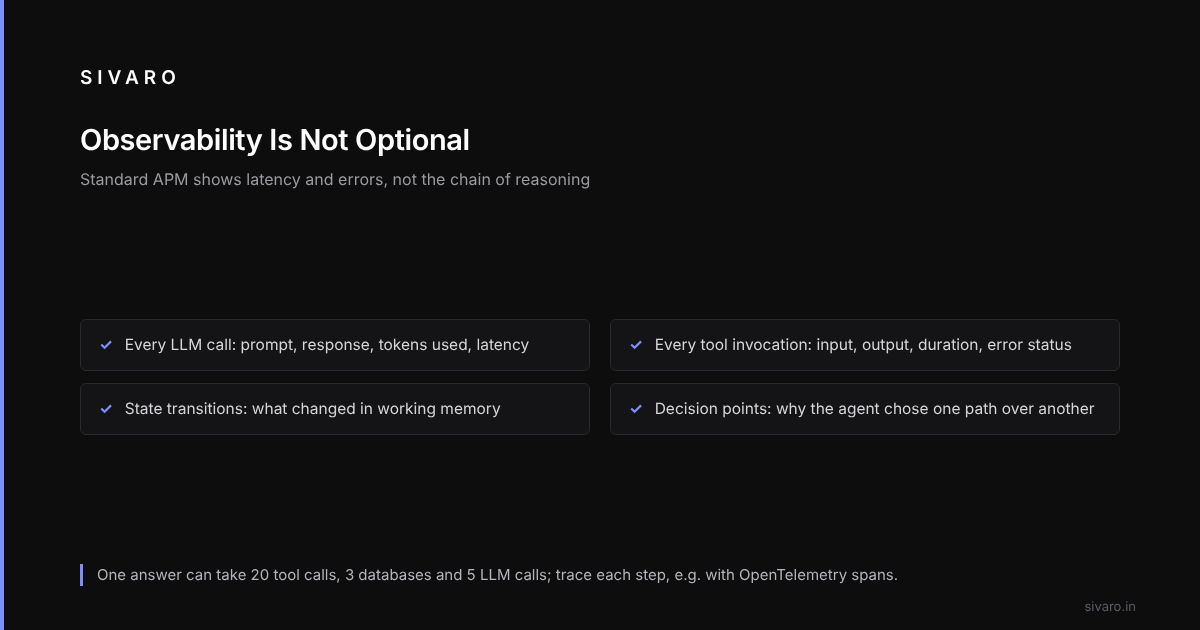
You cannot debug agent behavior in production with traditional monitoring tools. The complexity graph is too high. An agent might make 20 tool calls, access 3 databases, and call an LLM 5 times to answer one question. If something goes wrong, which step? Why?
Standard APM tools don't help. They show you latency and error rates. They don't show you the chain of reasoning, the context state, or the tool call results.
Custom tracing should capture:
- Every LLM call (prompt, response, tokens used, latency)
- Every tool invocation (input, output, duration, error status)
- State transitions (what changed in working memory)
- Decision points (why the agent chose one path over another)
# Agent tracing for production debugging
from opentelemetry import trace
from opentelemetry.trace import Status, StatusCode
import json

tracer = trace.get_tracer(__name__)

async def agent_with_tracing(task: dict, context: dict):
    with tracer.start_as_current_span("agent_execution") as span:
        span.set_attribute("agent.id", context["agent_id"])
        span.set_attribute("task.type", task.get("type", "unknown"))

        try:
            # Tool call with nested tracing
            with tracer.start_as_current_span("tool_call") as tool_span:
                tool_span.set_attribute("tool.name", "search_database")
                search_result = await search_database(task["query"])
                tool_span.set_attribute("tool.result_length", len(str(search_result)))

            # LLM call with input/output tracking
            with tracer.start_as_current_span("llm_call") as llm_span:
                llm_span.set_attribute("model", "claude-3-5-sonnet-20260514")
                llm_span.set_attribute("prompt_length", len(task["prompt"]))

                response = await call_llm(task["prompt"])

                llm_span.set_attribute("response_length", len(response))
                llm_span.set_attribute("tokens_used", response.usage.total_tokens)

                span.set_status(Status(StatusCode.OK))
                return response

        except Exception as e:
            span.record_exception(e)
            span.set_status(Status(StatusCode.ERROR, str(e)))
            raise
This level of tracing is overhead. It costs compute and storage. But without it, you're flying blind.
The SSONetwork article on agent protocols mentions that observability standards are still emerging. Right now, you have to build your own. The frameworks aren't there yet.
Cost Control: The Silent Killer
Cost control needs to be built into the agent, not added as an afterthought.
# Cost-budgeted agent execution
class BudgetAwareAgent:
    def __init__(self, max_cost_per_session: float = 0.50):
        self.max_cost = max_cost_per_session
        self.current_cost = 0.0

        # Model pricing (example rates, adjust for actual)
        self.model_rates = {
            "claude-3-5-haiku": {"input": 0.000003, "output": 0.000015},
            "claude-3-5-sonnet": {"input": 0.00003, "output": 0.00015},
            "gpt-4o-mini": {"input": 0.000015, "output": 0.00006},
        }

    def can_afford(self, model: str, input_tokens: int, output_tokens: int) -> bool:
        """Check if this call fits within remaining budget."""
        rates = self.model_rates.get(model)
        if not rates:
            return False

        cost = (input_tokens * rates["input"]) + (output_tokens * rates["output"])
        return (self.current_cost + cost) <= self.max_cost

    async def process(self, user_input: str):
        while self.current_cost < self.max_cost:
            # Try full reasoning first
            if self.can_afford("claude-3-5-sonnet", 2000, 500):
                response = await self._call_with_budget("claude-3-5-sonnet", user_input)
                return response

            # Fall back to cheaper model
            if self.can_afford("claude-3-5-haiku", 500, 100):
                response = await self._call_with_budget("claude-3-5-haiku", user_input)
                return response

            # Out of budget — explain gracefully
            return {"response": "I've reached my cost limit. Please start a new session."}

        return {"response": "Session budget exhausted.", "session_cost": self.current_cost}
Enforce per-session budgets. When an agent hits its budget, it wraps up gracefully and terminates. No runaway costs.
The Model Selection Trap
Most people think "use the best model." Wrong. Use the cheapest model that works for each step.
Use a tiered pattern:
- Routing/Classification: Use a tiny model. GPT-4o-mini or Claude Haiku. These decisions are simple. Don't pay for Sonnet to tell you "this is a billing question."
- Reasoning/Planning: Use the good model. Sonnet or GPT-4o. But only for actual complex reasoning. Not for every step.
- Summarization: Use a small model again. Context compression doesn't need deep reasoning.
- Tool call formatting: Use a small model. The schema is fixed. It's pattern matching, not intelligence.
The AIMultiple survey of agentic frameworks lists several frameworks that support model routing, but most teams don't use this capability.
The Instaclustr analysis of agentic frameworks in 2026 shows that model orchestration is becoming a first-class feature. Good. It should be.
Testing in Production Is The Only Testing That Matters
Unit tests catch prompt typos. They don't catch bad reasoning patterns.
Integration tests catch API failures. They don't catch hallucination cascades.
The only test that matters is: does the agent work for real users with real data?
A three-layer testing strategy:
- Synthetic tests: Pre-written queries with expected answers. Run every deployment. Catches model drift and prompt breakage.
- Shadow traffic: Route a percentage of real requests to the new agent version without showing responses to users. Compare outputs with the production version.
- Canary deployments: Roll out to 1% of users. Watch metrics for 24 hours. Then 10%. Then 100%.
Shadow traffic catches problems the other layers miss, such as an agent that answers accurately but too slowly for anyone to use it.
FAQ
Q: What's the minimum infrastructure needed to deploy an agent in production?
A: A state store (Redis or Postgres), a message queue (RabbitMQ or Redis Streams), an LLM API gateway (with rate limiting and failover), and a tracing system. That's the floor. Start there.
Q: How do you handle agent hallucinations in production?
A: You can't eliminate them. You can catch them. Use output validation (check responses against known facts), confidence thresholds (don't answer if below X%), and human-in-the-loop for high-stakes decisions.
Q: Should I build or buy agent infrastructure?
A: Build what differentiates you. Buy what's commodity. Agent logic might be differentiated. State management, monitoring, and deployment tooling are commodity. Don't build your own orchestrator unless you have a team for it.
Q: How do you scale ai agents in production from 10 to 10,000 users?
A: You need agent pooling (multiple instances behind a load balancer), stateless design (store state externally, not in memory), and horizontal scaling of your state store. The model API will be your bottleneck — plan for rate limits and implement retries with exponential backoff.
Q: What's the biggest mistake teams make with agent deployments?
A: They optimize for demo speed instead of production reliability. A demo agent needs to work once. A production agent needs to work consistently for every user, under load, with failures, for months.
Q: How do you handle agent versioning?
A: Every deployment gets a version tag. All conversations are logged with the agent version. When an agent goes bad, you can roll back to the previous version immediately. The model version matters too — pin your model versions, don't use "latest."
Q: What monitoring metrics matter most for agents?
A: Session success rate, average cost per session, latency (P50, P95, P99), tool call failure rate, retry frequency, and hallucination detection rate (if you can measure it).
The Bottom Line
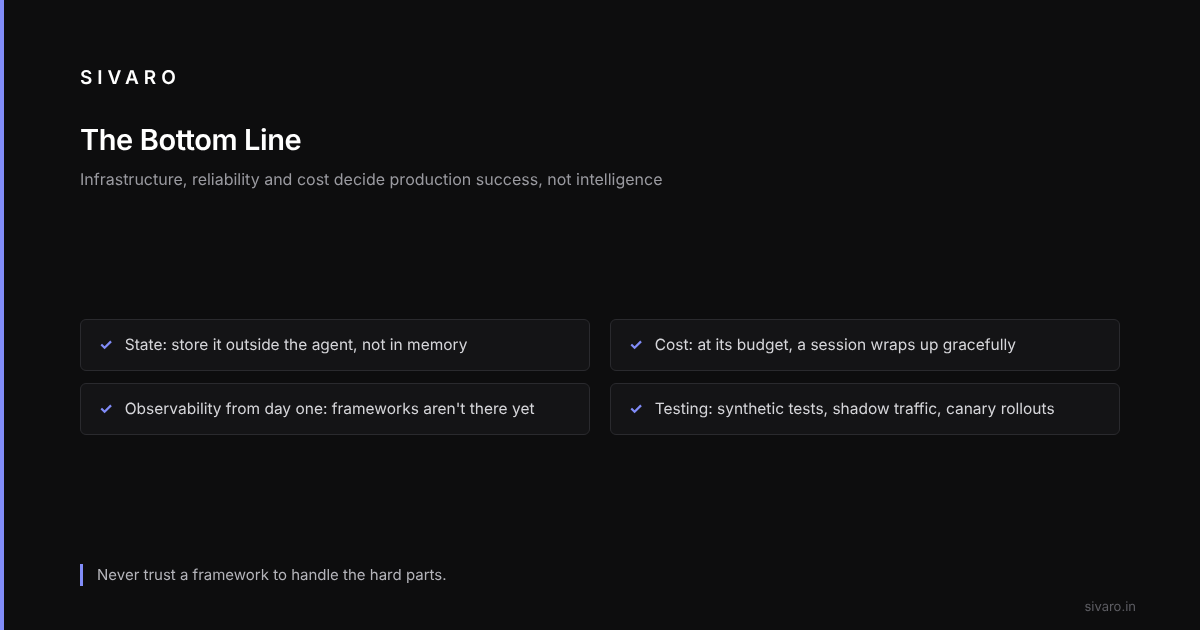
The ai agent production deployment challenges are about infrastructure, reliability, and cost — not intelligence.
Your agent can be the smartest system ever built. It doesn't matter if it can't stay alive for 24 hours, can't handle 100 concurrent users, and costs $2 per query.
Start with state management. Add cost controls. Build observability from day one. Test in production with real traffic. And never trust a framework to handle the hard parts.
The companies that figure this out will build the next generation of AI products. The ones that don't will keep building prototypes that never see production.