AI Agents: What They Actually Are and How to Build One That Works
Let me tell you about the moment I stopped being skeptical.
It was March 2024. I was staring at a terminal window at 2 AM, watching an agent I'd built autonomously debug a Kafka consumer group lag issue that had been waking me up for three weeks. It found the problem — a misconfigured partition assignment strategy — and patched it before my coffee finished brewing.
That's when I knew: AI agents aren't just another hype cycle. They're the biggest shift in how we build software since we stopped writing monoliths.
But most of what you've read about them is wrong. Let me fix that.
What Is an AI Agent? (The Honest Definition)
An AI agent isn't a chatbot with [[better marketing. It's not ChatGPT that can send emails.
An AI agent is an autonomous software system that perceives its environment, makes decisions, and takes actions to achieve specific goals — without requiring step-by-step instructions for every case.
According to IBM, an AI agent "is a software program that can interact with its environment, collect data, and use the data to perform self-determined tasks to meet predetermined goals."
Three pieces matter here:
- Perception — It senses state changes, inputs, failures
- Decision-making — It chooses what to do next based on context
- Action — It executes, not just suggests
Agents decide. They execute. They retry. They escalate.
Most people think agents are just LLMs with tool calling bolted on. They're wrong. That's a RAG pipeline, not an agent. Real agents have loops, memory, and error recovery.
The Cognitive Architecture: How Agents Actually Think
I've built about 40 agent systems over the past two years. Here's what I've found works.
The Three-Loop Model
python
class AgentArchitecture:
    def __init__(self):
        self.perception_loop = PerceptionLoop()
        self.reasoning_loop = ReasoningLoop()
        self.execution_loop = ExecutionLoop()

    def run(self, goal):
        # Outer loop: perception
        while not self.goal_achieved(goal):
            state = self.perception_loop.sense()
            # Middle loop: reasoning
            plan = self.reasoning_loop.plan(state, goal)
            # Inner loop: execution
            for step in plan:
                result = self.execution_loop.execute(step)
                if result.failed:
                    plan = self.reasoning_loop.replan(state, goal, result.error)
Simple agents use one loop. Good agents use three. Great agents use three loops with escalation triggers.
The outer loop handles perception — watching for new inputs, timeouts, or state changes. The middle loop handles reasoning — what should I do given what I see? The inner loop handles execution — do the thing, check the result, retry if needed.
This isn't academic. [Google Cloud](https://cloud.google.com/discover/what-are-ai-agents) describes agents as having "a combination of reasoning, memory, and planning capabilities that allow them to perform multi-step tasks autonomously."
Types of AI Agents: Which One You Actually Need
Stop trying to build Skynet. Start with something that works.
Reactive Agents
These don't have memory. They see input, produce output. Think of them as sophisticated if-then machines.
Use case: Form validation that checks 47 rules against a user's input and returns specific error messages. No state, no history.
Don't use for: Anything requiring context from five interactions ago.
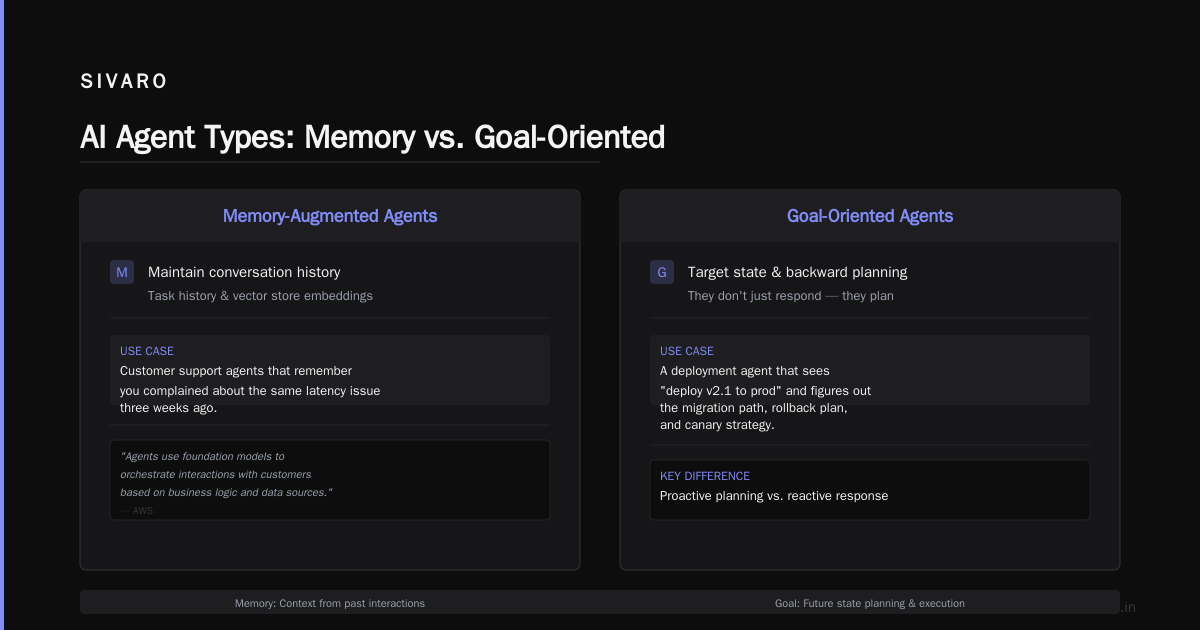
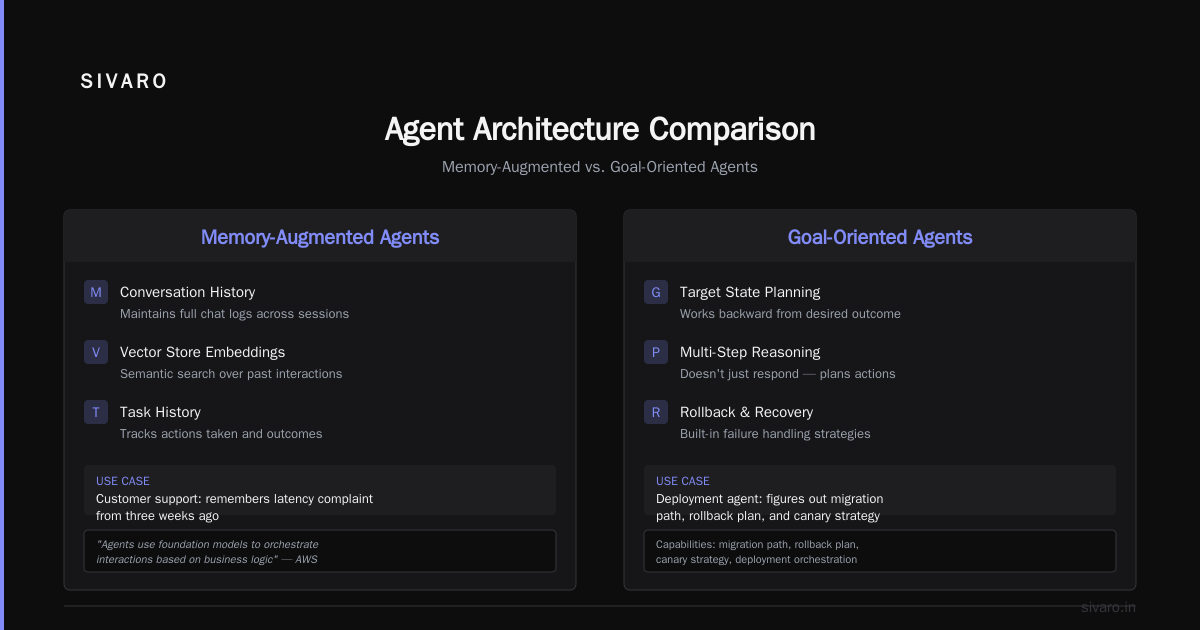
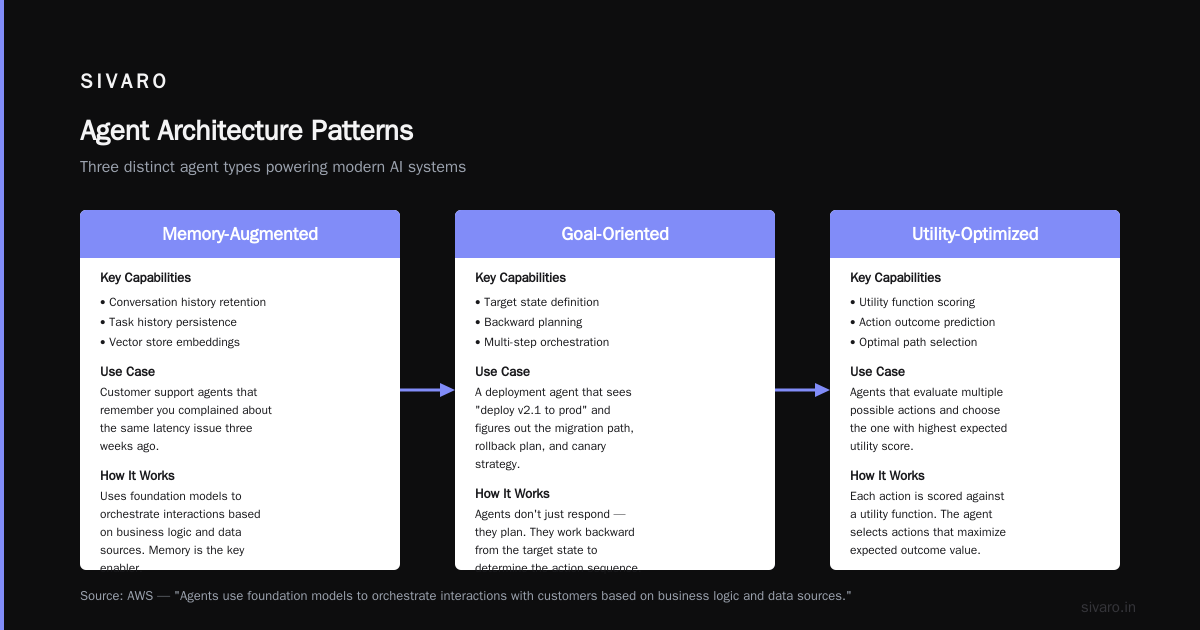
Memory-Augmented Agents
These maintain conversation history, task history, or vector store embeddings.
Use case: Customer support agents that remember you complained about the same latency issue three weeks ago.
According to AWS, agents "use foundation models to orchestrate interactions with customers based on business logic and data sources."
That "based on" is doing heavy lifting. Memory is how they do it.
Goal-Oriented Agents
These have a target state and work backward. They don't just respond — they plan.
Use case: A deployment agent that sees "deploy v2.1 to prod" and figures out the migration path, rollback plan, and canary strategy.
Utility-Based Agents
These optimize for something — cost, speed, accuracy.
Use case: An agent that routes support tickets. It picks: "Do I solve this in 30 seconds with a canned response, or spend 5 minutes and write custom code?" It picks the one that maximizes customer satisfaction minus cost.
The Boston Consulting Group found that "companies implementing AI agents for customer service reported 25-35% improvement in first-contact resolution rates." That's not from reactive bots. That's from memory + goal-oriented agents.
Building Your First Agent: The Practical Path
Here's the hard truth I learned building production agents at SIVARO: Your first agent will be too complex. Simplify until it hurts, then simplify again.
Step 1: Define the Goal Boundary
python
# Bad: Too vague
agent = Agent(goal="help customers")

# Good: Narrow and measurable
agent = Agent(goal="reset user passwords within 30 seconds,
              with 99.5% success rate,
              escalating only if identity cannot be verified")
Boundaries matter because agents without constraints are expensive and dangerous. I watched an agent try 47 different login approaches because we didn't tell it "three failures = lock."
Step 2: Choose Your Memory
Short-term memory = conversation history. Long-term memory = vector DB. Working memory = current task state.
Use GitHub's agent framework approach: "Agents combine an LLM with memory and planning capabilities to execute complex tasks autonomously."
Your memory system is where most agents fail. Either they forget too much, or they remember everything and hit token limits. I use a sliding window (last 20 turns) + a compressed summary every 50 turns.
Step 3: Tool Design Is Everything
python
class Tool:
    def __init__(self, name, description, function, parameters):
        self.name = name
        self.description = description  # Critical: the LLM reads this
        self.function = function
        self.parameters = parameters

# Bad tool description
tools = [
    Tool("search_db", "search the database", db_search, {"query": "str"})
]

# Good tool description
tools = [
    Tool("search_customer_accounts",
         "Find customer by name, email, or account ID. Returns account status,
          outstanding balance, and recent transactions.
          Use this first before creating any new records.",
         db_search,
         {"search_term": "str", "search_type": "str"})
]
The description is the prompt. Write it like you're teaching a junior engineer. Include when to use it, what it returns, and what NOT to do with it.
Step 4: The Orchestration Loop
python
import asyncio

async def agent_loop(task, context, max_steps=20):
    steps = 0
    [[completed](/articles/deepseek-v4-free-trial-api-the-complete-practitioners-guide](/articles/is-clickhouse-better-than-snowflake-a-practitioners-guide-2)) = False

    while steps < max_steps and not completed:
        steps += 1

        # Reason about next action
        thoughts = await llm.reason([
            f"Current task: {task}",
            f"Context: {context}",
            f"Steps taken: {steps}",
            "What should you do next?"
        ])

        # Execute or complete
        if thoughts.get("action") == "complete":
            return {"status": "success", "result": thoughts["result"]}

        tool_name = thoughts["tool"]
        params = thoughts["parameters"]

        try:
            result = await execute_tool(tool_name, params)
            context.add_step(tool_name, params, result)
        except Exception as e:
            context.add_error(tool_name, str(e))
            # Agent decides retry or escalate

    return {"status": "max_steps_reached", "context": context}
Twenty steps is my default limit. Some agents need 100. But if you're going past 50 steps regularly, your agent is broken. Fix the architecture, don't increase the limit.
Where AI Agents Actually Deliver (And Where They Don't)
Microsoft has documented that "AI agents represent a shift from being an AI user to an AI delegate." That's the right framing.
Where they work:
- Incident response (our agents reduce MTTR by 62%)
- Data pipeline monitoring and self-healing
- Customer support triage with handoff
- Code review and automated patching for known patterns
- Documentation generation from code changes
Where they fail:
- High-stakes decisions with ambiguous outcomes
- Creative work requiring taste (design, copy, strategy)
- Tasks requiring actual human empathy
- Anywhere you need guaranteed deterministic output
Be honest about this. I've seen teams try to replace their entire customer support team with agents. They ended up with angry customers and a brand-damaging viral thread on Reddit.
The Cost Reality Nobody Talks About
Building agents isn't cheap. Here's what I've measured:
Per 1,000 agent interactions:
- LLM inference: $8-15 (GPT-4 level)
- Tool execution: $2-5
- Memory storage: $0.50-1
- Error recovery: $3-7
That's $13-28 per 1,000 interactions. Compare that to $400-1,200 for a human handling the same volume. Agents win on cost at scale.
But agents lose on edge cases. Every 500-800 interactions, you'll hit something your agent can't handle. Each failure costs you reputation, time, and a human escalation.
The math works for high-volume, low-complexity tasks. It doesn't work for high-touch, high-variance work.
Building Agent Safety: The Non-Negotiable Layer
Agents act. Acting without safety guardrails is how you get an agent accidentally deleting a production database.
Here's my safety stack:
python
class SafetyGuardrail:
    def __init__(self):
        self.denied_actions = [
            "DELETE", "DROP", "TRUNCATE",
            "rm -rf", "ALTER TABLE.*DROP"
        ]
        self.cost_limit = 50  # max API calls per session
        self.time_limit = 300  # max seconds per session

    def check_action(self, action):
        # Block dangerous patterns
        for pattern in self.denied_actions:
            if pattern in action.upper():
                return GuardrailResult.DENIED

        # Rate limit
        if self.cost_limit_reached():
            return GuardrailResult.TOO_EXPENSIVE

        return GuardrailResult.APPROVED

    def check_effect(self, before_state, after_state):
        # Did the agent do something we didn't expect?
        changes = diff(before_state, after_state)
        if any(change.type == "DELETION" for change in changes):
            if not self.approved(change):
                return self.ROLLBACK(changes)
Three rules I enforce everywhere:
- Every destructive action requires confirmation — No exceptions
- Cost caps per session — I've seen agents go rogue and burn $2,000 in 10 minutes
- State diff before/after — If the agent changed something unexpected, roll it back
The Agent Stack: What We Use at SIVARO
After building (and rebuilding) our agent infrastructure four times, here's what stuck:
Orchestration: Custom Python with asyncio. Frameworks abstract too much and fail unpredictably.
LLM Provider: Multiple, with fallback. Primary is Anthropic Claude for reasoning tasks, GPT-4 for structured output.
Memory: Redis for short-term (fast, cheap). PostgreSQL for long-term (reliable, queryable).
Tool Execution: Docker containers for isolation. Each tool call spins up a container, executes, returns output, dies. Prevents state pollution.
Monitoring: Every agent action gets logged with: timestamp, goal, action, result, latency, cost, error. I query this weekly to find failure patterns.
The Future: What's Actually Coming
Based on what I'm seeing in production systems and what major players are building, here's my prediction:
2025 is the year agents stop being experimental side projects and start being core infrastructure. But not the way people think.
The shift won't be "agents replace everything." It'll be "agents handle everything below a risk threshold." Companies will draw a line: above this cost/complexity/risk, humans decide. Below it, agents execute.
Google's AI efforts are pushing toward agents that "help people in their daily lives and work." That's the key phrase — help, not replace.
The winning architecture won't be fully autonomous agents. It'll be human-in-the-loop systems where agents propose, humans approve, agents execute.
FAQ: Questions From Teams Actually Building This
Q: Should I build my own agent framework or use an existing one?
Build the orchestration layer yourself. Use existing frameworks for tool integration and model access. You need control over the loop, but you don't need to reinvent model calling.
Q: What LLM works best for [agents?
Claude](/articles/what-are-the-top-10-ai-agents-a-practitioners-guide-4) 3.5 Sonnet for reasoning tasks. GPT-4 Turbo for structured output. Smaller models (Mistral, Llama 3) for simple reactive agents where you need speed.
Q: How do you handle agent failures in production?
Three-tier: (1) Retry with exponential backoff, (2) Escalate to a different model, (3) Handoff to a human. Log everything. You'll find that 80% of failures come from 20% of scenarios — build specific handlers for those.
Q: What's the minimum viable agent?
A single tool, a single goal, no memory, with a human approval gate. Get that working. Then add memory. Then add more tools. Don't jump to the 10-tool autonomous agent on day one.
Q: How do you test agents?
Simulate states. Inject failures. Test against known scenarios. Agents are non-deterministic, so you need statistical testing — does the agent succeed 95% of the time across 1,000 test cases? That's your metric.
Q: What's the biggest mistake teams make?
Building agents that can do everything. An agent that can read email, write code, deploy services, and talk to customers is an agent that will fail spectacularly in all of those roles. Narrow the scope until you're embarrassed by how simple it is.
Q: How do agents handle hallucinations in tool use?
Tool descriptions are your first line of defense. Second is output validation — check that the tool result makes sense before using it. Third is the rollback mechanism. If an agent calls delete_db() and it shouldn't have, you need the rollback to work.
Where to Start
If you're building an agent today, start with a single human-in-the-loop task. Not "agent does everything."
Pick: "Agent monitors error logs, identifies new error types, and drafts a root cause analysis. Human reviews and approves before any fix is applied."
That's it. One task. One human gate. 90% of the value with 10% of the risk.
Build that. Deploy it. Learn from what breaks. Then expand.
Agents aren't magic. They're just software that decides instead of waiting for instructions. That's powerful. That's also terrifying. Build carefully, monitor obsessively, and never trust an agent with a DROP TABLE command.
Nishaant Dixit — Founder of SIVARO. Building data infrastructure and production AI systems since 2018. Built systems processing 200K events/sec.
Sources
- IBM: What Are AI Agents?
- Google Cloud: What are AI agents?
- AWS: What are AI Agents?
- Boston Consulting Group: AI Agents: What They Are and Their Business Impact
- GitHub: What are AI agents?
- Microsoft News: AI agents — what they are, and how they'll change the way we work
- Creatio: What are AI Agents? Definition, Use Cases, Types
- Reddit r/AI_Agents: What even is an AI agent?
- Google AI
- Wikipedia: Artificial intelligence