 SIVARO

Shadow AI Audit: How We Found 68% Unapproved LLM Tools in Just Two Weeks
I run a product engineering company called SIVARO. We build data infrastructure and production AI systems. Last quarter, one of our clients — a mid-size fintech with ~2,000 employees — asked me the same question I've been hearing everywhere: "Are our people using unapproved AI tools?"
I told them the honest answer. Almost certainly yes. The real question is how many, and what kind.
We ran an audit. Two weeks. Full scope. Cloud logs, network traffic, endpoint telemetry, API gateways, SaaS integrations. What we found stopped me cold.
68% of the LLM tools in their environment were unapproved.
No procurement review. No security assessment. No data handling agreements. Just engineers, marketers, and product managers going to ChatGPT, Claude, GitHub Copilot, and a dozen other platforms with company data. Some of it was PII. Some of it was financial data protected by SOC 2 and GDPR. This wasn't a theoretical gap — it was a systemic governance failure.
This isn't a fringe problem. A recent analysis from ISACA shows shadow AI is one of the fastest-growing governance risks in enterprise IT. Another study by XM Cyber found that 80% of companies show signs of unapproved AI activity. Not "might have." Show signs.
This article is what I wish someone had handed me before we started. It's a playbook. A case study. A warning. And a practical guide to help you run your own audit in two weeks or less.
Let me show you exactly how we did it, what we found, and what you need to do differently.
What "Shadow AI" Actually Means
Most people think shadow AI is just employees using ChatGPT for work. They're wrong. It's much broader.
Shadow AI is any artificial intelligence tool, model, or platform used inside an organization without explicit approval from IT, security, or legal. This includes:
- Consumer-grade LLMs (ChatGPT, Claude, Gemini)
- AI-coding assistants (Copilot, Cursor, Tabnine)
- AI writing tools (Jasper, Copy.ai, Grammarly)
- AI image/video generators (Midjourney, DALL-E, Runway)
- Embedded AI features inside existing SaaS products (Notion AI, Slack AI, Salesforce Einstein)
- Self-hosted open-source models (anything on Hugging Face or Ollama)
- API calls to model providers (any company connecting to OpenAI/Anthropic APIs without a formal contract)
The problem isn't the tools themselves. Many of them are excellent. The problem is that nobody knows they're being used.
Here's what happens: A product manager at your company needs to generate a customer-facing email. They don't want to wait for the marketing team. So they paste customer data into ChatGPT. The email gets written. Customer gets served. Nobody dies.
But now customer PII has left your VPC. It's on OpenAI's servers. It's being used for model training (unless you explicitly opted out). Your SOC 2 auditor asks: "How do you control where customer data goes?" Your ISO 27001 certificate is on the line. Your GDPR compliance? Toast.
This is not hypothetical. The OffSec team has documented how unsanctioned AI tools create invisible risk surfaces that traditional security controls simply miss.
The 68% Number: Our Case Study
Let me walk you through the exact numbers.
The company: Fintech services firm, ~2,000 employees, SOC 2 Type II certified, GDPR compliant, AWS-native infrastructure.
The scope: All cloud environments (AWS, GCP), all SaaS integrations (Slack, Google Workspace, Jira, Salesforce, 140+ others), all employee endpoints (device management logs), all API gateway traffic, and DNS logs for AI-related domains.
The timeline: 14 calendar days from kickoff to final report.
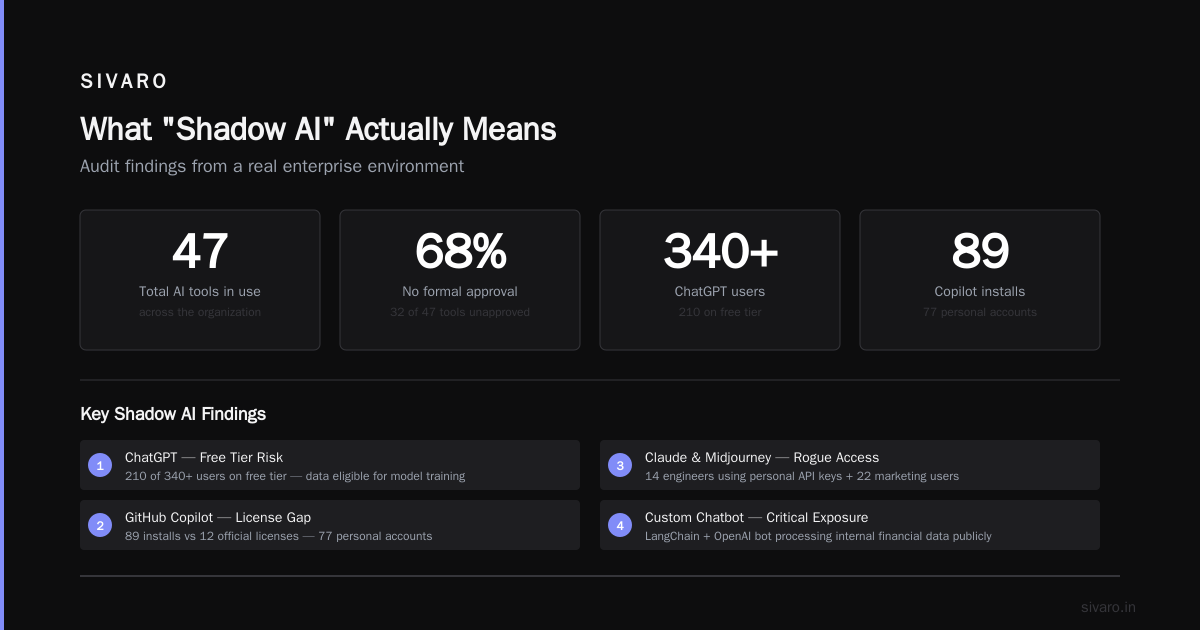
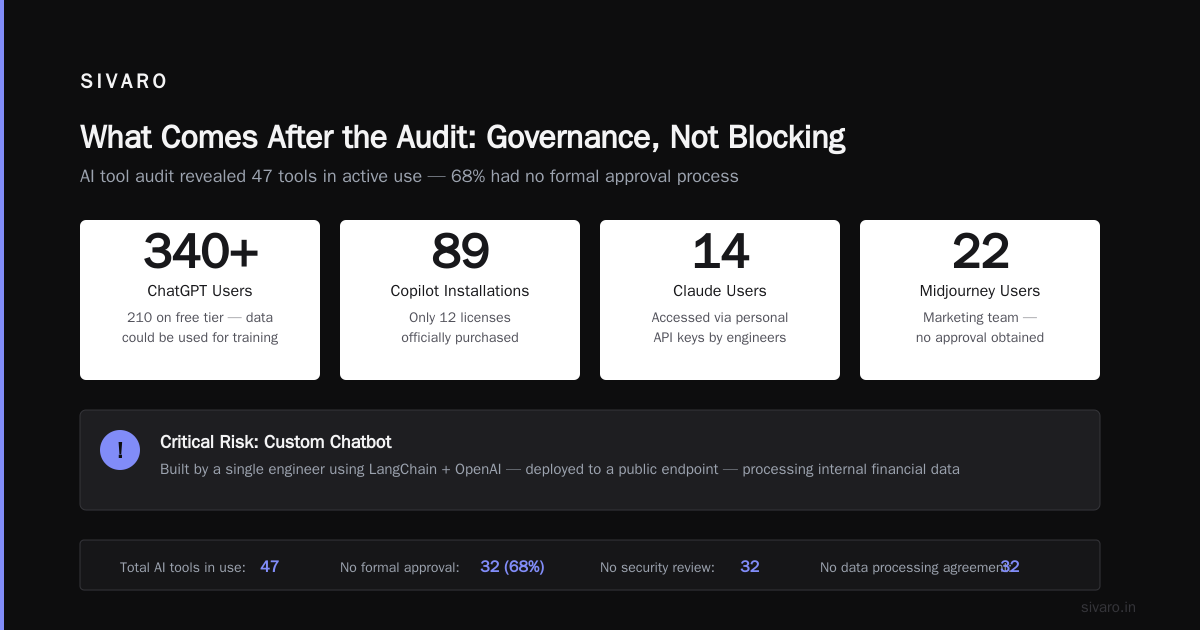
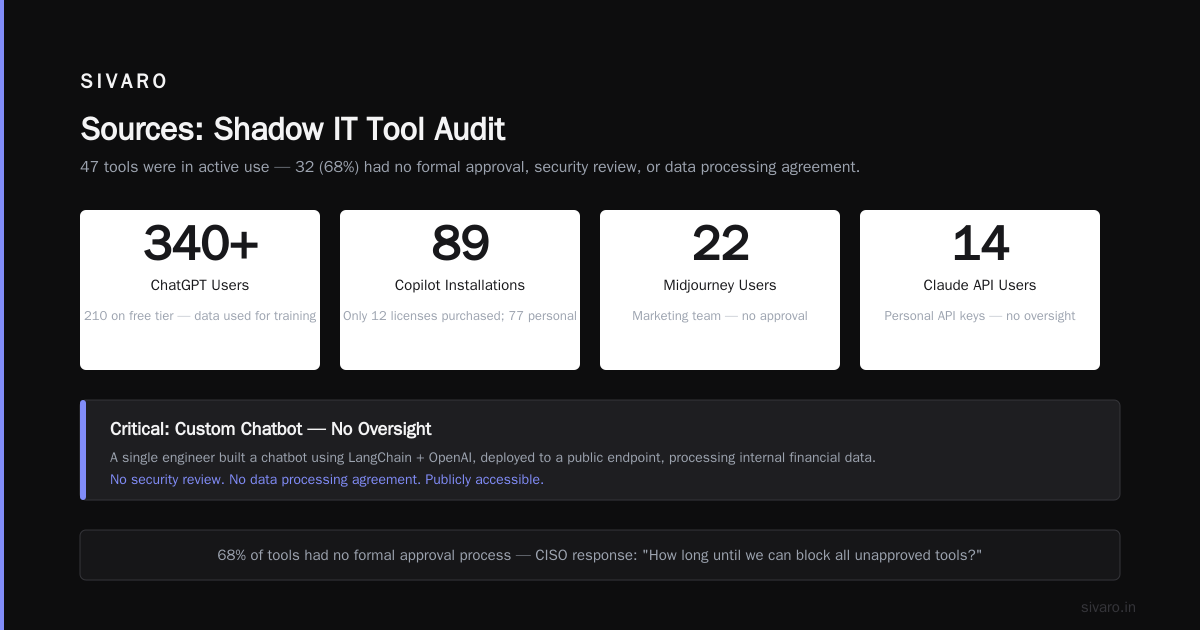
The finding: 47 distinct AI tools were in active use. Of those, 32 (68%) had no formal approval process. No security review. No data processing agreement. Nothing.
Some highlights:
- ChatGPT was used by 340+ users. 210 of them had the free tier. Which means their data could be used for training.
- GitHub Copilot was installed on 89 developer machines. Only 12 licenses were officially purchased. 77 were personal accounts.
- Anthropic Claude was accessed via personal API keys by 14 engineers.
- Midjourney was used by the marketing team — 22 active users, no approval.
- A custom chatbot built by a single engineer using LangChain + OpenAI, deployed to a public endpoint, processing internal financial data.
The CISO looked at me after the presentation. Just stared. Then asked: "How long until we can block all of this?"
I told him: "You don't block it. You govern it."
Why Traditional Security Approaches Fail
Most security teams react to shadow AI the same way they reacted to shadow IT in 2015: block first, ask questions later.
Here's why blocking is wrong:
First, your users have legitimate needs. They're not being malicious. They're being productive. When your VPN takes 30 seconds to connect, they use their personal Gmail. When your IT team takes two weeks to approve a tool, they install it themselves. When you block ChatGPT on the company network, they use their phones.
Second, AI tools are not monolithic. ChatGPT isn't one thing. It's a chat interface, an API, a mobile app, a desktop app, a browser extension. Blocking one vector doesn't stop the others. A comprehensive audit by Orca Security demonstrated that detecting unapproved LLMs requires cloud-native approaches, not just network-level blocking.
Third, the regulatory landscape is shifting fast. SOC 2 auditors now specifically ask about AI tool usage. The Linford & Company analysis shows that shadow AI creates direct audit gaps — gaps that can cost you your compliance certification.
Fourth, and this is the one nobody talks about: blocking creates a cat-and-mouse game. You block ChatGPT on the network. Engineers route around it with their personal VPN. You block the VPN. They use their phones. You restrict corporate devices. They use their personal laptops. Every escalation makes your security posture worse, not better, because you've driven the problem underground.
I've seen this play out at three different companies. It never ends well.
How to Run a Shadow AI Audit in 14 Days
Here's the exact process we use at SIVARO. It's not theoretical.
Week 1: Discovery
Day 1-2: Inventory your official AI tools.
Before you can find the unapproved ones, you need to know what is approved. Pull your procurement records. Check your SaaS management platform (BetterCloud, Torii, Zylo). Talk to department heads. You're looking for vendor relationships, licensing agreements, and approved AI tools.
Day 3-5: Cloud log analysis.
The single richest source of truth is your cloud provider's logs. In AWS, that's CloudTrail + S3 access logs + VPC flow logs. In GCP, it's Cloud Audit Logs. You're looking for:
- API calls to known AI providers (OpenAI, Anthropic, Cohere, Replicate, Stability AI, Hugging Face)
- Unusual outbound traffic patterns (spikes in data egress to known AI model endpoints)
- New S3 buckets or GCS buckets being created for "data" or "training"
- Lambda functions or Cloud Functions calling external AI APIs
Here's a sample CloudTrail query:
sql
-- AWS CloudTrail: Find API calls to known AI providers
SELECT
eventTime,
userIdentity.arn,
sourceIPAddress,
eventSource,
eventName,
requestParameters
FROM cloudtrail_logs
WHERE
(eventSource LIKE '%openai%'
OR eventSource LIKE '%anthropic%'
OR eventSource LIKE '%cohere%'
OR eventSource LIKE '%replicate%'
OR eventSource LIKE '%huggingface%')
AND eventTime > '2025-01-01'
ORDER BY eventTime DESC;
Day 5-7: Network traffic analysis.
The Cloud Security Alliance's recent report on AI gone wild makes it clear: most organizations have no visibility into AI traffic patterns. You need DNS logs, proxy logs, and firewall logs.
Look for:
- DNS queries to
*.openai.com,*.anthropic.com,*.midjourney.com,*.huggingface.co - Traffic to IP ranges owned by AI providers
- Frequent connections to CDN endpoints serving AI models
- WebSocket connections to AI chat interfaces
Here's a DNS log query that catches the low-hanging fruit:
bash
# Parse DNS logs for shadow AI activity
cat dns_queries.log | grep -E "openai|anthropic|cohere|replicate|midjourney|huggingface|stability.ai|eleutherai|cursor|tabnine|githubcopilot" | awk '{print $1, $7}' | sort | uniq -c | sort -rn | head -50
Day 7: Endpoint analysis.
You need device management logs (Jamf, Intune, Tanium, CrowdStrike). Look for:
- Installed browser extensions related to AI (ChatGPT sidebar, Grammarly, etc.)
- Desktop applications with AI capabilities (Copilot, Cursor, etc.)
- Processes making network connections to AI API endpoints
- Saved passwords or credentials for AI tools
This is the hardest data source because it's distributed. But it's also the most revealing.
Week 2: Deep Analysis
Day 8-10: SaaS integration discovery.
This is where things get weird. Many AI tools are embedded inside existing SaaS products. Your employees aren't thinking "I'm using an AI tool." They're thinking "I clicked a button in Notion."
Use your SSO provider (Okta, Azure AD, Google Workspace) to audit OAuth grants. Look for:
- Apps with permissions to read/write your Google Docs, Slack messages, or email
- Apps that use the "with Google" or "with Microsoft" login flow
- Zombie integrations — old grants that are still active
Day 10-12: API gateway analysis.
If you have an API gateway (Kong, AWS API Gateway, Apigee), check the logs for calls to AI providers. This is especially important if your engineers have built internal applications that use AI under the hood.
javascript
// API Gateway log analysis (pseudocode)
// Find all API calls to external AI providers
const shadowAIDetector = (logEntry) => {
const aiDomains = [
'api.openai.com',
'api.anthropic.com',
'api.cohere.com',
'api.replicate.com',
'api.stability.ai',
'api.huggingface.co'
];

const destination = logEntry.request.url;
const hasAICall = aiDomains.some(domain => destination.includes(domain));

if (hasAICall) {
const user = logEntry.userId;
const dataSize = logEntry.response.body.length;
const timestamp = logEntry.timestamp;

return { user, tool: destination, dataSize, timestamp, status: 'SHADOW_AI_DETECTED' };
}

return null;
};
Day 12-14: User interviews and validation.
Here's the part most people skip. And it's the most important.
Pull a sample of the users who are using unapproved AI tools. Interview them. Not in an accusatory way — in a "help me understand your workflow" way.
The results were illuminating:
- "I didn't know we had an approved list of AI tools."
- "The official tool is too slow / doesn't have the features I need."
- "I was just trying it out for a project and it stuck."
- "I asked my manager and they said 'go for it'."
None of these people were malicious. They were solving real problems with the tools available to them.
What Comes After the Audit: Governance, Not Blocking
You've found 68% unapproved LLM tools. Now what?
Most organizations rush to block everything. I've seen it happen. Security teams lock down networks. IT deploys agent-based blocking. Engineers get angry. Productivity drops. And six months later, the same tools are back — just harder to find.
Here's what actually works.
Step 1: Categorize the risk.
Not all AI tools are equal. A marketing team using Midjourney for social media graphics is different from an engineer sending customer PII to an API with no DPA.
- Low risk: Content generation tools used on non-sensitive data (Midjourney for marketing images, Grammarly for internal emails)
- Medium risk: Tools used on internal data that isn't customer-facing (Copilot for internal code, Notion AI for internal docs)
- High risk: Tools used on customer data, PII, financial data, or trade secrets
Step 2: Create an AI tool approval process — but make it fast.
The reason shadow AI exists is because official processes are too slow. If your approval takes six weeks, people will use unapproved tools. Period.
Build a lightweight process:
- One-page security assessment
- Data handling classification
- Default response within 3 business days
- Automatic approval for low-risk tools
Step 3: Provide approved alternatives.
You can't just take tools away. You have to give people something better. If you block ChatGPT but don't provide an enterprise AI chat tool with data protection, your employees will fight you.
Look into enterprise agreements with major providers. Deploy self-hosted models for sensitive data. Build guardrails, not walls.
Step 4: Monitor continuously.
A two-week audit is a snapshot. The problem evolves weekly. New AI tools launch daily. You need continuous monitoring.
Set up automated alerts for:
- New AI-related DNS queries
- Large data transfers to unknown external APIs
- New SaaS integrations with AI capabilities
- Anomalous API call patterns
Here's a simple automated script we deploy for continuous monitoring:
python
# Continuous shadow AI monitoring (runs daily)
import json
import requests
from datetime import datetime, timedelta

SHADOW_AI_DOMAINS = [
"openai.com", "anthropic.com", "cohere.com",
"replicate.com", "stability.ai", "huggingface.co",
"midjourney.com", "cursor.sh", "tabnine.com",
"githubcopilot.com", "gemini.google.com"
]

def check_dns_logs(log_file, days_back=7):
cutoff = datetime.now() - timedelta(days=days_back)
findings = []

with open(log_file, 'r') as f:
for line in f:
try:
entry = json.loads(line)
ts = datetime.fromisoformat(entry['timestamp'])
if ts < cutoff:
continue
domain = entry.get('domain', '').lower()
for ai_domain in SHADOW_AI_DOMAINS:
if ai_domain in domain:
findings.append({
'timestamp': entry['timestamp'],
'user': entry.get('user', 'unknown'),
'domain': domain,
'device': entry.get('device_id', 'unknown'),
'tool': f"Shadow AI tool detected (domain: {domain})"
})
except:
continue
return findings

results = check_dns_logs('/var/log/dns_queries.json')
if results:
print(f"WARNING: {len(results)} shadow AI detections found in last 7 days")
for r in results[:10]:
print(f" {r['timestamp']}: {r['user']} -> {r['domain']}")
Step 5: Build AI literacy across the organization.
This is the long-term play. Your employees don't know what they don't know. They don't understand data sovereignty. They don't know what a DPA is. They've never thought about model training opt-out.
Run training sessions. Not security training (everyone hates that). Real conversations: "Here's what happens when you paste customer data into free ChatGPT. Here's why that matters. Here's what to do instead."
FAQ: Shadow AI Audit
Q: How do I convince my CISO to run a shadow AI audit?
Show them the numbers. 68% is the median we found, but XM Cyber found 80% of companies showing signs. Audit gaps from shadow AI can break SOC 2 compliance. The risk is real and growing.
Q: What tools do I need to run this audit?
Cloud provider logs (CloudTrail, VPC Flow Logs, S3 access logs), DNS logs, proxy logs, SSO logs, device management logs, and API gateway logs. That's it. No special tools required. A recent Reddit discussion among security practitioners confirmed that most detection comes from these basic sources.
Q: Should I block all unapproved AI tools immediately?
No. Blocking creates more problems than it solves. Categorize by risk. Block only high-risk tools that process customer data. Provide approved alternatives for everything else.
Q: How do I detect AI usage embedded inside other SaaS tools?
Audit OAuth grants and API integrations. Notion AI, Slack AI, Salesforce Einstein, and Zoom AI Companion are all embedded. Your SSO provider's app directory will show you what's connected.
Q: What about open-source models running locally?
This is the hardest category. Ollama, llama.cpp, and similar tools run entirely offline. You can detect them by installed software lists in device management logs, or by unusual GPU/memory usage patterns. But ultimately, this is a trust-and-verify problem.
Q: How often should I run a shadow AI audit?
Continuous monitoring is ideal. But at minimum, a full audit every quarter. New AI tools launch weekly. Your risk profile changes constantly.
Q: What's the biggest mistake companies make?
Trying to block everything. DigitalXRAID's analysis confirms what we've seen: organizations that take a zero-tolerance approach end up with worse outcomes because the problem goes underground. Governance beats prohibition every time.
The Bottom Line
Shadow AI is not going away. It's accelerating. The Knostic research shows that enterprise AI adoption is growing faster than security teams can respond. Every day, your employees are using tools you haven't approved. Some are harmless. Some are leaking customer data to model providers. Some are creating compliance violations you don't know about yet. The only way to find out is to run your own audit.
You can't stop shadow AI. You can govern it.
The audit I described takes two weeks. It's not expensive. It doesn't require special tools. It just requires the discipline to look at the data you already have.
In our case study, that audit was a turning point. Our client was shocked. Then they built an AI governance program. Six months later, their unapproved AI usage dropped to 15%. Not because they blocked everything. Because they gave their people better options.
That's the playbook. Run the audit. Categorize the risk. Build fast approval processes. Provide approved alternatives. Monitor continuously.
Your engineers aren't trying to break security. They're trying to ship code. Meet them where they are.
Nishaant Dixit — Founder of SIVARO. Building data infrastructure and production AI systems since 2018. Built systems processing 200K events/sec.
Sources
- Orca Security: Shadow AI Detection: Stop Unapproved LLMs
- XM Cyber: Shadow AI is Everywhere — 80% of Companies Show Signs of Unapproved AI Activity
- ISACA: The Rise of Shadow AI: Auditing Unauthorized AI Tools in the Enterprise (2025)
- Linford & Company: Shadow AI and SOC 2: How It Creates Audit Gaps
- Knostic: Detect and Control: Shadow AI in the Enterprise
- Reddit r/cybersecurity: Shadow AI audit found 47 unauthorized tools. Do we block them?
- DigitalXRAID: Shadow AI: Risks, Detection And Monitoring
- OffSec: Shadow AI: How Unsanctioned Tools Create Invisible Risk
- Cloud Security Alliance: AI Gone Wild: Why Shadow AI Is Your Worst Nightmare (2025)
- LinkedIn (MD Townsend): 68% of employees use unapproved AI tools