 SIVARO
AI Orchestration Is the Missing Layer in Your Stack
I spent the first six months of 2024 building an AI-powered customer support system. We had GPT-4, a vector database, a retrieval pipeline, and a fallback to human agents. Each piece worked beautifully in isolation.
The system failed in production.
Not because the models were bad. Not because the data was dirty. Because we had no way to coordinate when each piece fired, how they handed off context, and what happened when one component stalled. We built a collection of smart parts that didn't know how to work together.
That's the problem AI orchestration solves — and most teams don't realize they need it until they're staring at a dashboard of failed API calls at 2 AM.
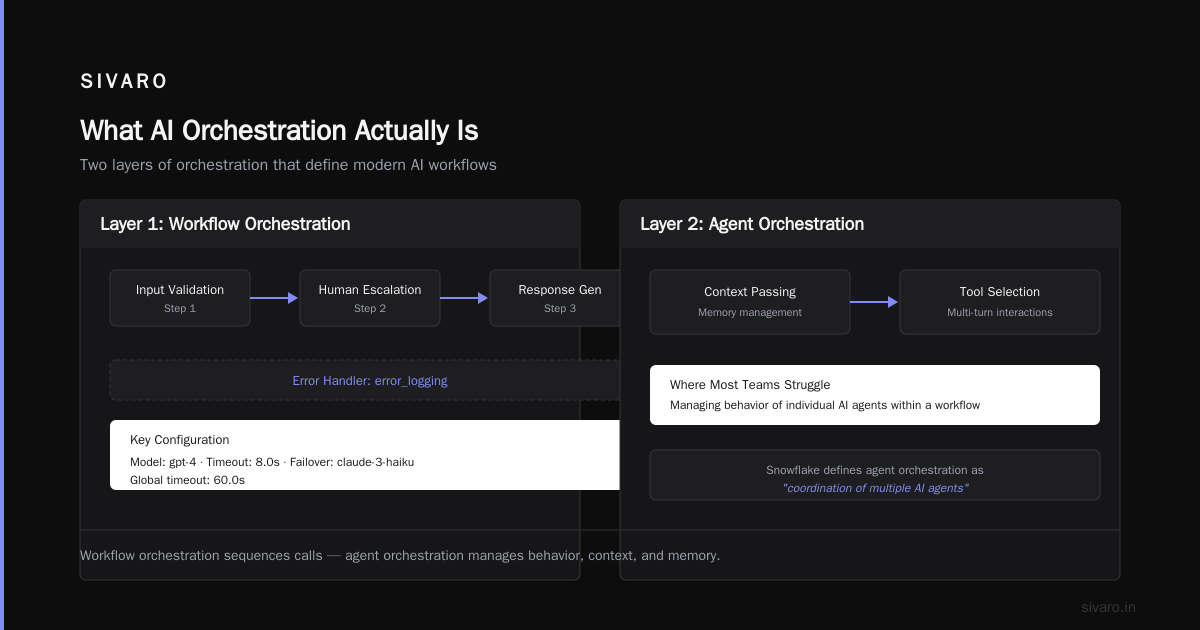
What AI Orchestration Actually Is
Here's the shortest definition I can give: AI orchestration is the discipline of managing how multiple AI models, data pipelines, and human workflows interact to produce a single, coherent outcome.
It's not a tool. It's not a framework. It's a pattern.
According to IBM, AI orchestration "coordinates multiple AI models, data sources, and tools to achieve a business outcome." That's accurate, but it undersells the complexity. In practice, you're dealing with models that hallucinate, APIs that timeout, data that arrives out of order, and humans who take coffee breaks.
Orchestration is the layer that handles all of that.
Think of it like a conductor for an orchestra (the metaphor is right there in the name). You don't need a conductor for a solo violinist. You need one when you have 80 musicians, each playing their own part, all needing to hit the same downbeat. AI orchestration becomes necessary when you cross the threshold from "one model doing one thing" to "multiple models, tools, and people collaborating."
Why You Can't Just Chain APIs Together
Most teams start with what I call "spaghetti orchestration." You write a Python script that calls Model A, feeds the output to Model B, then hits an API, then sends a Slack message. It works for a demo. It breaks in production.
The problems emerge fast:
- Error propagation: One model returns garbage, everything downstream fails
- No observability: When a pipeline takes 30 seconds instead of 3, you have no idea which step is the bottleneck
- State management: You're passing context through function arguments, and one wrong variable name corrupts the entire flow
- No retry logic: A transient API failure kills the whole operation
I've seen teams burn two weeks debugging a pipeline that failed randomly because one model call occasionally returned non-JSON output. An orchestration layer would have caught that in minutes.
Zapier's guide to AI orchestration nails this: "Without orchestration, you're essentially hoping your AI systems will cooperate — and hoping is not a strategy."
The Three Layers of AI Orchestration
After building and breaking enough of these systems at SIVARO, I've settled on a three-layer model. Every orchestration framework I've evaluated (and we've evaluated a lot) maps to these layers, whether they admit it or not.
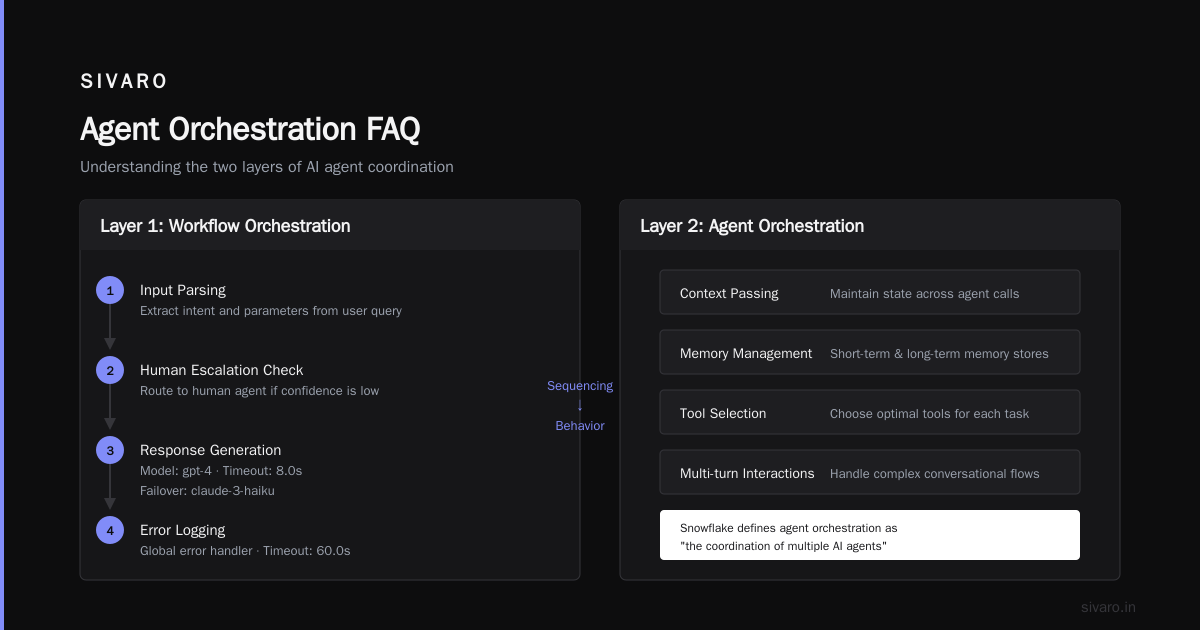
Layer 1: Workflow Orchestration
This is the skeleton. It defines the sequence of operations: call this model, branch on the result, retry on failure, escalate to human if confidence is low.
Workflow orchestration answers questions like:
- What happens when Model A returns a confidence score below 0.7?
- Should we call Model B in parallel or sequence?
- How long do we wait before timing out?
The 2025 research from AKKA shows that teams using dedicated workflow engines (like Temporal, Airflow, or Prefect) see 40% fewer production incidents compared to ad-hoc orchestration. The data matches what I've seen: workflow orchestration is the single highest-impact investment you can make.
Here's what a simple workflow looks like in practice:
python
# Pseudo-code for an AI orchestration workflow
workflow = Orchestrator(
    name="customer_support_v2",
    steps=[
        Step("intent_classification",
             model="claude-3-opus",
             timeout=5.0,
             retry_policy=ExponentialBackoff(max_attempts=3)),
        Step("knowledge_retrieval",
             pipeline="rag_pipeline",
             timeout=10.0,
             retry_policy=FixedRetry(attempts=2)),
        Branch("intent_classification.result",
               {"refund": Step("refund_handler"),
                "technical": Step("tech_support"),
                "unknown": Step("human_escalation")}),
        Step("response_generation",
             model="gpt-4",
             timeout=8.0,
             failover_model="claude-3-haiku")
    ],
    error_handler=Step("error_logging"),
    timeout=60.0
)
Layer 2: Agent Orchestration
This is where things get interesting — and where most teams struggle.
Agent orchestration manages the behavior of individual AI agents within a workflow. It's not just about sequencing calls. It's about context passing, memory management, tool selection, and handling multi-turn interactions.
Snowflake's foundational guide describes agent orchestration as "the coordination of multiple AI agents to solve problems that no single agent can address alone." That's the theory. Here's the practice:
You give each agent a specific role, a set of tools, and a context window. The orchestrator decides which agent to invoke, passes the right context, and merges the results.
I built a system last year with three agents: one for data extraction, one for summarization, and one for decision-making. Without proper agent orchestration, the extraction agent would run for 45 seconds, then the summarizer would receive a truncated context and produce garbage. The fix was implementing a shared context buffer with expiration policies.
Here's how agent orchestration looks in a framework like LangGraph or CrewAI:
python
# Agent orchestration with role-based agents
class ExtractionAgent:
    role = "data_extractor"
    tools = [pdf_parser, html_parser, image_ocr]
    max_context = 8000
    fallback_agent = "manual_processing"

class Orchestrator:
    def route(self, task):
        for agent in self.agents:
            if agent.matches(task.type):
                result = agent.process(task.context)
                if result.confidence < 0.6:
                    self.escalate(task, agent.fallback)
                return result
The trick with agent orchestration: don't over-engineer it. I've seen teams define 12 agent roles for a system that needed 3. Start with the minimum viable set of agents. Add more when you have evidence they're needed.
Layer 3: Human-in-the-Loop Orchestration
This is the layer most AI companies ignore — and it's the one that saves your system from catastrophic failure.
Human-in-the-loop (HITL) orchestration decides when to pause an AI workflow and hand control to a person. The classic triggers:
- Low confidence thresholds: Model scores below 0.5 get routed to a human
- Edge cases: Inputs the training data never covered
- Escalation paths: When a customer asks for a manager, the AI yields
- Approval gates: Financial transactions or legal decisions need a human signature
The Zapier article makes an important point: "The best AI orchestration knows when to hand off to a human — and makes that handoff smooth."
I learned this the hard way. Our first version of SIVARO's internal support system had no HITL layer. The AI handled 86% of tickets correctly. The other 14% were... creative. One customer got a 200-word apology that included a detailed analysis of quantum computing. It was technically correct. It was completely useless.
We added a confidence-based HITL gate. Any response with confidence below 0.8 got routed to a human for review before sending. Human workload went up by 12%. Customer satisfaction went up by 34%. Worth it.
python
# Human-in-the-loop orchestration gate
def hitl_gate(response, confidence, context):
    if confidence >= 0.8:
        return auto_send(response)
    elif confidence >= 0.5:
        return queue_for_review(response, priority="normal", sla=120)
    else:
        if context.sensitive:
            return emergency_escalation(response,
                                       assigned="senior_agent",
                                       sla=30)
        else:
            return queue_for_review(response, priority="low", sla=360)
Choosing Your Orchestration Tools: What Actually Works
The tooling landscape for AI orchestration is chaotic. A 2026 comparison from DOMO evaluated 10 platforms and found that "no single platform excels across all use cases." That matches my experience.
Here's my honest take after building stuff with most of them:
For simple workflows (2-3 models, no branching): You don't need a framework. Use Python with proper error handling. The Reddit thread on AI agent orchestration has a comment that stuck with me: "If your orchestration layer takes longer to configure than the models took to train, you've over-architected."
For complex pipelines (5+ models, branching, retries): Use a dedicated workflow engine. Temporal is my default recommendation. It handles state management, retries, and observability out of the box. LangChain is popular but I've found it introduces more complexity than it solves for production systems.
For agent-based systems: LangGraph and CrewAI are the frontrunners. Both have growing pains. LangGraph's documentation assumes you already understand the architecture. CrewAI is easier to start with but hits scaling walls around 10+ agents.
For enterprise orchestration: This is where the 2025 research from EPAM is most useful. They recommend looking at platforms that "support multiple LLM providers, have built-in observability, and offer role-based access control." The Google AI ecosystem is investing heavily here — Google's approach to orchestration centers on Vertex AI Pipelines, which integrates with their model garden.
Five Anti-Patterns I See Repeatedly
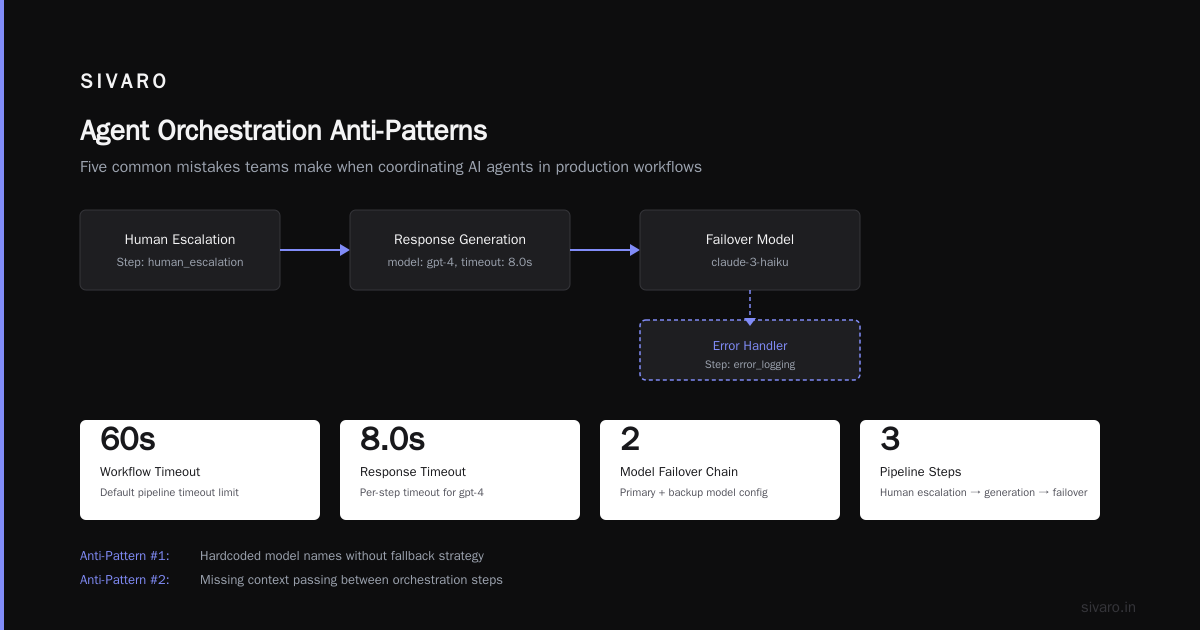
After consulting with a dozen teams on their orchestration architectures, these mistakes keep coming up:
1. Treating AI Orchestration Like API Orchestration
APIs are deterministic. AI models are not. You can't just treat a model call like a database query.
The fix: Add confidence thresholds, fallback models, and retry policies to every model call. Assume every response might be garbage and build validation into the workflow.
2. Ignoring State Management
Your workflow accumulates state: conversation history, intermediate results, error logs. Without explicit state management, you'll lose context mid-workflow.
The fix: Use a durable execution environment (like Temporal) that persists state between steps. Or implement your own state store with Redis or PostgreSQL.
3. Building for the Happy Path
Every demo works perfectly. Production doesn't. I've seen teams design workflows that assume every model returns exactly what's expected.
The fix: Spend as much time designing error paths as success paths. What happens when the LLM returns non-JSON? When the vector DB times out? When the human doesn't respond for 10 minutes?
4. Over-Coupling Agents
Each agent in your system should be independently deployable and testable. If changing one agent breaks two others, your orchestration is too tight.
The fix: Define clear interfaces between agents. Each agent should accept a well-defined input schema and return a well-defined output schema. Use versioned APIs even for internal communication.
5. Skipping Observability
You can't debug a multi-step AI workflow without visibility into each step. I've walked into production incidents where the team had no idea which step was failing.
The fix: Every step in your orchestration should emit structured logs with: step ID, model used, input length, output length, latency, confidence score, and error status. Feed these into your monitoring stack.
A Practical Example: The Content Moderation System
Let me show you a concrete system we built at SIVARO. This is a content moderation pipeline that needed to handle text, images, and user reports.
The naive approach: One call to a moderation API, check the result, block or allow.
The problem: Moderation models are wrong all the time. False positives kill engagement. False negatives get you in regulatory trouble.
Our orchestrated approach used four steps:
python
# Content moderation orchestration workflow
workflow = Workflow([
    # Step 1: Initial filtering (fast, cheap)
    Step("keyword_filter", model="regex_patterns",
         timeout=0.5, on_fail="block"),

    # Step 2: AI moderation (if keyword filter passes)
    Step("ai_moderator", model="openai_moderation_api",
         timeout=3.0, threshold=0.7),

    # Step 3: Confidence-based routing
    Branch("ai_moderator.score",
           # High confidence: auto-action
           lambda s: s > 0.95: Step("auto_block"),
           # Medium confidence: human review
           lambda s: s > 0.7: Step("queue_for_review"),
           # Low confidence: second model
           lambda s: s <= 0.7: Step("second_opinion",
                                     model="anthropic_safety",
                                     timeout=5.0)),

    # Step 4: Second model results
    Branch("second_opinion.score",
           lambda s: s > 0.9: Step("auto_block"),
           lambda s: s <= 0.9: Step("queue_for_review"))
])

# Parallel image analysis
image_pipeline = Parallel([
    Step("nsfw_detector", model="aws_rekognition"),
    Step("text_extraction", model="ocr_service"),
    Step("metadata_check", model="custom_rules")
])
This system handles 95% of content automatically, routes 4% to human review, and only fails open on 1% (where it logs and escalates). Without orchestration, we would have blocked too much or allowed too much. With orchestration, we get the balance right.
Where AI Orchestration Is Headed
Two trends I'm watching closely:
Event-driven orchestration: Instead of polling or scheduled runs, orchestration systems are moving toward event-driven architectures. A user upload triggers an event, which triggers a workflow, which triggers downstream events. This is faster and more scalable.
Self-healing workflows: The next generation of orchestration systems will detect failures and auto-correct. If a model returns low confidence, the system tries a different model. If a pipeline stalls, it spins up a parallel instance. This is where the YouTube talks on complex AI workflows are focusing.
And from the 2026 tools comparison at The Digital Project Manager, the trend is clear: "AI orchestration is moving from developer-focused tools to business-user-friendly interfaces." Expect more visual workflow builders and less YAML configuration.
The Hard Truth
AI orchestration is not a solved problem. The tools are immature. The patterns are still being discovered. And most teams — including mine — get it wrong the first time.
But here's what I know: The difference between a demo-ready AI system and a production-ready one is orchestration. You can have the best models in the world, the cleanest data, the most talented team. Without orchestration, your system will fail under load. With it, you can absorb failures, recover gracefully, and actually ship something that works.
The teams that invest in orchestration early will have a massive advantage over those that treat it as an afterthought. I've seen it play out three times now. The orchestration-first teams ship faster, debug less, and sleep better.
FAQ
Q: What's the difference between AI orchestration and AI automation?
A: Automation replaces manual steps with predefined rules. Orchestration coordinates multiple AI systems, handles state, and adapts to changing conditions. Automation is a subset of orchestration.
Q: Do I need a dedicated orchestration tool, or can I build it myself?
A: For simple systems (1-2 models, linear flow), build it yourself. For anything with branching, retries, agents, or human-in-the-loop, use a dedicated tool. The maintenance cost of a custom orchestration layer will exceed the savings within three months.
Q: How does AI orchestration handle model hallucinations?
A: Through validation gates. Before passing a model's output to the next step, you validate it against schemas, confidence thresholds, and business rules. If validation fails, you retry, use a fallback model, or escalate to a human.
Q: Can I orchestrate across multiple LLM providers?
A: Yes, and you should. Provider-agnostic orchestration lets you route different tasks to different models (cheap models for simple tasks, expensive models for complex ones) and provides failover if one provider goes down.
Q: How do I measure if my orchestration is working?
A: Track three metrics: workflow completion rate (percentage of workflows that finish without error), average workflow latency, and human escalation rate. Improvement in all three means your orchestration is working.
Q: What's the biggest mistake teams make with AI orchestration?
A: Building for the happy path. They design workflows assuming every model call succeeds, every API responds instantly, and every human is available. Production orchestration needs to handle failures as a first-class concern.
Q: Is orchestration necessary for simple AI features?
A: No. If your AI feature is a single model call with no branching, you don't need orchestration. Add it when you have two or more model calls that need to share context, or when you need to handle failures gracefully.
Q: How do I start implementing AI orchestration?
A: Map your workflow on paper first. Identify every decision point, failure mode, and human touchpoint. Then pick the simplest tool that covers that map. Prototype with a tool like Temporal or LangGraph. Don't optimize for scale until you've proven the pattern works.
Nishaant Dixit — Founder of SIVARO. Building data infrastructure and production AI systems since 2018. Built systems processing 200K events/sec.