You’ve got a model that takes three weeks to train on a single A100. Your boss says “just add more GPUs.”
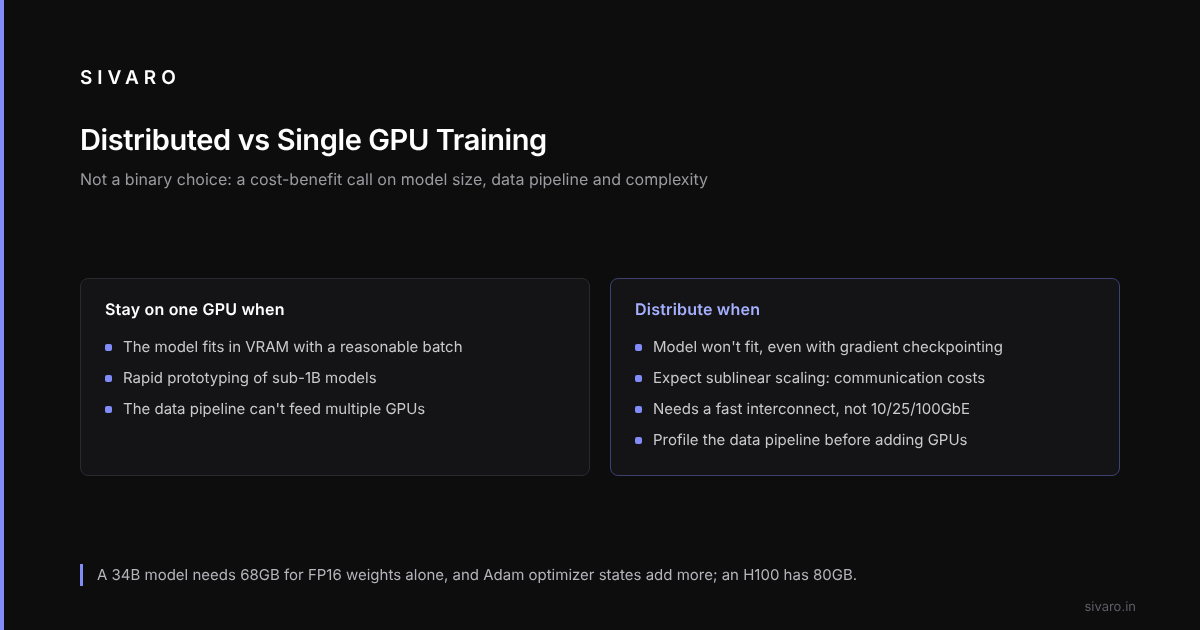
Here’s the truth nobody tells you: distributed GPU training vs single GPU isn’t a binary choice. It’s a cost-benefit calculation that depends on your model size, your data pipeline, and your tolerance for pain. Most people think “more GPUs = faster training.” They’re wrong. Because at some point, you’re not training — you’re debugging synchronization.
This guide covers when single GPU makes sense, when you need to scale, and how to not burn your budget on the cost of building a GPU cluster for machine learning that sits idle half the time, with code for each pattern.
Let’s get into it.
Single GPU Training: When It’s the Right Call
Single GPU training gets dismissed as amateur-hour stuff. That’s lazy thinking.
That’s the dirty secret: distributed training introduces overhead that can exceed the speedup if your model is small enough to fit in GPU memory.
When single GPU wins
- Model fits in VRAM with a reasonable batch size
- You’re doing rapid prototyping (sub-1B models)
- Your data pipeline can’t keep up with multi-GPU throughput
- You’re not paying for the GPU — cloud instances charge per GPU hour (and multi-GPU instances are way more expensive per GPU)
The real bottleneck nobody talks about
Data loading. Eight GPUs fed from a single NVMe drive starve, and a single GPU with a fast data pipeline and proper prefetching can outpace them.
Bottom line: If your model is < 7B parameters, you need a very good reason to go distributed.
When Single GPU Breaks
You can’t hide from scaling forever. The day comes when a single GPU can’t hold your model, even with gradient checkpointing and activation offloading.
Take a 34B parameter model. Model weights alone need 68GB (in FP16). Optimizer states in Adam add another 136GB. Total: 204GB. An H100 has 80GB.
Single GPU wasn’t just slow — it was impossible.
That’s when the question shifts from “should I use distributed training?” to “how do I make distributed training not suck?”
Distributed GPU Training: The Fundamentals
Distributed computing means splitting work across multiple machines (or GPUs) that coordinate via a network. In practice, for ML training, it’s almost always data parallelism or model parallelism — or some hybrid.
What is a distributed system? At its core, it’s a group of nodes that appear as a single system to the user. For GPU training, those nodes are GPUs sharing gradient information after each forward/backward pass.
Data Parallelism: The simplest scaling
You replicate the model on each GPU. Each GPU gets a different batch of data. After backward, you average the gradients across all GPUs. Then each GPU updates its copy.
This works great — until model size exceeds GPU memory. Then you need something else.
Model Parallelism: When the model doesn’t fit
You split the model layers across GPUs. GPU 0 has layers 1-4, GPU 1 has layers 5-8, etc. Training is sequential — GPU 0 computes, sends activations to GPU 1, waits, gets gradients back.
The cost is the pipeline bubble: idle time while each stage waits for the others.
Distributed Data Parallelism (DDP) vs Fully Sharded Data Parallelism (FSDP)
DDP is the classic approach. Each GPU holds the full model. Only gradients are synced.
FSDP shards the model parameters, gradients, and optimizer states across GPUs. At each layer, you all-gather the parameters, compute forward, then throw them away. This reduces memory per GPU dramatically.
A common split: FSDP for models > 13B, DDP with gradient accumulation for smaller models.
The communication nightmare
The hidden variable in distributed GPU training vs single GPU is network bandwidth. All-reduce for gradient sync can saturate NVLink (900 GB/s on H100) but on InfiniBand or Ethernet across nodes, you’re limited to 200-400 Gbps. That’s an order of magnitude slower.
If your cluster is on Ethernet, don’t expect linear scaling.
Cost of Building a GPU Cluster for Machine Learning
This is where the spreadsheet meets reality.
Cost of building a GPU cluster for machine learning varies wildly.
Most companies lease rather than buy. A 16-GPU H100 cluster on AWS p5.48xlarge costs $96 per GPU hour. That’s $1,536 per hour. Train a 70B model for 30 days? You’re looking at $1.1M.
Compare to a single H100 instance: $12 per GPU hour. Prototyping costs drop 8x.
The calculus shifts dramatically if you own the hardware. At scale, owning is cheaper — but only if utilization exceeds 60%. A cluster that runs at low utilization because data loading can’t keep up burns money.
Recommendation for 2026
- Under 10 GPUs: cloud spot instances. Don’t buy hardware.
- 10-100 GPUs: consider a dedicated cluster if you have predictable training runs.
- Over 100 GPUs: you’re probably a hyperscaler. You know more than me.
Best GPU Cluster Configuration for LLM Training
What’s the best GPU cluster configuration for LLM training? There isn’t a single answer, but here’s a reasonable starting point.
Node-Level Design
Each node should have 8 GPUs connected via NVLink (fourth-gen for H100, fifth-gen for B200 that started shipping late 2025). GPUs should share a common memory pool — this enables zero-copy kernel launches.
4-GPU nodes save money up front, but cross-node communication overhead can cancel the savings. 8 GPUs per node is the usual sweet spot for LLM training.
Network
InfiniBand NDR400 (400 Gbps) per port. Minimum 4 ports per node with adaptive routing. If your cluster is >64 GPUs, use a dragonfly topology, not fat-tree.
Don’t use Ethernet for LLM training. Period.
Storage
Parallel file system like Lustre or GPUDirect Storage (GDS). Without fast storage, GPUs sit idle waiting for data.
Specific config
- 16 nodes × 8 H200 GPUs = 128 GPUs
- H200 (141GB HBM3e, 3.35 TB/s bandwidth)
- NDR400 InfiniBand with dragonfly
- 200TB Lustre at 100 GB/s
- Cost: ~$3.2M capex or $28K/day cloud equivalent
The Practical Guide: Distributed Training in Code
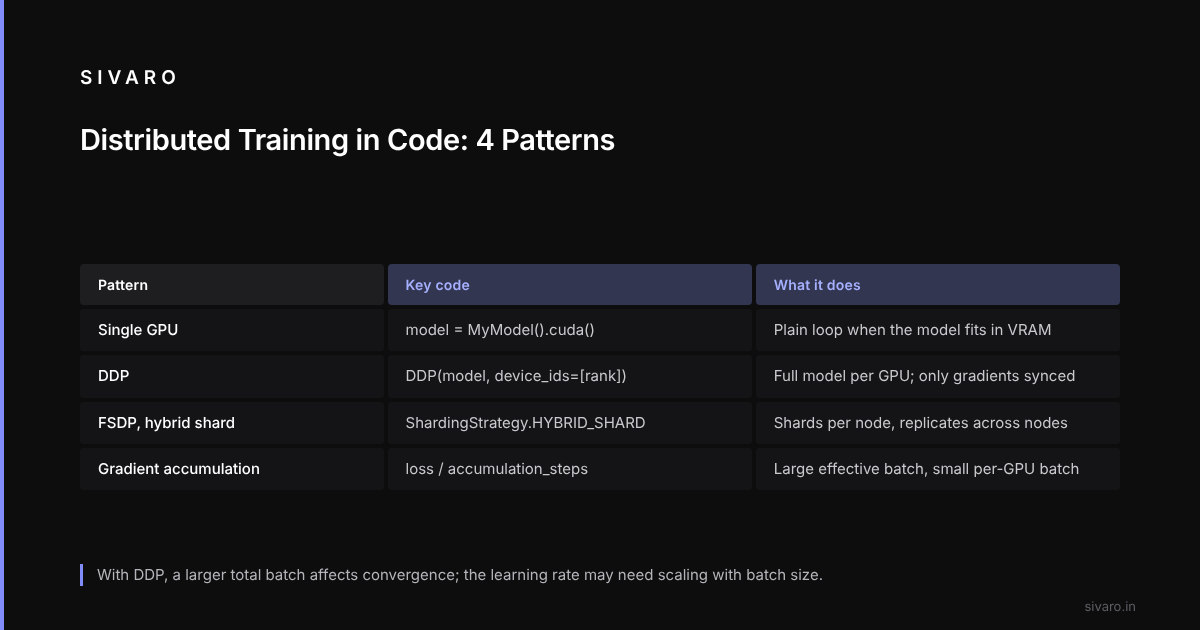
Theory is useless without hands-on. Here are the common patterns.
Single GPU training (PyTorch)
import torch
import torch.nn as nn

model = MyModel().cuda()
optimizer = torch.optim.Adam(model.parameters(), lr=3e-4)

for data, labels in train_loader:
    data, labels = data.cuda(), labels.cuda()
    optimizer.zero_grad()
    outputs = model(data)
    loss = criterion(outputs, labels)
    loss.backward()
    optimizer.step()
That’s it. Simple. Works for models up to 7B with gradient checkpointing.
DDP — Distributed Data Parallel
import torch.distributed as dist
from torch.nn.parallel import DistributedDataParallel as DDP

dist.init_process_group(backend='nccl')
rank = dist.get_rank()
torch.cuda.set_device(rank)

model = MyModel().cuda(rank)
ddp_model = DDP(model, device_ids=[rank])

for data, labels in train_loader:
    data, labels = data.cuda(rank), labels.cuda(rank)
    optimizer.zero_grad()
    outputs = ddp_model(data)
    loss = criterion(outputs, labels)
    loss.backward()
    optimizer.step()
Note: batch size per GPU should be scaled up by number of GPUs. But watch out — total batch size affects convergence. You may need to adjust learning rate linearly with batch size.
FSDP with sharding
from torch.distributed.fsdp import FullyShardedDataParallel as FSDP
from torch.distributed.fsdp import ShardingStrategy

model = MyModel().cuda(rank)
fsdp_model = FSDP(
    model,
    sharding_strategy=ShardingStrategy.HYBRID_SHARD,
    device_id=rank
)

# Training loop identical to DDP
# Memory usage drops ~4x on 8 GPUs
HYBRID_SHARD suits 4-16 GPUs. Fully sharding parameters across all GPUs can cause excessive all-gather overhead. Hybrid shards within node (NVLink fast) and replicates across nodes.
Gradient accumulation for high batch size
accumulation_steps = 4
scaler = torch.cuda.amp.GradScaler()  # Mixed precision

for i, (data, labels) in enumerate(train_loader):
    data, labels = data.cuda(), labels.cuda()
    with torch.cuda.amp.autocast():
        outputs = model(data)
        loss = criterion(outputs, labels) / accumulation_steps
    scaler.scale(loss).backward()

    if (i + 1) % accumulation_steps == 0:
        scaler.step(optimizer)
        scaler.update()
        optimizer.zero_grad()
This keeps per-GPU batch size low (fits in memory) while achieving large effective batch size.
The Hard Lessons
Lesson 1: Scaling isn’t linear
Marketing claims say “8x GPUs = 8x speedup.” That’s fantasy.
The gap grows because of communication overhead and load imbalance.
The solution: Overlap computation and communication. Use gradient compression (top-k sparsification) for large clusters.
Lesson 2: Your data pipeline is your bottleneck
A starved data loader looks like a network problem: GPU utilization stays low while CPU preprocessing is maxed out.
Moving preprocessing to the GPU, for example with Nvidia DALI, fixes this.
Never scale compute without scaling data.
Lesson 3: Mixed precision saves your budget
FP16 vs FP32 vs BF16 — the choice changes your memory footprint by 2x. For LLM training, BF16 is the usual choice. FP16 is a mess (gradient underflow). FP32 is wasteful.
With BF16, you fit a 70B model on 8 H100s with FSDP. Without it, you need 16 GPUs.
Lesson 4: Checkpointing kills throughput
Every time you save a checkpoint, the world stalls. Writing 200GB to disk on 16 nodes takes 2-5 minutes on shared storage. That’s 2-5 minutes of idle GPUs.
Saving every 1000 steps in a 100K-step run means 100 saves; at 3 minutes each, that’s 5 hours of idle time. On a 128-GPU cluster, that’s 640 GPU-hours of waste.
Fix: Use async checkpointing, so checkpoint writes happen in the background while training continues.
Distributed GPU Training vs Single GPU: Decision Framework
When you’re deciding, stop asking “which is faster?” Ask:
-
Can the model fit on one GPU?
Compute memory needed = (parameter count × bytes per param × 3) for Adam optimizer. If it fits with batch size 16+, start with single GPU. -
How fast is my data pipeline?
Profiletorch.utils.bottleneckor use Nvidia Nsight. If GPU utilization is below 80%, your bottleneck isn’t compute. Fix data first. -
What’s my tolerance for complexity?
Distributed training introduces failure modes: one GPU crashes, all 32 GPUs halt. Restarting a 64-GPU job costs hours. If you can’t handle that, stay single GPU longer. -
Am I building the product or training once?
For a single training run, cloud single-GPU is fine. If you’re iterating daily, invest in a distributed cluster — the speedup compounds across 100+ experiments. -
Do I need to pay engineers to maintain the cluster?
This is the hidden cost. The cost of building a GPU cluster for machine learning isn’t just hardware — it’s the ops team. A single engineer can manage 16 GPUs. Beyond that, you need dedicated DevOps.
The Future: What’s Changing in 2026
Three things are shifting the equation.
First, H200 and B200 GPUs with 141GB and 192GB HBM respectively make single-GPU training possible for models up to 30B parameters. That’s a huge shift. Many companies that bought A100 clusters now realize they could have done it on fewer H200s.
Second, Nvidia’s GB200 (Grace Blackwell superchip) integrates CPU and GPU with NVLink-C2C. This eliminates the CPU bottleneck in data loading. Early benchmarks show 1.5x improvement over H100 clusters of the same size.
Third, new communication libraries like NCCL 2.22 with adaptive routing and congestion control reduce synchronization overhead.
But the fundamentals remain. Distributed system architecture hasn’t changed: it’s still about managing state, bandwidth, and failure. The Splunk guide on distributed systems explains the theory — shared nothing, message passing. GPU training is just a special case.
FAQ
Q: Is distributed GPU training always faster than single GPU?
No. For small models (under 7B params) and poor data pipelines, single GPU can be faster. In some cases 8 GPUs are slower than 1 GPU because of overhead.
Q: What’s the minimum model size to benefit from distributed training?
About 7B parameters in 2025/2026. Below that, the communication overhead dwarfs the compute savings. With H200, you can train 13B on a single GPU.
Q: How many GPUs do I need to train Llama-3 70B?
With FSDP and BF16, you need 8 H100s minimum. For reasonable throughput (batch size 32 per GPU), 16-32 GPUs. For pretraining from scratch, 128+ GPUs.
Q: What’s the biggest mistake in distributed GPU training?
Not profiling the data pipeline first. Most teams scale compute before scaling storage and network. It’s like putting a Ferrari engine in a go-kart — looks fast, goes nowhere.
Q: Can I use Ethernet for distributed training?
Technically yes, practically no. For models > 13B, gradient sync across 10/25/100GbE will kill throughput. Use InfiniBand or NVLink. The Strapi article on distributed systems explains why network latency matters for tightly coupled systems.
Q: How do I choose between DDP and FSDP?
If model fits in a single GPU (with batch size 1): DDP. If it doesn’t fit: FSDP with hybrid shard. A common split: DDP up to 7B, FSDP above that.
Q: Should I use gradient checkpointing with distributed training?
Yes, always. Gradient checkpointing trades compute for memory — you recompute activations during backward. It reduces memory usage by 30-50%. Combined with FSDP, it lets you fit larger models on fewer GPUs.
Q: How do I handle stragglers in a distributed cluster?
Stragglers (slow GPUs due to thermal throttling, CPU interference, or network congestion) kill all speedup. Use dynamic load balancing: assign variable batch sizes per GPU based on historical throughput.
Conclusion
So which wins, distributed GPU training vs single GPU?
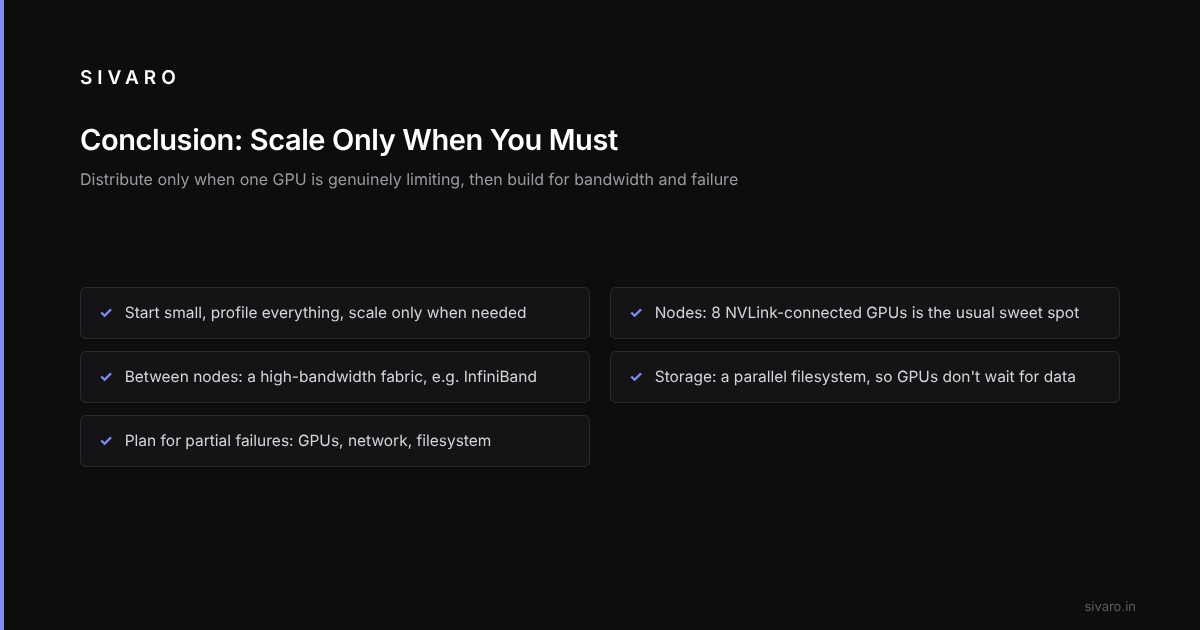
It depends. But here’s a rule of thumb: if your model can fit on one GPU with batch size 16+, don’t distribute. If it can’t, distribute but expect only 60-80% scaling efficiency. Budget accordingly.
The best GPU cluster configuration for LLM training in 2026 is 8x H200s per node with InfiniBand NDR400 and a parallel filesystem. Aim for 64-128 GPUs for serious pretraining. Skip Ethernet. Skip low-bandwidth storage.
And remember: every distributed system is held together by duct tape and logging. As the Wikipedia article on distributed computing says, “distributed systems must deal with partial failures.” Your GPUs will fail mid-training. Your network will drop packets. Your filesystem will run out of inodes. Plan for that.
Start small. Profile everything. Scale only when single-GPU is genuinely limiting.
That’s the honest truth.