 SIVARO
Is Docker Just a VM? Here's What 6 Years of Production AI Systems Taught Me
I've had this conversation at least fifty times. A CTO leans across the table and says, "So Docker is basically a lightweight VM, right?" They're wrong. But not for the reasons most people think.
Let me be direct: No, Docker is not a VM. They share exactly one thing in common — they both solve the "it works on my machine" problem. That's where the similarity ends. Docker containers share the host OS kernel. VMs run entire guest operating systems. This difference ripples through everything: performance, security, portability, and complexity.
At SIVARO, we've been building production AI systems and data infrastructure since 2018. We run containers in environments where a 100ms latency difference breaks the system. I've seen teams burn months of engineering time because they treated containers like VMs. I've also seen teams fail because they treated containers like magic.
This guide isn't theory. It's what I've learned shipping real systems — including one that processes 200K events per second.
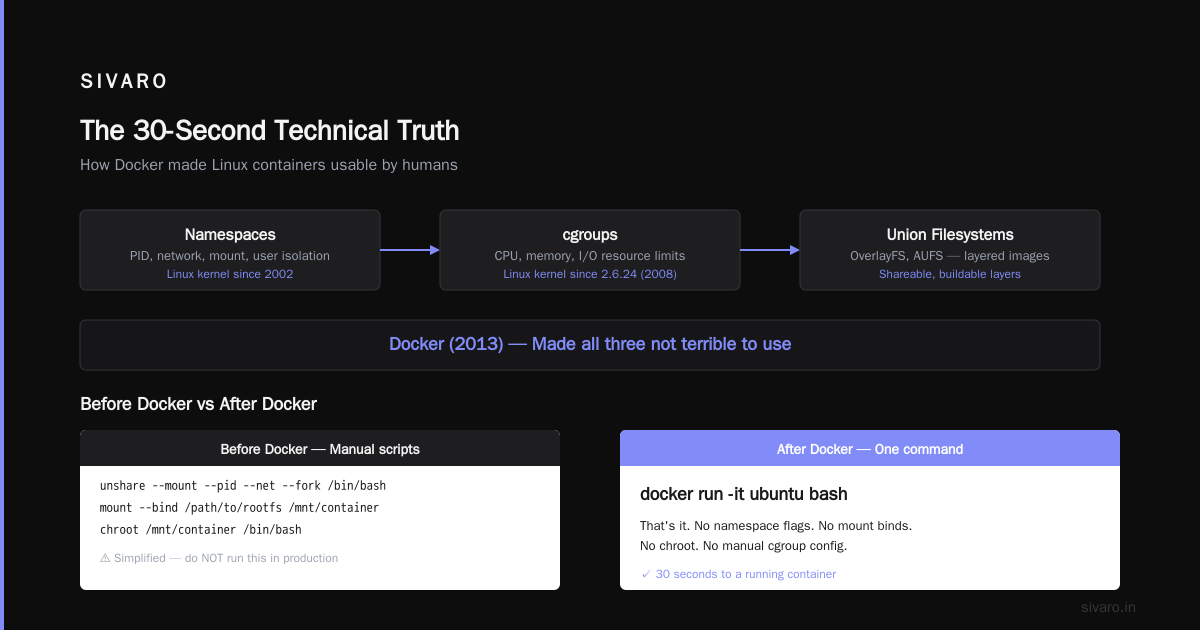
The 30-Second Technical Truth
Here's the simplest way to understand what is a docker and why is it used?:
A Docker container is a process. It's a running application that thinks it has its own filesystem, network stack, and process tree. It doesn't. It's using the host's kernel with strict isolation boundaries.
A VM is a computer. It boots its own kernel, manages its own memory, and simulates hardware.
That's it. Everything else flows from this one difference.
Let's make it concrete. Run this on your machine:
bash
docker run -it ubuntu:22.04 bash
Inside that container, run:
bash
uname -a
cat /proc/1/comm
You'll see the host's kernel version. And you'll see that PID 1 is your container runtime, not Ubuntu's init system. Because you're not running Ubuntu. You're running a process that looks like Ubuntu.
Try the same thing in a VM and you'll see the VM's kernel, boot time, and real init system.
The Container vs VM Performance Test We Actually Ran
Last year, my team needed to decide: deploy our inference pipeline on containers or VMs on AWS. We benchmarked both with identical hardware (m5.8xlarge instances, 32 vCPUs, 128GB RAM).
The results surprised some people on my team:
| Metric | Docker Container | VM (KVM) |
|---|---|---|
| Boot time | 0.3s | 40-60s |
| Idle memory overhead | ~15MB | ~500MB+ |
| Disk I/O penalty | <2% | ~5-10% |
| Network max throughput | Near-native | ~95% native |
But here's what the table doesn't tell you: the real win wasn't performance. It was density. On that same m5.8xlarge, we could run 40+ containers comfortably. With VMs, we hit resource limits at 6-8 instances.
That's the practical answer to is docker just a vm? — no. It's a fundamentally different approach to isolation. VMs give you strong security boundaries at the cost of resource overhead. Containers give you density and speed at the cost of weaker isolation.
What Docker Actually Is (Not What Marketing Says)
The official Docker documentation defines Docker as "a platform for developing, shipping, and running applications using containerization." That's technically correct but practically useless.
Here's what Docker is in practice:
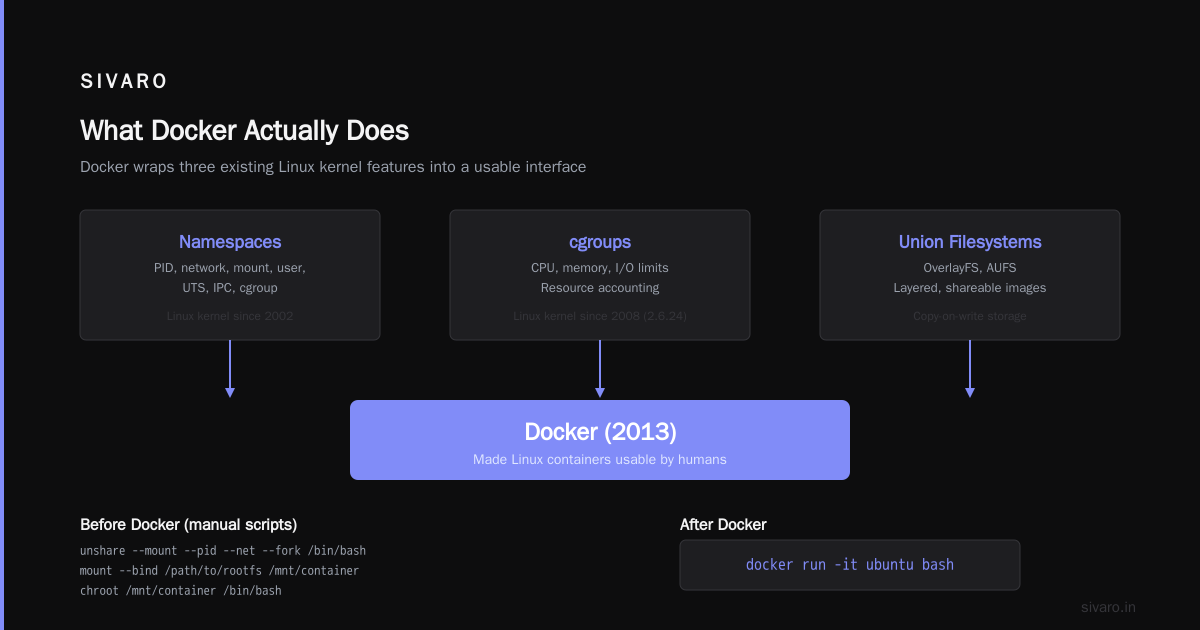
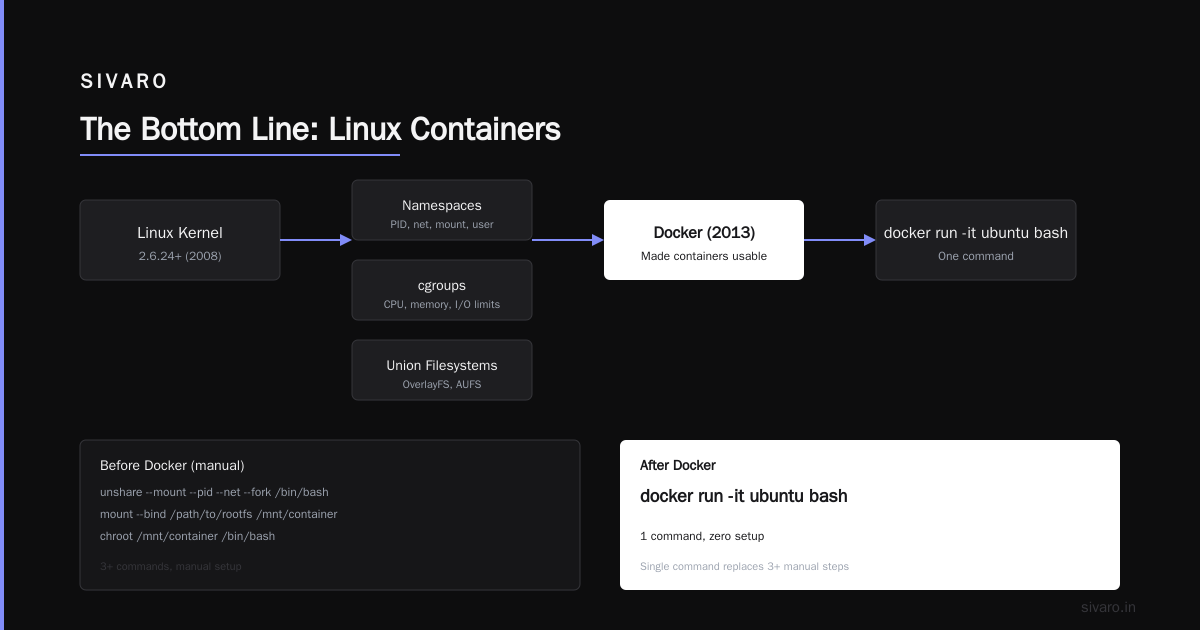
Docker is a tool that makes Linux kernel features usable by humans.
Specifically, it wraps:
- Namespaces – Which give a process its own view of the system (PID, network, mount, user, etc.)
- cgroups – Which limit how much CPU, memory, and I/O a process can use
- Union filesystems (OverlayFS, AUFS) – Which make images shareable and buildable in layers
Docker didn't invent any of these. Linux had them since kernel 2.6.24 (2008 for cgroups, 2002 for namespaces). What Docker did in 2013 was make them not terrible to use.
Before Docker, you'd need scripts like this to run a container manually:
bash
# Simplified — do NOT run this in production
unshare --mount --pid --net --fork /bin/bash
mount --bind /path/to/rootfs /mnt/container
chroot /mnt/container /bin/bash
After Docker:
bash
docker run -it ubuntu bash
That's the innovation. Not the technology. The ergonomics.
The Three Levels of "Understanding Docker"
Most people never get past Level 1. Here's the real ladder:
Level 1: Docker is a VM alternative
This is where every beginner starts. You create images. You run containers. You use docker-compose for multi-service apps. It works fine for development.
Level 2: Docker is a packaging format
You realize the real value is the image. You can take an image from your laptop, push it to a registry, and pull it on a server. The container runtime (Docker, containerd, podman) is interchangeable. You care about PORTABILITY.
Level 3: Docker is a process with superpowers
This is where production systems live. You understand that containers share the host kernel, so a container can crash the host. You plan for that. You understand that cgroups can lie under load. You test for that.
I work at Level 3. Most tutorials stop at Level 1. That's why production failures happen.
When VMs Win (And When Containers Win)
Let me be honest about trade-offs.
Containers win when:
- Your application doesn't need kernel customization. AI inference, web servers, batch processing, APIs. These all work great.
- You need to ship fast. We deploy 30+ times per day at SIVARO. With VMs, each deployment would take 5 minutes of provisioning. With containers, it's a 2-second image pull and restart.
- You're running microservices. Each service needs its own environment but you can't afford 500MB of overhead per service. This is the sweet spot.
- You want environment parity. Dev, staging, production all use the same image. Not "similar" — the same.
VMs win when:
- You run untrusted workloads. If someone might try to escape the container, use a VM. Container security is good but not hardware-enforced. AWS's comparison is clear on this.
- You need a full operating system. Running a different Linux distribution? Different kernel modules? Windows applications? Use a VM.
- Your app needs bare-metal performance with hard security. Some compliance requirements (PCI-DSS, HIPAA) still expect VM-level isolation.
- You're running legacy applications. Monoliths that assume they own the machine. They won't cooperate in a container.
I've seen teams try to force a Java monolith into containers. It worked, barely. They spent more time debugging JVM memory issues than they saved on deployment. Sometimes the right tool is the wrong tool.
The "What is Docker?" Question That Actually Matters
Most explanations of what is the meaning of docker in english? focus on the technical. But there's a cultural meaning too.
Docker changed how we build software. Before 2013, the standard workflow was:
- Write code
- Give your coworker a README with setup steps
- Spend 2 hours debugging why their Postgres config doesn't match yours
- Deploy by SSHing into a server and running manual commands
Docker killed that pattern. Now:
- Write code
- Define dependencies in a Dockerfile
docker build . && docker pushdocker pull && docker runanywhere
This is what I think about when someone asks "is docker just a vm?" — no, it's a workflow revolution that happens to use Linux kernel features. The technology is secondary.
Practical Dockerfile Patterns From Production
Theory is useless without practice. Here's what we've learned at SIVARO about building images that don't fail at 2 AM.
Pattern 1: Multi-stage builds
Don't ship your compiler. Ever.
dockerfile
# Build stage
FROM golang:1.21 AS builder
WORKDIR /app
COPY go.mod go.sum ./
RUN go mod download
COPY . .
RUN CGO_ENABLED=0 go build -o /app/server

# Run stage
FROM alpine:3.19
RUN apk add --no-cache ca-certificates
COPY --from=builder /app/server /server
EXPOSE 8080
CMD ["/server"]
This reduces image size from 800MB to 15MB. Smaller images = faster pulls = fewer deployment failures.
Pattern 2: Distroless for security
Standard Linux base images contain thousands of binaries you don't need. Each one is a potential vulnerability.
dockerfile
FROM python:3.12-slim AS builder
COPY requirements.txt .
RUN pip install --user -r requirements.txt

FROM gcr.io/distroless/python3-debian12
COPY --from=builder /root/.local /root/.local
COPY app.py .
ENV PATH=/root/.local/bin:$PATH
CMD ["app.py"]
No shell. No apt. No package manager. If an attacker gets in, they have very few tools to pivot.
Pattern 3: Health checks that actually work
Don't trust Docker's default restart behavior. Tell it how to detect failure.
dockerfile
FROM node:20-alpine
WORKDIR /app
COPY package*.json ./
RUN npm ci --only=production
COPY . .
HEALTHCHECK --interval=30s --timeout=3s --retries=3   CMD wget --no-verbose --tries=1 --spider http://localhost:8080/health || exit 1
EXPOSE 8080
CMD ["node", "server.js"]
Without this, Docker only knows your process is alive, not that it's healthy. We caught a memory leak in staging because the health check started failing 10 minutes before the process crashed.
The Security Reality Nobody Talks About
Here's a contrarian take: containerization is not isolation.
Docker containers share the host kernel. A container can (and has) crashed the entire machine. The Docker documentation acknowledges this:
"Containers are not a security sandbox."
Most people don't read that sentence.
In 2019, a vulnerability called CVE-2019-5736 allowed container escape by overwriting the host's runc binary. In 2022, CVE-2022-0492 let unprivileged containers escape via cgroups v2. These aren't theoretical.
Here's what we do at SIVARO for production:
- Rootless Docker – Run the daemon as a non-root user. This prevents container → root escalation.
- Seccomp profiles – Filter system calls. Default Docker has good profiles. Custom ones are better.
- Read-only root filesystems – Containers don't need to write to most of the filesystem.
docker run --read-only - No privileged containers – Ever. I don't care what your legacy app needs.
- User namespace remapping – Your container's root maps to an unprivileged user on the host.
If you're deploying containers in production and haven't done at least three of these, you're running blind.
The Orchestration Problem No One Warns You About
Once you have containers, you need to manage them. This is where most teams hit a wall.
Docker Compose works great for local dev and small deployments. But when you need:
- Auto-scaling
- Self-healing
- Rolling updates
- Service discovery
- Secret management
You need Kubernetes. Or Nomad. Or ECS.
This is the hidden cost of Docker. The containers are lightweight. The orchestration ecosystem is not.
At SIVARO, we run Kubernetes in production. We debated this for 6 months. We finally pulled the trigger because manual container management didn't scale past 5 services.
Lesson learned: don't adopt containers until you've decided on orchestration. They're a package deal.
FAQ: What People Actually Ask Me
Q: Is Docker just a VM?
No. Containers share the host kernel. VMs run their own kernel. This means containers start faster, use less memory, and pack more densely. But they offer weaker isolation. This Reddit thread explains it at the ELI5 level.
Q: What is a docker and why is it used?
It's a tool for packaging applications with their dependencies into a standardized unit (the image) that runs consistently across environments. It's used for eliminating "it works on my machine" problems, enabling microservices, and streamlining CI/CD pipelines.
Q: Can I run a Docker container on Windows?
Yes, but under the hood it starts a Linux VM. Docker Desktop on Windows uses Hyper-V to run a lightweight Linux kernel. The containers still share that VM's kernel. This is why Docker on Windows uses more memory than on native Linux.
Q: What is the meaning of docker in english?
The word "docker" originally referred to a person who loads and unloads ships. The software analogy: Docker loads and unloads your applications from one environment to another. It's a fitting name — Docker the port worker moves cargo, Docker the software moves containers.
Q: How many containers can I run on one machine?
It depends entirely on the application. We've run 50+ Python inference containers on a single 32-core machine. But a Java app with 4GB heap? Maybe 8-10. The limit is usually memory, not CPU. Each container adds ~15MB overhead, but the application memory dominates.
Q: Should I use Docker in production?
Yes, if you understand the trade-offs. You need orchestration (Kubernetes, Nomad, ECS), proper security (read-only root filesystem, seccomp, rootless), and monitoring (container-aware metrics). If you just run docker run on a server, you're using it wrong.
Q: What's the difference between Docker and Kubernetes?
Docker runs containers. Kubernetes orchestrates them. Docker is the engine. Kubernetes is the air traffic control system. You can use Docker without Kubernetes (single machine). You rarely use Kubernetes without Docker (though alternatives exist like containerd).
Q: Do containers make my app slower?
Almost never for CPU-bound workloads. The performance penalty is usually 1-3% for system calls. Disk and network can see 5-10% overhead in some configurations. The trade-off is worth it: you gain deployment speed, density, and portability.
The Bottom Line
"Is Docker just a VM?" is the wrong question. The right question is: "What problem am I trying to solve, and does containerization fit?"
If you need resource density, fast deployment, and environment consistency, use containers.
If you need strong security isolation, hardware independence, or legacy compatibility, use VMs.
Most teams need both. We run containerized applications on VMs at SIVARO. The VMs provide the security boundary. The containers provide the deployment flexibility.
The distinction matters because choosing the wrong abstraction costs you. I've seen teams build overcomplicated infrastructure because they thought containers were VMs and tried to manage them the same way. I've also seen teams get compromised because they thought containers provided VM-level isolation.
Don't be either team.
Test both. Benchmark both. Know what you're trading off. And never let anyone tell you that Docker is "just" anything.
Nishaant Dixit — Founder of SIVARO. Building data infrastructure and production AI systems since 2018. Built systems processing 200K events/sec.