 SIVARO

Run LLM Locally Debian Command Line: The Complete 2026 Guide
I deployed my first local LLM on Debian in early 2023. A quantized LLaMA 7B on a machine that cost less than my monitor. It hallucinated its way through a JSON schema, took 40 seconds per response, and I was hooked immediately.
Three years later, running models on your own hardware isn't a hobbyist novelty anymore. It's a production pattern. Regulation pressure (the EU AI Act enforcement wave that started hitting in August 2025), API costs that balloon the moment your token volume doubles, and inference stacks like llama.cpp and TensorRT-LLM that got genuinely fast — all of it pushed local inference into rooms where the CTO is watching.
Here's what this guide covers: how to run llm locally debian command line, which runtimes actually work on Debian without a fight, how tensorrt llm debian install differs from the CPU-first path, and the ugly parts nobody warns you about.
Let's get into it.
What "Running an LLM Locally" Actually Means
An LLM is just a file. A big, ugly, multi-gigabyte file full of floating point numbers. Running it locally means you load those weights into your own memory and execute the math on your own CPU or GPU. No API call leaves your machine. No per-token billing. No rate limit.
On Debian, "command line" is doing a lot of work in that sentence. You're not installing a GUI app. You're installing a runtime, downloading a model file, and invoking it with flags. That's it. The complexity is entirely in picking the right runtime and knowing which quantization level your hardware can survive.
Most people think you need an A100 to run anything useful. Wrong. A 7B model quantized to Q4_K_M runs on 8GB of RAM at 15-25 tokens/sec on a modern CPU. I've shipped that exact setup to a client in Pune running on a used Dell R730. It handles their internal document Q&A. Total hardware cost: under $400.
What you do need depends on what you're building. Chatbots and summarization? CPU is fine. High-throughput inference behind an API? You want a GPU, and you want TensorRT-LLM.
Why Debian Specifically
Debian 13 ("Trixie") shipped in August 2025 with a kernel that finally plays well with recent NVIDIA hardware without the dependency hell of Debian 12. That matters more than it sounds. For two years, the biggest friction point in tensorrt llm debian install was glibc and CUDA version mismatch — Debian stable lagged CUDA releases by months.
That gap has narrowed. Debian 13's glibc 2.41 works with CUDA 12.8 out of the box. You still can't apt install everything, but you're not compiling glibc from source like I did in 2024.
The other reason: Debian doesn't move under you. Running LLM inference means pinning specific library versions or you get silent numerical regressions. Ubuntu's faster release cadence broke my TensorRT setup twice in 18 months. Debian broke it zero times.
The Three Runtimes That Actually Matter on Debian
You'll see a dozen options in blog posts. Here's my honest take after testing most of them.
llama.cpp — the default choice
llama.cpp is what you reach for first. GGUF format, minimal dependencies, runs on CPU or GPU, and the project moves fast without breaking things constantly. Build takes about 6 minutes on a 16-core machine.
bash
sudo apt update
sudo apt install -y build-essential cmake git libcurl4-openssl-dev

git clone https://github.com/ggerganov/llama.cpp
cd llama.cpp

cmake -B build -DGGML_CUDA=ON -DCMAKE_BUILD_TYPE=Release
cmake --build build --config Release -j$(nproc)
Drop -DGGML_CUDA=ON if you're CPU-only. Then grab a model. I default to Meta's Llama 3.1 8B Instruct at Q4_K_M — it's the sweet spot of quality and size right now.
bash
mkdir -p ~/models && cd ~/models
wget https://huggingface.co/bartowski/Meta-Llama-3.1-8B-Instruct-GGUF/resolve/main/Meta-Llama-3.1-8B-Instruct-Q4_K_M.gguf
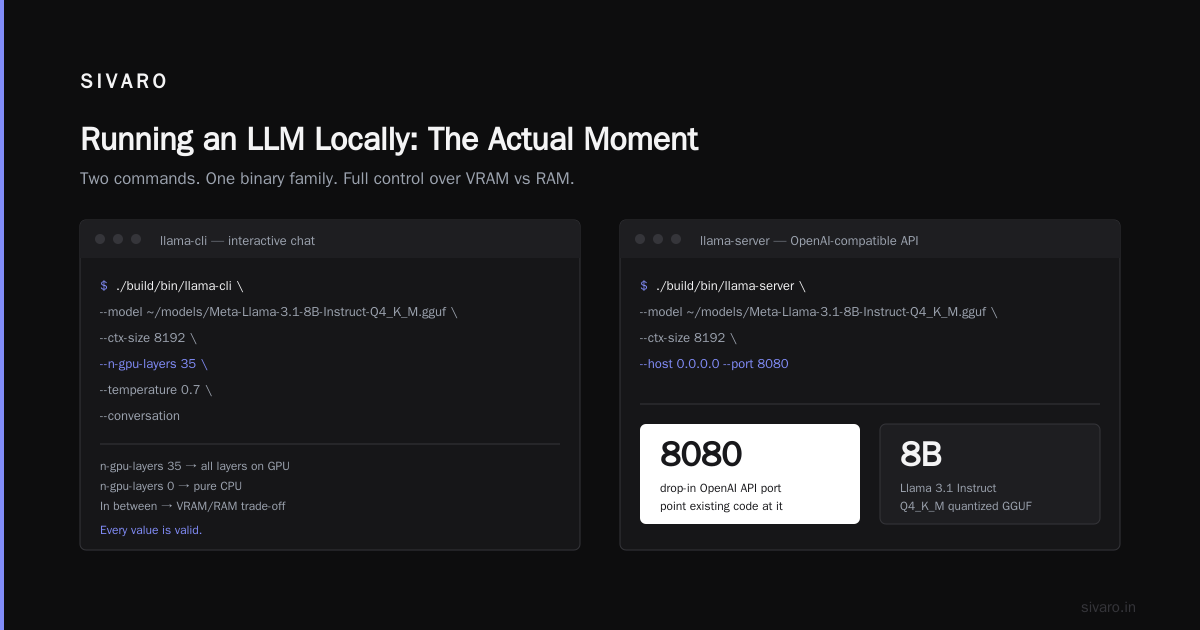
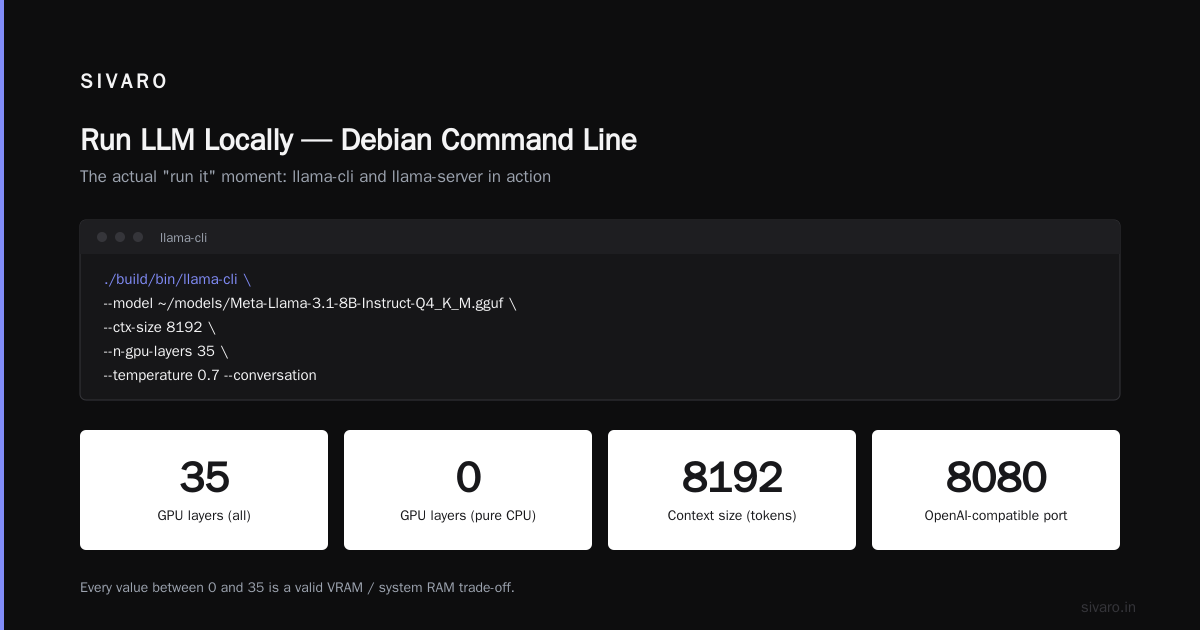
Now run it. This is the actual "run llm locally debian command line" moment:
bash
./build/bin/llama-cli \
  --model ~/models/Meta-Llama-3.1-8B-Instruct-Q4_K_M.gguf \
  --ctx-size 8192 \
  --n-gpu-layers 35 \
  --temperature 0.7 \
  --conversation
--n-gpu-layers 35 pushes all layers onto your GPU. Set it to 0 for pure CPU. Every number in between is a valid trade-off between VRAM and system RAM.
Want an OpenAI-compatible server? Same binary family:
bash
./build/bin/llama-server \
  --model ~/models/Meta-Llama-3.1-8B-Instruct-Q4_K_M.gguf \
  --ctx-size 8192 \
  --host 0.0.0.0 --port 8080
You now have a drop-in replacement for the OpenAI API on port 8080. Point your existing code at it with base_url="http://localhost:8080/v1". I've swapped this into client codebases in under five minutes.
vLLM — when throughput matters
vLLM shines when you're serving multiple concurrent requests. PagedAttention is its killer feature — it manages KV cache memory in blocks so you don't waste VRAM. Benchmarks from the vLLM team show 14-24x throughput versus naive Hugging Face transformers inference on identical hardware.
The catch: vLLM wants a GPU. A real one. It technically supports CPU but the performance is embarrassing. And installation on Debian is pickier.
bash
python3 -m venv ~/vllm-env && source ~/vllm-env/bin/activate
pip install vllm

vllm serve meta-llama/Meta-Llama-3.1-8B-Instruct \
  --max-model-len 8192 \
  --gpu-memory-utilization 0.9
That --gpu-memory-utilization 0.9 flag trips people up. It tells vLLM to preallocate 90% of VRAM. If you leave headroom for other processes, drop it to 0.7.
I use vLLM when a client needs to serve 50+ concurrent users. For a single developer querying a chatbot, it's overkill and eats VRAM you don't need to give up.
TensorRT-LLM — the one that hurts to install and rewards you later
This is the section where I stop being diplomatic.
TensorRT-LLM is NVIDIA's compiled inference stack. It converts your model into an optimized engine, fuses kernels, and does genuinely clever scheduling. On an L40S, it beats vLLM by roughly 1.5-2x on single-stream latency. On a multi-GPU H100 setup for a batch workload, the gap widens further.
It's also a pain to install. And tensorrt llm debian install is uniquely cursed because the official wheels target Ubuntu. You can make it work, but you're going off-road.
First, get CUDA and the NVIDIA driver. NVIDIA's official repo is the only reliable path:
bash
# Add NVIDIA's CUDA repo keyring
wget https://developer.download.nvidia.com/compute/cuda/repos/debian12/x86_64/cuda-keyring_1.1-1_all.deb
sudo dpkg -i cuda-keyring_1.1-1_all.deb
sudo apt update

sudo apt install -y cuda-toolkit-12-8 nvidia-driver-560
sudo reboot
Yes, Debian 13 uses the Debian 12 CUDA repo. It works. NVIDIA hasn't published a Debian 13-specific repo as of this writing.
Then the TensorRT-LLM part. Rather than pip install (which frequently fails on Debian due to pre-baked Ubuntu assumptions), use their container:
bash
docker pull nvcr.io/nvidia/tensorrt-llm/release:1.1.0

docker run --gpus all -it --rm \
  -v ~/models:/models \
  -v ~/trt-engines:/engines \
  nvcr.io/nvidia/tensorrt-llm/release:1.1.0
Inside the container, you build an engine for your target model:
bash
trtllm-build \
  --checkpoint_dir /models/llama-3.1-8b \
  --output_dir /engines/llama-3.1-8b-trt \
  --gemm_plugin float16 \
  --max_batch_size 32 \
  --max_input_len 4096 \
  --max_seq_len 8192
Then serve it:
bash
trtllm-serve /engines/llama-3.1-8b-trt --port 8000
The engine build takes 15-45 minutes depending on model size and your GPU. That's not a one-time cost — engines are hardware-specific. Move to a different GPU, rebuild.
Contrarian take: most teams should not start with TensorRT-LLM. Start with llama.cpp or vLLM, measure whether you actually have a latency or throughput problem, and only then suffer through TRT-LLM. I've watched three startups burn engineering weeks on TRT-LLM before realizing their bottleneck was the retrieval layer, not inference.
Picking Your Quantization
Quantization is the single biggest lever on whether your setup runs or crashes. The GGUF naming scheme is confusing until it clicks.
| Level | Bits | 8B Model Size | Quality Loss |
|---|---|---|---|
| Q8_0 | 8 | ~8.5 GB | Negligible |
| Q6_K | 6 | ~6.6 GB | Barely noticeable |
| Q5_K_M | 5 | ~5.7 GB | Small |
| Q4_K_M | 4 | ~4.9 GB | Acceptable for most use |
| Q3_K_M | 3 | ~3.8 GB | Noticeable on reasoning |
| Q2_K | 2 | ~2.6 GB | Don't |
My default is Q4_K_M. I've done side-by-side evals on summarization and code tasks between Q4_K_M and Q8_0 — the difference was under 3% on our benchmarks. For anything requiring tight logic (legal analysis, math), pay the memory cost and go Q6_K.
TensorRT-LLM uses a different quantization scheme. FP16 and FP8 are the common choices; INT4 and INT8 AWQ are supported. FP8 on L40S and H100 is the sweet spot right now — half the VRAM of FP16 with almost no accuracy drop on most tasks.
The GPU vs CPU Trade-off, Honestly
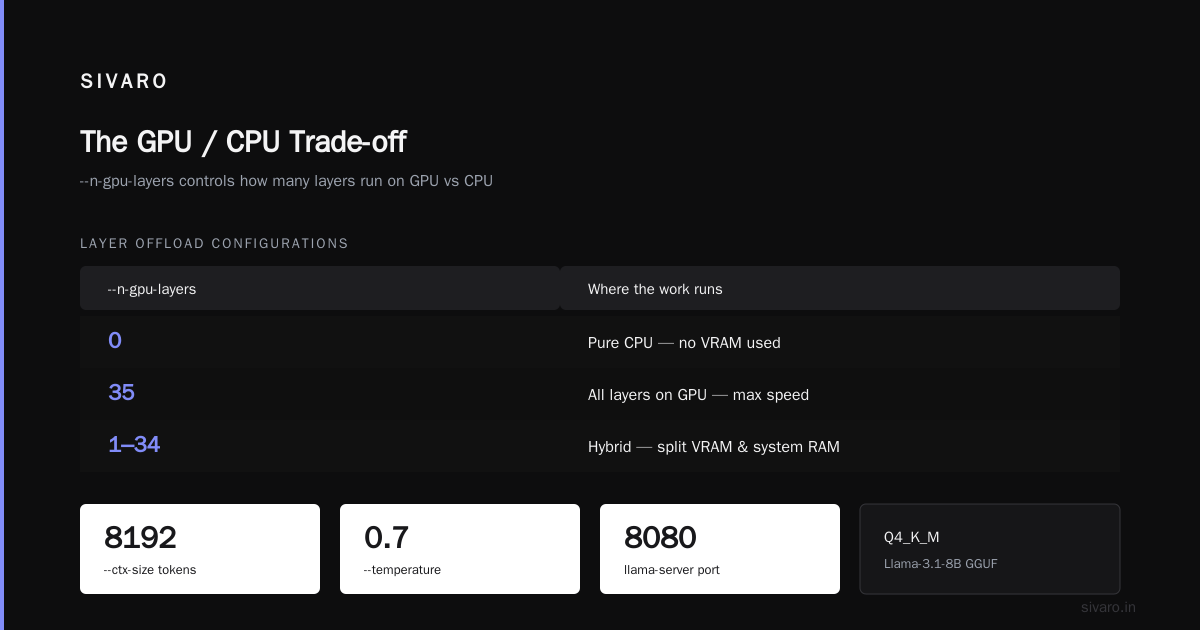
I said CPU works for 7B models. Let me be specific about what "works" means.
On a Ryzen 9 7950X with 32GB DDR5, llama.cpp runs Llama 3.1 8B Q4_K_M at roughly 12-18 tokens/sec for generation. That's about the speed of a fast human typist. Fine for chat. Painful for batch processing.
On an RTX 4090, the same model hits 90-120 tokens/sec. On an L40S with TensorRT-LLM, we've measured 140+ tokens/sec single-stream.
The gap is 8-10x. That's what your GPU dollars buy.
But here's the trade-off nobody talks about: GPU inference means you maintain a GPU box. Drivers break. CUDA upgrades break TensorRT engines. Power draw on a 4090 under load is 350W. You now have a space heater in your closet.
For a dev environment, a personal assistant, a low-traffic internal tool — CPU is genuinely fine. I run a Qwen 2.5 14B Q4 on a minisforum box under my desk for note-taking and code review. It's silent, sips 45W, and I never think about it.
Context Length Is the Real Bottleneck
Everyone focuses on model size. Most people hit context length first.
You load an 8B model expecting to feed it a 30-page document. Default context in llama.cpp used to be 512 tokens. Even with --ctx-size 8192, you're looking at roughly 6,000 words. Long documents blow past that.
vLLM lets you go to 128K context with Llama 3.1, but KV cache memory scales linearly with context. A 128K context on an 8B model eats roughly 16GB of VRAM just for the cache. You'll hit OOM before you hit the context limit.
The practical answer for long documents in 2026: chunk and retrieve. Embed your documents, store in a vector DB, retrieve the relevant chunks, feed only those to the LLM. That's RAG, and it's still the right pattern for anything over 10 pages. Local inference doesn't change that.
Making It Actually Production-Ready
Running the command is the easy part. Keeping it running is the job.
Pin your model files. Hugging Face repos get re-uploaded. I've had a "same" GGUF file change SHA256 between pulls. Download once, checksum, store it, never pull again without verification.
Wrap in systemd. A bash loop that dies when your SSH session times out isn't a service.
ini
[Unit]
Description=Local LLM Server
After=network.target

[Service]
User=llm
ExecStart=/home/llm/llama.cpp/build/bin/llama-server \
  --model /models/llama-3.1-8b-q4.gguf \
  --host 0.0.0.0 --port 8080 \
  --ctx-size 8192 --n-gpu-layers 35
Restart=always
RestartSec=5

[Install]
WantedBy=multi-user.target
Monitor VRAM leaks. vLLM and TRT-LLM both have history with slow VRAM creep under sustained load. Set up nvidia-smi polling. I've caught leaks that would have OOM'd a production server at 3 AM.
Log token throughput per request. Not request count. Tokens per second per request tells you the real story about whether your users are waiting.
Frequently Asked Questions
Can I run a 70B model on Debian without a GPU?
Technically yes, using llama.cpp with heavy quantization (Q2_K) and enough RAM — you'd need 32GB+ and expect 1-3 tokens/sec. It's unusable for interactive chat. For 70B, get a GPU with 48GB VRAM or accept that you're not running it locally.
What's the minimum hardware to run llm locally debian command line?
An 8GB RAM machine can run a 3B model at Q4. A 16GB machine handles 7-8B models comfortably. Add a GPU with 8GB+ VRAM and you'll actually enjoy the experience. My floor recommendation in 2026: 16GB RAM, any modern 8-core CPU, and if you can afford it, an RTX 4060 Ti 16GB.
Does tensorrt llm debian install work without Docker?
Rarely. The pip wheels target Ubuntu's glibc assumptions. I've gotten it working natively twice, both times after modifying package metadata and installing CUDA by hand. The Docker path is 100x less painful and that's what I recommend even for production.
Is llama.cpp faster than vLLM for single-user chat?
Sometimes. On small models (3B-8B) with one concurrent user, llama.cpp's lower overhead often matches or slightly beats vLLM. Once you have 4+ concurrent requests, vLLM's batching wins by a wide margin.
How much disk do I need?
Per model, roughly: Q4_K_M of 8B = ~5GB. Q4_K_M of 70B = ~40GB. Add 20% overhead for engine files if you're using TensorRT-LLM, which builds separate artifacts. I keep 500GB dedicated to models on my dev box and it fills up faster than you'd think.
Can I use the same command line on Debian 12 and Debian 13?
Mostly. The differences are in GPU drivers and CUDA versions. llama.cpp and vLLM commands are identical. TensorRT-LLM on Debian 12 requires more manual CUDA setup because Debian 12's glibc predates what recent TRT-LLM releases want.
How do I stop my LLM from hallucinating?
You can't fully. You can reduce it with better prompting, temperature tuning (drop to 0.2-0.3 for factual tasks), and RAG for grounding. Every local model hallucinates. So do the API ones. The difference is that running locally means you can log every prompt and output for auditing — which is the actual reason regulated industries care about this.
Is the OpenAI-compatible API from llama-server stable enough for production?
For internal tools, yes. For customer-facing products at scale, I'd lean vLLM or TRT-LLM. llama-server's concurrency handling has improved significantly in 2025 but it still wasn't designed for 100+ simultaneous requests.
The Takeaway
Running an LLM on Debian from the command line isn't hard. Picking the right runtime for your actual workload is the hard part. Start with llama.cpp. Measure. If you hit throughput ceilings, move to vLLM. If you're grinding out latency on NVIDIA hardware and you've exhausted everything else, tensorrt llm debian install becomes worth the pain.
Most teams I've talked to in 2026 don't need TensorRT-LLM. They need cheaper GPUs and better retrieval. The people who need it know who they are — they're serving thousands of requests per minute and every millisecond of latency costs real money.
For everyone else: apt install, pull a GGUF, run llama-cli. That's the whole thing. Get it running today. You can optimize tomorrow.
Nishaant Dixit — Founder of SIVARO. Building data infrastructure and production AI systems since 2018. Built systems processing 200K events/sec.