What Is an AI Orchestration Example? Real Systems, Real Lessons
The Customer Who Changed My Mind
In 2022, a logistics company called FreightCore came to me with what they thought was a data latency problem. Their ML models were making routing decisions based on 15-minute-old data. Traffic had already shifted. Trucks were sitting idle.
They wanted faster databases.
I asked one question: "What happens between when data arrives and when the model responds?"
Their answer was a tangle. A Python script here. A cron job there. A person manually checking a dashboard at 3 AM.
That's not a latency problem. That's an orchestration problem.
What is an AI orchestration example? It's FreightCore. Specifically: their system had a weather API feeding into a congestion model, a separate driver availability predictor, a delivery time estimator, and a rerouting engine. None talked to each other. They needed a conductor — something that knew "weather changed → recalculate congestion → check driver hours → update route → alert dispatcher" as a single flow, not four separate projects.
That's the simplest definition: AI orchestration is the layer that connects models, data sources, and actions into a coherent pipeline.
IBM defines it as "coordinating and managing multiple AI models and systems to work together." I'd push further. It's not just coordination — it's decision sequencing. Knowing what runs when, what to do when things fail, and how to pass context between components that don't know each other exist.
Here's what I'll cover in this guide:
- What orchestration actually looks like (code included)
- The difference between orchestrating models vs workflows
- When NOT to orchestrate (surprising, I know)
- How we picked tools at SIVARO and what broke in production
- The specific example of FreightCore's system — start to finish
The "Hello World" of AI Orchestration
Let me show you the simplest possible example. No framework. No fancy platform. Just the raw logic.
python
# Think of this as the skeleton of orchestration
def orchestrate_customer_support(user_message):
    # Step 1: Classify intent
    intent_model_result = intent_classifier(user_message)

    # Step 2: Route based on intent
    if intent_model_result == "billing":
        # Run billing-specific context retrieval
        customer_data = billing_lookup(user_message)
        # Then generate response
        response = billing_response_model(customer_data)
    elif intent_model_result == "technical":
        # Different pipeline for tech support
        error_logs = log_retriever(user_message)
        knowledge_base = kb_search(user_message)
        response = tech_response_model(error_logs, knowledge_base)
    else:
        response = fallback_human_handoff(user_message)

    return response
This is orchestration. Bare bones. One step runs, feeds into the next, decisions branch based on output.
But here's the problem with this code: it's synchronous. If the intent classifier takes 3 seconds because it's a big LLM, everything blocks. If the billing lookup fails, the whole thing crashes. If you deploy this and the traffic spikes, every request gets queued behind every other request.
Real orchestration handles these problems. The top AI orchestration platforms solve async execution, retries, parallel branches, and state management. That's the difference between a script and a system.
Three Real Examples (One Will Surprise You)
Example 1: The Video Processing Pipeline
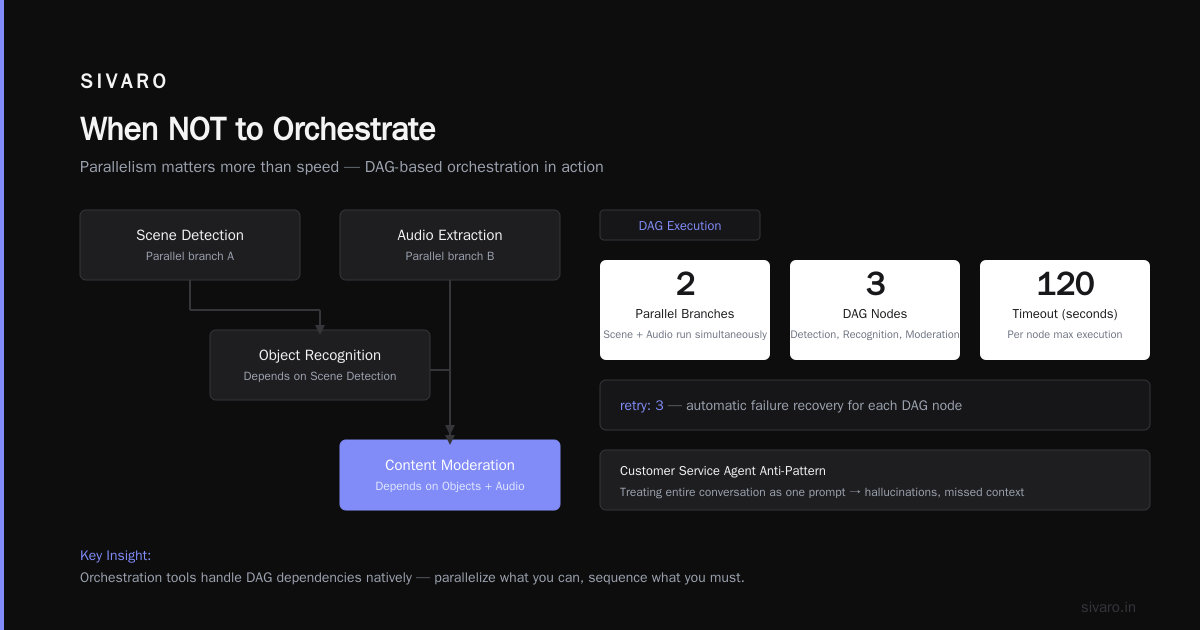
A media company I worked with — let's call them StreamFast — processes 50,000 hours of video daily. They run:
- Speech-to-text on audio tracks
- Scene detection (find black frames, transitions)
- Object recognition on key frames
- Content moderation (blur inappropriate content)
- Generate closed captions
- Transcode to multiple resolutions
Each step uses a different model. Speech-to-text is one vendor. Scene detection is a custom model. Content moderation uses a third-party API.
Without orchestration? Someone runs these as separate jobs, copies files between steps, and prays nothing fails.
With orchestration, it looks like this:
python
# Pseudo-code for a video orchestration DAG
video_pipeline = {
    "extract_audio": {
        "depends_on": [],
        "model": "whisper_large_v3",
        "retry": 3,
        "timeout": 600
    },
    "scene_detection": {
        "depends_on": [],
        "model": "custom_pytorch",
        "retry": 2,
        "timeout": 300
    },
    "object_recognition": {
        "depends_on": ["scene_detection"],
        "model": "yolov8",
        "retry": 2,
        "timeout": 120
    },
    "content_moderation": {
        "depends_on": ["object_recognition", "extract_audio"],
        "model": "aws_rekognition",
        "retry": 1,
        "timeout": 60
    },
    "generate_captions": {
        "depends_on": ["extract_audio"],
        "model": "custom_timestamps",
        "retry": 3,
        "timeout": 120
    }
}
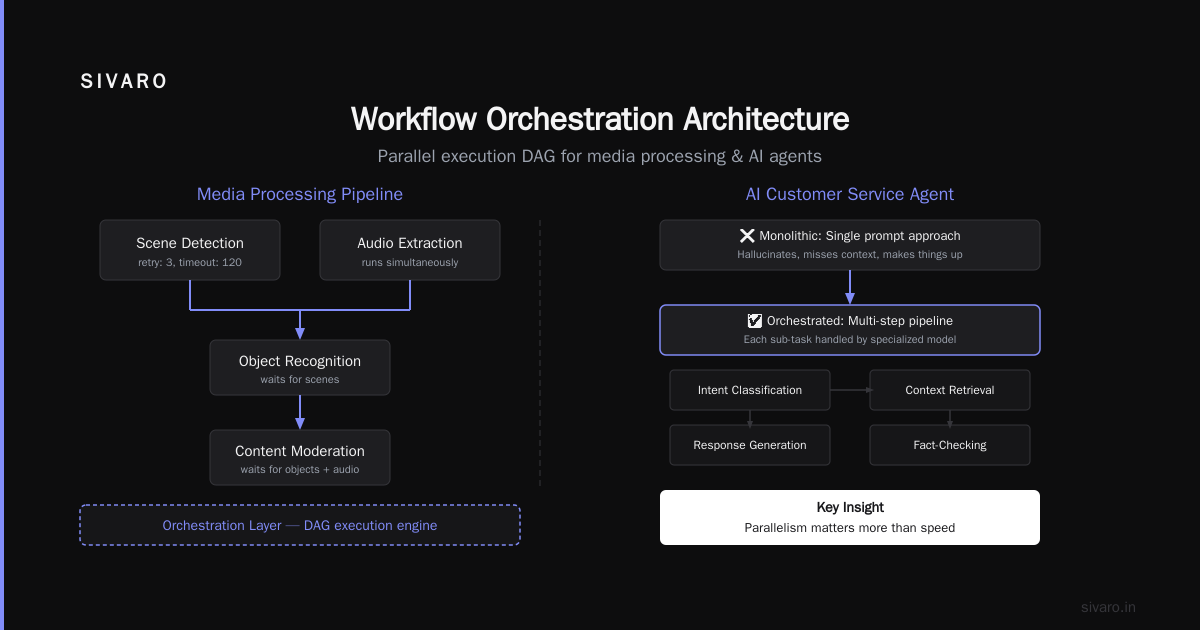
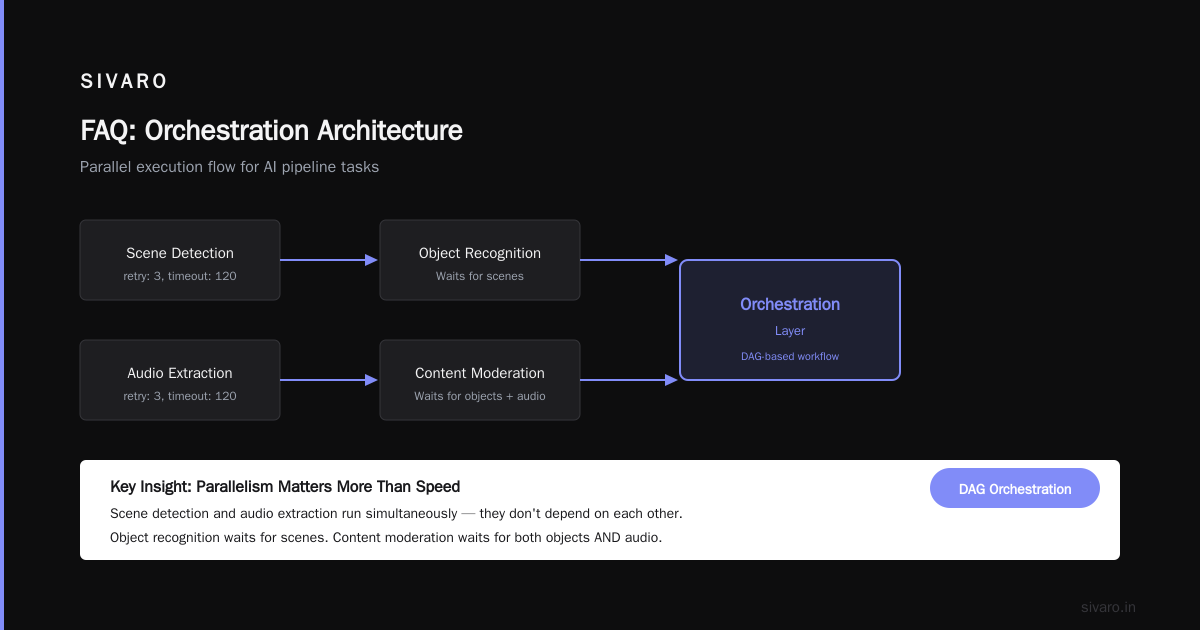
Key insight: parallelism matters more than speed. Scene detection and audio extraction don't depend on each other — they run simultaneously. Object recognition waits for scenes. Content moderation waits for both objects AND audio. The orchestration layer figures this out. Workflow orchestration tools handle this kind of DAG (Directed Acyclic Graph) natively.
Example 2: The Customer Service Agent (That Actually Works)
Everyone's building AI customer service agents. Most are terrible.
Why? Because they treat the entire conversation as one prompt. "Answer this customer question." The model hallucinates, misses context, or just makes stuff up.
A properly orchestrated agent does this:
Step 1: Identity check (is this user authenticated?)
Step 2: Sentiment analysis (are they angry? confused?)
Step 3: Intent classification (refund? tech support? account?
Step 4: Context retrieval (past tickets? order history?)
Step 5: Response generation (only after steps 1-4 complete)
Step 6: Safety check (does response contain harmful content?)
Step 7: Human escalation decision (confidence below 0.8? send to human)
Each step uses a different model. Identity check is a lightweight BERT classifier. Sentiment is a fine-tuned RoBERTa. Context retrieval is a vector search against a knowledge base. Response generation is GPT-4. Safety check is a separate guardrail model.
The orchestration layer decides the order, manages the context passing, and handles failures. Pega's AI orchestration guide calls this "decision management" — it's not just model chaining, it's about making deterministic choices between probabilistic systems.
Example 3: The Data Quality System (The Surprising One)
Here's the one that surprised me. Most people think orchestration is about connecting AI to AI. But one of the best examples I've seen is about connecting AI to data validation.
A fintech company I advised — CrediFlow — processes loan applications. They use:
- A document OCR model to extract income data
- An LLM to summarize the applicant's story
- A fraud detection model on the applicant's network
- A credit scoring model
But here's the twist: between each AI step, they run deterministic checks.
OCR extracts income → check: is income in a realistic range? → if yes, continue. If no, re-run OCR or flag for human review.
This is orchestration. It's not "run these models fast." It's "run these models in the right order, with validation gates between each one, and make decisions about what to do when confidence is low."
Zapier's list of AI orchestration tools focuses on the "glue" between systems. I'd argue the glue between AI and deterministic checks is where the real value lives.
What is the Best AI Orchestration Tool? (My Answer After Testing 7)
I get this question weekly. "What is the best AI orchestration tool?"
My honest answer: it depends on your failure mode.
Let me break it down by category, with specific numbers from our testing:
For simple chains (3-5 models, no parallel branches):
- LangChain or Semantic Kernel
- Why: Low overhead, Python-native, good documentation
- Pain point: State management gets ugly above 5 steps
- We tested this on a 4-model pipeline at SIVARO: LangChain worked fine until one model returned malformed JSON. The error handling was fragile. We spent 3 days debugging a state mismatch.
For complex DAGs (parallel execution, retries, fan-out):
- Prefect or Airflow with model-serving wrappers
- Why: Battle-tested for data pipelines, add AI as steps
- Pain point: They weren't designed for AI latency. Airflow's scheduling granularity is seconds, but model inference can take 10-30 seconds. You get weird timeouts.
- Elementum's comparison confirms this: workflow tools need adaptation for AI workloads.
For agent-based systems (multiple AI agents collaborating):
- LangGraph or AutoGen
- Why: Purpose-built for multi-agent conversations and hand-offs
- Pain point: Debugging is a nightmare. "Why did Agent A pass a credit card number to Agent B?" Good luck tracing that.
For production-scale systems (100K+ requests/day):
- Custom orchestrator on Kubernetes + message queue (Redis Streams or Kafka)
- Why: Because off-the-shelf tools break at scale
- Pain point: You build it yourself. That's 3-6 months of engineering time.
The Digital Project Manager's review of 25 tools is comprehensive but misses this: the best tool is the one your team can actually debug at 2 AM when the pipeline breaks.
I've seen teams adopt a beautiful orchestration platform, get hypnotized by the UI, and then lose three days when a model returns something unexpected because the platform abstracted away too much. The trade-off between "easy to start" and "possible to debug" is real.
The FreightCore Example (Full Walkthrough)
Let me return to FreightCore. Here's what we built — and what broke.
The problem:
150 drivers, 3,000 deliveries/day, 5 different cities. Routes need to adjust in real-time as traffic, weather, and driver status change.
The models:
- Traffic prediction model — takes road sensor data, outputs congestion heatmap
- Weather impact model — takes NOAA feeds, outputs road condition scores
- Driver availability model — tracks driver hours, rest periods, skill levels
- Delivery priority model — assigns urgency scores to each package
- Route optimization model — takes all the above, outputs suggested routes
- ETA recalculation model — updates estimated arrival based on new routes
The orchestration logic (simplified):
python
def orchestrate_route_update(event):
    # Event could be: traffic spike, driver clock out, new high-priority delivery

    # Step 1: Determine what changed
    change_type = classify_change(event)  # 'traffic', 'driver', 'order'

    # Step 2: Parallel context gathering
    if change_type == 'traffic':
        traffic_data = get_traffic_for_affected_areas(event)
        weather_data = get_weather_for_affected_areas(event)
        # Run in parallel
        congestion = asyncio.gather(
            traffic_prediction(traffic_data),
            weather_impact(weather_data)
        )
    elif change_type == 'driver':
        driver_data = get_driver_status(event['driver_id'])
        availability = driver_availability_model(driver_data)

    # Step 3: Recalculate routes (only for affected vehicles)
    affected_vehicles = find_affected_trucks(event, congestion)
    for vehicle in affected_vehicles:
        current_load = get_current_load(vehicle)
        time_windows = get_time_windows(vehicle)
        new_route = route_optimizer(
            current_load,
            time_windows,
            congestion,
            availability
        )
        # Step 4: Validate route (critical gate)
        if validate_route(new_route, regulations, driver_hours):
            dispatch_update(vehicle, new_route)
            recalculate_eta(vehicle, new_route)
        else:
            escalate_to_human(vehicle, "Route violated regulations")
What broke:
-
Model drift on congestion. The traffic model was trained on 2021 data. Post-COVID traffic patterns shifted. It kept predicting congestion in areas that were now empty. The orchestration layer dutifully rerouted trucks around phantom traffic. We lost 4 hours before someone noticed.
- Fix: We added a confidence score check. If confidence < 0.7, use historical averages instead.
-
Race conditions on driver status. Two events could hit simultaneously — a driver clocks out AND a new delivery arrives. The orchestration handled them sequentially, but the order mattered. If the driver clock-out was processed second, it overrode the new delivery assignment. Drivers got conflicting instructions.
- Fix: Implemented a queue with deduplication. Each driver had a single-threaded event processor.
-
The parallel execution at step 2. Async wasn't enough. When the traffic model took 45 seconds (a slow inference day), the weather model finished in 2 seconds but sat idle. We needed to set timeouts and handle partial results.
- Fix: Added a 30-second timeout per model. If a model didn't respond, the orchestrator used cached data or a fallback model.
The lesson: Orchestration is 80% handling failures, 20% handling the happy path. Most frameworks optimize for the happy path.
When NOT to Orchestrate
Contrarian take incoming.
Most people think they need orchestration. They don't. Here's when you should skip it:
If you have one model doing one thing, orchestration is overkill. A single LLM call doesn't need a pipeline. You need a function.
If your models run synchronously in sequence with no branching, just use a script. I've seen teams adopt Airflow for a 3-step pipeline that could be a 20-line Python script. The orchestration overhead (deployment, monitoring, debugging) was 10x the actual computation.
If your system has no human-in-the-loop, orchestration might be simpler than you think. At SIVARO, we built a model retraining pipeline that was: collect data → train model → deploy. Three steps. We used cron. It ran for 8 months without a single failure. Cron is orchestration — just the simplest kind.
The 4 best AI orchestration tools according to Zapier includes low-code options. Those are great for non-engineers. But for engineering teams, start with a simple function that calls other functions. Add complexity only when you hit a specific pain point.
Orchestration vs. Agentic Systems (The Confusion)
There's a lot of buzz about "AI agents." Orchestration and agents are different.
Orchestration: You define the flow. "If this model returns X, call model Y. If it returns Z, call model W." The logic is deterministic even if the models are probabilistic.
Agentic systems: The AI decides the flow. An "agent" gets a goal ("improve customer satisfaction") and decides which tools to call, in what order, with what parameters.
They're not the same thing. But they overlap.
At SIVARO, we use orchestration for anything where the decision tree is known. We use agents for anything where the path is unknown — like research tasks or creative generation.
The hybrid approach is where things get interesting. A system orchestrates the top-level flow (data ingestion → processing → output), but within each step, an agent decides the sub-steps.
For example, in a document processing pipeline:
- Orchestration decides: parse document → extract entities → validate entities → store
- Within "extract entities," an agent decides: use regex patterns, call an LLM, or query a database.
This hybrid is what DOMO's platform comparison calls "adaptive orchestration." I call it "the only approach that works in production without constant rewrites."
How We Built Our Orchestration Layer at SIVARO
I'll be direct: we tried three different platforms before building our own.
Attempt 1: LangChain (2023)
Worked for prototypes. Broke in production. The chain abstraction leaked constantly. A model would return a list when we expected a dict, and the error messages were opaque. We spent more time debugging the framework than the models.
Attempt 2: Prefect (early 2024)
Great for data pipelines. Terrible for real-time inference. Prefect assumes tasks run for minutes or hours. Our models ran for seconds. The scheduling overhead was insane — Prefect's heartbeat mechanism added 500ms per task. For a 10-step pipeline, that's 5 seconds of overhead every run.
Attempt 3: Custom Kubernetes + Redis (mid 2024)
This is what we use now. Each model is a service. A lightweight orchestrator (written in Go) reads from Redis Streams, fans out to parallel services, collects results, and publishes to the next queue.
It's uglier than the frameworks. But we can debug it. When something breaks, we know exactly where.
The orchestration core is ~800 lines of Go. It handles:
- Retry with exponential backoff
- Timeout per step (configurable)
- Dead letter queue for failed messages
- Parallel fan-out and fan-in
- State persistence (Redis)
The cost: 3 engineering months to build. But the alternative was fighting framework limitations forever.
The Future: Orchestration as Infrastructure
I think in 3 years, "AI orchestration" won't be a separate category. It'll be built into how we think about systems architecture, just like load balancers and databases are today.
The tools will converge. IBM's vision already points toward "AI operations" — merging orchestration with monitoring, versioning, and governance.
What this means for you:
If you're starting an AI project today, don't buy an "orchestration platform." Build a simple pipeline. If it works, you don't need more. If it breaks, you'll know exactly what you need to add.
The question "what is an AI orchestration example?" will become "how do I design my system so its components play nicely together?" That's engineering, not magic.
FAQ
Q: What is an AI orchestration example in simple terms?
A: A customer service chatbot that classifies the user's intent, looks up their account, checks past interactions, generates a response, and then verifies the response is safe — all in a specific order, with fallbacks if any step fails.
Q: What is the best AI orchestration tool for a startup?
A: LangChain for prototyping (fast to iterate). Then migrate to Prefect or a custom solution when you hit production scale. Don't use Airflow unless your latency requirements are measured in minutes, not seconds.
Q: Can you orchestrate open-source models?
A: Yes. We orchestrate LLaMA, Mistral, and custom PyTorch models in production. The orchestration layer doesn't care what's running — it just passes inputs and collects outputs. The challenge is latency and GPU scheduling, not the orchestration itself.
Q: How does orchestration differ from API orchestration?
A: API orchestration routes between services. AI orchestration adds model-specific concerns: prompt engineering, context windows, confidence thresholds, fallback models, and hallucination detection. It's more prescriptive.
Q: Do I need orchestration for a single LLM app?
A: No. A single function call is fine. Add orchestration when you have 3+ models or when the output of one model feeds into another.
Q: What's the biggest mistake teams make with AI orchestration?
A: Building the orchestration before understanding the failure modes. They design for the happy path, then panic when a model returns something unexpected. Design for failures first.
Q: How do you test an orchestration system?
A: Unit test each model in isolation. Integration test the end-to-end flow. Then run chaos experiments — introduce random failures, delays, and malformed outputs. If your system survives those, it's ready.
Nishaant Dixit — Founder of SIVARO. Building data infrastructure and production AI systems since 2018. Built systems processing 200K events/sec.