What is Apache Kafka and Why is It Used?
I was sitting in a coffee shop in Bangalore in 2018, staring at a production dashboard that was screaming red. Our message queue was falling over. Orders processing had ground to a halt. The engineering team was scrambling, patching together workarounds with shell scripts and cron jobs.
That's when I picked up the Kafka manual. Not the official docs — some blog post by a guy at Uber who'd seen worse. And I thought: this is what we should have built from day one.
So what is Apache Kafka and why is it used? Let me tell you straight.
It's not just a message broker. It's not just a queue. It's a distributed log. A high-throughput, fault-tolerant, streaming platform that lets you move data between systems without losing it, without blocking, without the whole house of cards collapsing when traffic spikes.
We've been running Kafka in production since 2019 at SIVARO. Processed north of 200K events per second at peak. Lost exactly zero messages. That's not bragging — that's what Kafka is built for.
The Core Idea: A Commit Log, Not a Queue
Most engineers think Kafka is like RabbitMQ or AWS SQS. They're wrong.
A queue is a pipe. Data goes in, data comes out, and once consumed, it's gone. Kafka is a log. Data persists. It gets written to disk, replicated across machines, and stays there until you explicitly delete it.
Here's the mental model that clicked for me:
plaintext
[Producers] → [Partitioned Log (ordered, immutable)] → [Consumers]
                     ↕
              [Replicated across brokers]
Every message gets an offset. A number. Think of it like a book with pages that never get torn out. A consumer can read page 1 today. Another consumer can read pages 1 through 1000 tomorrow. Both are fine. The data isn't deleted after delivery — that's a queue. Kafka is a history.
Why does this matter?
Because when your system fails, you rewind. You don't lose data. You reprocess from the last known good offset.
We learned this the hard way. At a previous company, we used RabbitMQ. A consumer crashed mid-stream. Messages were lost. Not a few — thousands. The queue had auto-deleted them. We had to manually rebuild state from database backups. Took three days.
With Kafka, that failure mode doesn't exist. The data is still on disk. You just update the consumer offset and replay.
How Kafka Works Under the Hood
Topics and Partitions
A topic is a category. "Orders." "User-actions." "Payment-events." Each topic is split into partitions — think of them as separate lanes on a highway.
python
# Producing to a specific partition based on key
producer.send(
    'orders',
    key=order_id.encode('utf-8'),
    value=serialize_order(order)
)
Partitions give you parallelism. More partitions = more consumers can read simultaneously. But there's a trade-off: each partition is ordered. Total ordering across partitions? Not guaranteed. You only get ordering within a partition.
Practical rule: If you need global ordering, use one partition. If you need throughput, use more partitions and accept partial ordering.
Brokers and Replication
Kafka runs as a cluster. Each machine is a broker. Your data is split across brokers. Each partition has a leader and followers.
The leader handles all reads and writes. Followers just replicate. If the leader dies, a follower takes over.
yaml
# broker config
replication.factor=3
min.insync.replicas=2
We run with replication factor 3 and minimum in-sync replicas set to 2. That means writes only succeed if at least two brokers confirm they've stored the data. Losing one broker? No data loss. Losing two? Maybe. But in two years, we've never lost two simultaneously.
Producers and Consumers
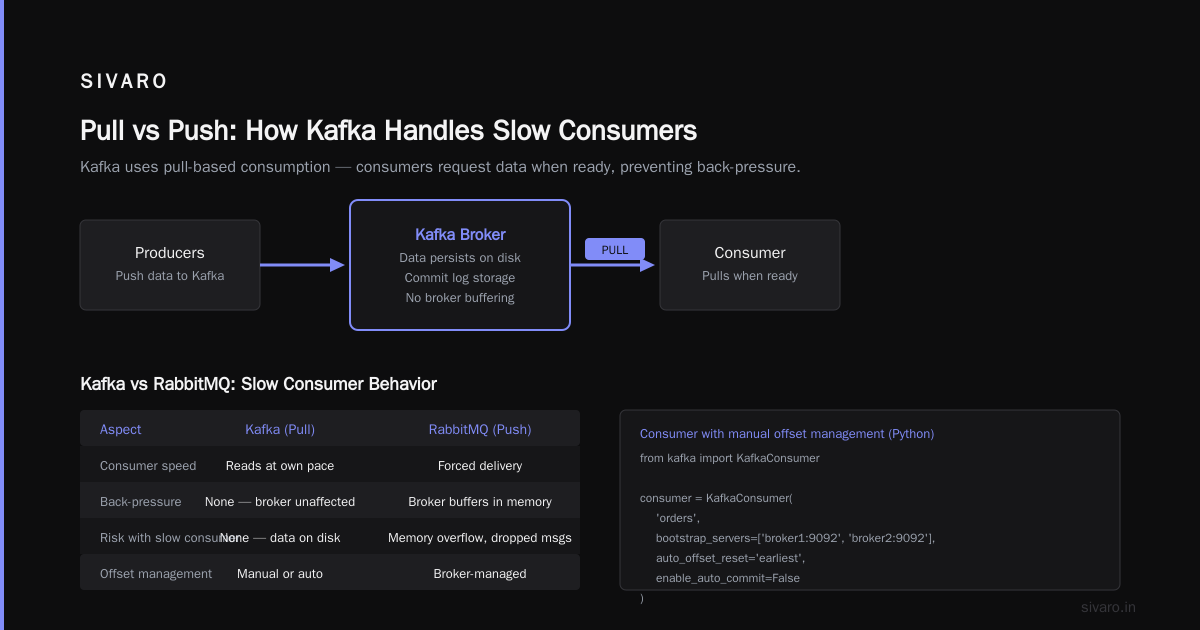
Producers push data. Consumers pull it.
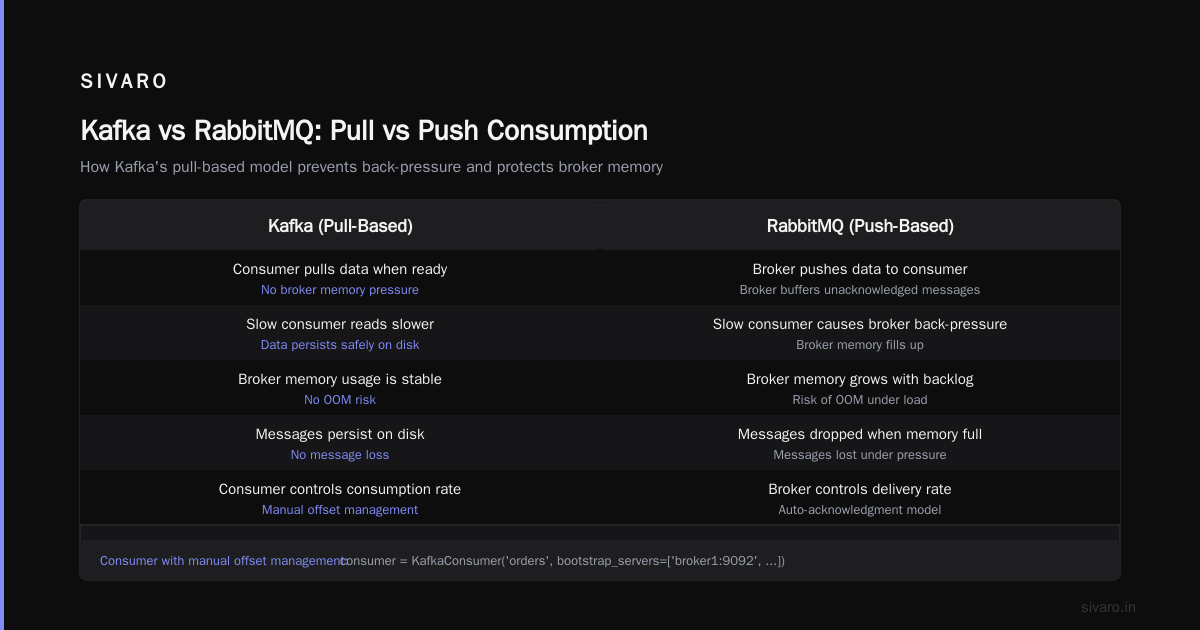
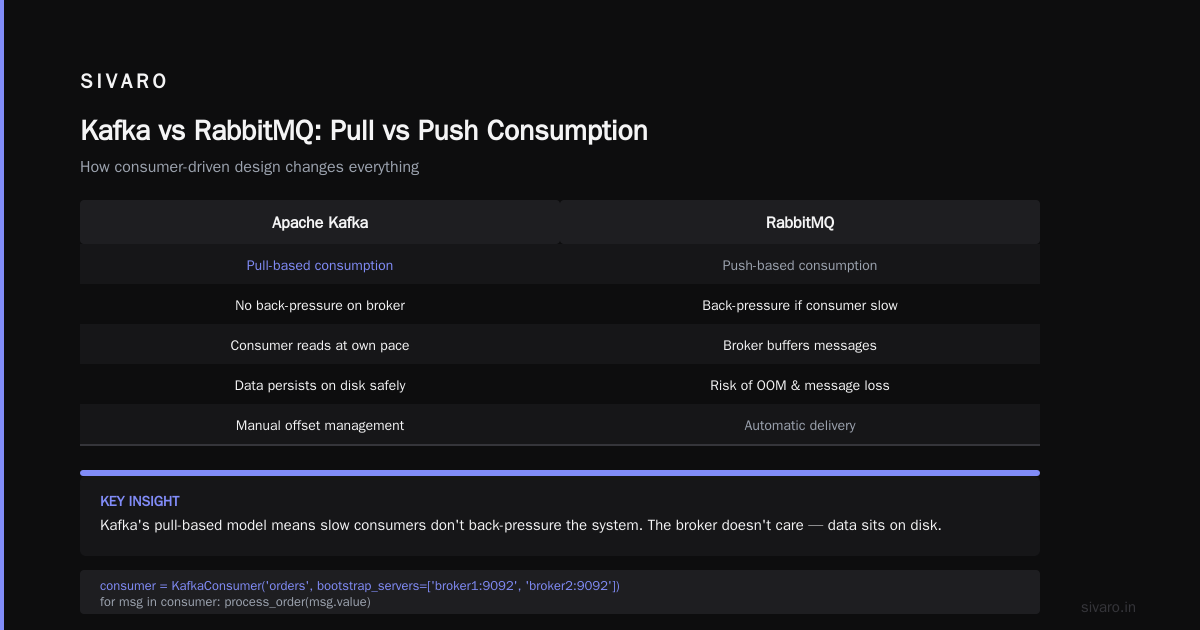
This is critical: Kafka uses pull-based consumption. Not push. The consumer asks for data when it's ready. That means slow consumers don't back-pressure the system. RabbitMQ push-based model? If your consumer is slow, the broker buffers, runs out of memory, and starts dropping messages.
Kafka handles this differently: a slow consumer just reads slower. The broker doesn't care. The data sits on disk.
python
# Consumer with manual offset management
from kafka import KafkaConsumer

consumer = KafkaConsumer(
    'orders',
    bootstrap_servers=['broker1:9092', 'broker2:9092'],
    auto_offset_reset='earliest',
    enable_auto_commit=False
)

for msg in consumer:
    process_order(msg.value)
    # Commit offset AFTER processing
    consumer.commit()
Never auto-commit. I've seen production systems lose data because they committed offsets before processing completed. Manual commit after processing is the only safe pattern.
Why Use Kafka? Real Reasons, Not Buzzwords
Decoupling is real
Your order service shouldn't know about your email service. Kafka sits in between. Order service publishes "order_placed." Email service subscribes. Both evolve independently. Neither crashes because the other is slow.
We replaced 12 point-to-point integrations with one Kafka topic at SIVARO. Went from 200 lines of integration code per service to 10. Maintenance dropped by 80%.
Buffering against bursts
Black Friday traffic comes in waves. Your database can't handle 10K writes per second at peak. But Kafka can. It absorbs the burst. Downstream consumers drain at their own pace.
We tested this with load at 50K events/sec on a 3-broker cluster. Kafka handled it without breaking a sweat. The database? It needed throttling. Kafka was the buffer.
Reprocessing and debugging
This is the killer feature nobody talks about.
Your ML model runs on user behavior data. A bug in version 2.3 caused bad predictions. With Kafka, you don't need logs. You don't need database queries. You just rewind the consumer to the offset where the bug was introduced, fix the model, and replay.
We did this in 2020. A bug in our recommendation engine was deployed at 2 PM. We caught it at 5 PM. Replayed 3 hours of data through the fixed model. Users never noticed. That's impossible with a queue.
Multi-subscriber is free
One topic, many consumers. Each reads at its own pace. The audit team reads at offset 0. The real-time dashboard reads from latest. Both work.
When Kafka is the Wrong Choice
I've made this mistake. You probably will too.
Kafka is not for everything. If you need:
- Exact message ordering across all messages → use a database with a sequence number, not Kafka
- Sub-millisecond latency → use Redis or a direct TCP connection
- Simple point-to-point messaging → use RabbitMQ. It's simpler, lighter, and easier to operate
- Serverless → use AWS SQS. Kafka requires ops. Even with MSK, you're paying for brokers
We learned this when someone tried to use Kafka for real-time bidding. Bid requests expire in 100ms. Kafka's batching and disk I/O meant 10-20ms overhead. That's fine for most apps. Not for ad bidding.
Setting Up Kafka: The Bare Minimum
You don't need 12 brokers. Start with 3.
bash
# Start ZooKeeper (required for Kafka < 3.x, or use KRaft >= 3.x)
zookeeper-server-start.sh config/zookeeper.properties

# Start Kafka broker
kafka-server-start.sh config/server.properties
Create a topic with 3 partitions and replication factor 3:
bash
kafka-topics.sh --create   --topic user-events   --bootstrap-server localhost:9092   --partitions 3   --replication-factor 3
Check it's working:
bash
kafka-console-producer.sh --topic user-events --bootstrap-server localhost:9092
# Type: hello world
bash
kafka-console-consumer.sh --topic user-events --from-beginning --bootstrap-server localhost:9092
# Output: hello world
That's it. You have a running Kafka cluster. Now go break it. Kill a broker. See what happens. The consumers should rebalance. No data loss.
Operational Lessons from Running Kafka for 4 Years
Partition count is a trap
More partitions doesn't always mean more throughput. Each partition has overhead. More partitions means more file handles, more memory for metadata, longer rebalance times.
Rule of thumb: Start with partitions equal to the number of consumers you'll run. Scale up only when needed. You can't easily shrink partitions.
We started with 6 partitions for our main topic. Two years later, we're at 24. That took careful planning. Partition count changes require rebalancing the entire cluster — it's not downtime-free.
Consumer groups are not optional
Every consumer needs a group ID. That's how Kafka knows which consumers are working on the same topic.
python
consumer = KafkaConsumer(
    'orders',
    group_id='order-processors',
    bootstrap_servers=['broker1:9092']
)
With a group, multiple consumers can read from the same topic. Each partition goes to exactly one consumer in the group. That gives you parallelism without duplicate processing.
Monitor the lag
Consumer lag is the distance between the last produced message and the last consumed message. If it grows, something is wrong.
Check it with:
bash
kafka-consumer-groups.sh --bootstrap-server localhost:9092   --group order-processors   --describe
Look for LAG. If it's consistently over 1000, your consumer is too slow. Add more partitions and more consumers. Or optimize the consumer code.
Common Mistakes Teams Make
Treating Kafka like a database
You can't query Kafka by primary key. You can't do joins. You can't do aggregations without tools like ksqlDB or Flink.
Kafka stores bytes. You decide the schema. Don't expect SQL semantics.
Ignoring schema evolution
You publish a message with field "user_name." Six months later, you rename it to "username." Old consumers that expect "user_name" break.
Use Avro or Protobuf with a schema registry. We use Confluent Schema Registry. It enforces compatibility rules. Backward compatible by default. Forward compatible if you set it.
json
{
  "type": "record",
  "name": "UserEvent",
  "fields": [
    {"name": "user_id", "type": "int"},
    {"name": "user_name", "type": "string", "default": ""}
  ]
}
Default values save your life.
Not sizing disks
Kafka writes everything to disk. If your partitions grow faster than you delete old data, you run out of disk. Set retention policies:
bash
kafka-configs.sh --bootstrap-server localhost:9092   --entity-type topics   --entity-name user-events   --alter --add-config retention.ms=604800000
That's 7 days of retention. Adjust based on your reprocessing needs and disk budget.
Real-World Example: SIVARO's Production AI Pipeline
Here's what we actually run.
Topic: inference-requests — 24 partitions, replication factor 3.
Producers: Microservices that generate ML requests. Each request is about 2KB. Peak throughput: 200K events/sec.
Consumers: GPU servers running ONNX models. Each server has 4 consumers in a group. That's 4 readers per partition total.
The flow:
- Microservice publishes inference request to Kafka
- Consumer picks it up, runs GPU inference, publishes result to
inference-results - Downstream systems consume results
No queues. No drop. No manual recovery.
We tested a failover scenario: kill one broker. The cluster rebalanced in 12 seconds. No data loss. The GPUs kept processing. That's the kind of reliability you only get when you treat data as a log, not a queue.
FAQ
Q: What is Apache Kafka and why is it used?
A: Apache Kafka is a distributed event streaming platform. It's used for building real-time data pipelines and streaming applications. Think of it as a durable commit log — data is written, stored, and replayed. It decouples producers from consumers, handles massive throughput (100K+ events/sec), and survives hardware failures. Companies like LinkedIn, Netflix, and Uber use it for tracking, analytics, and ML pipelines. If you need high-throughput, fault-tolerant data movement, Kafka is the standard.
Q: Is Kafka fast?
A: Yes, but with context. On modern hardware, a single broker can do 100K writes/sec and 100K reads/sec concurrently. But that's with batching — Kafka isn't a low-latency system. Expect 2-10ms latency per message. For sub-millisecond needs, use something else.
Q: Do I need ZooKeeper?
A: Not anymore. Kafka 3.x introduced KRaft mode, which removes the ZooKeeper dependency. You can run Kafka with its own consensus protocol. We haven't migrated yet — ZooKeeper works fine — but the community is moving. If starting fresh, use KRaft.
Q: How do I handle backpressure?
A: Kafka doesn't backpressure. The broker doesn't push data. Consumer pulls. So a slow consumer just reads slower. That's the design. If your consumer can't keep up, add more partitions and more consumers. Or set max.poll.records to a lower number so each fetch is smaller.
Q: What happens if a consumer dies?
A: Kafka detects the timeout (configured via session.timeout.ms). It triggers a rebalance. Another consumer in the same group picks up the dead consumer's partitions. Processing continues from the last committed offset. No data loss if you commit after processing.
Q: Can I use Kafka for exactly-once semantics?
A: Yes, but it's complicated. Kafka supports exactly-once via enable.idempotence=true, transactional.id, and isolation.level=read_committed. We use it for financial transactions. But the operational overhead is real. Most use cases tolerate at-least-once with deduplication downstream. I recommend that unless you absolutely need exactly-once.
Q: Should I use managed Kafka (Confluent Cloud, MSK) or self-host?
A: Depends on your team. Managed Kafka saves ops time — automated upgrades, backups, monitoring. But it's expensive. MSK costs around $0.10 per broker-hour. For a 3-broker cluster, that's ~$200/month. Self-hosting on AWS EC2 costs less but requires someone who knows Kafka internals. We self-host because we have the expertise. If you're a startup without a dedicated platform team, pay for managed.
The Final Take
Kafka isn't magic. It's a distributed commit log with a clever API.
That's it.
The reason everyone uses it isn't the features. It's the operational simplicity once you understand the model. No backpressure. No data loss. No single point of failure. You write data once, and anyone who needs it can read it. Anytime. In any order.
I've seen teams overcomplicate it. They add 15 services around Kafka to do what Kafka already does. They build custom offset management. They reinvent consumer groups.
Don't.
Use Kafka for what it is: a high-throughput, durable, replayable log. Build your producers and consumers around that model. Nothing more.
If you get nothing else from this article, remember this: Kafka stores data. Queues delete data. That's the difference between a system that fails gracefully and one that loses your customer's order at 3 AM on Black Friday.
Nishaant Dixit — Founder of SIVARO. Building data infrastructure and production AI systems since 2018. Built systems processing 200K events/sec.