 SIVARO

What Is Docker and Why Is It Used? The Honest Guide
It's 2014. I'm staring at a production outage. The app works perfectly on my MacBook. The staging server runs it fine. But production? Dead. The error message? "Missing libssl.so.1.0.0." Six hours of debugging later, I learned a hard truth: your code isn't the problem. The environment is.
That's the problem Docker solves.
So what is a docker and why is it used? Docker is a platform for developing, shipping, and running applications inside lightweight, portable containers (Docker: Accelerated Container Application Development). Think of it as a standardized shipping container for your software. Everything your app needs — code, system tools, libraries, runtime, config files — gets packaged together. It runs the same on your laptop, your team's servers, or in the cloud.
This isn't theory. I've seen teams cut deployment failures by 80% just by switching to Docker. But let's be clear about what it actually is and isn't — because most explanations are either too simplistic or flat wrong.
In this guide, I'll cover:
- What Docker actually is (and why it's not a VM)
- How containers work at the system level
- Real production use cases that matter
- When Docker is the wrong tool
- Common myths debunked
Let's skip the marketing fluff and get into what a container actually does.
The Foundational Question: What Is a Docker and Why Is It Used?
Most people think Docker is a virtualization tool. They're wrong.
Docker is a process isolation tool that happens to look like a lightweight VM. The official Docker documentation defines it as "a platform for developing, shipping, and running applications." The key word is "running." Docker doesn't create virtual hardware. It creates isolated user-space environments that share the host OS kernel.
Here's the brutal truth I learned the hard way: if you think of Docker as "a better VM," you'll design your infrastructure wrong. You'll allocate resources poorly. You'll debug things incorrectly.
At SIVARO, we process 200K events per second in production. Every one of those events passes through containers. We don't use VMs for that workload — we'd need 5x the hardware.
The Container Contract
Every container makes three promises:
- Same code, same result — regardless of host environment
- Lightweight isolation — no hypervisor overhead
- Disposable infrastructure — kill and recreate in seconds
That last point is the one most people miss. Containers are designed to be ephemeral. You should be comfortable deleting and recreating them. If you're treating containers like pets with static IPs and manual configuration, you're missing the point.
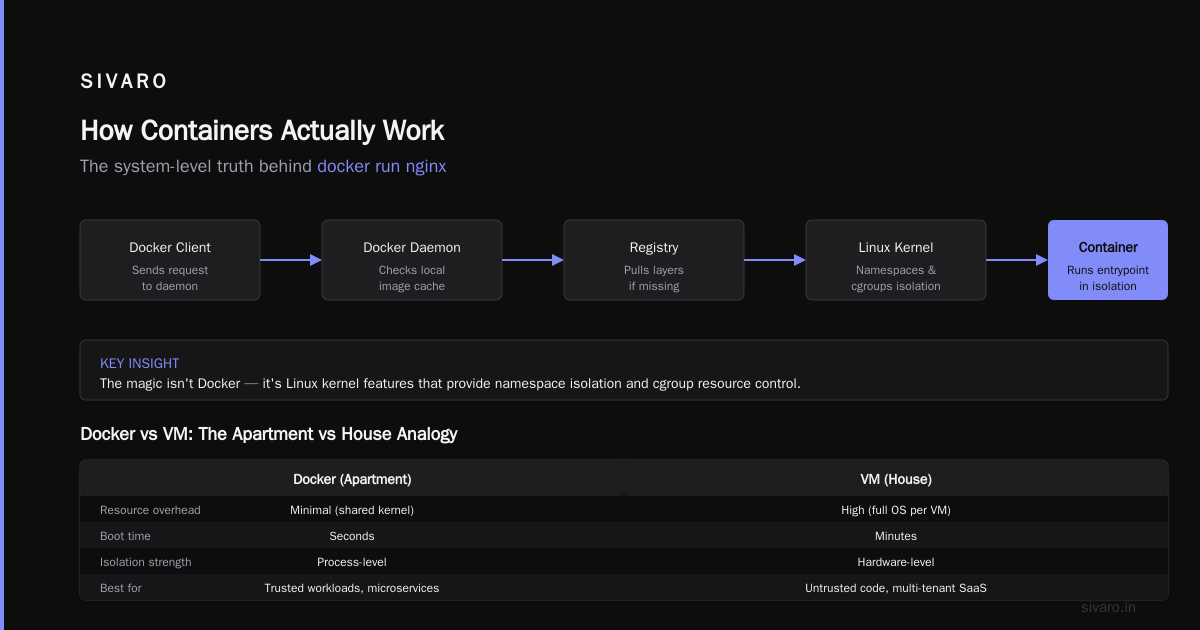
Docker vs VM: The Technical Split
I get asked "is docker just a vm?" about once a week. Let's settle this.
Docker is not a VM. AWS's comparison lays it out clearly: VMs virtualize hardware, containers virtualize the operating system.
| Aspect | Docker Container | Virtual Machine |
|---|---|---|
| Startup time | Milliseconds | 30-60 seconds |
| Size | MBs | GBs |
| Kernel | Shares host kernel | Own kernel |
| Resource overhead | ~5% | ~20-30% |
| Isolation level | Process-level | Hardware-level |
Here's what this means in practice. I run 20 containers on a single development machine. Each container is a separate microservice with its own dependencies. Total memory usage: about 4GB. If I ran those same services in VMs? I'd need at least 40GB RAM and a lot more patience waiting for boots.
But there's a trade-off you need to hear: containers don't provide the same security isolation as VMs.
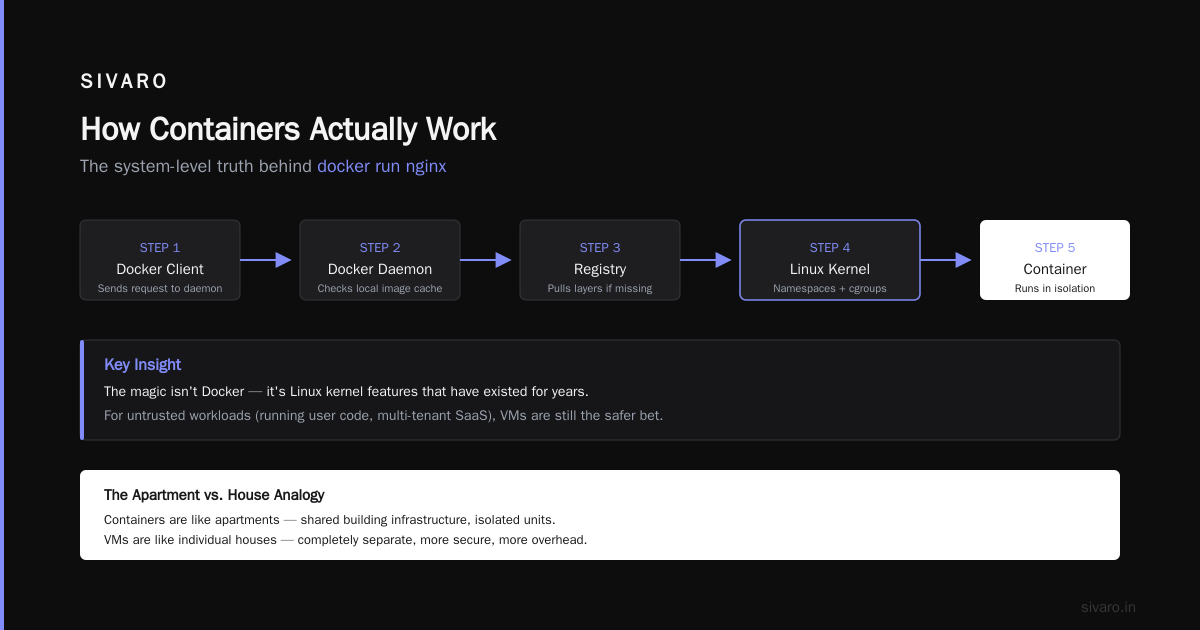
That shared kernel is the double-edged sword. If someone breaks out of a container, they have access to the host kernel. With VMs, they'd need to break the hypervisor first — which is much harder. For untrusted workloads (running user code, multi-tenant SaaS), VMs are still the safer bet.
A great visual explanation of this is in Docker vs VM: What's the Difference, and Why You Care! — the analogy of apartments vs individual houses is spot on.
How Containers Actually Work (The System-Level Truth)
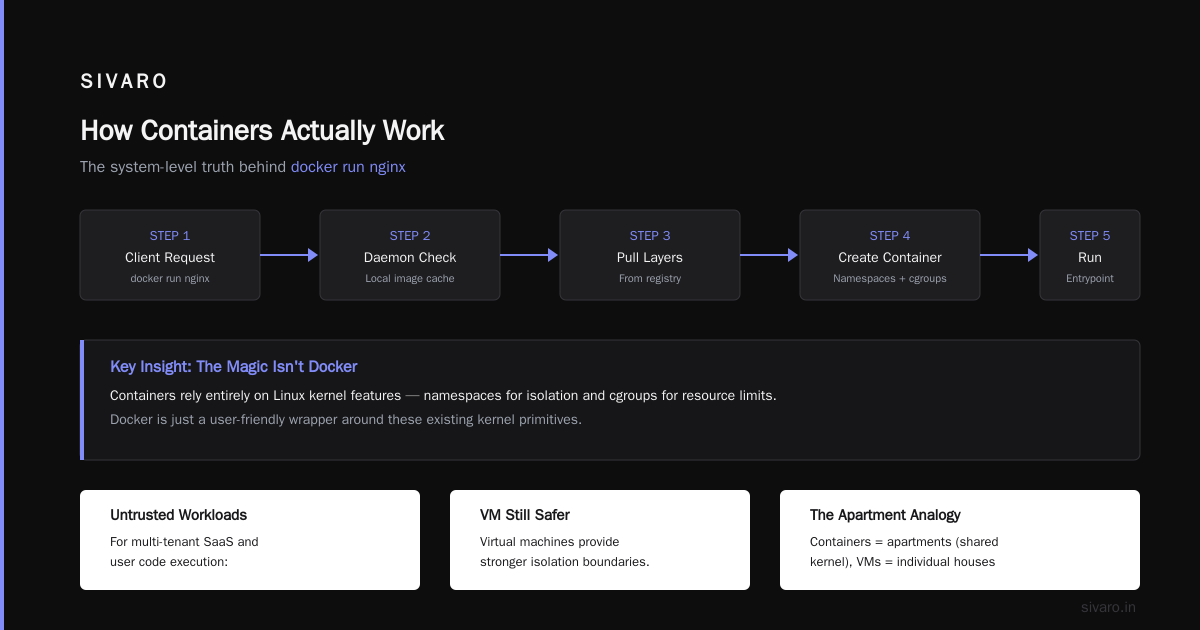
When you run docker run nginx, here's what happens under the hood:
- Docker client sends request to daemon
- Daemon checks local image cache
- If missing, pulls layers from registry
- Creates a container using Linux namespaces and cgroups
- Runs the entrypoint process in isolation
The magic isn't Docker — it's Linux kernel features that have existed for over a decade:
- Namespaces: Isolate PID, network, mount, UTS, IPC, user
- Cgroups: Limit CPU, memory, disk I/O
- Union filesystems: Overlay layers for efficient storage
Docker just packaged these into a usable tool.
The Layer System
Each Docker image is built from layers. Every RUN command in a Dockerfile creates a new layer. Layers are cached and shared across images.
dockerfile
FROM python:3.11-slim          # Base layer ~120MB
WORKDIR /app                   # Metadata layer
COPY requirements.txt .        # ~1KB layer
RUN pip install -r requirements.txt  # ~200MB layer
COPY . .                       # Source code layer
CMD ["python", "app.py"]       # Metadata layer
If you change your source code, only the last two layers need rebuilding. The rest comes from cache. This is why Docker builds are fast after the first time.
But here's a mistake I see constantly: people shove giant, single-layer images into production.
dockerfile
# DON'T DO THIS
FROM ubuntu:22.04
RUN apt-get update && apt-get install -y python3 nodejs git curl vim nginx
...
That image is 1.5GB. For a web service that needs Python and nothing else. Use slim variants. Use multi-stage builds. A production Node.js app should be under 200MB.
Why Teams Actually Use Docker in Production
Let's move past the "works on my machine" narrative. Here are the real reasons teams adopt Docker, based on what I've seen at SIVARO and with clients:
1. Dependency Hell Ends
At first I thought this was a branding problem — turns out it was dependency management. Before Docker, every new hire spent 2-3 days setting up their development environment. Different OS versions, different package managers, different PATH variables. Every time.
bash
# The old way - run these commands and pray
sudo apt-get install python3.8
curl -sL https://deb.nodesource.com/setup_16.x | sudo -E bash -
sudo apt-get install -y nodejs
npm install -g @angular/cli
pip install -r requirements.txt
# Hope nothing conflicts with system packages
With Docker:
bash
docker compose up
# Everything just works
2. CI/CD Becomes Predictable
Your CI server runs Ubuntu 22.04. Production runs Amazon Linux 2. Your local machine runs macOS. Three different environments, three sets of potential issues.
Docker eliminates this. Your CI pipeline builds the exact same image that runs in production. No surprises.
3. Horizontal Scaling Without Pain
At SIVARO, we spin up 50-100 containers during traffic spikes. Each one is identical. We don't worry about "warming up" instances or checking state — containers are stateless by design.
yaml
# docker-compose.yml for a scaled service
version: '3.8'
services:
  api:
    image: myapp-api:latest
    deploy:
      replicas: 5
      resources:
        limits:
          cpus: '0.5'
          memory: 512M
4. Isolation for Microservices
Each service gets its own container with its own dependencies. Service A needs Python 3.8 and Redis 6. Service B needs Python 3.11 and PostgreSQL 15. On the same machine. No conflicts.
Can You Learn Docker in 2 Days?
I get asked "can i learn docker in 2 days?" constantly. Here's my honest answer:
Yes, if you want basic competency. No, if you want production readiness.
In 2 days of focused effort, you can learn:
- What Docker is and the container vs VM distinction
- How to write a Dockerfile
- Basic docker-compose for multi-service setups
- How to pull, run, stop, and remove containers
- Volume mounting for data persistence
- Basic networking between containers
Here's a realistic 2-day curriculum:
Day 1 (6 hours):
- Docker docs overview (1 hour)
- Install Docker Desktop (30 min)
- Run your first container:
docker run hello-world(15 min) - Build a simple web app with a Dockerfile (2 hours)
- Learn docker-compose for a web+db setup (2 hours)
Day 2 (6 hours):
- Docker networking and port mapping (1 hour)
- Volumes and data persistence (1 hour)
- Multi-stage builds for smaller images (1.5 hours)
- Docker Hub and private registries (1 hour)
- Basic Docker security practices (1 hour)
- Debugging common issues (30 min)
But here's what you won't learn in 2 days:
- Orchestration with Kubernetes
- Production-grade security hardening
- Multi-architecture builds (ARM vs x86)
- Advanced networking like service meshes
- Docker in CI/CD pipelines
- Monitoring and logging patterns
Be honest about what you need. If you're a solo developer building a side project, 2 days is enough to start. If you're architecting a production system, plan for 2-3 weeks of hands-on learning.
Practical Docker Examples You Can Try
Example 1: Containerize a Simple Python App
python
# app.py
from flask import Flask
import os

app = Flask(__name__)

@app.route('/')
def hello():
    return f"Running in container on {os.uname().nodename}"

if __name__ == '__main__':
    app.run(host='0.0.0.0', port=5000)
dockerfile
# Dockerfile
FROM python:3.11-slim
WORKDIR /app
COPY requirements.txt .
RUN pip install --no-cache-dir -r requirements.txt
COPY . .
EXPOSE 5000
CMD ["python", "app.py"]
txt
# requirements.txt
flask==3.0.0
Build and run:
bash
docker build -t my-flask-app .
docker run -p 5000:5000 my-flask-app
Example 2: Multi-Container Setup with Database
yaml
# docker-compose.yml
version: '3.8'
services:
  web:
    build: .
    ports:
      - "5000:5000"
    environment:
      - DB_HOST=db
      - DB_NAME=mydb
    depends_on:
      - db
  db:
    image: postgres:16-alpine
    volumes:
      - pgdata:/var/lib/postgresql/data
    environment:
      - POSTGRES_PASSWORD=secret
    healthcheck:
      test: ["CMD-SHELL", "pg_isready -U postgres"]
      interval: 10s

volumes:
  pgdata:
Example 3: Production Multi-Stage Build
dockerfile
# Build stage
FROM node:20-alpine AS builder
WORKDIR /app
COPY package*.json ./
RUN npm ci --only=production
COPY . .
RUN npm run build

# Production stage
FROM node:20-alpine
WORKDIR /app
COPY --from=builder /app/dist ./dist
COPY --from=builder /app/node_modules ./node_modules
EXPOSE 3000
USER node
CMD ["node", "dist/server.js"]
This produces a 150MB image instead of the 1.2GB single-stage version. That's 8x smaller.
The Dark Side: When Docker Isn't the Answer
Most people think Docker solves everything. It doesn't. Here's when you should think twice:
Desktop applications. Running GUI apps in containers is painful. X11 forwarding is unreliable. Audio is a mess. USB passthrough is fragile.
Real-time systems. Containers add latency jitter. If you need microsecond-level timing, containers aren't for you.
Single, monolithic applications with no dependencies. If your app just needs a compiled binary and nothing else, docker run adds complexity with zero benefit.
Resource-constrained IoT devices. Docker's daemon itself uses memory. On a device with 256MB RAM, that overhead matters.
High-security environments. As mentioned earlier, container escape vulnerabilities exist. For HIPAA, PCI-DSS, or military-grade isolation, VMs or bare metal are more appropriate.
Docker Ecosystem: Beyond the Basics
Once you understand what Docker is, the ecosystem expands rapidly:
- Docker Compose: Multi-container orchestration for development
- Docker Swarm: Built-in clustering (though Kubernetes dominates)
- Docker Hub: Default image registry
- Docker Desktop: GUI for Mac/Windows with built-in Kubernetes
- Docker BuildKit: Next-gen build system with better caching
The introduction to containers and Docker covers these components in more depth, especially for teams just starting their container journey.
Common Docker Myths, Debunked
Myth 1: "Docker is only for microservices"
Wrong. Monolithic apps benefit too. One of our clients at SIVARO runs a 10-year-old Java monolith in a single container. Deployment went from 45 minutes to 2 minutes.
Myth 2: "Containers are stateless, period"
Not entirely true. Volumes provide persistent storage. The pattern is: containers are stateless, but your data layer is mounted externally.
Myth 3: "Docker solves all deployment issues"
Docker solves environment issues. It doesn't solve bad code, database migrations, or networking misconfiguration. Don't expect magic.
Myth 4: "You need Docker for Kubernetes"
You can run containers directly with containerd or CRI-O. Docker is just the most popular container runtime, not the only one.
FAQ: What Is a Docker and Why Is It Used?
What exactly is Docker in simple terms?
Docker packages your application and all its dependencies into a lightweight, portable container that runs consistently on any system with Docker installed. Think of it as a standardized lunchbox for your app — everything it needs to run is inside, sealed and portable.
Is Docker just a VM?
No. Docker containers share the host OS kernel, while VMs include their own complete OS. This makes containers lighter, faster, and more resource-efficient. However, this also means containers provide weaker isolation than VMs.
Can I learn Docker in 2 days?
You can learn the basics in 2 days — writing a Dockerfile, using docker-compose, building and running containers. But production-level knowledge (security, orchestration, monitoring) takes weeks of practice.
Why is Docker so popular?
Three reasons: it eliminates "works on my machine" issues, it reduces infrastructure costs by allowing denser server utilization, and it enables consistent CI/CD pipelines.
What problems does Docker solve?
Docker solves environment inconsistency, dependency conflicts, slow onboarding for new developers, and inefficient resource utilization compared to VMs.
Is Docker free?
Docker Desktop has a paid tier for commercial use. The Docker Engine (for Linux servers) is free and open source. Most production setups use the free engine.
Can Docker run on Windows?
Yes, but it runs inside a Linux VM via WSL2 or Hyper-V. Native Windows containers exist but are less common and less performant.
What's the difference between Docker and Kubernetes?
Docker runs individual containers. Kubernetes orchestrates many containers across multiple machines. They're complementary — you typically use Docker to build containers and Kubernetes to manage them at scale.
Getting Started: Your First Week
Based on what I've seen work at SIVARO, here's your actionable plan:
Day 1: Install Docker Desktop. Run docker run -d -p 8080:80 nginx. Visit localhost:8080. See it work.
Day 2: Write a Dockerfile for a simple app (Flask, Express, or your language of choice).
Day 3: Add docker-compose with a database. Connect your app to it.
Day 4: Learn multi-stage builds. Optimize your image size.
Day 5: Set up Docker in your CI pipeline (GitHub Actions, GitLab CI, or whatever you use).
Day 6-7: Push to a registry. Deploy to a cloud provider.
Don't try to learn Kubernetes in week one. Crawl before you run. The Docker quickstart guide is actually decent for this path.
The Bottom Line
Docker isn't a silver bullet. It won't make your code better or your architecture cleaner. What it will do is make your deployments predictable, your development environment reproducible, and your infrastructure more efficient.
What is a docker and why is it used? It's a tool that eliminates a specific class of problems — environment inconsistency — with a specific mechanism — operating system level virtualization. Use it where those problems hurt most: development workflows, CI/CD pipelines, and production deployments at scale.
I've watched teams spend months fighting environment issues. Docker gives you back that time to focus on building actual products.
Just don't call it a VM. I will find you.
Nishaant Dixit — Founder of SIVARO. Building data infrastructure and production AI systems since 2018. Built systems processing 200K events/sec.