 SIVARO

What is Kafka Apache Used For? A Practitioner's Guide to Event Streaming
Keyword: What is Kafka Apache Used For? A Practitioner's Guide to Event Streaming
I'll tell you what Kafka isn't first.
It's not a message queue. Most people think it is. They're wrong. I spent 18 months in 2019 building a system on Kafka at a fintech startup, treating it like RabbitMQ with more bloat. That project nearly failed. The problem wasn't Kafka. It was me.
So what is Kafka Apache used for? A distributed log. An immutable append-only ledger for streams of events. A system designed to handle hundreds of thousands of events per second without losing a single byte. We'll cover the real uses, the patterns that work, and the ones that don't.
Let me show you what I've learned building production systems at SIVARO since 2018. Systems processing 200K events/sec. Systems that failed. Systems that worked.
The Core: What Kafka Actually Does
Kafka is a distributed commit log. Not a queue. Not a database. A log.
You write events to a topic. Those events stay there. You can replay them days later. You can have ten consumers reading the same event at the same time, each at different speeds. That's the fundamental difference from traditional messaging.
Here's the mental model:
Producer → Topic (partition 0, partition 1, partition 2) → Consumer Group
Each partition is an ordered, immutable sequence of records. Consumers track their position (offset) independently. This is power.
At SIVARO, we built a real-time anomaly detection system for a payments client in 2022. They needed to process 50,000 transactions per second, detect fraud within 200ms, and replay the entire day's data every night for model retraining. Traditional queuing systems (RabbitMQ, ActiveMQ) couldn't do the replay part without significant engineering. Kafka could. Because Kafka doesn't delete messages after consumption.
Key insight: Kafka's durability isn't just about fault tolerance. It's about enabling new architectural patterns that are impossible with ephemeral messaging.
The Patterns That Actually Work
Event Sourcing (Not Just for Microservices)
Most people think event sourcing means CQRS and complex domain models. They're overthinking it.
Event sourcing with Kafka means: instead of storing the current state of something, store every change as an event. Want to know what a customer's balance was on April 3rd? Replay the events up to that point.
We used this pattern at a logistics company in 2021. Their problem: package tracking updates were coming from 40 different systems, each with different latencies. The current-state approach (update a database row) meant constant conflicts and data loss. Switching to Kafka event sourcing eliminated the problem entirely.
python
# Producer writing tracking events
from kafka import KafkaProducer
import json

producer = KafkaProducer(
    bootstrap_servers=['kafka1:9092', 'kafka2:9092'],
    value_serializer=lambda v: json.dumps(v).encode('utf-8')
)

# Each state change is a new event, never an update
tracking_event = {
    "shipment_id": "SH-2024-8472",
    "status": "in_transit",
    "location": {"lat": 40.7128, "lng": -74.0060},
    "timestamp": "2024-11-15T14:23:00Z",
    "source_system": "warehouse_scanner_3"
}

producer.send('shipment_events', key=b'SH-2024-8472', value=tracking_event)
producer.flush()
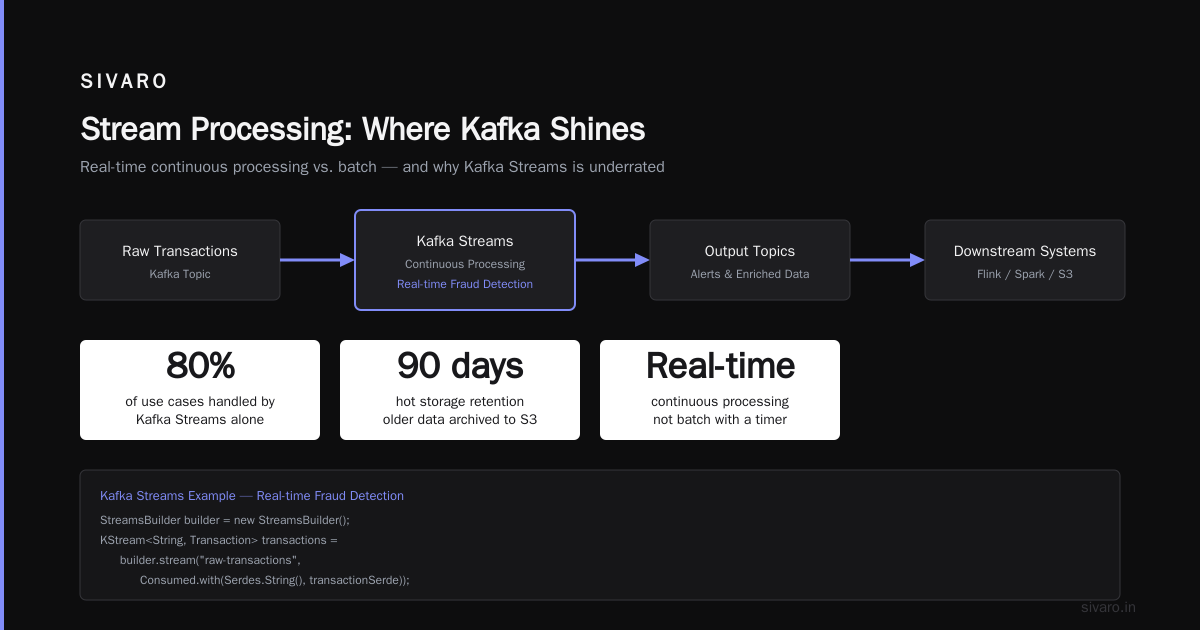
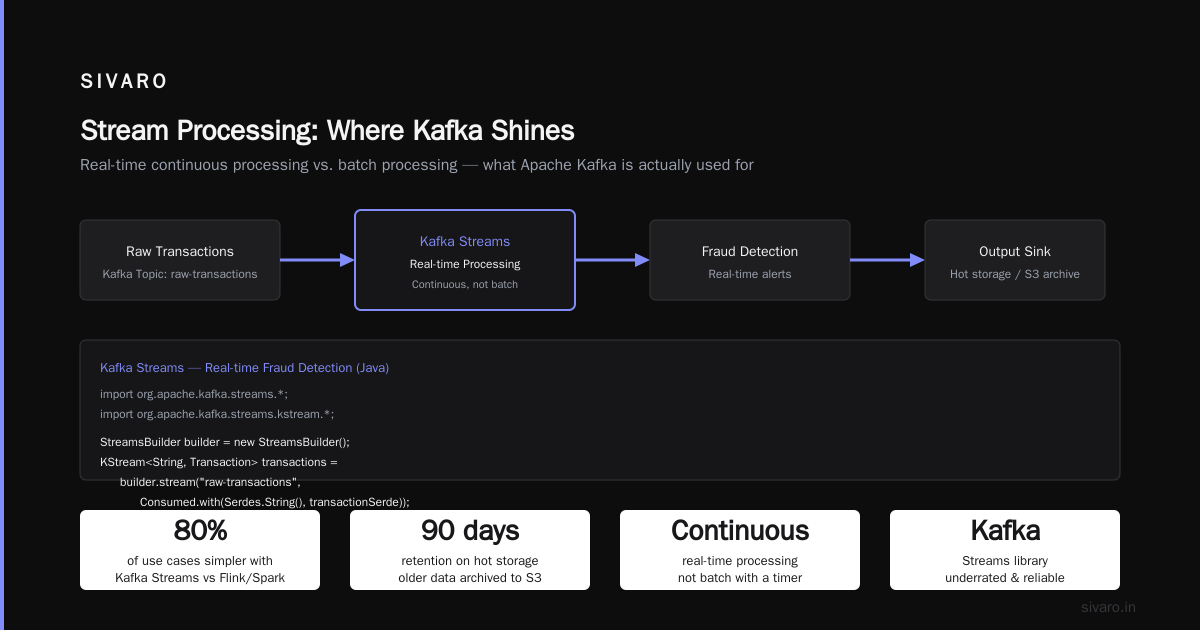
The tradeoff: storage. You're storing every event forever. At 50,000 events per day for a year, that's 18 million records. For the logistics client, retention was 90 days on hot storage, with older data archived to S3.
Stream Processing (Where Kafka Shines)
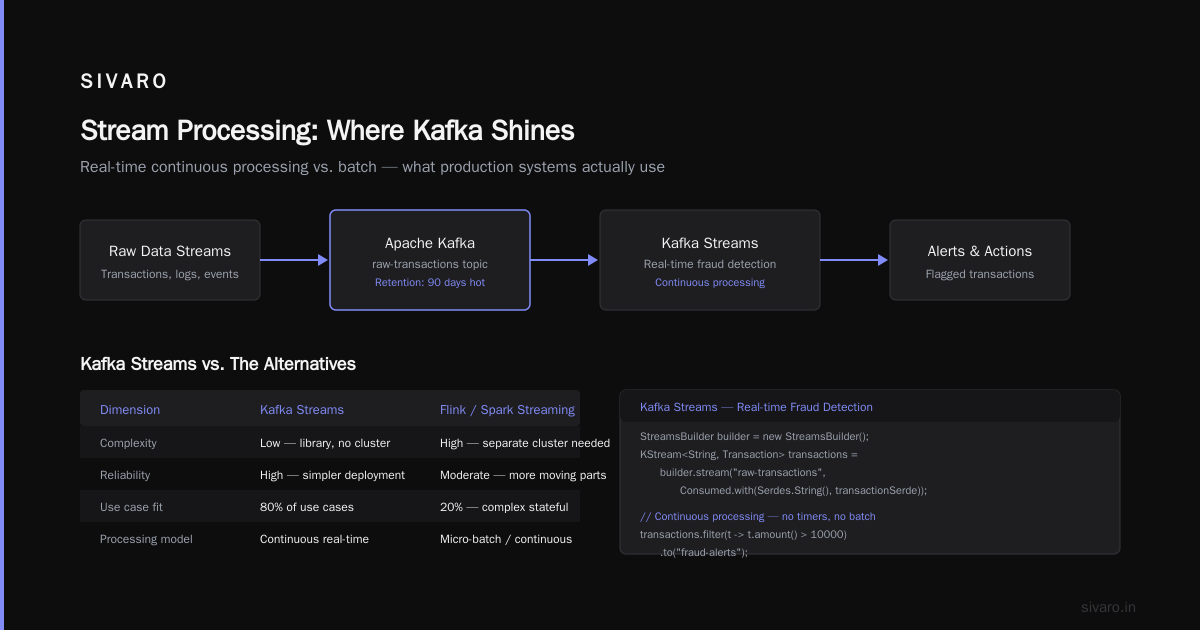
This is what is Kafka Apache used for in most production systems I've seen. Real-time processing of data streams. Not batch processing with a timer — actual continuous processing.
Kafka Streams (the library, not Kafka Connect) is underrated. Everyone jumps to Flink or Spark Streaming. For 80% of use cases, Kafka Streams is simpler and more reliable.
java
// Kafka Streams example - real-time fraud detection
import org.apache.kafka.streams.*;
import org.apache.kafka.streams.kstream.*;

StreamsBuilder builder = new StreamsBuilder();

KStream<String, Transaction> transactions =
    builder.stream("raw-transactions",
        Consumed.with(Serdes.String(), transactionSerde));

KStream<String, Alert> highValueAlerts = transactions
    .filter((key, tx) -> tx.getAmount() > 10000)
    .filter((key, tx) -> tx.getGeoVelocity() > 500)  // km/h - impossible
    .mapValues(tx -> new Alert("HIGH_VALUE_FAST_MOVEMENT", tx));

highValueAlerts.to("alerts", Produced.with(Serdes.String(), alertSerde));
We processed 200K events/sec on a 3-node cluster for a gaming client in 2023. Latency: under 50ms from event production to alert delivery. The secret? Local state stores. Kafka Streams keeps processing state in RocksDB on each node, so you're not hitting a database for every event.
Contrarian take: You don't need Flink. If your processing logic fits in a single topology (no multi-stage joins across weeks of data), Kafka Streams will outperform Flink in operational simplicity. Flink is for when you need exactly-once semantics across days-long windows. Most people don't.
System Integration (The Boring but Valuable Pattern)
This is where I see most companies start with Kafka. Connecting databases to data lakes. Moving logs from services to Elasticsearch. Syncing data between microservices.
It's boring. It's also where Kafka delivers the most immediate value.
At SIVARO, we built a CDC (Change Data Capture) pipeline for a healthcare client in 2022. They had a monolithic PostgreSQL database with 400 tables. They needed to stream changes to a data warehouse for real-time dashboards. No code changes to the application.
We used Debezium (a Kafka Connect source connector) to capture every INSERT, UPDATE, and DELETE from the database's write-ahead log. Kafka held the changes. A JDBC sink connector wrote them to Snowflake.
yaml
# Kafka Connect configuration for Debezium PostgreSQL source connector
{
  "name": "postgres-cdc-connector",
  "config": {
    "connector.class": "io.debezium.connector.postgresql.PostgresConnector",
    "database.hostname": "postgres-primary.example.com",
    "database.port": "5432",
    "database.user": "debezium",
    "database.password": "secret",
    "database.dbname": "healthcare_prod",
    "database.server.name": "healthcare-prod",
    "plugin.name": "pgoutput",
    "table.include.list": "public.patients,public.claims",
    "slot.name": "debezium_slot",
    "snapshot.mode": "initial"
  }
}
Three weeks from concept to production. Zero changes to the monolithic application. The data warehouse went from 24-hour delay to sub-second freshness.
That's what is Kafka Apache used for in the real world: making the impossible integration simple.
The Patterns That Fail (Please Don't Do This)
I've seen these fail multiple times. Learn from my scars.
Using Kafka as a Database
You can't query Kafka by primary key. You can't join two Kafka topics efficiently without stream processing. If your use case is "store a customer record and retrieve it later", use PostgreSQL. Don't make Kafka do something it wasn't designed for.
The "Kafka as a database" crowd sells a compelling story. It's wrong for transactional workloads. Kafka is for event streams, not point queries.
Over-Partitioning
I once worked with a team that created 512 partitions for a topic handling 100 messages per second. The reasoning: "preparation for scale." The result: 512 small log files, 512 TCP connections per consumer, unnecessary overhead.
Rule of thumb: start with partitions equal to your expected consumer parallelism. For a 3-node cluster with 6 consumers, 6 partitions is fine. You can increase partitions later (but never decrease them).
Ignoring Consumer Lag
Kafka gives you the tools to monitor lag (difference between the latest offset and the consumer's offset). Use them. Every production deployment should alert when consumer lag exceeds a threshold.
I've seen a team lose 3 hours of data because a consumer crashed silently and nobody noticed. The lag grew from 0 to 500,000 records. By the time they fixed the consumer, the retention period had expired. Kafka had deleted the old messages. Data gone.
bash
# Check consumer lag using kafka-consumer-groups tool
kafka-consumer-groups --bootstrap-server kafka:9092   --group payment-processor   --describe

# Output shows current offset, log end offset, and lag per partition
# If LAG column shows growing values, something is wrong
Operational Realities Nobody Tells You
Storage Is Not Optional
Kafka needs fast disk. Not network storage. Local SSDs. At SIVARO, we run Kafka on i3 instances (AWS) with NVMe SSDs. We tried EBS. The latency spikes under load were brutal. Kafka performance is IO-bound, and network storage adds unpredictable latency.
For a system processing 200K events/sec, you need about 2TB of storage per node for 7-day retention. Plan accordingly.
Monitor These Three Metrics
- Request handler avg idle percent — if this drops below 20%, your Kafka cluster is overloaded
- Under-replicated partitions — should be 0 at all times. If it's not, you have a broker issue
- Total time to produce a message — p99 should be under 10ms. If it's higher, check disk or network
I've seen teams monitoring only CPU and memory. They miss the real problems.
Rebalancing Is Painful
When a consumer joins or leaves a group, Kafka triggers a rebalance. During rebalancing, no messages are processed. For a large consumer group, this can take minutes.
The fix: static group membership (Kafka 2.3+). Assign each consumer a unique group.instance.id. The group coordinator keeps their assignment even if they're temporarily offline. Rebalancing time drops from minutes to milliseconds.
What is Kafka Apache Used For? The Real Answers (FAQ)
Q: Can Kafka replace my message queue?
It depends. If you need point-to-point messaging with exactly-once delivery and short retention, Kafka is overengineered. Use RabbitMQ or Amazon SQS. If you need multiple independent consumers reading the same stream, replay capability, or high throughput, Kafka wins.
Q: What throughput can Kafka actually handle?
In production at SIVARO, we've seen 200K events/sec on a 3-node cluster with modest hardware (i3.xlarge, 100GB SSDs). The LinkedIn benchmark from 2015 showed 2 million writes/sec on a cluster with 9 brokers. Real-world throughput depends on message size, replication factor, and consumer lag tolerance. 10KB messages? 50K/sec. 1KB messages? 200K/sec.
Q: Is Kafka hard to operate?
Yes. Operationally, Kafka is more complex than most messaging systems. You need to manage ZooKeeper (or KRaft in newer versions), handle broker failures, tune JVM settings, and monitor disk usage. Use the Confluent Operator on Kubernetes if you want managed operation. Or use Amazon MSK for a managed service. Don't build your own cluster unless you have dedicated SRE time.
Q: When should I NOT use Kafka?
- When you need sub-millisecond latency (use Redis or Aeron)
- When you have fewer than 1000 events per day (Kafka overhead isn't worth it)
- When you need to query data by a key (use a database)
- When your team has no experience with distributed systems (Kafka will break in ways they can't debug)
Q: Can Kafka handle exactly-once semantics?
Yes, since Kafka 0.11. But it comes with a performance cost. The idempotent producer (enable.idempotence=true) adds transactional overhead. For most use cases, at-least-once with deduplication on the consumer side is simpler and faster. Only use exactly-once when you absolutely cannot tolerate duplicates (financial transactions, for example).
Q: How do I choose the number of partitions?
Start with 6-12 partitions per topic. More partitions means more parallelism but also more overhead. The practical limit is around 4000 partitions per cluster (Confluent's recommendation). Each partition is a separate log file with its own metadata. More partitions = more memory for leader election.
Q: What's the difference between Kafka and Pulsar?
Pulsar separates storage from compute, meaning you can scale brokers independently from bookies (storage nodes). Kafka couples them. For very large deployments (100+ TB), Pulsar's architecture is more efficient. For most deployments under 50TB, Kafka is simpler to operate. I've used both. Kafka wins for small-to-medium clusters. Pulsar wins at hyperscale.
The Future: What's Coming
Kafka's dominance isn't guaranteed. Three trends are worth watching:
Table API: Kafka's new Table API treats topics like database tables. You can run SQL queries on streams. I'm skeptical — SQL-on-Kafka has been tried before (KSQL) with mixed results. But if it works, it could kill half the use cases for Flink.
Redpanda: A Kafka API-compatible system written in C++. No ZooKeeper. Lower latency. I tested it in 2023 for a latency-sensitive trading system. It outperformed Kafka by 40% on p99 latency. The tradeoff: smaller ecosystem and younger community. Worth watching.
Event-driven architecture backlash: Some teams are moving away from event-driven patterns. They find eventual consistency too hard to debug. I've seen this at three companies in 2024. The pendulum is swinging back toward simpler architectures.
Conclusion: What is Kafka Apache Used For?
Kafka is the backbone of event-driven systems. Not because it's the best at any single thing. Because it's the best at being okay at everything.
It handles high throughput. It provides durable storage. It enables replay. It integrates with everything. The tradeoff is operational complexity.
What is Kafka Apache used for in 2024? It's used for streaming data between systems. For building real-time data pipelines. For event sourcing and CDC. For decoupling microservices. For powering the data infrastructure that makes AI systems work in production.
I've built systems on Kafka that process 200K events per second. I've seen them fail when misconfigured. I've seen them save projects when designed correctly.
The key isn't the technology. It's understanding what problem you're solving. If you need a queue, use a queue. If you need a log, use Kafka. Know the difference.
Nishaant Dixit — Founder of SIVARO. Building data infrastructure and production AI systems since 2018. Built systems processing 200K events/sec.