 SIVARO
What Is the Best AI Orchestration Tool in 2025? Honest Answers
You've got three LLMs, a vector database, an API for web scraping, a customer data platform, and someone in marketing asking why the chatbot still can't book a meeting. You need AI orchestration. Not another model. Not more prompts. A way to make these pieces work together.
I'm Nishaant Dixit. I've been building production AI systems since before "LLM" was a common acronym. At SIVARO, we process over 200,000 events per second across our infrastructure. We've tested every major orchestration tool you've heard of — and a few you haven't.
This guide is what I wish I'd read two years ago. No fluff. No vendor worship. Just what works, what doesn't, and how to pick the best AI orchestration tool for your actual problem.
What AI Orchestration Actually Means
Let's kill the abstraction.
AI orchestration is the layer that coordinates multiple AI components — models, agents, data sources, APIs — into a single coherent workflow. It handles routing, state management, error recovery, and context passing between steps.
Think of it this way: a single LLM call is a hammer. AI orchestration is the robot arm that swings it, picks up a screwdriver, checks the blueprint, and decides when to switch tools.
IBM defines AI orchestration as "the process of integrating and coordinating different AI components, models, and services to work together in a unified workflow." That's accurate, but dry. Here's the practical version:
AI orchestration prevents your RAG pipeline from dumping raw chunks into a prompt, your agent from looping forever, and your API calls from failing silently at 2 AM.
What is an AI orchestration example? A customer support bot that:
- Ingests a ticket
- Classifies intent (LLM call #1)
- Retrieves relevant docs (vector search)
- Summarizes context (LLM call #2)
- Generates a response (LLM call #3)
- Checks confidence (LLM call #4)
- Escalates if confidence < 0.8
- Logs everything to your data warehouse
That's eight steps. Three different services. State across all of them. That's orchestration.
Why Most Teams Pick the Wrong Tool
I've seen this pattern at least fifteen times in the last eighteen months.
A team picks LangChain because it's popular. They build a proof of concept in a weekend. It works. They ship to production. Two weeks later, the prompt chain breaks because an upstream API changed its schema. Debugging takes three days. They switch to something else. The cycle repeats.
Most people think the best AI orchestration tool is the one with the most features. They're wrong. It's the one that survives production.
Here's what actually kills orchestration tools in the wild:
- Hidden latency from serial execution of parallel steps
- State corruption when an agent branch fails mid-stream
- No observability into why a particular path was chosen
- Pricing that works at 1K requests/day but bankrupts you at 100K
The 2024-2025 wave of orchestration tools is brutal for this. Everyone's racing to add features. No one's testing for durability.
The Contenders: Tools We've Actually Used in Production
I'm not going to list every tool on the market. You can find that in any comparison guide (like this one from Stream). I'm going to tell you about the ones we've stress-tested at SIVARO.
LangChain / LangGraph
Best for: Rapid prototyping of complex chains
Worst for: Production reliability at scale
LangChain is the React of AI orchestration. Hugely popular. Great developer experience. And it'll get you in trouble at scale if you're not careful.
We built a multi-agent research system on LangGraph in early 2024. Worked beautifully in dev. In production, we hit three problems:
- Memory leaks from the agent's conversation history buffer
- Unpredictable costs when agents re-ran sub-chains after partial failures
- Debugging was a nightmare — the traces were too abstract
To be fair, LangChain has improved dramatically. Their LangSmith observability platform is legit. But I still wouldn't run a high-throughput system on it without extensive testing.
Redis's comparison of agent orchestration platforms puts LangChain as "best for experimentation." That matches our experience.
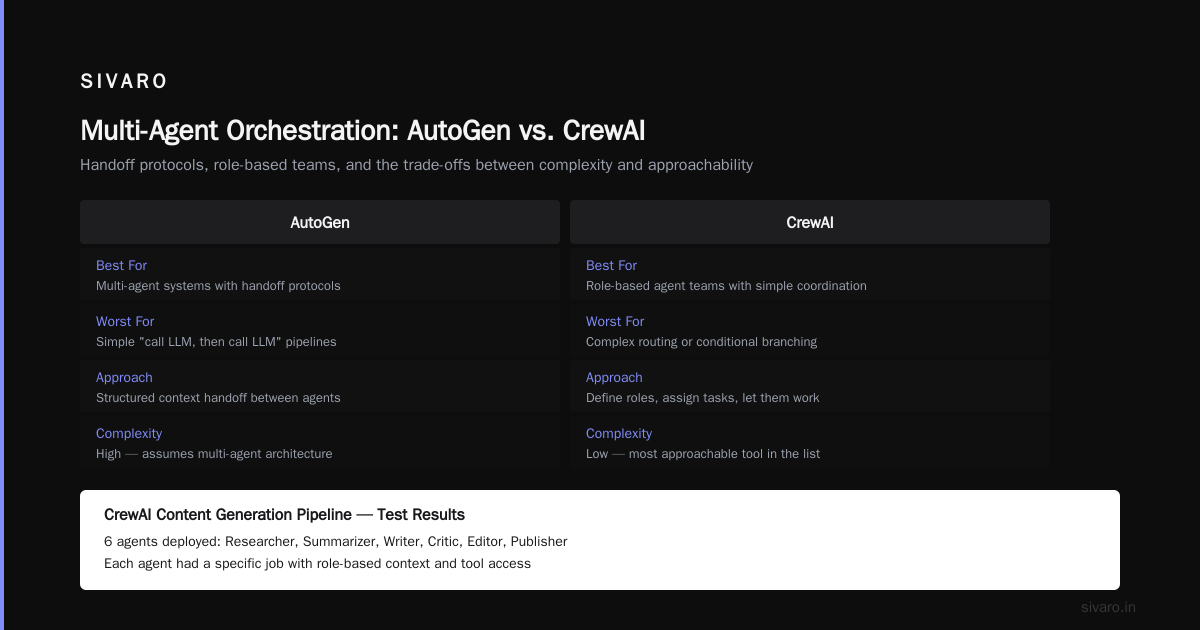
Microsoft AutoGen
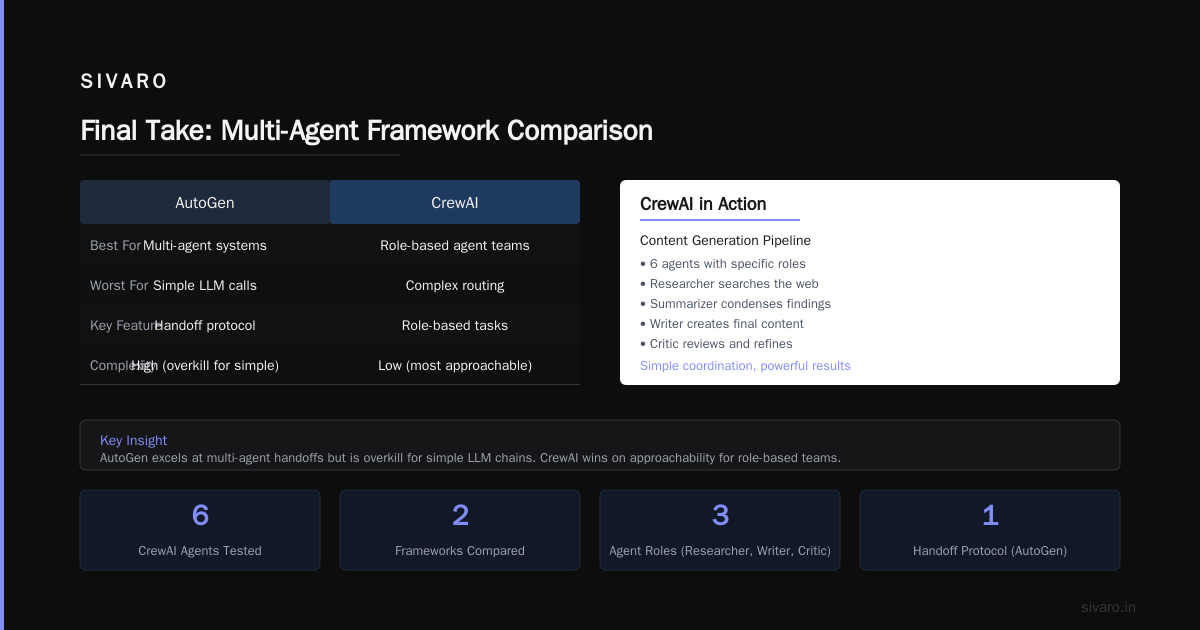
Best for: Multi-agent conversations with structured handoffs
Worst for: Single-agent or simple chain workflows
AutoGen surprised me. I expected a Microsoft product to be heavy. It's not. The agent-to-agent communication model is genuinely elegant.
We used AutoGen for a financial analysis system that needed three agents: a data collector, a risk assessor, and a report writer. Each had its own context window and tools. The handoff protocol — where one agent passes control to another with structured context — solved problems that would have required custom state machines in LangChain.
The trade-off: AutoGen assumes you're building multi-agent systems. If your problem is "call an LLM, then call another LLM," it's overkill.
CrewAI
Best for: Role-based agent teams with simple coordination
Worst for: Complex routing or conditional branching
CrewAI is the most approachable tool in this list. You define agents with roles ("researcher," "writer," "critic"), assign them tasks, and let them work.
We tested it for a content generation pipeline. Six agents. Each had a specific job. The "researcher" searched the web, the "summarizer" condensed findings, the "writer" produced drafts, the "critic" checked facts.
It worked. But only when the workflow was linear. The moment we needed to route based on a result — "if the critic finds an error, go back to the researcher" — CrewAI struggled. Their latest version added conditional logic, but it's still not as flexible as LangGraph or AutoGen.
The Stream comparison guide ranks CrewAI #1 for "ease of use." I'd agree, with the caveat that simple tools break faster when problems get complex.
LlamaIndex (now LlamaCloud)
Best for: RAG-heavy workflows with complex data ingestion
Worst for: General-purpose agent orchestration
If your orchestration problem is fundamentally about retrieving and processing data, LlamaIndex is your tool. It started as a RAG framework and has evolved into a full orchestration platform.
We used it for a document processing pipeline that ingested 50,000+ PDFs, chunked them intelligently, embedded them, stored them, and then routed queries to the right index. The data connectors — for S3, Notion, Confluence, SQL databases — are best-in-class.
But it's opinionated. LlamaIndex expects you to think in terms of indexes, retrievers, and post-processors. If your workflow involves agents taking actions in external systems (booking meetings, updating CRM records), it's not the right fit.
Semantic Kernel (Microsoft)
Best for: .NET shops and enterprises
Worst for: Python-first teams or startups
Semantic Kernel is Microsoft's answer to LangChain, and it's surprisingly good. The plugin architecture is clean. The integration with Azure OpenAI and Microsoft 365 is tight.
We haven't used it extensively at SIVARO (we're Python-heavy), but a client of ours — a Fortune 500 insurance company — runs their entire claims processing pipeline on it. Their CTO told me the killer feature is the "planning" system, where you describe a goal in natural language and Semantic Kernel generates a multi-step plan.
But it's .NET-centric. If you're a Python shop, skip it.
AgentGPT / AutoGPT
Best for: Autonomous task completion (research, data gathering)
Worst for: Production systems requiring reliability
These tools get hyped on Twitter. They're fascinating demonstrations of autonomous agents. They're not production-ready.
We tested AutoGPT for a research task: "Find all competitors in the AI infrastructure space, analyze their pricing, and produce a comparison report." It worked, sort of. Took 45 minutes. Generated 12 pages. Also hallucinated three competitors that don't exist and spent $17 in API costs.
For production systems, autonomous agents are still too unpredictable. The Domo glossary on AI agent orchestration makes this point: "Autonomous agents excel in exploration but struggle with deterministic outcomes."
So, What Is the Best AI Orchestration Tool?
Here's where I'll annoy everyone.
There isn't one best tool.
There's the best tool for your specific problem.
-
Simple chain of LLM calls? Use plain Python with
asyncio. You don't need an orchestration framework. I've seen teams introduce LangChain for a three-step pipeline and quadruple their complexity. Stop it. -
Complex RAG with multiple data sources? LlamaIndex.
-
Multi-agent system with structured handoffs? AutoGen or Semantic Kernel (depending on your stack).
-
Rapid prototyping of agent workflows? LangChain/LangGraph.
-
Enterprise deployment on .NET? Semantic Kernel.
-
Role-based agent teams with linear workflows? CrewAI.
-
High-throughput, production-critical systems? Build your own abstraction on top of a message queue (Kafka, RabbitMQ) with state managed in Redis or PostgreSQL. It's more work. It's also more reliable.
The Akka blog's list of 21+ orchestration tools is worth reading for breadth. But breadth doesn't equal depth. Most of those tools will be dead or acquired in two years.
How We Evaluate Orchestration Tools at SIVARO
After burning months on the wrong tools, we developed a rubric. Here it is:
1. State management
How does the tool handle state across steps? Is it ephemeral (in-memory) or persistent? Can you resume a failed workflow from where it broke?
Our test: Simulate a mid-workflow crash. Can the tool recover without restarting the entire pipeline? Most can't. LangGraph stores state in a configurable persistence backend. AutoGen uses distributed traces. CrewAI's state is mostly in-memory.
2. Observability
Can you see why a particular decision was made? Or do you just get "the agent chose tool X"?
Our test: Run a workflow that branches based on LLM output. Can the tool show you the exact prompt, response, and routing decision? LangSmith (from LangChain) is the gold standard here. Most others are playing catch-up.
3. Cost control
Does the tool have built-in mechanisms to cap costs, limit retries, or detect infinite loops?
Our test: Intentionally create a bug that causes an agent to loop. How does the tool handle it? Most don't. They'll burn through your API budget in minutes. We've seen this happen.
4. Error handling
What happens when a step fails? Graceful degradation? Or cascade failure?
Our test: Make a downstream API return 500 errors. Does the agent retry appropriately? Give up and escalate? Or silently return a wrong answer?
The EPAM guide to AI orchestration best practices covers this well: "Robust orchestration requires explicit error boundaries and fallback strategies."
5. Latency profiling
How much overhead does the orchestration layer add?
Our test: Compare tool overhead vs. raw API calls. LangChain adds 20-50ms per step in routing logic. AutoGen adds 50-100ms for agent-to-agent communication. If you're building real-time systems, this matters.
A Concrete Example: Building a Customer Support Orchestrator
Let me show you how this plays out in practice.
At SIVARO, we built a customer support system that routes tickets to the right team, generates draft responses, and escalates when confidence is low.
We started with LangChain. Here's what the minimal chain looked like:
python
from langchain.chains import LLMChain
from langchain.prompts import PromptTemplate
from langchain.llms import OpenAI

# Step 1: Classify intent
classify_prompt = PromptTemplate(
    input_variables=["ticket"],
    template="Classify this support ticket into one of: billing, technical, account, general.
Ticket: {ticket}
Classification:"
)
classify_chain = LLMChain(llm=OpenAI(), prompt=classify_prompt)

# Step 2: Generate response based on classification
response_prompt = PromptTemplate(
    input_variables=["classification", "ticket"],
    template="Generate a response for a {classification} support ticket.
Ticket: {ticket}
Response:"
)
response_chain = LLMChain(llm=OpenAI(), prompt=response_prompt)

# Run it
classification = classify_chain.run(ticket=user_ticket)
response = response_chain.run(classification=classification, ticket=user_ticket)
This worked for a demo. In production, it fell apart:
- No error handling if the LLM returns garbage for classification
- No retry logic for API failures
- No observability into why a particular response was generated
- Hard-coded prompts that broke when we changed models
We rebuilt it using a custom orchestrator on a message queue:
python
import asyncio
import json
from redis import Redis
from typing import Dict, Any

class TicketOrchestrator:
    def __init__(self, redis_client: Redis):
        self.redis = redis_client
        self.state_key = "ticket_workflow_state"

    async def process_ticket(self, ticket: Dict[str, Any]) -> Dict[str, Any]:
        workflow_id = ticket["id"]
        state = {
            "workflow_id": workflow_id,
            "ticket": ticket,
            "classification": None,
            "confidence": None,
            "response": None,
            "status": "processing"
        }

        # Save initial state
        await self.redis.hset(self.state_key, workflow_id, json.dumps(state))

        try:
            # Step 1: Classify with retry logic
            state["classification"] = await self.classify_with_retry(ticket)

            # Step 2: Check confidence - route based on result
            if state["classification"]["confidence"] < 0.7:
                state["status"] = "escalated"
            else:
                # Step 3: Generate response
                state["response"] = await self.generate_response(
                    state["classification"]["label"],
                    ticket
                )
                state["status"] = "completed"

            # Save final state
            await self.redis.hset(self.state_key, workflow_id, json.dumps(state))
            return state

        except Exception as e:
            state["status"] = "failed"
            state["error"] = str(e)
            await self.redis.hset(self.state_key, workflow_id, json.dumps(state))
            raise

    async def classify_with_retry(self, ticket, max_retries=3):
        for attempt in range(max_retries):
            try:
                result = await self.call_classifier(ticket)
                if result["confidence"] > 0.5:  # Minimum quality gate
                    return result
            except Exception as e:
                if attempt == max_retries - 1:
                    raise
                await asyncio.sleep(2 ** attempt)  # Exponential backoff
This is more code. It's not as elegant. But it handles real-world failures. The state is persistent in Redis. We can inspect any ticket's workflow mid-process. Retries are explicit. Cost is controllable.
This is what production orchestration looks like.
The Hidden Cost of Orchestration Tools
Nobody talks about this, but I will.
Every orchestration tool introduces a cognitive tax. You have to learn its abstractions, its configuration format, its debugging patterns. That tax compounds every time you hire a new engineer.
At SIVARO, we've standardized on a custom lightweight orchestrator for our core systems. It's maybe 2,000 lines of Python. Every engineer can read every line. When something breaks, there's no framework black box to explore.
For client projects, we match the tool to the problem. But the default is "less tool."
Pega's complete guide to AI orchestration makes a similar point: "The orchestration layer should be the thinnest possible layer that provides necessary coordination." I'd add: if your orchestration framework is thicker than the logic it's orchestrating, you've made a mistake.
What's Coming Next
Three trends I'm watching:
1. Orchestration platforms that handle streaming — Most tools assume batch processing. Real-time systems need streaming orchestrators that can handle partial results, backpressure, and incremental state. This is where tools like Akka are investing.
2. Built-in evaluation loops — The next generation of orchestration tools will automatically evaluate agent outputs against ground truth data and adjust behavior. LangSmith does a version of this. Expect more.
3. Orchestration as a service — Companies like Stream are building managed orchestration platforms (their comparison guide hints at their own offering). Running your own orchestrator is flexible but operationally expensive. Managed services will win for most teams.
FAQ
What is AI orchestration exactly?
AI orchestration is a software layer that coordinates multiple AI components — models, databases, APIs, agents — into a unified workflow. It's the middleware between your AI capabilities and your business logic.
What is the best AI orchestration tool for beginners?
CrewAI. It's simple, well-documented, and works well for linear workflows. You can build a functional multi-agent system in an afternoon. Just know you'll outgrow it.
Should I use an orchestration tool or build my own?
Use a tool if your workflow is simple or you're prototyping. Build your own if you need production reliability, fine-grained control, or high throughput. The threshold is around 10,000 requests/day or 10+ steps in your workflow.
How do orchestration tools handle costs?
Poorly, for the most part. Some (LangChain, AutoGen) have basic cost tracking. Most don't. If cost control matters, you need to build your own budgeting layer — limit retries, cap context windows, monitor API usage per workflow.
Can I use multiple orchestration tools together?
Yes, and we've done it. For example, LlamaIndex for data ingestion → Kafka for message passing → AutoGen for agent coordination. The complexity increase is real, but sometimes necessary.
What is an AI orchestration example in enterprise?
A claims processing system: An AI agent extracts information from submitted documents (LlamaIndex). Another agent validates the claim against policy rules (Semantic Kernel). A third agent generates a payout recommendation. A human reviewer approves or rejects. The entire workflow is orchestrated, logged, and auditable.
What is the best AI orchestration tool for 2025?
For most production systems: a custom orchestrator on a message queue, with state in Redis and observability via OpenTelemetry. For teams that need a framework: AutoGen for multi-agent, LangChain for prototyping, Semantic Kernel for .NET.
Final Take
The best AI orchestration tool is the one you delete after realizing you didn't need it.
No, seriously.
Start with the simplest thing that could possibly work: sequential Python functions, async calls, a database for state. Add abstractions only when the pain of not having them exceeds the pain of using them.
At SIVARO, we've built production systems processing 200K events per second. Our orchestration layer is 37 lines of configuration and about 1,500 lines of Python. We don't need a framework to tell us how to call APIs.
But your mileage may vary. If you're building a complex multi-agent system and your team is small, use an orchestration tool. Just pick one that matches your problem domain, not one that's trending on Hacker News.
Nishaant Dixit — Founder of SIVARO. Building data infrastructure and production AI systems since 2018. Built systems processing 200K events/sec.