 SIVARO

What Is Apache Kafka Used For? The Honest Guide for Engineers Who Build Real Systems
I remember the exact moment I stopped pretending Kafka was just another message queue. It was 2019. My team at SIVARO was building a real-time fraud detection pipeline for a payments client. We'd started with RabbitMQ. Classic choice. Worked fine for the first 10,000 events per second.
Then the client's Black Friday traffic hit.
We saw 200,000 events per second. RabbitMQ choked. Backpressure cascaded. Consumers fell behind by minutes. The fraud models were making decisions on stale data.
We swapped to Kafka over a weekend. It didn't just handle the load — it changed how we thought about data flow entirely.
Apache Kafka is a distributed event streaming platform. That's the official definition. But here's what it actually means for you: Kafka lets you publish, store, and consume streams of records in real time, at scale, with replayability. It's the backbone for data pipelines, streaming analytics, and production AI systems.
By the end of this guide, you'll know exactly when to use Kafka, when not to, and how it fits into real architectures — including code examples that show the sharp edges I've hit myself.
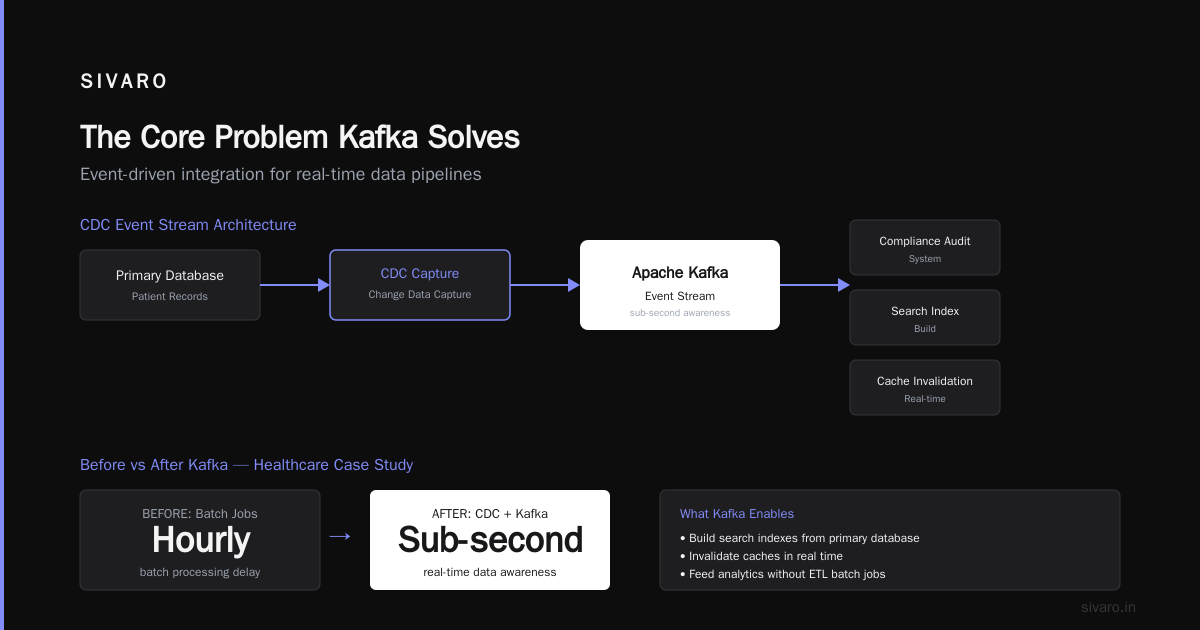
The Core Problem Kafka Solves
Most people think Kafka is just "fast messaging." They're wrong.
The real problem Kafka solves is decoupling data producers from data consumers at scale. Before Kafka, you had two options:
- Direct point-to-point integrations — every service talks to every other service. Fine for 5 services. Chaos for 50.
- Traditional message queues (RabbitMQ, ActiveMQ) — great for job queues, terrible for replaying history or building data pipelines.
Kafka introduces a fundamentally different approach: the commit log.
Think of it like a database for streams. Every event gets written to a log. Consumers read from the log at their own pace. They can go back in time. They can reprocess data. They can add new consumers without impacting producers.
This changes everything.
What Is Apache Kafka Used For? The Real Use Cases
Real-Time Data Pipelines
This is Kafka's bread and butter. You have data coming in from multiple sources — application logs, user activity, IoT sensors, database changes — and you need to move it to multiple destinations.
I've seen this in practice at a logistics company in 2021. They had GPS pings from 50,000 delivery trucks arriving every 2 seconds. Each ping needed to go to:
- A real-time tracking dashboard
- An analytics database for route optimization
- A machine learning model predicting delivery times
- A compliance archive for 7-year retention
Kafka handled all four consumers with a single event stream. When they added a fifth consumer (a fraud detection system), they didn't touch the producers at all.
Stream Processing
This is where Kafka gets interesting. You don't just move data — you transform it in flight.
Kafka Streams (the library) or ksqlDB (the database for streams) lets you do operations like:
- Joining streams (enrich click events with user profile data)
- Aggregating over time windows (count clicks per user per minute)
- Filtering and transforming (mask PII before sending to analytics)
Real example: A fintech startup I advised in 2022 used Kafka Streams to detect account takeover attempts. They joined a stream of login attempts with a stream of known fraud patterns. The join window was 30 seconds. Latency? Under 100ms.
Database Change Data Capture (CDC)
This is the killer app nobody talks about enough.
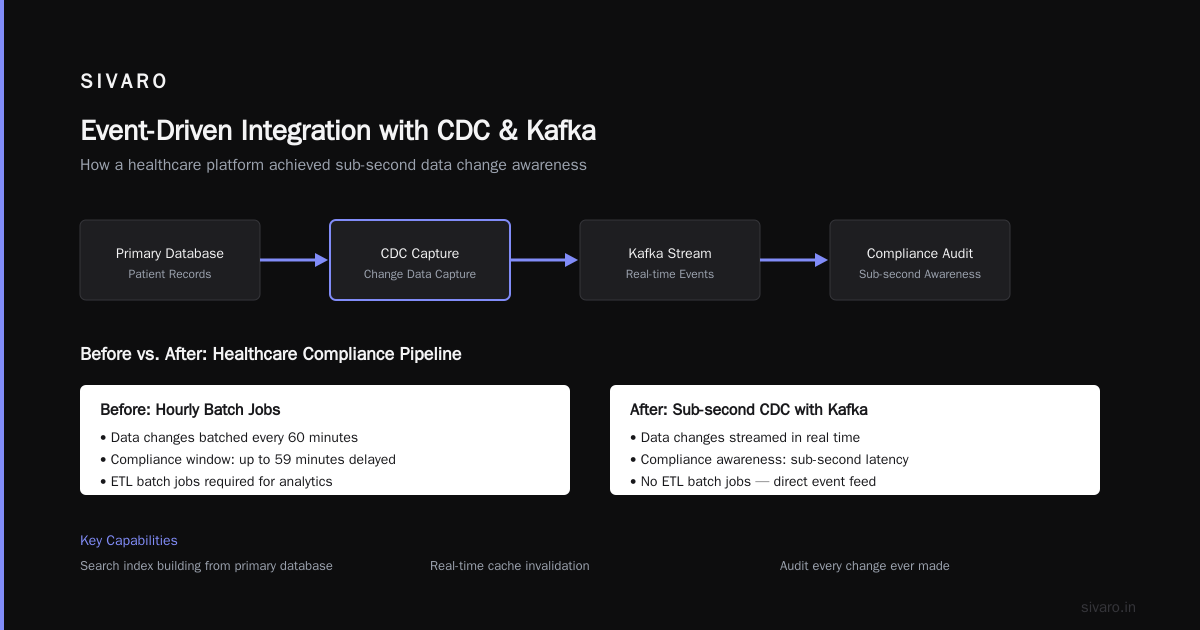
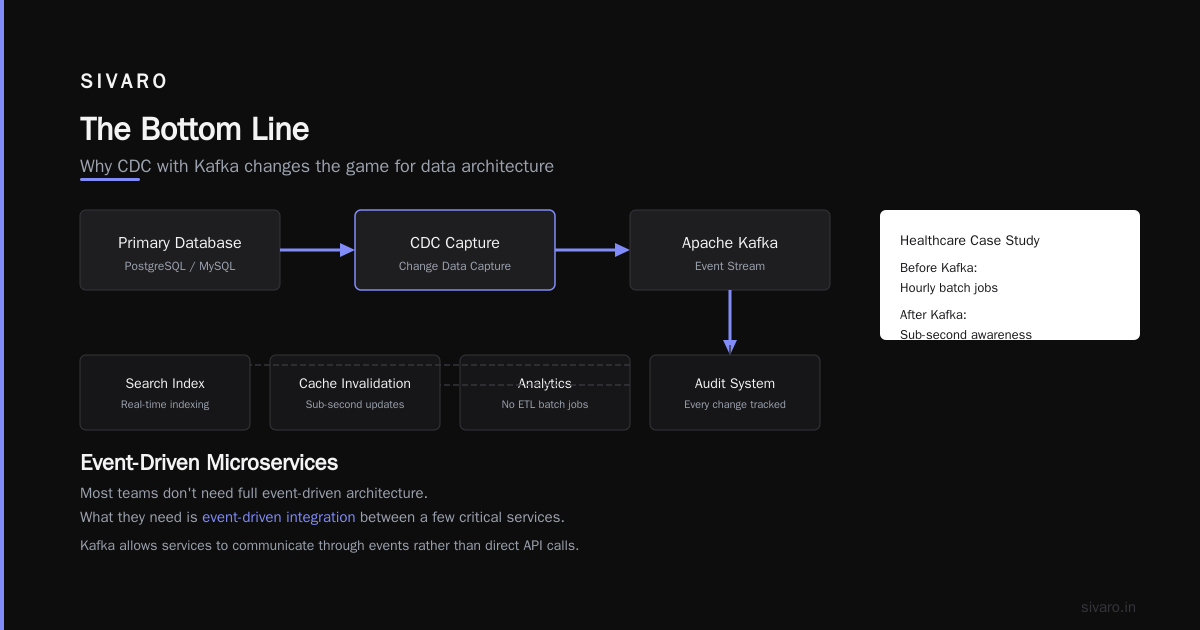
Using Debezium (an open-source connector), you can stream every change from your database into Kafka. Every INSERT, UPDATE, DELETE becomes an event.
Why does this matter?
- You can build search indexes from your primary database
- You can invalidate caches in real time
- You can feed changes into analytics systems without ETL batch jobs
- You can audit every change ever made
I had a client in 2023 — a healthcare platform — that used CDC with Kafka to stream patient record changes to a compliance audit system. Before Kafka, they ran hourly batch jobs. After Kafka, they had sub-second awareness of all data changes.
Event-Driven Microservices
This is the pattern every conference talk loves. But I'll be honest: most teams don't need full event-driven architecture. What they need is event-driven integration between a few critical services.
Kafka allows services to communicate through events rather than direct API calls. Service A publishes "order.created". Service B subscribes and handles payment. Service C subscribes and updates inventory. Service D subscribes and sends confirmation email.
The key advantage? If the email service is down, it doesn't block the order. The event stays in Kafka until the consumer comes back.
Log Aggregation and Monitoring
Kafka replaced dedicated log aggregation systems at places like LinkedIn, Uber, and Netflix. Instead of shipping logs to Elasticsearch directly (which can crash under load), logs go to Kafka first.
Why? Kafka acts as a shock absorber. If Elasticsearch goes down, logs keep piling up in Kafka. When ES comes back, it catches up. No data loss.
At SIVARO, we process about 200K events/sec for client workloads. Kafka holds the buffer. Nothing gets dropped.
AI and Machine Learning Pipelines
This is where I've spent most of my time recently.
Production AI systems need:
- Feature stores that update in real time
- Model inference at low latency
- Training data pipelines that reprocess historical data
- A/B testing infrastructure
Kafka serves all of these. Here's a concrete example from a recommendation system we built in 2024:
python
from kafka import KafkaConsumer
import json
import numpy as np
from sklearn.linear_model import SGDClassifier

# Online learning via Kafka stream
consumer = KafkaConsumer(
    'user-interactions',
    bootstrap_servers=['localhost:9092'],
    value_deserializer=lambda m: json.loads(m.decode('utf-8'))
)

model = SGDClassifier()
for message in consumer:
    feature_vector = np.array(message.value['features']).reshape(1, -1)
    label = message.value['clicked']
    model.partial_fit(feature_vector, label, classes=[0, 1])

    # Score for inference
    prediction = model.predict(feature_vector)[0]
    print(f"Prediction: {prediction}, Window: {message.key}")
The model learns incrementally from every event. No batch retraining.
The Architecture: How Kafka Actually Works
You don't need to know every detail, but you do need to understand the moving parts.
Topics — the categories where you publish events. Think of them like database tables.
Partitions — each topic is split into partitions. This is how Kafka scales. More partitions = more parallel consumers. But too many partitions hurts performance. Rule of thumb: start with partition count equal to your planned consumer count, then double it.
Producers — publish events to topics. They decide which partition an event goes to (usually based on a key like user_id).
Consumers — read events from topics. They belong to consumer groups. Each partition is consumed by exactly one consumer in a group. This ensures ordered processing per partition.
Brokers — the servers that store the data. They're designed to be cheap. Use three for prod, five for larger clusters.
ZooKeeper / KRaft — the coordination service. ZooKeeper is the old way. KRaft is the new way (Kafka without ZooKeeper). Use KRaft for new clusters.
Here's a producer example in Java (Kafka's native language):
java
import org.apache.kafka.clients.producer.*;

Properties props = new Properties();
props.put("bootstrap.servers", "localhost:9092,localhost:9093");
props.put("key.serializer", "org.apache.kafka.common.serialization.StringSerializer");
props.put("value.serializer", "org.apache.kafka.common.serialization.StringSerializer");
props.put("acks", "all"); // Wait for all replicas to acknowledge

KafkaProducer<String, String> producer = new KafkaProducer<>(props);

for (int i = 0; i < 1000; i++) {
    ProducerRecord<String, String> record = new ProducerRecord<>(
        "orders",
        "user_123",  // key determines partition
        "Order placed: " + i
    );
    producer.send(record, (metadata, exception) -> {
        if (exception != null) {
            System.err.println("Failed: " + exception.getMessage());
        }
    });
}
producer.close();
Notice acks=all. That's the safe setting. You lose some throughput, but you guarantee no data loss.
The Hard Truth: Kafka Is Not For Everything
Most articles tell you Kafka is the answer to every problem. It's not. Here are the cases where you should think twice.
When NOT to Use Kafka
-
Simple job queues — You have a worker that processes tasks. Use Redis or RabbitMQ. Kafka's retention and replayability add complexity you don't need.
-
Sub-millisecond latency — Kafka's minimum latency is around 2-5ms in practice. If you need sub-ms, use Redis or a direct socket.
-
Small data volumes — Under 100 events per second? Kafka adds operational overhead. A PostgreSQL table with LISTEN/NOTIFY might be simpler.
-
Exactly-once semantics at massive scale — Kafka supports exactly-once, but it's complex and slows things down. Most teams settle for at-least-once and deduplicate downstream.
The Operational Reality
I'm going to be direct: running Kafka yourself is a pain. Here's what I've learned the hard way:
- Disk space planning is critical — Kafka retains data until a size limit or time limit. If you set retention to 7 days but your traffic spikes, you'll run out of disk. Monitor this daily.
- Rebalancing sucks — When a consumer joins or leaves a group, partitions get reassigned. During rebalance, no processing happens. For large groups, this can take 30+ seconds.
- Compression matters — Use snappy or zstd compression. We reduced our disk usage by 60% just by switching to zstd.
- You need at least 3 brokers — 1 is not for production. 2 can have split-brain issues. 3 is the minimum for quorum.
Setting Up Your First Production-Ready Pipeline
Here's a practical example. You need to stream user signup events to both an analytics system and a verification service.
Step 1: Create the topic
bash
kafka-topics.sh --create   --topic user-signups   --partitions 3   --replication-factor 3   --bootstrap-server localhost:9092   --config cleanup.policy=compact   --config retention.ms=604800000
cleanup.policy=compact means Kafka keeps the latest value for each key. For signups, this means we always have the latest user state.
Step 2: Producer code
python
from kafka import KafkaProducer
import json

producer = KafkaProducer(
    bootstrap_servers=['localhost:9092'],
    value_serializer=lambda v: json.dumps(v).encode('utf-8'),
    acks='all',
    compression_type='zstd'
)

def on_user_signup(user_id, email, signup_time):
    event = {
        'user_id': user_id,
        'email': email,
        'signup_time': signup_time,
        'event_type': 'user.signup'
    }
    producer.send('user-signups', key=user_id.encode(), value=event)
    producer.flush()
Step 3: Two consumers, one group
python
from kafka import KafkaConsumer
import json

# Consumer for analytics
consumer_analytics = KafkaConsumer(
    'user-signups',
    group_id='analytics-group',
    bootstrap_servers=['localhost:9092'],
    value_deserializer=lambda m: json.loads(m.decode('utf-8'))
)

# Consumer for verification (same group, different partition)
consumer_verify = KafkaConsumer(
    'user-signups',
    group_id='analytics-group',
    bootstrap_servers=['localhost:9092'],
    value_deserializer=lambda m: json.loads(m.decode('utf-8'))
)

# They'll partition the work automatically
for msg in consumer_analytics:
    process_for_analytics(msg.value)
Each consumer gets a subset of partitions. Together they process all signups.
The Future: Kafka and AI at Scale
This is where the industry is heading. Every AI system I'm building today starts with Kafka as the backbone.
We're seeing:
- Feature stores built on Kafka — Features computed in real time, served to models instantly
- Reinforcement learning loops — Model actions published to Kafka, reward signals consumed asynchronously
- Multi-modal pipelines — Text, image, and event data all streaming through Kafka topics
At SIVARO, we recently built a system that ingests 200K events/sec from user interactions, processes them through a feature pipeline in Kafka Streams, and serves real-time recommendations. The model retrains every hour using the last 7 days of data from Kafka's log.
The same infrastructure handles production inference and training data generation. That's the power of the commit log.
FAQ: What Is Apache Kafka Used For?
Is Kafka replacing traditional message queues?
Not exactly. Kafka complements queues for different use cases. Use Redis or RabbitMQ for simple task distribution. Use Kafka for event streaming, data pipelines, and replayability.
Can Kafka handle real-time analytics?
Yes, with sub-100ms latency for most use cases. Combined with Kafka Streams or ksqlDB, you can run real-time aggregations, joins, and filtering.
Does Kafka work with microservices?
Yes, but don't go overboard. Use Kafka for event-driven communication between services that need async, reliable data flow. Don't use Kafka for synchronous request-response — that's what HTTP is for.
How many partitions should I use?
Start with partition count equal to your expected consumer count, then double it. Monitor consumer lag. If consumers are idle, you have too many partitions. If they're lagging, add more partitions or consumers.
What is the difference between Kafka and Kinesis?
Kafka is open source, runs anywhere, and gives you more control over partitioning and retention. Kinesis is AWS-managed, simpler to set up, but vendor-locked and more expensive at scale. For serious production systems, I prefer Kafka.
Does Kafka guarantee exactly-once delivery?
It can, using idempotent producers and transactions. But it adds complexity and reduces throughput. Most teams use at-least-once delivery and deduplicate downstream. That's the pragmatic choice.
How do I monitor Kafka?
Track consumer lag, disk usage, network throughput, and request handler utilization. Use tools like Burrow for consumer lag, JMX metrics, and Grafana dashboards.
The Bottom Line
Apache Kafka is not just a message queue. It's a fundamental infrastructure component for any system that needs to move data at scale — in real time, reliably, with the ability to replay history.
I've used it for fraud detection, logistics tracking, healthcare compliance, recommendation engines, and AI pipelines. In every case, the decision to use Kafka came down to one question: Do we need to decouple producers from consumers, retain data for replay, and scale to high throughput without losing events?
If the answer is yes, Kafka is probably right for you.
If the answer is "we just need to notify a worker," use something simpler. Save yourself the operational headache.
But for the hard problems — the ones that involve millions of events per day, multiple consumers, and the need to reprocess data — Kafka remains the best tool we have.
Nishaant Dixit — Founder of SIVARO. Building data infrastructure and production AI systems since 2018. Built systems processing 200K events/sec.