Continuous SOC2 Monitoring RAG Pipelines Drift Alerts Least Privilege Access
You're running a RAG pipeline in [[[[production)](/articles/temporal-workflow-engine-comparison-what-actually-works-in)](/articles/temporal-workflow-engine-comparison-what-actually-works-in)](/articles/temporal-workflow-engine-comparison-what-actually-works-in). Users ask questions. Your system retrieves documents, feeds them to an LLM, returns answers. Everything works.
Until it doesn't.
Suddenly your vector database exposes customer PII. Or your embedding model starts pulling from an unapproved data source. Or a new engineer deployed a change that bypassed access controls entirely.
This is control drift in your RAG pipelines. And it's why continuous SOC2 monitoring with drift alerts and least privilege access isn't optional — it's critical for production AI.
At SIVARO, we've spent the last three years building data infrastructure for AI systems. We've watched teams treat SOC2 like a checkbox exercise. They pass the audit, hang the certificate on their website, and go back to shipping code. Six months later, their security posture has eroded. Controls that were tight during the audit have loosened. Permissions have expanded. New data sources were added without review.
This article is about fixing that. I'll show you what continuous SOC2 monitoring actually looks like for RAG pipelines, how to set up drift alerts that catch problems before auditors do, and why least privilege access isn't optional — it's the foundation everything else sits on.
Let's start with what we're actually talking about.
What Is Continuous SOC2 Monitoring for RAG Pipelines?
Continuous SOC2 monitoring means you're checking your security controls in real time, not once a year when the auditor shows up. For a RAG pipeline — retrieval-augmented generation — this means monitoring every layer: the data sources, the vector store, the embedding model, the LLM, and the access controls connecting them.
According to a recent analysis by the Diogenes Club, "continuous SOC2 monitoring for RAG pipelines requires instrumentation at five distinct layers — data ingestion, vector storage, retrieval, generation, and access control" (Stop SOC 2 control drift). Most companies instrument maybe two of these. That's why they experience dangerous drift.
Here's what continuous monitoring looks like in practice:
- Every API call to your vector database gets logged
- Every change to embedding model versions triggers a drift alert
- Every new data source gets scanned against your approved list
- Every role assignment gets checked hourly against your least-privilege baseline
The alternative — snapshot audits — is like taking a photo of a running river and claiming you know everything about the water. It doesn't work.
Why RAG Pipelines Are Especially Vulnerable to Drift
RAG pipelines are uniquely messy. You're combining:
- Data ingestion pipelines (often pulling from multiple sources)
- Vector databases (with their own access controls)
- Embedding services (model versions that change)
- LLM endpoints (prompts that evolve)
- Authentication layers (users with varying permissions)
Each of these is a drift vector. Change one thing — say, you update your embedding model from text-embedding-ada-002 to text-embedding-3-small — and suddenly your retrieval quality shifts. But also: the security posture of the new endpoint might be different. Maybe it has different rate limiting. Maybe it logs data differently. Maybe it exposes metadata you didn't expect.
The Teleport blog noted in their 2025 analysis that "AI agents introduce new trust boundary challenges because they operate in an environment where the control plane and data plane are often conflated" (How AI Agents Impact SOC 2). This conflation is exactly why drift happens fast in RAG systems.
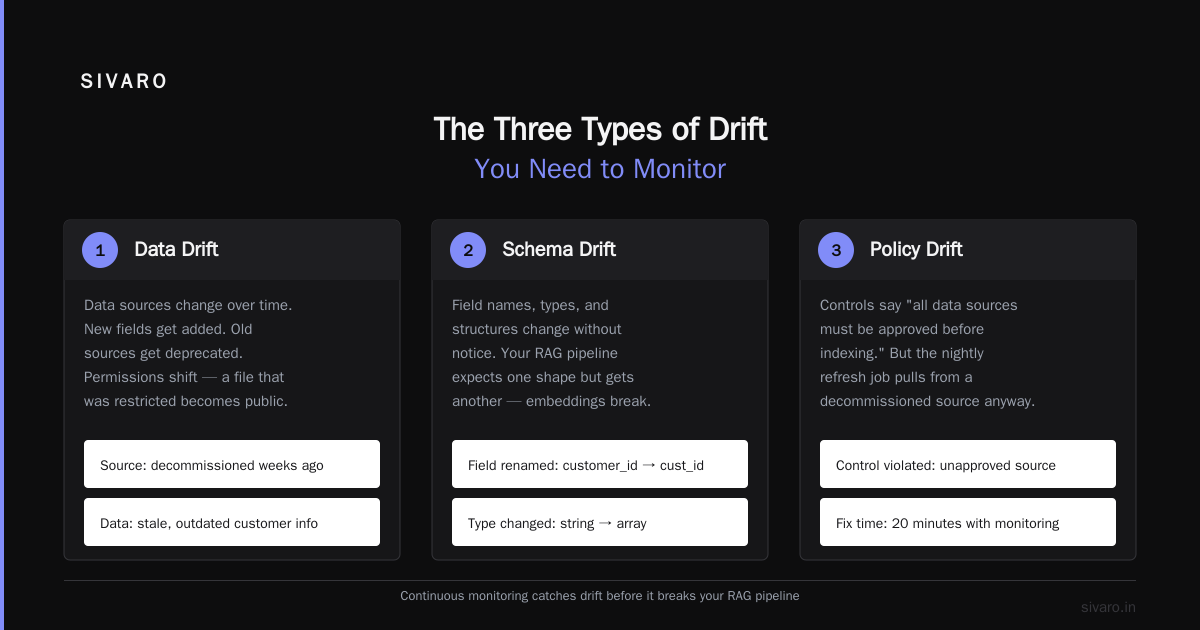
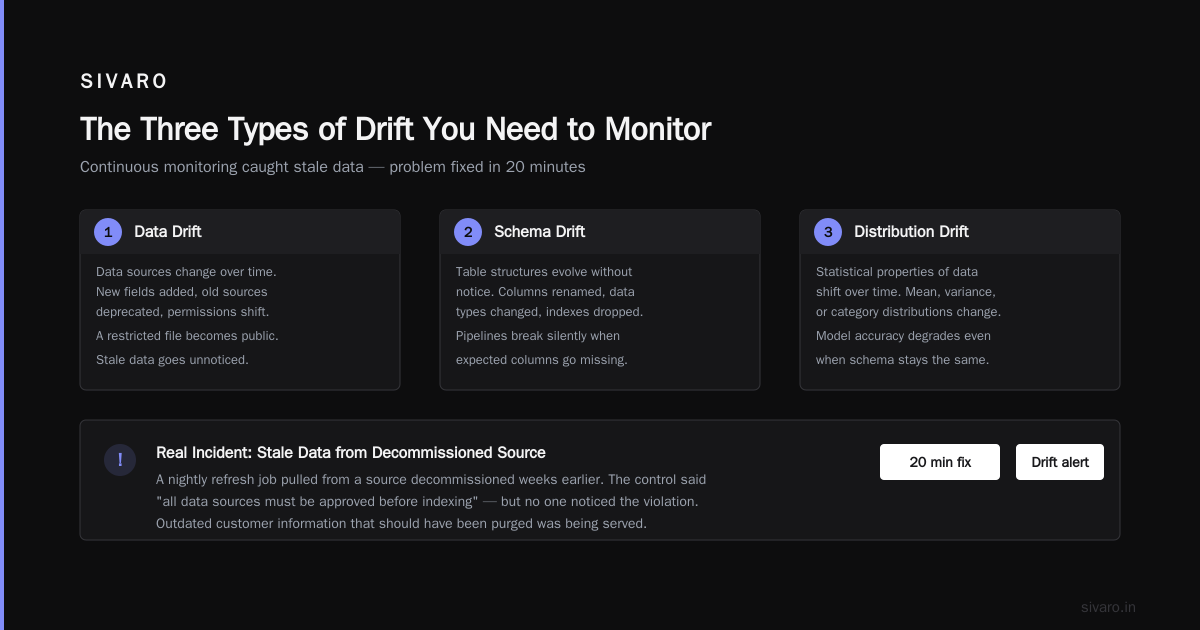
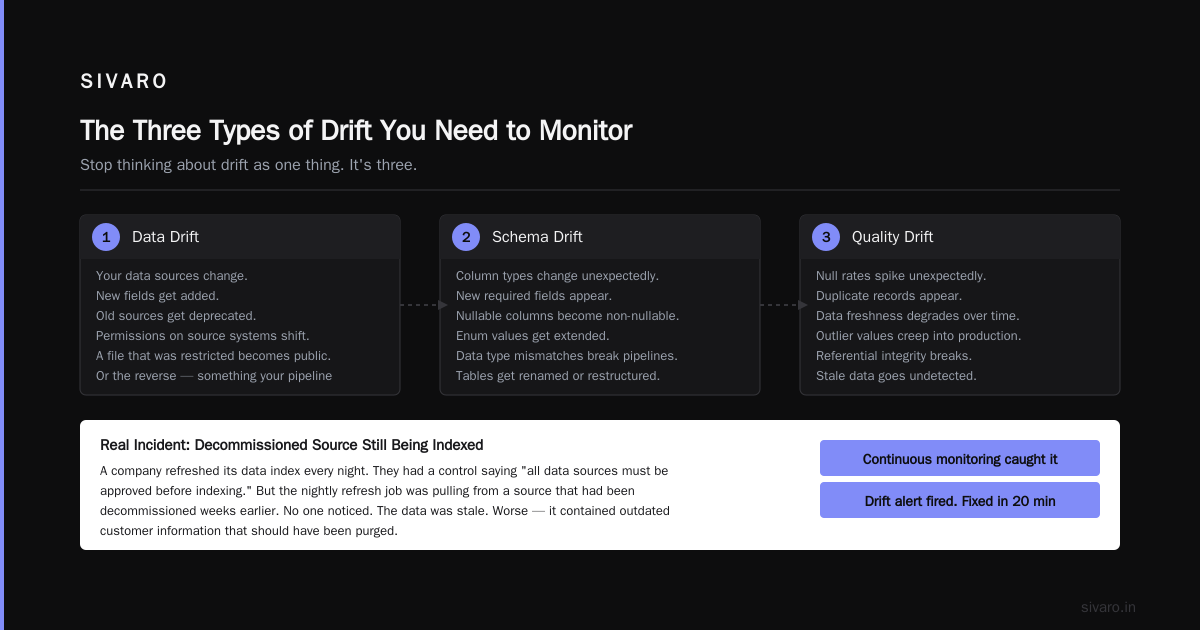
At SIVARO, we saw a client whose RAG pipeline was automatically refreshing its data index every night. They had a control saying "all data sources must be approved before indexing." But the nightly refresh job was pulling from a source that had been decommissioned weeks earlier. No one noticed. The data was stale. Worse — it contained outdated customer information that should have been purged.
Continuous monitoring caught it. Drift alert fired. Problem fixed in 20 minutes.
The Three Types of Drift You Need to Monitor
Stop thinking about drift as one thing. It's three:
1. Data Drift
Your data sources change. New fields get added. Old sources get deprecated. Permissions on source systems shift. A file that was restricted becomes public. Or the reverse — something your pipeline depends on gets locked down without notice.
2. Model Drift
Your embedding model or LLM gets updated. The version bumps. The behavior changes. This is the most common drift I see. Teams update models for performance reasons but don't re-validate the security controls tied to that model. A December 2025 report from TechAhead found that "60% of AI companies we surveyed updated their LLM version without re-running security controls, and 40% of those experienced a compliance gap as a result" (SOC 2 for AI: Controls, Audits and Evidence 2026).
3. Access Drift
Permissions accumulate. People change roles. Contractors leave. New services get spun up with overly permissive IAM roles. This is the classic least-privilege failure mode. You start with tight controls. Twelve months later, everyone has admin access "just in case."
Setting Up Drift Alerts That Actually Matter
Drift alerts are useless if they don't tell you something actionable. I've seen teams set up 200 alerts and then ignore all of them because 95% are noise.
Here's what we've found works at SIVARO:
Alert on changes to approved lists, not on raw activity.
Don't alert me because a user queried the vector database. Alert me because a user queried a vector collection that wasn't on the approved list. Don't alert me because a model was called. Alert me because a model version was called that diverged from the registered version.
This shifts the signal-to-noise ratio dramatically.
Here's a practical example. You have a vector database with collections for different data domains. You want to be alerted when a collection gets created that isn't approved:
yaml
drift-alert-config.yaml
drift_monitors:
- name: unapproved_vector_collection
check_type: inventory_drift
schedule: every_5_minutes
source: pinecone
action:
query: "SELECT collection_name, created_at, metadata FROM collections WHERE created_at > NOW() - INTERVAL '5 minutes'"
compare_against: approved_collections_list
alert:
severity: high
channels: pagerduty, [slack]
message_template: "New unapproved collection ${collection_name} detected. Created at ${created_at}. Metadata: ${metadata}"
I know — YAML for everything. But this pattern works. You're defining what "good" looks like and alerting on divergence.
For model drift, we use a version registry that checks every request:
python
model_version_check.py
from sivaro_drift_monitor import VersionRegistry
registry = VersionRegistry(approved_versions={
"embedding": ["text-embedding-ada-002", "text-embedding-3-small"],
"llm": ["gpt-4-turbo-2025-04-09", "claude-3-opus-2025-06-01"]
})
def check_deployment_version(model_name: str, deployed_version: str) -> bool:
approved = model_name in registry.approved_versions
if not approved:
alert_drift(model_name, deployed_version, "unapproved_model")
return False
if deployed_version not in registry.approved_versions[model_name]:
alert_drift(model_name, deployed_version, "version_mismatch")
return False
return True
This function runs on every deployment event and every hour as a reconciler. If someone deploys a model version that isn't registered, the drift alert fires before it hits production traffic.
Least Privilege Access in RAG: It's Harder Than You Think
Everyone agrees on least privilege. "Users should only have access to the data they need." Easy to say. Hard to set up when your RAG pipeline is dynamically retrieving documents based on natural language queries.
Here's the problem: if your vector database doesn't understand document-level permissions, then any user who can query the index can potentially retrieve any document. The LLM might refuse to answer based on the content, but the retrieval step already leaked the document.
This is why document-level filtering in vector databases is essential. Most teams don't set it up. They rely on the application layer to filter results. That's not secure.
At SIVARO, we enforce least privilege access at two levels:
- Vector database level: Each document has a metadata field for
access_group. Queries include a filter clause that restricts results based on the user's groups. - Application layer: The RAG pipeline checks permissions again before passing documents to the LLM.
This is defense in depth. Here's what the vector query looks like:
python
least_privilege_query.py
from openai import OpenAI
from pinecone import Pinecone
def query_with_permissions(question: str, user: User, top_k: int = 5):
Get embedding
embedding = OpenAI().embeddings.create(
model="text-embedding-3-small",
input=question
).data[0].embedding
Query vector DB with permission filter
results = Pinecone().Index("knowledge-base").query(
vector=embedding,
top_k=top_k,
filter={
"access_group": {"$in": user.groups}
}
)
Verify permissions at application layer
filtered_results = [
r for r in results.matches
if has_permission(user, r.metadata["access_group"])
]
return filtered_results
This approach means even if someone accidentally removes the filter at the application layer, the vector database still enforces least privilege access. And if someone bypasses the vector database entirely and reads the raw index, the documents themselves are encrypted at rest.
Building Continuous Monitoring That Doesn't Burn Out Your Team
Continuous monitoring is great — until you're drowning in alerts.
The LinkedIn piece on engineering trust across AI and [cloud systems made a point I agree with: "The goal of continuous compliance is not to detect every deviation, but to detect the deviations that matter before they compound" (Engineering Trust Across AI and Cloud Systems).
We've settled on a tiered alerting system:
Tier 1 — Investigate immediately:
- New unapproved data source connected
- Vector collection created outside change management
- Model version deployed that wasn't tested for compliance
- Access control bypass detected
Tier 2 — Review within 24 hours:
- Permission updates to existing roles
- New embedding model endpoints added
- Changes to retrieval pipeline configuration
Tier 3 — Weekly report:
- Number of queries by user
- Query patterns that changed significantly
- Data sources that haven't been accessed in 90 days
This tiered approach means the on-call engineer doesn't get paged for everything. The weekly report can be reviewed during the team's compliance sync.
Measuring Drift: What the Numbers Say
We track drift using a simple metric: time to drift detection and time to drift remediation.
Before continuous monitoring, most teams detect drift during the next audit — that's 12 months later. With continuous monitoring and drift alerts, we see detection times under 5 minutes.
A practical example: we had a client where an engineer accidentally changed a role from "read-only" to "read-write" for a service account. Without monitoring, that would have been caught in the next quarterly review. With monitoring, the drift alert fired within 3 minutes. The engineer got a Slack notification. They reversed the change in 8 minutes. Total exposure: 11 minutes.
Compare that to the alternative: 90 days of unnecessary write access to production data.
Common Implementation Mistakes
I've seen teams set up continuous SOC2 monitoring and fail. Here's why:
Mistake 1: Monitoring everything equally. You don't need to monitor every login attempt with equal rigor. Focus on the things that change. Data sources. Model versions. Permissions.
Mistake 2: Relying on agents without validation. DSalta's guide on continuous monitoring warns that "automated remediation agents can cause cascading failures if they respond to false positives by making infrastructure changes" (SOC 2 Continuous Monitoring). We always route drift alerts to a human for confirmation before automated rollback.
Mistake 3: Not testing your monitoring. You need to test that your drift alerts actually fire. We simulate drift events in staging environments monthly. Create an unapproved collection. Deploy an unregistered model. See if the alert fires. If it doesn't, you've got a gap.
The Role of Automation (Without Going Overboard)
Automation is useful. But I've seen teams go too far.
The Torq blog on SOC2 automation notes that "full automation of compliance responses can violate the separation of duties control if the same system that detects the issue also remediates it without oversight" (Automate SOC 2 Compliance).
We use a hybrid model:
- Detection: Fully automated
- Alerting: Automated, with severity-based routing
- Remediation: Manual approval for high-severity changes, automated rollback for low-severity (with audit trail)
This gives us speed where we need it and oversight where it matters.
Drift Alerting: The Practical Checklist
If you're setting this up today, here's the checklist:
- Inventory your RAG pipeline components — data sources, vector stores, embedding models, LLMs, access controls
- Define approved baselines for each component (approved versions, allowed collections, permitted roles)
- Instrument each component with monitoring agents that check against these baselines
- Set up tiered alerting — pager for critical changes, daily report for configuration drift
- Test your monitoring monthly by introducing controlled drift
- Review and refine quarterly — your baselines will change as your system evolves
Frequently Asked Questions
What's the minimum frequency for continuous monitoring in a RAG pipeline?
Every 5 minutes for access controls and data sources. Hourly for model version verification. Daily for full inventory reconciliation. More frequent than that creates noise without value.
Do I need a separate tool for continuous SOC2 monitoring?
You can build it with existing infrastructure — CloudWatch, Datadog, or open-source tools. But the configuration is complex. Pre-built solutions like TuringPulse or Vanta can reduce setup time significantly.
How do I handle LLM prompt drift as part of SOC2?
Treat prompts like code. Version them. Track changes. Prompt injection attacks are a real SOC2 concern — the Soc2Auditors blog notes that "auditors in 2026 are specifically checking for prompt injection protections in AI systems" (SOC 2 for AI Companies).
What if my RAG pipeline uses multiple vector databases?
Monitor each one separately. Cross-database access can create blind spots where permissions are enforced inconsistently.
Can least privilege access be fully automated in a RAG pipeline?
Partially. Role assignments can be automated based on user attributes. But the dynamic nature of RAG queries means you need real-time permission checks on every retrieval. Pluralsight's guide on RAG security emphasizes that "dynamic permission filtering at query time is non-negotiable for RAG systems handling sensitive data" (Securing your RAG application).
How do I handle data source deprecation in continuous monitoring?
Mark the source as deprecated in your approved list. Any query hitting that source triggers a drift alert. After a grace period (usually 30 days), remove the source entirely.
What's the biggest gap I should fix first?
Access drift. It's the most common, easiest to exploit, and hardest to catch without continuous monitoring. Fix permissions first, then data drift, then model drift.
Where This Is Going
Continuous SOC2 monitoring for RAG pipelines isn't a nice-to-have anymore. It's table stakes. Auditors are starting to ask for evidence of ongoing monitoring, not just point-in-time controls. The Kiteworks guide on RAG security best practices puts it bluntly: "Static compliance approaches cannot keep pace with the dynamic nature of AI systems" (Secure RAG Pipelines).
At SIVARO, we're building the drift monitoring infrastructure we wished we'd had three years ago. The stack is getting [better. Tools are maturing. But the fundamentals don't change: know what good looks like, measure continuously, alert on divergence, fix fast.
That's it. That's the whole game.
Sources
- Stop SOC 2 control drift: AI-powered continuous monitoring
- How AI Agents Impact SOC 2 Trust Services Criteria
- SOC 2 for AI: Controls, Audits and Evidence 2026
- Engineering Trust Across AI and Cloud Systems
- SOC 2 Continuous Monitoring: Stop Audit Findings Early
- Automate SOC 2 Compliance: Stay Ready, Not Just Audited
- SOC 2 for AI Companies (2026): What Auditors Test First
- SOC 2 Compliance for AI Systems - TuringPulse
- Securing your RAG application: A practical guide
- Secure RAG Pipelines: Data Protection Best Practices
Nishaant Dixit — Founder of SIVARO. Building data infrastructure and production AI systems since 2018. Built systems processing 200K events/sec.